Tuya TV02
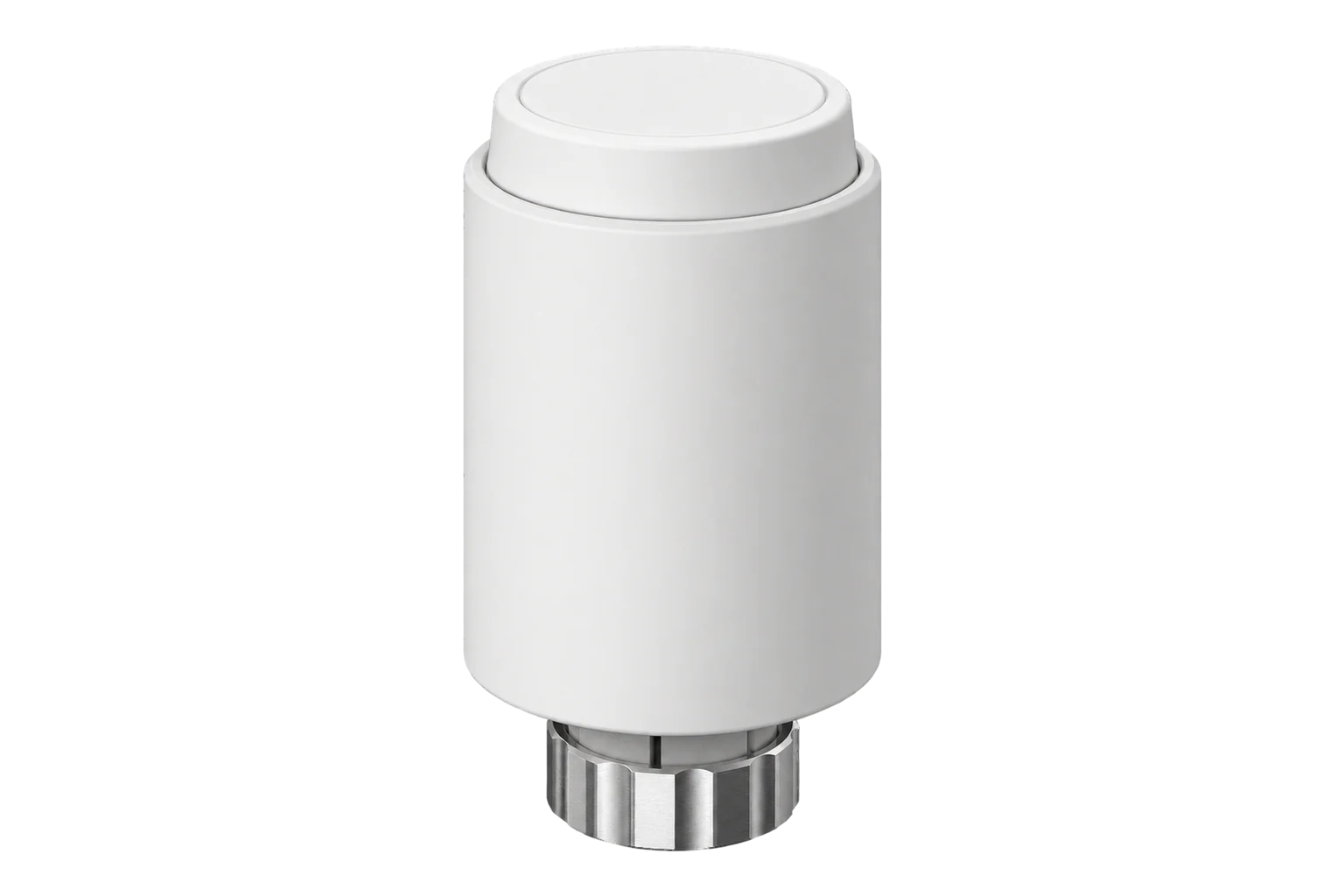
Thermostatic radiator valve
A battery-powered Zigbee 3.0 radiator valve head for M30 × 1.5 valves, holding a 5 to 30 °C setpoint in 0.5 °C steps, with comfort and eco temperatures, open-window detection, frost protection and up to ten schedule steps a day.
Also sold asMOES ZTRV-ZX-TV02MOES TV01-ZBAVATTO TRV06-1Tesla Smart TSL-TRV-TV01ZGGIEX TV06EKF ETT-8
Compatibility
Compatible with EpiSensor Edge over Zigbee.
Pair it with the Zigbee radio on an EpiSensor Gateway. Edge reads it locally on the Gateway.
Edge reads 30 values from it, listed under Interface.
Connect it with

Specifications
The TV02 is a motorised head that replaces the manual head on a radiator valve. It screws straight onto M30 × 1.5 valves from Danfoss, Heimeier, Oventrop, Honeywell-Braukmann, Comap, Siemens and other makers, and ships with adapters for Danfoss RA, RAV and RAVL valves. It holds a setpoint between 5 and 30 °C in 0.5 °C steps, measured at the head.1
- Power
- Battery. Two 1.5 V LR6 (AA) alkaline cells, rated for about 1.5 years. Rechargeable cells are not supported.1
- Setpoint range
- 5 to 30 °C in 0.5 °C steps1
- Temperature offset
- ±5 °C1
- Valve connection
- M30 × 1.5, adapters for Danfoss RA, RAV and RAVL1
- Working temperature
- -10 to 40 °C, indoor use1
- Protection class
- IP201
- Wireless
- Zigbee 3.0, 2.400 to 2.483 GHz, 10 dBm maximum1
- Display
- LED1
- Dimensions
- 56.5 × 56.5 × 100 mm1
- Weight
- 190 g with batteries, 140 g without1
- Schedule
- Up to 10 steps a day, set in 10 minute steps1
- Boost
- Valve fully open for 5 minutes1
Where it is used
Radiator control room by room in offices, schools, hotels and rented housing, each valve on its own schedule.
Indoor environmental monitoringSetting radiators back to eco or frost protection from Edge when a building is empty, alongside the boiler’s own monitoring.
Boiler performance monitoringRooms where windows are opened often, since the valve stops heating when the room cools quickly.
Interface
Readings and settings, with units and ranges where Tuya publishes them. readable, readable and writable, writable only.
| Reading | Unit | Range or values | Access |
|---|---|---|---|
| Measurements 10 | |||
| Climate | - | - | Read only |
| Local temperature | °C | - | Read only |
| Schedule monday | - | - | Read only |
| Schedule tuesday | - | - | Read only |
| Schedule wednesday | - | - | Read only |
| Schedule thursday | - | - | Read only |
| Schedule friday | - | - | Read only |
| Schedule saturday | - | - | Read only |
| Schedule sunday | - | - | Read only |
| Error status | - | - | Read only |
| Controls 3 | |||
| Preset | - | automanualholiday |
Read and write |
| Current heating setpoint | °C | 5 to 30 °C | Read and write |
| System mode | - | offheat |
Read and write |
| Settings 15 | |||
| Child lock | - | Binary state | Read and write |
| Open window | - | Binary state | Read and write |
| Open window temperature | °C | 5 to 30 °C | Read and write |
| Comfort temperature | °C | 5 to 30 °C | Read and write |
| Eco temperature | °C | 5 to 30 °C | Read and write |
| Local temperature calibration | °C | -5 to 5 °C | Read and write |
| Heating stop | - | Binary state | Read and write |
| Frost protection | - | Binary state | Read and write |
| Boost timeset countdown | s | 0 to 465 s | Read and write |
| Holiday temperature | °C | 5 to 30 °C | Read and write |
| Holiday start stop | - | - | Read and write |
| Working day | - | mon_sunmon_fri+sat+sunseparate |
Read and write |
| Schedule | - | - | Write only |
| Week day | - | mondaytuesdaywednesdaythursdayfridaysaturdaysunday |
Write only |
| Online | - | Binary state | Read and write |
| Diagnostics 1 | |||
| Battery low | - | Binary state | Read only |
The TV02 identifies as Tuya TS0601 with manufacturer code _TZE200_hue3yfsn or _TZE200_lllliz3p. The MOES ZTRV-ZX-TV02 reports _TZE200_x9axofse and the MOES TV01-ZB _TZE200_e9ba97vf or _TZE200_7yoranx2; all use the same readings.3
The weekly schedule is written one day at a time as up to ten time and temperature pairs, and read back as one text value per day.2
Battery level is reported only as a low-battery alarm, not a percentage. The valve raises it below 12 %.12
Setup
-
Insert the batteries and fit the valve
Insert two AA cells. The display shows InS while the motor retracts, then AdA. Screw the head onto the valve, using the Danfoss adapter if needed, then press the pair button to start the adaptation run.1
-
Open pairing in Edge
In Edge, open pairing on the Gateway’s Zigbee network.
-
Start pairing on the valve
Hold the pair button for 5 seconds until the Zigbee icon flashes. The icon stays on once the valve has joined.1
-
If it will not join, reset it
Hold the reset button under the cover for 5 seconds until the display shows FAC, then start pairing again. A reset clears its settings.1
-
Check one reading and one setting
Confirm Edge identifies it as Tuya TV02-Zigbee, compare the room temperature with a thermometer and set the calibration offset if it differs. Then change the setpoint from Edge and check the display follows.
Common questions
- Is the MOES or AVATTO valve I have the same as the TV02?
- Probably. The MOES ZTRV-ZX-TV02 and TV01-ZB, the AVATTO TRV06-1, the Tesla Smart TSL-TRV-TV01ZG and several other brands share this Zigbee definition. The manufacturer code the valve reports when it joins, listed under Interface on this page, confirms which one you have.3
- Does it need a Tuya hub or the Smart Life app?
- No. It is a Zigbee 3.0 device and joins the Zigbee radio on an EpiSensor Gateway directly. Edge reads and controls it without a Tuya hub or cloud account.12
- How long do the batteries last?
- About 1.5 years on two alkaline AA cells. It does not work on rechargeable cells. When changing cells, wait about a minute after removing the old ones before fitting new ones.1
- What do F1, F2 and F3 on the display mean?
- F1 means the valve drive is sluggish, F2 that the travel is too wide and F3 that it is too small. Check the head is fastened properly and that the valve pin is not stuck, then run the adaptation again.1
Related devices

Sources
- ZTRV-ZX-TV02 Thermostatic Radiator Valve Zigbee 3.0 instruction manual (opens in a new tab)
- Tuya TV02-Zigbee (opens in a new tab)
- Tuya device definitions (tuya.ts), v26.111.0 (opens in a new tab)
Further reading
Product names and trademarks belong to their owners. Publication does not imply endorsement or a commercial relationship.