Bosch BTH-RM
Room thermostat
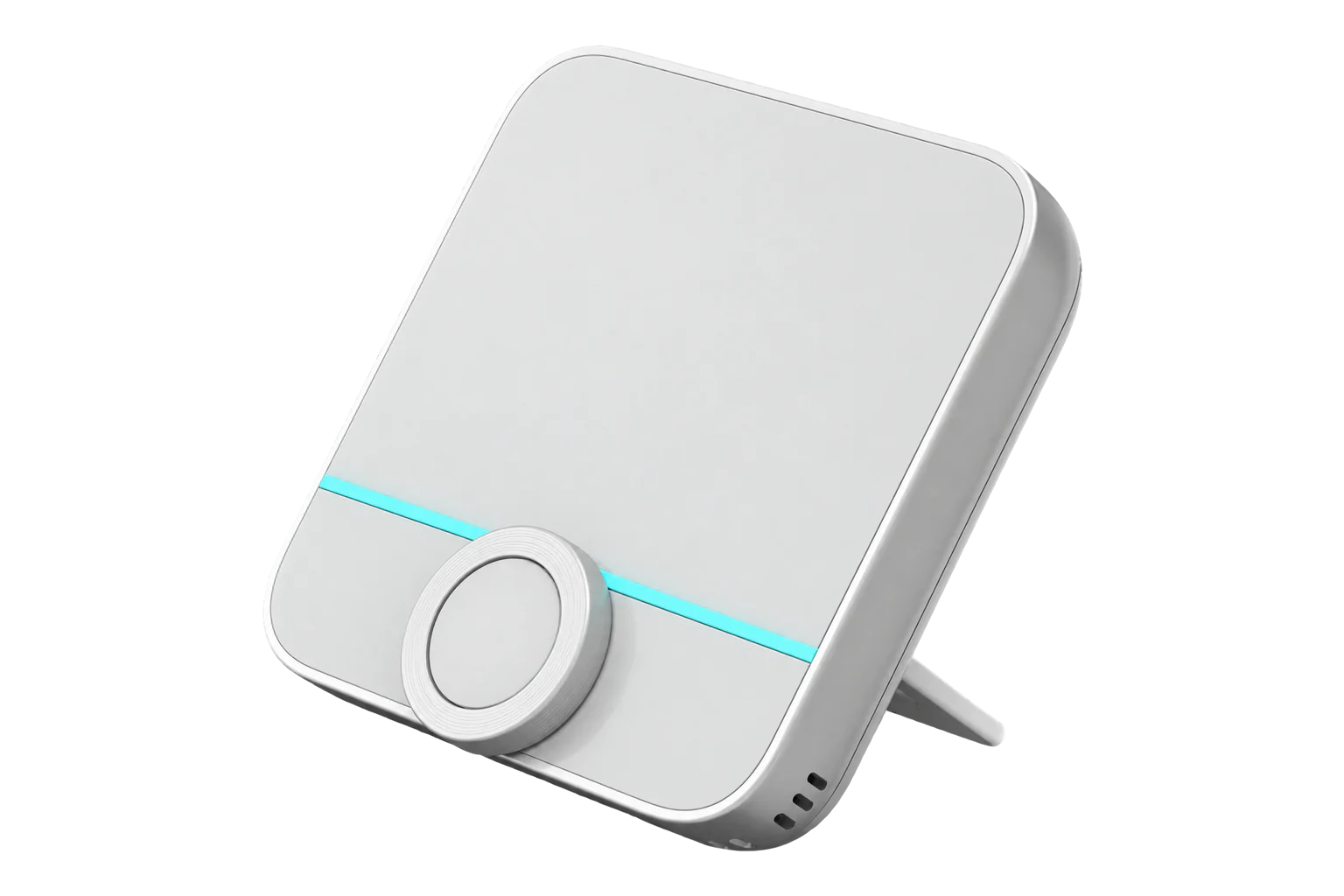
Bosch’s battery-powered Room Thermostat II is a Zigbee 3.0 wall unit that measures room temperature and humidity, holds heating and cooling setpoints from 5 to 30 °C and takes an optional 10 kΩ NTC probe, such as a floor sensor.
Also sold asBosch Smart Home Room Thermostat II
Compatibility
Compatible with EpiSensor Edge over Zigbee.
Pair it with the Zigbee radio on an EpiSensor Gateway. Edge reads it locally on the Gateway.
Edge reads 23 values from it, listed under Interface.
Connect it with

Specifications
The BTH-RM is the battery version of Bosch’s Room Thermostat II. It sits on the wall at a representative point in the room, shows the actual and set temperature and the room humidity on an LED display, and runs on four AAA alkaline cells that Bosch rates for a typical life of under two years. It mounts on a wall plate or stands on a bracket on a flat surface.1
- Power
- Battery. Four 1.5 V AAA (LR3) alkaline cells. Bosch quotes a typical life of under two years.1
- Type
- BTH-RM1
- Radio
- Zigbee 3.0, 2.4 to 2.4835 GHz1
- Maximum transmit power
- 10 dBm1
- Range in the open
- Under 100 m1
- Setpoints
- Heating and cooling, 5 to 30 °C each3
- Calibration offset
- -5 to +5 °C3
- External sensor input
- NTC 10 kΩ probe, for example a floor sensor2
- Display
- LED: actual and set temperature, humidity, operating mode1
- Ambient temperature
- 0 to 50 °C1
- Humidity
- Up to 80 %, non-condensing1
- Dimensions (W × H × D)
- 86 × 87 × 28 mm1
- Weight
- 85 g without batteries1
Where it is used
Room temperature and humidity in offices, meeting rooms and small clinics, measured on the wall where people are rather than at the radiator.
Indoor environmental monitoringA reference temperature for the Radiator Thermostat II heads in the same room, with Edge passing the room reading to each valve.
HVAC energy monitoring for commercial buildingsFloor surface temperature beside air temperature in rooms with underfloor heating, using a 10 kΩ NTC probe on the sensor input.
Interface
Readings and settings, with units and ranges where Bosch publishes them. readable, readable and writable.
| Reading | Unit | Range or values | Access |
|---|---|---|---|
| Measurements 8 | |||
| Climate | - | - | Read only |
| Local temperature | °C | - | Read only |
| Running state | - | idleheatcool |
Read only |
| Control sequence of operation | - | cooling_onlyheating_only |
Read only |
| Setpoint change source | - | manualscheduleexternally |
Read only |
| Humidity | % | - | Read only |
| Cable sensor temperature | °C | - | Read only |
| Error state | - | - | Read only |
| Controls 3 | |||
| Occupied heating setpoint | °C | 5 to 30 °C | Read and write |
| Occupied cooling setpoint | °C | 5 to 30 °C | Read and write |
| System mode | - | offheatcool |
Read and write |
| Settings 9 | |||
| Operating mode | - | schedulemanualpause |
Read and write |
| Local temperature calibration | °C | -5 to 5 °C | Read and write |
| Cable sensor mode | - | not_usedcable_sensor_without_regulationcable_sensor_with_regulation |
Read and write |
| Window detection | - | Binary state | Read and write |
| Boost heating | - | Binary state | Read and write |
| Child lock | - | Binary state | Read and write |
| Display brightness | % | 0 to 100 % | Read and write |
| Display switch on duration | s | 5 to 30 s | Read and write |
| Activity LED | - | offautoon |
Read and write |
| Diagnostics 3 | |||
| Battery | % | 0 to 100 % | Read only |
| Voltage | mV | - | Read only |
| Battery low | - | Binary state | Read only |
cable_sensor_mode selects what the probe input does: not_used, cable_sensor_without_regulation (report only) or cable_sensor_with_regulation. The probe reading is cable_sensor_temperature.3
Bosch’s error E04 is a fault on the external sensor input. With no probe fitted, set cable_sensor_mode to not_used to clear it.23
Zigbee2MQTT records excessive battery drain on firmware 0.2.9, so check the firmware version on sites where cells run down early.3
Setup
-
Have the install code ready
The thermostat joins with a Zigbee install code, held in the QR code on the battery cover. The Gateway’s Zigbee network needs that code before it will accept the thermostat.3
-
Open pairing in Edge
Open pairing on the Gateway’s Zigbee network in Edge, then power the thermostat up by inserting the batteries. The status LED flashes orange while pairing is active.1
-
Confirm the join
The LED flashes green when pairing has succeeded and red once if it has failed. After a failure, reset the thermostat to factory settings and try again.1
-
Mount it
Fix the mounting plate to the wall away from cables and pipes, or use the bracket to stand it on a flat surface. Choose a spot that represents the room, away from radiators and direct sun.1
-
Check one reading
Confirm that Edge identifies it as Bosch BTH-RM. Compare the room temperature and humidity with a reference instrument beside it, and set the calibration offset if they differ.
Common questions
- Does the BTH-RM need a Bosch Smart Home Controller?
- No. It is a Zigbee 3.0 device and joins the Gateway’s Zigbee network with its install code. Edge then reads it and writes its settings directly.13
- Can it control Bosch radiator thermostats through Edge?
- Not by itself. In a Bosch system the Bosch controller links them. On the Gateway they are separate devices, so an Edge automation can write the room thermostat’s temperature to each BTH-RA’s remote temperature, refreshing it at least every 30 minutes.23
- Can it switch underfloor heating actuators?
- No. Bosch says the battery Room Thermostat II is not designed to drive underfloor heating controls in the distribution cabinet. The Room Thermostat II 230 V connects to the actuators directly.2
- What probe does the sensor input take?
- A 10 kΩ NTC temperature sensor. Bosch sells a sensor cable of that type, and the probe can be used as a floor sensor or to measure elsewhere in the room.2
- How do I reset it to factory settings?
- Remove one battery and refit it while holding the knob. Keep holding until the LED flashes orange and RES appears, release briefly, then hold again until the LED lights green. The thermostat restarts.1
Related devices
More from Bosch

Sources
- Room thermostat II quick instructions (BTH-RM) (opens in a new tab) (PDF)
- Room thermostat II help (opens in a new tab)
- Bosch BTH-RM device documentation (opens in a new tab)
- Bosch BTH-RM Zigbee definition (opens in a new tab)
Further reading
Product names and trademarks belong to their owners. Publication does not imply endorsement or a commercial relationship.