Ubisys H10
10-zone heating controller
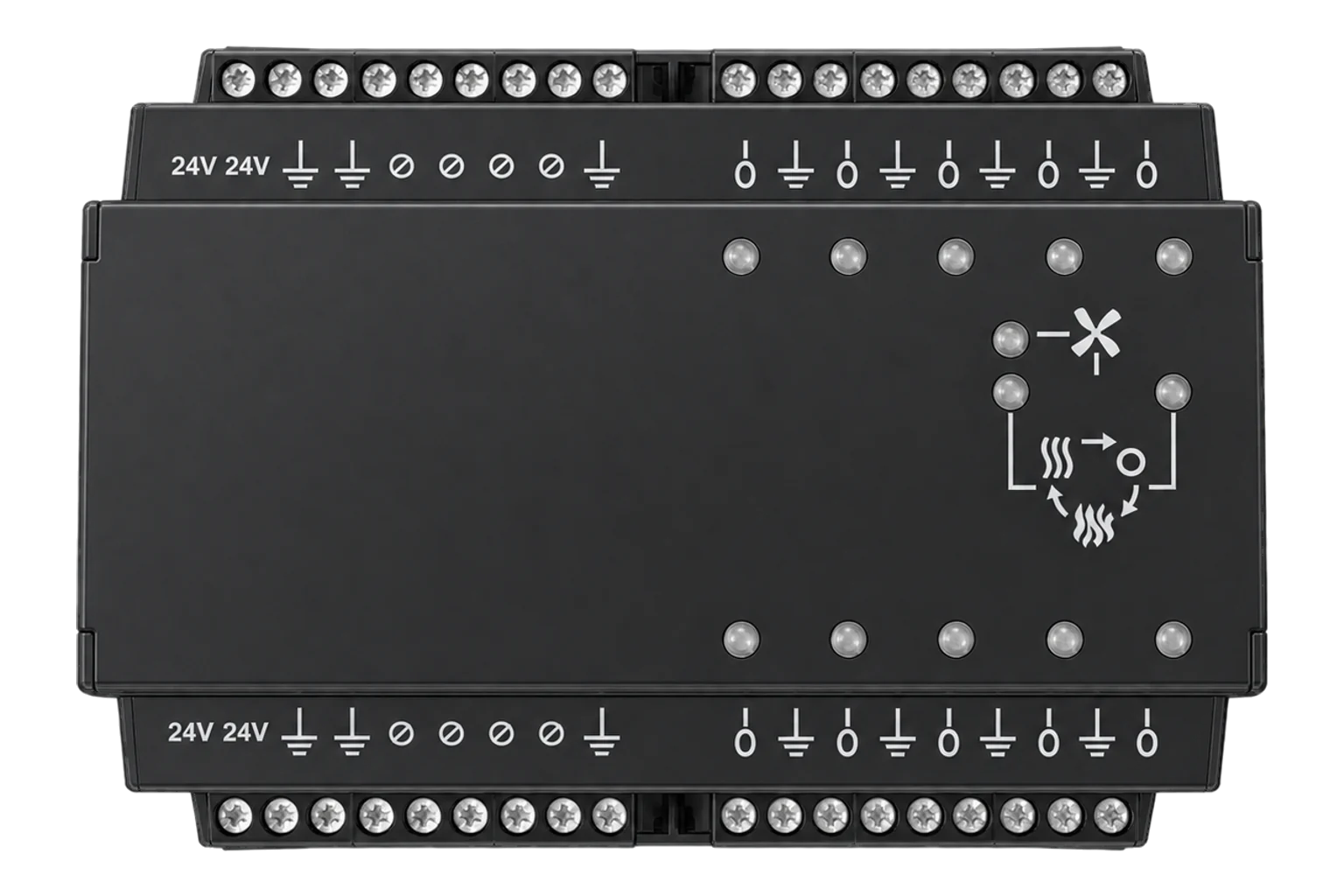
A DIN-rail Zigbee 3.0 controller for underfloor heating manifolds, with 10 thermostats and 10 valve outputs in one module. It drives thermoelectric actuators at 230 V AC or 24 V, runs schedules on its own clock, and acts as a Zigbee router.
Compatibility
Compatible with EpiSensor Edge over Zigbee.
Pair it with the Zigbee radio on an EpiSensor Gateway. Edge reads it locally on the Gateway.
Edge reads 60 values from it, listed under Interface.
Connect it with

Specifications
The H10 is a modular heating controller from Ubisys of Düsseldorf, built for DIN rail mounting in underfloor heating distribution cabinets. The base module holds 10 independent thermostats, each with a PI control loop, and 10 outputs that drive thermoelectric valve actuators directly by pulse-width modulation. It serves 10 heating or cooling zones in a two-pipe system, or 5 zones with both heating and cooling in a four-pipe system.2
- Power
- Mains. The H10/230-B runs from 230 V AC (85 to 264 V, 47 to 440 Hz). The H10/24-B runs from 24 V. Neither needs a battery; the clock has its own backup cell.2
- Zones
- 10 heating or cooling (two-pipe), or 5 heating and cooling (four-pipe)2
- Base modules
- H10/230-B for 230 V AC, 50 Hz valves (order code 1205); H10/24-B for 24 V valves (order code 1199)2
- Output rating
- 10 VA per output (230 V version); 5 W per output (24 V version)1
- Power dissipation
- 0.3 W2
- Output switching
- Solid state, PWM, staggered to spread valve inrush current2
- Setpoint range
- 7 to 30 °C, in 0.5 °C steps4
- Clock
- Real-time clock with backup battery2
- Extension modules
- H10-XP pump control, H10-XS heating and cooling demand, H10-XW 1-Wire sensors, H10-XI wired thermostats2
- Wireless
- Zigbee 3.0 with Green Power, 2.4 GHz, 5 dBm transmit, -98 dBm receive sensitivity2
- Zigbee tables
- 78 neighbours, 96 routes, 24 buffers for sleeping end devices2
- Mounting
- DIN rail, in heating distribution cabinets2
- Housing
- Flame retardant (V-0), black, RAL 90052
Where it is used
Underfloor heating demand per zone, lined up against the boiler’s firing and fuel use.
Boiler performance monitoringCall for heat to a heat pump through an H10-XS relay, with each zone’s demand logged beside the heat pump’s output.
Heat pump performance monitoringRoom temperature per zone in apartments, offices and schools with wet underfloor heating.
Indoor environmental monitoring
Interface
On the Zigbee network it joins as a router and extends the mesh for other devices.2
Readings and settings, with units and ranges where Ubisys publishes them. readable, readable and writable.24
| Reading | Unit | Range or values | Access |
|---|---|---|---|
| Measurements 30 | |||
| Zone 1 temperatureRoom temperature the zone regulates to, from its temperature source. | °C | - | Read only |
| Zone 1 demandValve opening the zone’s PI control loop is calling for. | % | 0 to 100 % | Read only |
| Zone 1 running mode | - | offheatcool |
Read only |
| Zone 2 temperature | °C | - | Read only |
| Zone 2 demand | % | 0 to 100 % | Read only |
| Zone 2 running mode | - | offheatcool |
Read only |
| Zone 3 temperature | °C | - | Read only |
| Zone 3 demand | % | 0 to 100 % | Read only |
| Zone 3 running mode | - | offheatcool |
Read only |
| Zone 4 temperature | °C | - | Read only |
| Zone 4 demand | % | 0 to 100 % | Read only |
| Zone 4 running mode | - | offheatcool |
Read only |
| Zone 5 temperature | °C | - | Read only |
| Zone 5 demand | % | 0 to 100 % | Read only |
| Zone 5 running mode | - | offheatcool |
Read only |
| Zone 6 temperature | °C | - | Read only |
| Zone 6 demand | % | 0 to 100 % | Read only |
| Zone 6 running mode | - | offheatcool |
Read only |
| Zone 7 temperature | °C | - | Read only |
| Zone 7 demand | % | 0 to 100 % | Read only |
| Zone 7 running mode | - | offheatcool |
Read only |
| Zone 8 temperature | °C | - | Read only |
| Zone 8 demand | % | 0 to 100 % | Read only |
| Zone 8 running mode | - | offheatcool |
Read only |
| Zone 9 temperature | °C | - | Read only |
| Zone 9 demand | % | 0 to 100 % | Read only |
| Zone 9 running mode | - | offheatcool |
Read only |
| Zone 10 temperature | °C | - | Read only |
| Zone 10 demand | % | 0 to 100 % | Read only |
| Zone 10 running mode | - | offheatcool |
Read only |
| Controls 30 | |||
| Zone 1 setpointHeating setpoint in 0.5 °C steps. | °C | 7 to 30 °C | Read and write |
| Zone 1 mode | - | offheatcool |
Read and write |
| Output 1Switching an output from Edge overrides its zone thermostat and drives the valve directly. | - | ONOFF |
Read and write |
| Zone 2 setpoint | °C | 7 to 30 °C | Read and write |
| Zone 2 mode | - | offheatcool |
Read and write |
| Output 2 | - | ONOFF |
Read and write |
| Zone 3 setpoint | °C | 7 to 30 °C | Read and write |
| Zone 3 mode | - | offheatcool |
Read and write |
| Output 3 | - | ONOFF |
Read and write |
| Zone 4 setpoint | °C | 7 to 30 °C | Read and write |
| Zone 4 mode | - | offheatcool |
Read and write |
| Output 4 | - | ONOFF |
Read and write |
| Zone 5 setpoint | °C | 7 to 30 °C | Read and write |
| Zone 5 mode | - | offheatcool |
Read and write |
| Output 5 | - | ONOFF |
Read and write |
| Zone 6 setpoint | °C | 7 to 30 °C | Read and write |
| Zone 6 mode | - | offheatcool |
Read and write |
| Output 6 | - | ONOFF |
Read and write |
| Zone 7 setpoint | °C | 7 to 30 °C | Read and write |
| Zone 7 mode | - | offheatcool |
Read and write |
| Output 7 | - | ONOFF |
Read and write |
| Zone 8 setpoint | °C | 7 to 30 °C | Read and write |
| Zone 8 mode | - | offheatcool |
Read and write |
| Output 8 | - | ONOFF |
Read and write |
| Zone 9 setpoint | °C | 7 to 30 °C | Read and write |
| Zone 9 mode | - | offheatcool |
Read and write |
| Output 9 | - | ONOFF |
Read and write |
| Zone 10 setpoint | °C | 7 to 30 °C | Read and write |
| Zone 10 mode | - | offheatcool |
Read and write |
| Output 10 | - | ONOFF |
Read and write |
Endpoints 1 to 10 are the zone thermostats and endpoints 11 to 20 the matching outputs. In a four-pipe system zones 1 to 5 can switch between heating and cooling on their own.2
Each output applies the highest-priority valid steering value: emergency, then a level set over the network, then thermostat demand, then a wired thermostat, then the seasonal backup value. Switching an output on or off over the network overrides its thermostat.2
Each zone needs a temperature source, bound directly to its thermostat endpoint. Without one it stays in backup mode.2
After a power cycle the zones run in backup mode until fresh sensor reports arrive.2
Setup
-
Install it in the manifold cabinet
Mount the base module on the DIN rail and wire the valve actuators to its outputs, with the right module for the actuator voltage. Ubisys requires a professional installer.2
-
Open pairing, then power it
Open pairing on the Gateway’s Zigbee network in Edge and switch the H10 on. It blinks quickly while it searches, then five slow blinks when it has joined, or three quick blinks if it failed; it keeps searching after a failure.2
-
Reset a used unit first
If it was on another network, hold the button behind the small hole on the front for about 10 seconds until the LED flashes (firmware 1.06 or later). Or power it for at least 4 seconds, give it three short power cycles of half a second to two seconds each, and leave it on.2
-
Give each zone a temperature
Bind a Zigbee temperature sensor or thermostat to each zone’s thermostat endpoint, or fit H10-XW 1-Wire sensors. Zones without one stay at the backup valve opening.2
-
Check one zone
Confirm that Edge identifies it as a Ubisys H10 with 10 zones. Raise zone 1’s setpoint above its temperature and check that its demand rises and its channel LED lights for longer.2
Common questions
- Does the H10 measure room temperature?
- No. Each zone needs a temperature source: a Zigbee or Green Power room sensor bound to it, another thermostat, or a 1-Wire sensor on the H10-XW extension. Without one the zone runs at a preset backup valve opening.2
- Can it control electric underfloor heating?
- Yes, through a solid-state relay on each circuit. The outputs are only rated for valve actuators, and heating foils often need 10 A or 16 A per circuit. Ubisys advises against electromechanical relays because of the PWM switching.2
- Can it switch a boiler or heat pump?
- With the H10-XS extension. It has two changeover relays, rated 1,800 VA at 230 V, that call for heat and call for cold, or act as dry contacts for a heat pump.2
- What happens if the Zigbee network goes down?
- Its real-time clock keeps its own schedules running. Sensors bound directly to a zone report to the H10 device to device, not through the Gateway. A zone that loses its temperature falls back to its backup value, and the front button can drive the valves by hand.2
Related devices

Sources
- Heating Regulator H10 (opens in a new tab)
- Zigbee Heating Regulator H10 reference manual (opens in a new tab) (PDF)
- Ubisys H10 device documentation (opens in a new tab)
- Ubisys H10 Zigbee definition (opens in a new tab)
Further reading
Product names and trademarks belong to their owners. Publication does not imply endorsement or a commercial relationship.