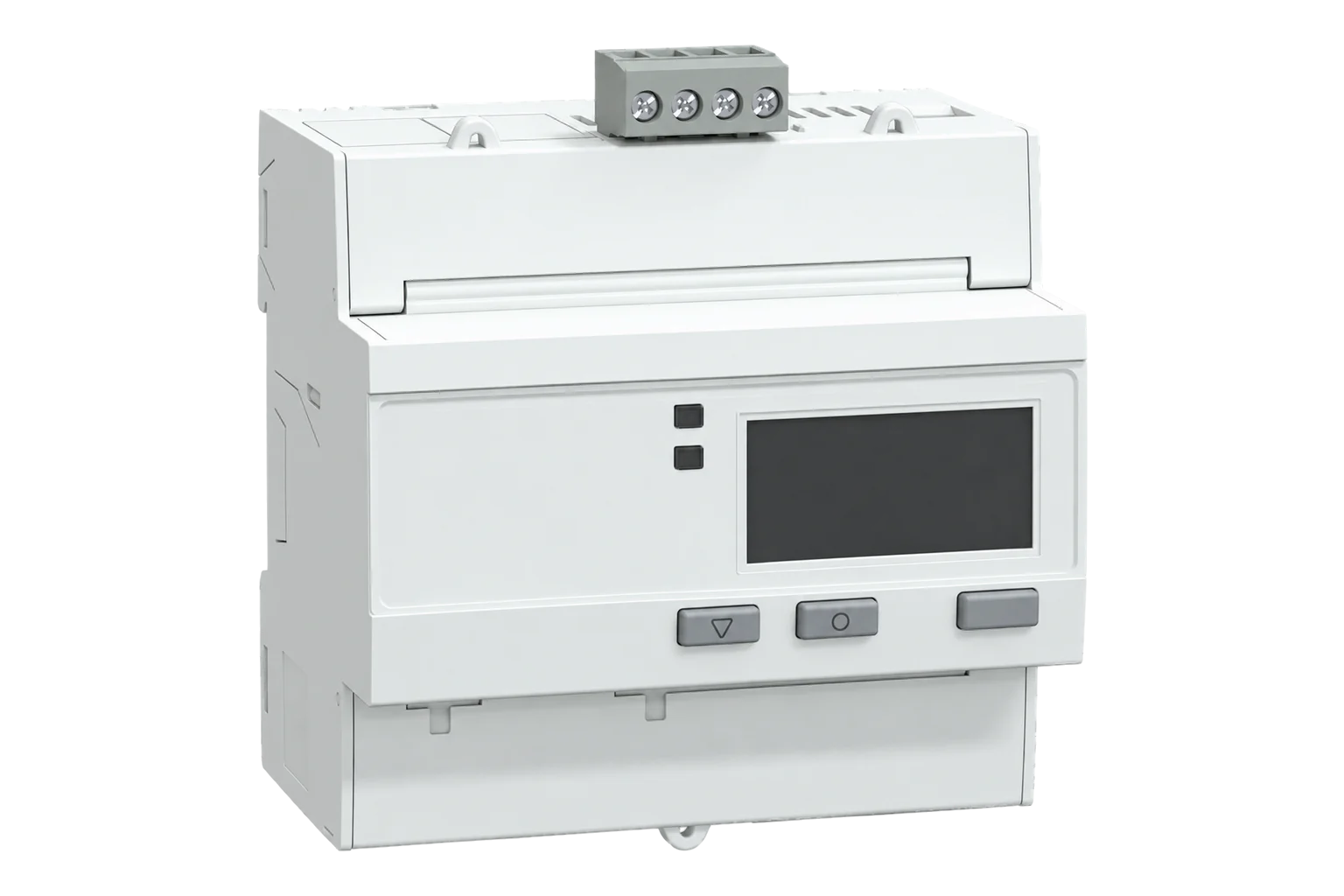
Schneider Electric iEM3000 series
Energy meter
Schneider Electric's DIN-rail energy meters with a Modbus RTU port: the iEM3150 and iEM3155 up to 63 A, the iEM3350 and iEM3355 up to 125 A, and the iEM3250 and iEM3255 on 1 A or 5 A current transformers. Every value is a Float32 holding register, so there is no scaling to set.
Also sold asiEM3150iEM3155iEM3250iEM3255iEM3350iEM3355
Compatibility
Compatible with EpiSensor Edge over Modbus RTU.
Connect its RS-485 port to a Modbus Interface or to a serial interface on the Gateway. Edge polls it with its Modbus client.
Edge reads 29 values from it, listed under Interface.
Connect it with
-
Modbus Interface ZMB-3XFrom €399 ex VAT Configure Modbus Interface
-
Gateway ZGW-20From €899 ex VAT Configure Gateway


Specifications
Every Modbus model measures current, voltage, active power, power factor, frequency and active energy, per phase and in total. The iEM3155, iEM3255 and iEM3355 add reactive and apparent power, export and reactive energy, four tariffs, a digital input, a digital output, an overload alarm and MID approval for billing. The iEM3150, iEM3250 and iEM3350 are the plain versions: Schneider leaves those registers, the tariffs and MID approval out.1
- Power
- Self-powered from the measured supply. The meter runs from its voltage inputs. There is no separate auxiliary supply to wire.1
- Active energy accuracy
- Class 1 (IEC 62053-21); Class 0.5S (IEC 62053-22) on the iEM3250 and iEM3255 with 5 A CTs1
- MID approval
- iEM3155 and iEM3355: Class B (EN 50470-3); iEM3255: Class B with 1 A CTs, Class C with 5 A CTs1
- Direct current range
- 0.5 to 63 A (iEM3150, iEM3155); 1 to 125 A (iEM3350, iEM3355)1
- CT inputs (iEM3250, iEM3255)
- 1 A or 5 A nominal, 20 mA to 6 A measured1
- Voltage
- 100 to 277 V L-N, 173 to 480 V L-L, ±20 %1
- Frequency
- 50 or 60 Hz, ±10 %1
- Tariffs
- 4 on the iEM3155, iEM3255 and iEM3355, switched by internal clock, digital input or Modbus1
- Width
- 5 modules of 18 mm (63 A models); 7 modules (125 A models)1
- Protection
- IP40 front panel, IP20 body1
- Operating conditions
- -25 to 70 °C, 5 to 95 % RH non-condensing1
- Order references
- A9MEM3150, A9MEM3155, A9MEM3250, A9MEM3255, A9MEM3350, A9MEM33553
Where it is used
Tenant and departmental submetering, where the MID-approved iEM3155, iEM3255 and iEM3355 give a kWh register fit for billing.
Tenant submetering and cost allocationFeeder and incomer monitoring on larger boards through current transformers, with the iEM3250 or iEM3255.
Transformer and distribution board monitoringMetering air handling units, chillers and heat pumps on their own circuits, up to 63 A or 125 A direct.
HVAC energy monitoring for commercial buildingsBringing meters already on a Modbus bus into a BMS or SCADA system through Edge.
Modbus meter integration for a BMS or SCADA system
Interface
This register map is for the iEM3150.
Communication settings: iEM3150
- Protocol
- Modbus RTU over RS-485
- Unit address
- 1 to 247
- Baud rate
- 9600, 19200 or 38400 bit/s
- Parity
- Even, odd or none, with 1 stop bit
- Functions
- FC03 read holding registers, FC16 write multiple registers, FC43/14 read device identification
- Terminals
- D0/- (A), D1/+ (B), 0V and shield
- Cable
- Shielded twisted pair, up to 2.5 mm² (14 AWG)
- Port isolation
- 4.0 kV rms
- Settings lock
- With Com. Protection enabled (the factory setting), communication settings change only from the front panel
- Read with
- FC03 (holding registers)
- Word order
- High word first on every value
- Addresses
- Zero-based PDU addresses, as sent on the bus
From iEM3100 / iEM3200 / iEM3300 series user manual (DOCA0005EN-16)1.
Register map: iEM3150
| Point | Address | Hex | Format | Scale | Unit |
|---|---|---|---|---|---|
| Current L1 | 2999 | 0x0BB7 |
FLOAT32 | ×1 | A |
| Current L2 | 3001 | 0x0BB9 |
FLOAT32 | ×1 | A |
| Current L3 | 3003 | 0x0BBB |
FLOAT32 | ×1 | A |
| Average Current | 3009 | 0x0BC1 |
FLOAT32 | ×1 | A |
| Voltage L1-L2 | 3019 | 0x0BCB |
FLOAT32 | ×1 | V |
| Voltage L2-L3 | 3021 | 0x0BCD |
FLOAT32 | ×1 | V |
| Voltage L3-L1 | 3023 | 0x0BCF |
FLOAT32 | ×1 | V |
| Average Voltage L-L | 3025 | 0x0BD1 |
FLOAT32 | ×1 | V |
| Voltage L1-N | 3027 | 0x0BD3 |
FLOAT32 | ×1 | V |
| Voltage L2-N | 3029 | 0x0BD5 |
FLOAT32 | ×1 | V |
| Voltage L3-N | 3031 | 0x0BD7 |
FLOAT32 | ×1 | V |
| Average Voltage L-N | 3035 | 0x0BDB |
FLOAT32 | ×1 | V |
| Active Power L1 | 3053 | 0x0BED |
FLOAT32 | ×1 | kW |
| Active Power L2 | 3055 | 0x0BEF |
FLOAT32 | ×1 | kW |
| Active Power L3 | 3057 | 0x0BF1 |
FLOAT32 | ×1 | kW |
| Total Active Power | 3059 | 0x0BF3 |
FLOAT32 | ×1 | kW |
| Total Power Factor | 3083 | 0x0C0B |
FLOAT32 | ×1 | - |
| Frequency | 3109 | 0x0C25 |
FLOAT32 | ×1 | Hz |
| Total Active Energy Import | 45099 | 0xB02B |
FLOAT32 | ×1 | kWh |
| Partial Active Energy Import | 45107 | 0xB033 |
FLOAT32 | ×1 | kWh |
| Active Energy Import L1 | 45111 | 0xB037 |
FLOAT32 | ×1 | kWh |
| Active Energy Import L2 | 45113 | 0xB039 |
FLOAT32 | ×1 | kWh |
| Active Energy Import L3 | 45115 | 0xB03B |
FLOAT32 | ×1 | kWh |
This register map is for the iEM3155.
Communication settings: iEM3155
- Protocol
- Modbus RTU over RS-485
- Unit address
- 1 to 247
- Baud rate
- 9600, 19200 or 38400 bit/s
- Parity
- Even, odd or none, with 1 stop bit
- Functions
- FC03 read holding registers, FC16 write multiple registers, FC43/14 read device identification
- Terminals
- D0/- (A), D1/+ (B), 0V and shield
- Cable
- Shielded twisted pair, up to 2.5 mm² (14 AWG)
- Port isolation
- 4.0 kV rms
- Settings lock
- With Com. Protection enabled (the factory setting), communication settings change only from the front panel
- Read with
- FC03 (holding registers)
- Word order
- High word first on every value
- Addresses
- Zero-based PDU addresses, as sent on the bus
From iEM3100 / iEM3200 / iEM3300 series user manual (DOCA0005EN-16)1.
Register map: iEM3155
| Point | Address | Hex | Format | Scale | Unit |
|---|---|---|---|---|---|
| Current L1 | 2999 | 0x0BB7 |
FLOAT32 | ×1 | A |
| Current L2 | 3001 | 0x0BB9 |
FLOAT32 | ×1 | A |
| Current L3 | 3003 | 0x0BBB |
FLOAT32 | ×1 | A |
| Average Current | 3009 | 0x0BC1 |
FLOAT32 | ×1 | A |
| Voltage L1-L2 | 3019 | 0x0BCB |
FLOAT32 | ×1 | V |
| Voltage L2-L3 | 3021 | 0x0BCD |
FLOAT32 | ×1 | V |
| Voltage L3-L1 | 3023 | 0x0BCF |
FLOAT32 | ×1 | V |
| Average Voltage L-L | 3025 | 0x0BD1 |
FLOAT32 | ×1 | V |
| Voltage L1-N | 3027 | 0x0BD3 |
FLOAT32 | ×1 | V |
| Voltage L2-N | 3029 | 0x0BD5 |
FLOAT32 | ×1 | V |
| Voltage L3-N | 3031 | 0x0BD7 |
FLOAT32 | ×1 | V |
| Average Voltage L-N | 3035 | 0x0BDB |
FLOAT32 | ×1 | V |
| Active Power L1 | 3053 | 0x0BED |
FLOAT32 | ×1 | kW |
| Active Power L2 | 3055 | 0x0BEF |
FLOAT32 | ×1 | kW |
| Active Power L3 | 3057 | 0x0BF1 |
FLOAT32 | ×1 | kW |
| Total Active Power | 3059 | 0x0BF3 |
FLOAT32 | ×1 | kW |
| Total Reactive Power | 3067 | 0x0BFB |
FLOAT32 | ×1 | kVAR |
| Total Apparent Power | 3075 | 0x0C03 |
FLOAT32 | ×1 | kVA |
| Total Power Factor | 3083 | 0x0C0B |
FLOAT32 | ×1 | - |
| Frequency | 3109 | 0x0C25 |
FLOAT32 | ×1 | Hz |
| Total Active Energy Import | 45099 | 0xB02B |
FLOAT32 | ×1 | kWh |
| Total Active Energy Export | 45101 | 0xB02D |
FLOAT32 | ×1 | kWh |
| Total Reactive Energy Import | 45103 | 0xB02F |
FLOAT32 | ×1 | kVARh |
| Total Reactive Energy Export | 45105 | 0xB031 |
FLOAT32 | ×1 | kVARh |
| Partial Active Energy Import | 45107 | 0xB033 |
FLOAT32 | ×1 | kWh |
| Partial Reactive Energy Import | 45109 | 0xB035 |
FLOAT32 | ×1 | kVARh |
| Active Energy Import L1 | 45111 | 0xB037 |
FLOAT32 | ×1 | kWh |
| Active Energy Import L2 | 45113 | 0xB039 |
FLOAT32 | ×1 | kWh |
| Active Energy Import L3 | 45115 | 0xB03B |
FLOAT32 | ×1 | kWh |
This register map is for the iEM3250.
Communication settings: iEM3250
- Protocol
- Modbus RTU over RS-485
- Unit address
- 1 to 247
- Baud rate
- 9600, 19200 or 38400 bit/s
- Parity
- Even, odd or none, with 1 stop bit
- Functions
- FC03 read holding registers, FC16 write multiple registers, FC43/14 read device identification
- Terminals
- D0/- (A), D1/+ (B), 0V and shield
- Cable
- Shielded twisted pair, up to 2.5 mm² (14 AWG)
- Port isolation
- 4.0 kV rms
- Settings lock
- With Com. Protection enabled (the factory setting), communication settings change only from the front panel
- Read with
- FC03 (holding registers)
- Word order
- High word first on every value
- Addresses
- Zero-based PDU addresses, as sent on the bus
From iEM3100 / iEM3200 / iEM3300 series user manual (DOCA0005EN-16)1.
Register map: iEM3250
| Point | Address | Hex | Format | Scale | Unit |
|---|---|---|---|---|---|
| Current L1 | 2999 | 0x0BB7 |
FLOAT32 | ×1 | A |
| Current L2 | 3001 | 0x0BB9 |
FLOAT32 | ×1 | A |
| Current L3 | 3003 | 0x0BBB |
FLOAT32 | ×1 | A |
| Average Current | 3009 | 0x0BC1 |
FLOAT32 | ×1 | A |
| Voltage L1-L2 | 3019 | 0x0BCB |
FLOAT32 | ×1 | V |
| Voltage L2-L3 | 3021 | 0x0BCD |
FLOAT32 | ×1 | V |
| Voltage L3-L1 | 3023 | 0x0BCF |
FLOAT32 | ×1 | V |
| Average Voltage L-L | 3025 | 0x0BD1 |
FLOAT32 | ×1 | V |
| Voltage L1-N | 3027 | 0x0BD3 |
FLOAT32 | ×1 | V |
| Voltage L2-N | 3029 | 0x0BD5 |
FLOAT32 | ×1 | V |
| Voltage L3-N | 3031 | 0x0BD7 |
FLOAT32 | ×1 | V |
| Average Voltage L-N | 3035 | 0x0BDB |
FLOAT32 | ×1 | V |
| Active Power L1 | 3053 | 0x0BED |
FLOAT32 | ×1 | kW |
| Active Power L2 | 3055 | 0x0BEF |
FLOAT32 | ×1 | kW |
| Active Power L3 | 3057 | 0x0BF1 |
FLOAT32 | ×1 | kW |
| Total Active Power | 3059 | 0x0BF3 |
FLOAT32 | ×1 | kW |
| Total Power Factor | 3083 | 0x0C0B |
FLOAT32 | ×1 | - |
| Frequency | 3109 | 0x0C25 |
FLOAT32 | ×1 | Hz |
| Total Active Energy Import | 45099 | 0xB02B |
FLOAT32 | ×1 | kWh |
| Partial Active Energy Import | 45107 | 0xB033 |
FLOAT32 | ×1 | kWh |
| Active Energy Import L1 | 45111 | 0xB037 |
FLOAT32 | ×1 | kWh |
| Active Energy Import L2 | 45113 | 0xB039 |
FLOAT32 | ×1 | kWh |
| Active Energy Import L3 | 45115 | 0xB03B |
FLOAT32 | ×1 | kWh |
This register map is for the iEM3255.
Communication settings: iEM3255
- Protocol
- Modbus RTU over RS-485
- Unit address
- 1 to 247
- Baud rate
- 9600, 19200 or 38400 bit/s
- Parity
- Even, odd or none, with 1 stop bit
- Functions
- FC03 read holding registers, FC16 write multiple registers, FC43/14 read device identification
- Terminals
- D0/- (A), D1/+ (B), 0V and shield
- Cable
- Shielded twisted pair, up to 2.5 mm² (14 AWG)
- Port isolation
- 4.0 kV rms
- Settings lock
- With Com. Protection enabled (the factory setting), communication settings change only from the front panel
- Read with
- FC03 (holding registers)
- Word order
- High word first on every value
- Addresses
- Zero-based PDU addresses, as sent on the bus
From iEM3100 / iEM3200 / iEM3300 series user manual (DOCA0005EN-16)1.
Register map: iEM3255
| Point | Address | Hex | Format | Scale | Unit |
|---|---|---|---|---|---|
| Current L1 | 2999 | 0x0BB7 |
FLOAT32 | ×1 | A |
| Current L2 | 3001 | 0x0BB9 |
FLOAT32 | ×1 | A |
| Current L3 | 3003 | 0x0BBB |
FLOAT32 | ×1 | A |
| Average Current | 3009 | 0x0BC1 |
FLOAT32 | ×1 | A |
| Voltage L1-L2 | 3019 | 0x0BCB |
FLOAT32 | ×1 | V |
| Voltage L2-L3 | 3021 | 0x0BCD |
FLOAT32 | ×1 | V |
| Voltage L3-L1 | 3023 | 0x0BCF |
FLOAT32 | ×1 | V |
| Average Voltage L-L | 3025 | 0x0BD1 |
FLOAT32 | ×1 | V |
| Voltage L1-N | 3027 | 0x0BD3 |
FLOAT32 | ×1 | V |
| Voltage L2-N | 3029 | 0x0BD5 |
FLOAT32 | ×1 | V |
| Voltage L3-N | 3031 | 0x0BD7 |
FLOAT32 | ×1 | V |
| Average Voltage L-N | 3035 | 0x0BDB |
FLOAT32 | ×1 | V |
| Active Power L1 | 3053 | 0x0BED |
FLOAT32 | ×1 | kW |
| Active Power L2 | 3055 | 0x0BEF |
FLOAT32 | ×1 | kW |
| Active Power L3 | 3057 | 0x0BF1 |
FLOAT32 | ×1 | kW |
| Total Active Power | 3059 | 0x0BF3 |
FLOAT32 | ×1 | kW |
| Total Reactive Power | 3067 | 0x0BFB |
FLOAT32 | ×1 | kVAR |
| Total Apparent Power | 3075 | 0x0C03 |
FLOAT32 | ×1 | kVA |
| Total Power Factor | 3083 | 0x0C0B |
FLOAT32 | ×1 | - |
| Frequency | 3109 | 0x0C25 |
FLOAT32 | ×1 | Hz |
| Total Active Energy Import | 45099 | 0xB02B |
FLOAT32 | ×1 | kWh |
| Total Active Energy Export | 45101 | 0xB02D |
FLOAT32 | ×1 | kWh |
| Total Reactive Energy Import | 45103 | 0xB02F |
FLOAT32 | ×1 | kVARh |
| Total Reactive Energy Export | 45105 | 0xB031 |
FLOAT32 | ×1 | kVARh |
| Partial Active Energy Import | 45107 | 0xB033 |
FLOAT32 | ×1 | kWh |
| Partial Reactive Energy Import | 45109 | 0xB035 |
FLOAT32 | ×1 | kVARh |
| Active Energy Import L1 | 45111 | 0xB037 |
FLOAT32 | ×1 | kWh |
| Active Energy Import L2 | 45113 | 0xB039 |
FLOAT32 | ×1 | kWh |
| Active Energy Import L3 | 45115 | 0xB03B |
FLOAT32 | ×1 | kWh |
This register map is for the iEM3350.
Communication settings: iEM3350
- Protocol
- Modbus RTU over RS-485
- Unit address
- 1 to 247
- Baud rate
- 9600, 19200 or 38400 bit/s
- Parity
- Even, odd or none, with 1 stop bit
- Functions
- FC03 read holding registers, FC16 write multiple registers, FC43/14 read device identification
- Terminals
- D0/- (A), D1/+ (B), 0V and shield
- Cable
- Shielded twisted pair, up to 2.5 mm² (14 AWG)
- Port isolation
- 4.0 kV rms
- Settings lock
- With Com. Protection enabled (the factory setting), communication settings change only from the front panel
- Read with
- FC03 (holding registers)
- Word order
- High word first on every value
- Addresses
- Zero-based PDU addresses, as sent on the bus
From iEM3100 / iEM3200 / iEM3300 series user manual (DOCA0005EN-16)1.
Register map: iEM3350
| Point | Address | Hex | Format | Scale | Unit |
|---|---|---|---|---|---|
| Current L1 | 2999 | 0x0BB7 |
FLOAT32 | ×1 | A |
| Current L2 | 3001 | 0x0BB9 |
FLOAT32 | ×1 | A |
| Current L3 | 3003 | 0x0BBB |
FLOAT32 | ×1 | A |
| Average Current | 3009 | 0x0BC1 |
FLOAT32 | ×1 | A |
| Voltage L1-L2 | 3019 | 0x0BCB |
FLOAT32 | ×1 | V |
| Voltage L2-L3 | 3021 | 0x0BCD |
FLOAT32 | ×1 | V |
| Voltage L3-L1 | 3023 | 0x0BCF |
FLOAT32 | ×1 | V |
| Average Voltage L-L | 3025 | 0x0BD1 |
FLOAT32 | ×1 | V |
| Voltage L1-N | 3027 | 0x0BD3 |
FLOAT32 | ×1 | V |
| Voltage L2-N | 3029 | 0x0BD5 |
FLOAT32 | ×1 | V |
| Voltage L3-N | 3031 | 0x0BD7 |
FLOAT32 | ×1 | V |
| Average Voltage L-N | 3035 | 0x0BDB |
FLOAT32 | ×1 | V |
| Active Power L1 | 3053 | 0x0BED |
FLOAT32 | ×1 | kW |
| Active Power L2 | 3055 | 0x0BEF |
FLOAT32 | ×1 | kW |
| Active Power L3 | 3057 | 0x0BF1 |
FLOAT32 | ×1 | kW |
| Total Active Power | 3059 | 0x0BF3 |
FLOAT32 | ×1 | kW |
| Total Power Factor | 3083 | 0x0C0B |
FLOAT32 | ×1 | - |
| Frequency | 3109 | 0x0C25 |
FLOAT32 | ×1 | Hz |
| Total Active Energy Import | 45099 | 0xB02B |
FLOAT32 | ×1 | kWh |
| Partial Active Energy Import | 45107 | 0xB033 |
FLOAT32 | ×1 | kWh |
| Active Energy Import L1 | 45111 | 0xB037 |
FLOAT32 | ×1 | kWh |
| Active Energy Import L2 | 45113 | 0xB039 |
FLOAT32 | ×1 | kWh |
| Active Energy Import L3 | 45115 | 0xB03B |
FLOAT32 | ×1 | kWh |
This register map is for the iEM3355.
Communication settings: iEM3355
- Protocol
- Modbus RTU over RS-485
- Unit address
- 1 to 247
- Baud rate
- 9600, 19200 or 38400 bit/s
- Parity
- Even, odd or none, with 1 stop bit
- Functions
- FC03 read holding registers, FC16 write multiple registers, FC43/14 read device identification
- Terminals
- D0/- (A), D1/+ (B), 0V and shield
- Cable
- Shielded twisted pair, up to 2.5 mm² (14 AWG)
- Port isolation
- 4.0 kV rms
- Settings lock
- With Com. Protection enabled (the factory setting), communication settings change only from the front panel
- Read with
- FC03 (holding registers)
- Word order
- High word first on every value
- Addresses
- Zero-based PDU addresses, as sent on the bus
From iEM3100 / iEM3200 / iEM3300 series user manual (DOCA0005EN-16)1.
Register map: iEM3355
| Point | Address | Hex | Format | Scale | Unit |
|---|---|---|---|---|---|
| Current L1 | 2999 | 0x0BB7 |
FLOAT32 | ×1 | A |
| Current L2 | 3001 | 0x0BB9 |
FLOAT32 | ×1 | A |
| Current L3 | 3003 | 0x0BBB |
FLOAT32 | ×1 | A |
| Average Current | 3009 | 0x0BC1 |
FLOAT32 | ×1 | A |
| Voltage L1-L2 | 3019 | 0x0BCB |
FLOAT32 | ×1 | V |
| Voltage L2-L3 | 3021 | 0x0BCD |
FLOAT32 | ×1 | V |
| Voltage L3-L1 | 3023 | 0x0BCF |
FLOAT32 | ×1 | V |
| Average Voltage L-L | 3025 | 0x0BD1 |
FLOAT32 | ×1 | V |
| Voltage L1-N | 3027 | 0x0BD3 |
FLOAT32 | ×1 | V |
| Voltage L2-N | 3029 | 0x0BD5 |
FLOAT32 | ×1 | V |
| Voltage L3-N | 3031 | 0x0BD7 |
FLOAT32 | ×1 | V |
| Average Voltage L-N | 3035 | 0x0BDB |
FLOAT32 | ×1 | V |
| Active Power L1 | 3053 | 0x0BED |
FLOAT32 | ×1 | kW |
| Active Power L2 | 3055 | 0x0BEF |
FLOAT32 | ×1 | kW |
| Active Power L3 | 3057 | 0x0BF1 |
FLOAT32 | ×1 | kW |
| Total Active Power | 3059 | 0x0BF3 |
FLOAT32 | ×1 | kW |
| Total Reactive Power | 3067 | 0x0BFB |
FLOAT32 | ×1 | kVAR |
| Total Apparent Power | 3075 | 0x0C03 |
FLOAT32 | ×1 | kVA |
| Total Power Factor | 3083 | 0x0C0B |
FLOAT32 | ×1 | - |
| Frequency | 3109 | 0x0C25 |
FLOAT32 | ×1 | Hz |
| Total Active Energy Import | 45099 | 0xB02B |
FLOAT32 | ×1 | kWh |
| Total Active Energy Export | 45101 | 0xB02D |
FLOAT32 | ×1 | kWh |
| Total Reactive Energy Import | 45103 | 0xB02F |
FLOAT32 | ×1 | kVARh |
| Total Reactive Energy Export | 45105 | 0xB031 |
FLOAT32 | ×1 | kVARh |
| Partial Active Energy Import | 45107 | 0xB033 |
FLOAT32 | ×1 | kWh |
| Partial Reactive Energy Import | 45109 | 0xB035 |
FLOAT32 | ×1 | kVARh |
| Active Energy Import L1 | 45111 | 0xB037 |
FLOAT32 | ×1 | kWh |
| Active Energy Import L2 | 45113 | 0xB039 |
FLOAT32 | ×1 | kWh |
| Active Energy Import L3 | 45115 | 0xB03B |
FLOAT32 | ×1 | kWh |
Schneider's manual gives each register a hexadecimal address and a decimal register number one higher. The addresses on this page are the ones sent on the bus: register 3000 in the manual, current L1, is address 2999 (0x0BB7).1
Energy is also available as 64-bit integers in watt-hours from register 3204. The maps use the Float32 copies in kilowatt-hours from register 45100, which hold the same totals.1
The iEM3150, iEM3250 and iEM3350 do not answer reactive power, apparent power, export energy or reactive energy. Use the template for the exact model so Edge never polls a register the meter does not have.1
Edge templates
This JSON file supplies the register map. Applying it to an existing meter replaces its sensor list while retaining the site connection, unit ID and enable state.
| Model | Connection | Points | Version | Updated | Download |
|---|---|---|---|---|---|
| iEM3150 | Modbus RTU over RS-485 | 23 | 1.0.0 | Download | |
| iEM3155 | Modbus RTU over RS-485 | 29 | 1.0.0 | Download | |
| iEM3250 | Modbus RTU over RS-485 | 23 | 1.0.0 | Download | |
| iEM3255 | Modbus RTU over RS-485 | 29 | 1.0.0 | Download | |
| iEM3350 | Modbus RTU over RS-485 | 23 | 1.0.0 | Download | |
| iEM3355 | Modbus RTU over RS-485 | 29 | 1.0.0 | Download |
Downloads need a signed-in account with Edge download access.
Use the template in Edge
- Import the JSON file
On the target Gateway in Edge, open Settings, then Device Templates. Choose Import and select the downloaded JSON file. Confirm that the model and template name match your device.
- Load the map for your meter
In the Modbus device wizard, choose the site connection and unit ID, then use Load Template to select the imported map. For an existing device, apply the template to that exact model. Its connection, unit ID and enable state are retained.
- Test a reading
Use Test in the wizard and compare a known reading with the meter display. Check its unit, sign and scale, then confirm that timestamps keep advancing. These starter maps are read-only and leave exports off until you configure them.
Setup
-
Check the model
Only the iEM3150, iEM3155, iEM3250, iEM3255, iEM3350 and iEM3355 have a Modbus port. The iEM3135, iEM3235 and iEM3335 are M-Bus, the iEM3165, iEM3265 and iEM3365 are BACnet, and the iEM3175, iEM3275 and iEM3375 are LonWorks.1
-
Wire the bus
Run shielded twisted pair from the meter's D0/- and D1/+ terminals to A and B on a ZMB-31 or the Gateway's serial interface, with 0V to the common. The terminals take wire up to 2.5 mm².1
-
Set address and speed
Hold the two setup buttons together for about 2 seconds and enter the password (0010 from the factory). Under Communication, give the meter a unique address from 1 to 247 and set the baud rate and parity. Set Edge to match, with one stop bit.1
-
Read one register
Import the template for your exact model, then read Voltage L1-N at address 3027 (register 3028 in the manual). It arrives in volts and should match the display with no scaling.1
-
Enable the map
Once voltage, current and total active power match the display, enable the rest of the map and watch several fresh readings before you add exports or alarms.
Common questions
- Which iEM3000 meters have Modbus?
- The iEM3150, iEM3155, iEM3250, iEM3255, iEM3350 and iEM3355. Their order references are A9MEM3150 to A9MEM3355 with the same digits. The other communicating models use M-Bus, BACnet or LonWorks.13
- What is the difference between the iEM3150 and the iEM3155?
- Both measure up to 63 A directly and speak Modbus. The iEM3155 adds MID approval, four-quadrant energy with reactive and apparent power, four tariffs, one digital input, one digital output and an overload alarm. The iEM3150 has none of those, so it answers fewer registers.12
- Why are the addresses one lower than in the Schneider manual?
- The manual lists a register number and an address for every value, and the register number is the address plus one. The address is what goes on the bus. This page and the Edge templates use the address, so register 3000 in the manual is 2999 here.1
- Do I need to swap words on the iEM3000?
- No. The measurements are IEEE 754 32-bit floats sent high word first, which Edge reads as big-endian with no word or byte swap. There is no multiplier to set either.14
- Can the iEM3155 be used for billing?
- The iEM3155, iEM3255 and iEM3355 comply with the Measuring Instruments Directive and the UK MIR. To keep that approval, install them in a cabinet rated IP51 or better and set the wiring type to 3PH4W or 1PH4W. The iEM3150, iEM3250 and iEM3350 are not MID approved.1
- Why can I not change the address over Modbus?
- The Com. Protection setting is enabled from the factory. While it is on, communication settings, wiring, date and time and the tariffs can only be changed from the front panel.1
Related devices
Sources
- iEM3100 / iEM3200 / iEM3300 series user manual (DOCA0005EN-16) (opens in a new tab)
- iEM3155 energy meter, 63 A, Modbus, MID (A9MEM3155) (opens in a new tab)
- Acti9 Isobar P and Active Safety System catalogue 2022 (SE12183), DIN-rail energy meters (opens in a new tab) (PDF)
- mbmd iEM3000 RS-485 driver (opens in a new tab)
- Current, voltage, power, power factor and frequency register table (opens in a new tab)
- Energy, energy by tariff and input metering register table (opens in a new tab)
- Schneider Electric iEM3000 series device template (opens in a new tab)
Further reading
Product names and trademarks belong to their owners. Publication does not imply endorsement or a commercial relationship.