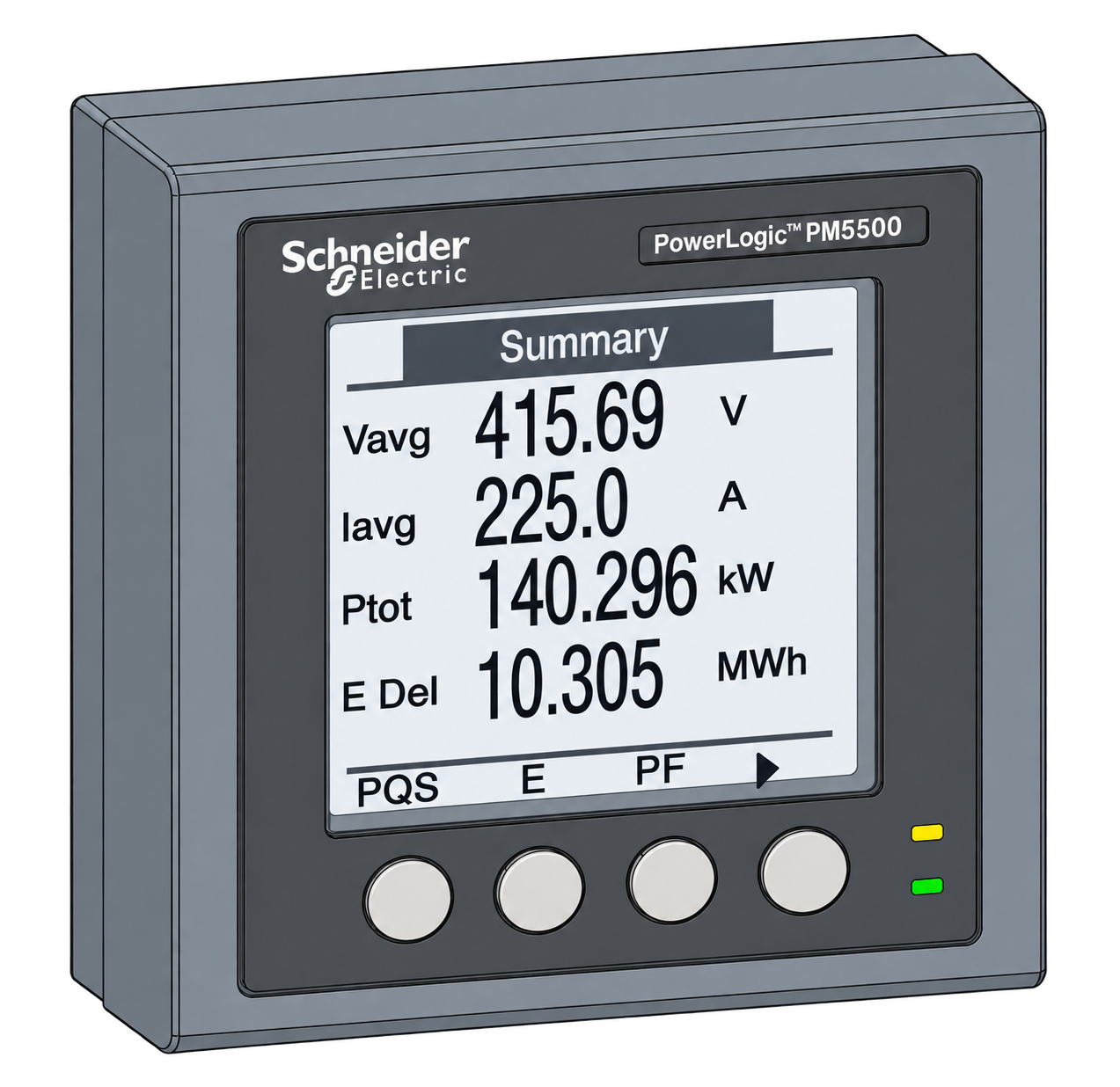
Schneider Electric PowerLogic PM5000
Power and energy meter
The PM5000 family is compatible with EpiSensor through its documented open interfaces. The exact route depends on the meter model: RS-485 variants use Modbus RTU, Ethernet variants use Modbus TCP, and selected Ethernet models also expose BACnet/IP.
Compatibility
Compatible with Edge
Schneider Electric publishes the PM5000 communication interfaces and model-specific register lists. Edge reads supported Modbus RTU or TCP paths through the appropriate site interface. BACnet/IP additionally requires an Edge build containing its BACnet client.
Choose the exact PM5000 model and firmware first. Its physical port, unit address, serial settings and register-list revision determine the configuration; the family name alone is not a register map.
Connect it with
-
Modbus Interface ZMB-3XFrom €399 ex VAT Configure Modbus Interface
-
Gateway ZGW-20From €899 ex VAT Configure Gateway
-
Evaluation Gateway on a Raspberry Pi Edge with one device licensedFree Set up Evaluation Gateway on a Raspberry Pi


For a PM5000 model with a serial Modbus port
- Modbus
- Wireless
- Edge
- Platforms
For a PM5000 model with an Ethernet port
- Modbus
- Edge
- Platforms
For a PM5000 model that explicitly lists BACnet/IP
- BACnet
- Edge
- Platforms
Specifications
Panel-mounted power meters for 1 A or 5 A current transformers, from the PM5110 with RS-485 to the PM5560 with Ethernet and BACnet/IP. Schneider publishes separate register lists for PM5100/PM5300 and PM5500/PM5600/PM5700 meters. Use the list for the installed model and firmware rather than transferring a family template unchanged.12
Interface
This register map is for the PM5110 (METSEPM5110). PM5330 and other variants have their own interfaces and are not covered here.
Communication settings: PM5110
- Interface
- Modbus RTU/ASCII over two-wire RS-485
- Read with
- FC03 (holding registers)
- Word order
- High word first on every value
- Addresses
- Zero-based PDU addresses, as sent on the bus
- Route into Edge
- ZMB-31 or a configured serial Modbus client
From PM5110, PM5310 and PM5330 firmware V2.2.4 with PM51xx/PM53xx register list6.
Register map: PM5110
| Point | Address | Hex | Format | Scale | Unit |
|---|---|---|---|---|---|
| Current L1 | 2999 | 0x0BB7 |
FLOAT32 | ×1 | A |
| Current L2 | 3001 | 0x0BB9 |
FLOAT32 | ×1 | A |
| Current L3 | 3003 | 0x0BBB |
FLOAT32 | ×1 | A |
| Average Current | 3009 | 0x0BC1 |
FLOAT32 | ×1 | A |
| Voltage L1-L2 | 3019 | 0x0BCB |
FLOAT32 | ×1 | V |
| Voltage L2-L3 | 3021 | 0x0BCD |
FLOAT32 | ×1 | V |
| Voltage L3-L1 | 3023 | 0x0BCF |
FLOAT32 | ×1 | V |
| Average Voltage L-L | 3025 | 0x0BD1 |
FLOAT32 | ×1 | V |
| Voltage L1-N | 3027 | 0x0BD3 |
FLOAT32 | ×1 | V |
| Voltage L2-N | 3029 | 0x0BD5 |
FLOAT32 | ×1 | V |
| Voltage L3-N | 3031 | 0x0BD7 |
FLOAT32 | ×1 | V |
| Average Voltage L-N | 3035 | 0x0BDB |
FLOAT32 | ×1 | V |
| Active Power L1 | 3053 | 0x0BED |
FLOAT32 | ×1 | kW |
| Active Power L2 | 3055 | 0x0BEF |
FLOAT32 | ×1 | kW |
| Active Power L3 | 3057 | 0x0BF1 |
FLOAT32 | ×1 | kW |
| Total Active Power | 3059 | 0x0BF3 |
FLOAT32 | ×1 | kW |
| Reactive Power L1 | 3061 | 0x0BF5 |
FLOAT32 | ×1 | kVAr |
| Reactive Power L2 | 3063 | 0x0BF7 |
FLOAT32 | ×1 | kVAr |
| Reactive Power L3 | 3065 | 0x0BF9 |
FLOAT32 | ×1 | kVAr |
| Total Reactive Power | 3067 | 0x0BFB |
FLOAT32 | ×1 | kVAr |
| Apparent Power L1 | 3069 | 0x0BFD |
FLOAT32 | ×1 | kVA |
| Apparent Power L2 | 3071 | 0x0BFF |
FLOAT32 | ×1 | kVA |
| Apparent Power L3 | 3073 | 0x0C01 |
FLOAT32 | ×1 | kVA |
| Total Apparent Power | 3075 | 0x0C03 |
FLOAT32 | ×1 | kVA |
| Frequency | 3109 | 0x0C25 |
FLOAT32 | ×1 | Hz |
| Total Power Factor IEC | 3191 | 0x0C77 |
FLOAT32 | ×1 | - |
| Import Active Energy | 2699 | 0x0A8B |
FLOAT32 | ×1 | kWh |
| Export Active Energy | 2701 | 0x0A8D |
FLOAT32 | ×1 | kWh |
| Import Reactive Energy | 2707 | 0x0A93 |
FLOAT32 | ×1 | kVArh |
| Export Reactive Energy | 2709 | 0x0A95 |
FLOAT32 | ×1 | kVArh |
This register map is for the PM5560 (METSEPM5560). PM5330 and other variants have their own interfaces and are not covered here.
Communication settings: PM5560
- Interface
- Modbus RTU/ASCII, Modbus TCP/IP and BACnet/IP
- Read with
- FC03 (holding registers)
- Word order
- High word first on every value
- Addresses
- Zero-based PDU addresses, as sent on the bus
- Route into Edge
- Serial Modbus, Ethernet Modbus TCP or Edge BACnet/IP client
From PowerLogic PM5000 Series Modbus Register List9.
Register map: PM5560
| Point | Address | Hex | Format | Scale | Unit |
|---|---|---|---|---|---|
| Current L1 | 2999 | 0x0BB7 |
FLOAT32 | ×1 | A |
| Current L2 | 3001 | 0x0BB9 |
FLOAT32 | ×1 | A |
| Current L3 | 3003 | 0x0BBB |
FLOAT32 | ×1 | A |
| Average Current | 3009 | 0x0BC1 |
FLOAT32 | ×1 | A |
| Voltage L1-L2 | 3019 | 0x0BCB |
FLOAT32 | ×1 | V |
| Voltage L2-L3 | 3021 | 0x0BCD |
FLOAT32 | ×1 | V |
| Voltage L3-L1 | 3023 | 0x0BCF |
FLOAT32 | ×1 | V |
| Average Voltage L-L | 3025 | 0x0BD1 |
FLOAT32 | ×1 | V |
| Voltage L1-N | 3027 | 0x0BD3 |
FLOAT32 | ×1 | V |
| Voltage L2-N | 3029 | 0x0BD5 |
FLOAT32 | ×1 | V |
| Voltage L3-N | 3031 | 0x0BD7 |
FLOAT32 | ×1 | V |
| Average Voltage L-N | 3035 | 0x0BDB |
FLOAT32 | ×1 | V |
| Active Power L1 | 3053 | 0x0BED |
FLOAT32 | ×1 | kW |
| Active Power L2 | 3055 | 0x0BEF |
FLOAT32 | ×1 | kW |
| Active Power L3 | 3057 | 0x0BF1 |
FLOAT32 | ×1 | kW |
| Total Active Power | 3059 | 0x0BF3 |
FLOAT32 | ×1 | kW |
| Reactive Power L1 | 3061 | 0x0BF5 |
FLOAT32 | ×1 | kVAr |
| Reactive Power L2 | 3063 | 0x0BF7 |
FLOAT32 | ×1 | kVAr |
| Reactive Power L3 | 3065 | 0x0BF9 |
FLOAT32 | ×1 | kVAr |
| Total Reactive Power | 3067 | 0x0BFB |
FLOAT32 | ×1 | kVAr |
| Apparent Power L1 | 3069 | 0x0BFD |
FLOAT32 | ×1 | kVA |
| Apparent Power L2 | 3071 | 0x0BFF |
FLOAT32 | ×1 | kVA |
| Apparent Power L3 | 3073 | 0x0C01 |
FLOAT32 | ×1 | kVA |
| Total Apparent Power | 3075 | 0x0C03 |
FLOAT32 | ×1 | kVA |
| Frequency | 3109 | 0x0C25 |
FLOAT32 | ×1 | Hz |
| Total Power Factor IEC | 3191 | 0x0C77 |
FLOAT32 | ×1 | - |
| Import Active Energy | 2699 | 0x0A8B |
FLOAT32 | ×1 | kWh |
| Export Active Energy | 2701 | 0x0A8D |
FLOAT32 | ×1 | kWh |
| Import Reactive Energy | 2707 | 0x0A93 |
FLOAT32 | ×1 | kVArh |
| Export Reactive Energy | 2709 | 0x0A95 |
FLOAT32 | ×1 | kVArh |
Assessment
This page covers the PM5000 family. Accuracy class, ports and the values each meter reports depend on the exact model and firmware.
- InteroperabilityWell supported
- Schneider publishes the Modbus register list for the family. Some Ethernet models also speak BACnet/IP.125
- AccuracySupported with conditions
- Every model measures the main electrical values. Accuracy class, power-quality functions and I/O differ by model, so check the model against the job before you order.234
- SecurityLimited
- Modbus and BACnet have no authentication or encryption. Put the meters on a separate network segment and never expose one to the internet.45
- ReliabilityWell supported
- Logs, minimum and maximum values and alarms survive a power cut, and a three-year battery keeps the clock. Immunity is declared to IEC 61000-4 and tested under EN 50470, from -25 to +70 °C.234
- RuggednessSupported with conditions
- Each model’s datasheet gives its installation and environmental limits. Check them against the panel it goes in.34
Edge templates
This JSON file supplies the register map. Applying it to an existing meter replaces its sensor list while retaining the site connection, unit ID and enable state.
Downloads need a signed-in account with Edge download access.
Use the template in Edge
- Import the JSON file
In Edge, open Settings, then Devices and Templates. Choose Import JSON and select the downloaded file. Confirm that the model and template name match your device.
- Load the map for your meter
For a new Modbus device, use Load Template before entering the manufacturer or model; it fills those fields and the register list. Set the name, site connection and unit ID, check the polling enable state, then test before saving. For an existing device, apply only to the matching model; this replaces its sensor list but retains its connection, unit ID and enable state.
- Test a reading
Use Test in the wizard and compare a known reading with the meter display. Check its unit, sign and scale, then confirm that timestamps keep advancing. These starter maps are read-only and leave exports off until you configure them.
Setup
-
Identify the model
Record the catalogue number and firmware. Schneider publishes one workbook for PM5100/PM5300 and another for PM5500/PM5600/PM5700. Choose that model group first; use its published map as the starting point and compare one measurement with the display before expanding the read list.
-
Set the address and serial settings
On RS-485, record the baud rate, parity, stop bits and address. On Ethernet, record the IP address and unit ID, and allow only the peers that need the meter.
-
Wire and terminate the bus
Check polarity, the common reference, bias and termination along the whole RS-485 bus.
-
Check one value
Schneider numbers registers from 1, so register 3000 is address 2999. Read one known value and compare it with the display, then check sign, scaling and energy direction under a known load.
-
Import the template
Import the Edge template for your model, then set polling intervals and alarms that the meter and the network can sustain.
Related devices

Sources
- PowerLogic PM5000 Series Modbus Register List (opens in a new tab)
- PowerLogic PM5000 Series technical datasheet, brochure and part-number breakdown (opens in a new tab)
- PowerLogic PM5330 product datasheet (opens in a new tab) (PDF)
- PowerLogic PM5560 product datasheet (opens in a new tab) (PDF)
- Modbus specifications and implementation guides (opens in a new tab)
- PM5110, PM5310 and PM5330 firmware V2.2.4 with PM51xx/PM53xx register list (opens in a new tab)
- Reading PM5300 current values over Modbus TCP (opens in a new tab)
- PM5000 register byte and word order (opens in a new tab)
- PowerLogic PM5000 Series Modbus Register List (opens in a new tab)
- PowerLogic PM5560 product page (opens in a new tab)
Further reading
- ApplicationModbus meter integration for a BMS or SCADA system
- ApplicationTransformer and distribution-board monitoring
- ToolModbus register address translator
- ToolModbus data decoder
- ToolModbus RTU timing planner
- GuideModbus commissioning over RS-485
- GuideIoT interoperability in multi-vendor systems
- GuidePM5560 exact-model commissioning guide
- ManufacturerSchneider Electric devices
- ProtocolModbus devices and register maps
- CategoryEnergy meters
Product names and trademarks belong to their owners. Publication does not imply endorsement or a commercial relationship.