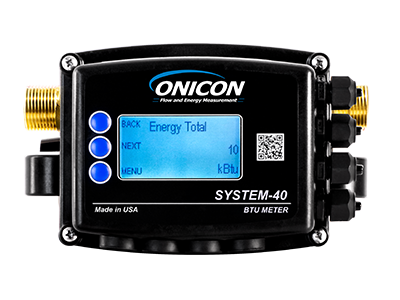
ONICON System-40
Thermal energy meter
The System-40 combines an inline ultrasonic flow sensor and a matched platinum temperature pair for hot, chilled or condenser water. For a tenant branch, record pipe size, expected flow range and the fitted communications option. ONICON offers sizes from ½ to 2½ inches. The BACnet version joins a serial trunk; the controls contractor can identify its route to the building IP network.
Compatibility
Compatible with Edge through a BACnet router
Edge reads the BACnet MS/TP version over the site BACnet/IP router. The meter calculates thermal energy from its own flow and temperature measurements.
Identify the meter’s serial protocol and compare its supply and return temperatures with the local display. The Modbus RTU version has a different point map.
Connect it with

For the BACnet MS/TP version of the System-40
- BACnet
- Edge
- Platforms
Models
| Models | Interface | Route into Edge |
|---|---|---|
| System-40 with BACnet MS/TP | Serial BACnet with factory-selected auxiliary inputs or outputs. | Use the IP router already serving the meter trunk. Include a router in the quote if this is a new isolated segment. |
Interface
Documented measurements and integration boundaries for System-40.
- Analog Input 3 is supply temperature and Analog Input 4 is return temperature. Read Units on each object to distinguish °C from °F.
- Analog Input 1 reports thermal energy rate. Its configured unit can be kBtu/h, tons, kW or MW. Analog Input 2 reports volume flow. Record the units with both readings.
Assessment
Reading an inline System-40 on the BACnet MS/TP option.
- InteroperabilityWell supported
- The manual identifies the BACnet objects for energy rate, volume flow and temperatures.1
- AccuracySupported with conditions
- Match the branch flow range to the selected meter size. The integral flow sensor and matched RTDs supply the thermal calculation.2
- SecurityNot yet assessed
- Control access to the routed network through the building operator.1
- ReliabilitySupported with conditions
- The meter makes signal strength and quality available as AI 6 and AI 7 for comparison with a questionable flow reading.1
- RuggednessLimited
- The manufacturer specifies indoor installation. Confirm the proposed location and the conditions at the pipe.1
- ScalabilitySupported with conditions
- Inventory the meters on each serial trunk and identify the BACnet router before specifying the collection interval.1
- LifecycleSupported with conditions
- Record the factory communication and auxiliary I/O options when pricing replacement hardware.2
Setup
-
Ask for the pipe service, meter location, installed protocol and a photograph of the displayed units.
-
Using the manual’s section 7.4, read Present_Value and Units for AI 3 and AI 4 on the same Device instance.
Compare both temperatures with the meter display at the same time.
-
For a consumption report, identify the cumulative energy total and its unit on the installed meter.
Keep that total separate from the instantaneous rate at AI 1.
Related devices
Sources
- System-40 BTU measurement system manual, DOC-0002831 (opens in a new tab) (PDF)
- System-40 thermal energy meter selection and communication options (opens in a new tab)
Further reading
Product names and trademarks belong to their owners. Publication does not imply endorsement or a commercial relationship.