ONICON F-1500
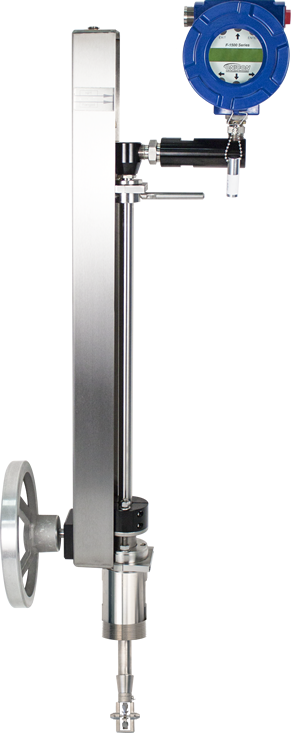
Steam and liquid flow meter
Identify the fluid before specifying the meter or its reporting points. ONICON offers a volumetric version for liquids and a mass-flow version with temperature measurement. The catalog identifies the optional pressure sensor for superheated steam and compressed air applications. For an existing steam meter, record whether the line carries saturated or superheated steam and which sensors the transmitter actually uses.
Compatibility
Compatible with Edge through a BACnet MS/TP router
The F-1500 manual documents read access to BACnet Analog Input objects over RS-485. Edge reads the transmitter through the site BACnet/IP router.
The object examples in manual section 4.3.3.2 are for mass-flow meters. Confirm the installed variant, configured fluid and exposed object list.
Connect it with

For a transmitter with BACnet MS/TP commissioned on its serial interface
- BACnet
- Edge
- Platforms
Models
| Models | Interface | Route into Edge |
|---|---|---|
| F-1500 mass-flow configuration | Turbine velocity measurement with temperature sensing and optional pressure sensing. | For a steam consumption report, verify the mass-flow unit and compensation inputs on the installed meter. |
| F-1500 volumetric configuration | Turbine flow measurement for liquids. | Request the actual volume point and unit on this variant before committing a mass-flow channel to the quote. |
Interface
Documented measurements and integration boundaries for F-1500.
- On the documented mass-flow version, Analog Input 1 is volume flow. Values in US gallons per minute and Imperial gallons per minute require distinct unit mappings.
- Analog Input 2 is mass flow on that version. Its available units include kilograms per hour and pounds per hour. Record the configured unit with the rate.
Assessment
F-1500 insertion turbine transmitter with the documented BACnet MS/TP interface.
- InteroperabilityWell supported
- The manufacturer publishes separate BACnet object identifiers for mass and volume flow.1
- AccuracySupported with conditions
- Select the volumetric or compensated mass-flow version for the process fluid. The catalog associates superheated steam with the pressure option.2
- SecurityNot yet assessed
- The site controls operator determines network access.1
- ReliabilitySupported with conditions
- Compare the collected rate and unit against the transmitter’s local display when checking a trend.1
- RuggednessSupported with conditions
- The catalog gives an upper temperature of 450 °F (232 °C) for hot water and superheated steam. Confirm the installed configuration against its process conditions.2
- ScalabilitySupported with conditions
- The manufacturer lists four MS/TP speeds from 9600 to 76800 bit/s. Confirm the configured trunk rate before specifying polling.1
- LifecycleSupported with conditions
- Record the fluid, turbine configuration and installed temperature and pressure options when preparing a replacement quote.2
Setup
-
Ask for the line service, normal operating pressure and temperature, expected flow range and the fitted compensation sensors.
Obtain the serial network and meter identity from the controls operator.
-
Using section 4.3.3.2 of DOC-0003872, read Present_Value and Units from Analog Input 2 on a mass-flow meter.
Compare with the local mass-flow display during steady operation.
-
If the customer also wants volume, read AI 1 separately and retain its own units.
Confirm the volume or mass total on the installed meter before agreeing a cumulative reporting channel.
Related devices
Sources
- F-1500 insertion turbine flow meter manual, DOC-0003872 (opens in a new tab) (PDF)
- F-1500 application and selection catalog sheet, DOC-0002999 (opens in a new tab) (PDF)
Further reading
Product names and trademarks belong to their owners. Publication does not imply endorsement or a commercial relationship.