ONICON D-100
Flow meter interface
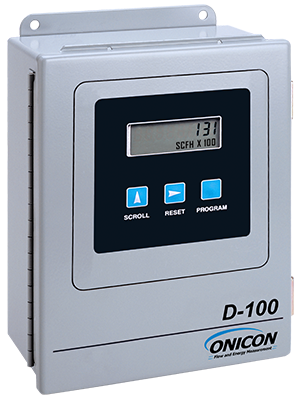
A D-100 can bring an existing liquid, gas or steam flow meter onto the building network. Identify both the meter in the pipe and the display on the wall. Its main input accepts current, pulse or contact closure signals. An enquiry for an existing display should state the input signal, its scaling and the fitted network interface. A bidirectional application also needs the site’s definition of each direction.
Compatibility
Compatible with Edge via a BACnet-equipped D-100
The dual-network interface manual documents BACnet/IP over Ethernet and MS/TP over RS-485. The display publishes measurements derived from its flow input.
Match the installed board to the dual-network guide and read the displayed engineering unit. Other D-100 interface versions require their own point schedules.
Connect it with

For a D-100 interface commissioned for BACnet/IP
- BACnet
- Edge
- Platforms
For a display commissioned for BACnet MS/TP
- BACnet
- Edge
- Platforms
Models
| Models | Interface | Route into Edge |
|---|---|---|
| D-100 with dual network interface | The guide documents Ethernet and two-wire RS-485. The D-100 family also includes displays with other network options. | Obtain a photograph of the network option and a reading from the display. If the fitted unit lacks BACnet, check whether the existing building controller already exposes the flow measurement. |
Interface
Documented measurements and integration boundaries for D-100.
- Analog Input 2 reports volume or mass flow rate. Read the engineering unit on the object: water may be reported in gallons per minute while steam may be reported in kilograms per hour.
- Analog Inputs 3 and 4 are generic auxiliary analog inputs. Their quantity and unit depend on the connected signal. Obtain the site point schedule before including them in the enquiry.
Assessment
D-100 display using the documented dual network interface.
- InteroperabilityWell supported
- The interface guide documents the two BACnet transports and identifies the primary flow-rate object.1
- AccuracySupported with conditions
- The measurement depends on the connected meter and scaling of its current or pulse output.2
- SecurityNot yet assessed
- Network access depends on the commissioned installation.1
- ReliabilitySupported with conditions
- Local indication allows the operator to compare the primary flow reading with the value collected remotely.2
- RuggednessNot yet assessed
- Assess the wall-mounted display separately from its pipe-mounted meter.1
- ScalabilitySupported with conditions
- The D-100 can also accept two auxiliary analog inputs and one totalizing pulse input. Confirm the installed configuration.2
- LifecycleSupported with conditions
- Keep the connected meter, signal type and optional network board on the asset record for future replacements.2
Setup
-
Confirm the connected flow meter, input scaling, displayed units and whether the installation measures one or two flow directions.
-
Following section 2.2 of the dual network guide, read Present_Value and Units from Analog Input 2.
Compare the result with the displayed rate at the same time.
-
For consumption reporting, also compare changes in the direction-specific display totals across a known interval.
Keep rate and accumulated volume or mass in separate fields.
Related devices

Sources
- D-100 Dual Network Interface Installation Guide, section 2.2 (opens in a new tab) (PDF)
- D-100 Series flow display inputs and network options (opens in a new tab)
Further reading
- GuideConnecting ONICON flow and heat meters to BACnet
- GuideCommissioning and reconciling pulse meters
- GuideConnecting existing meters to BACnet
- GuideGateway for BACnet/IP monitoring
- GuideONICON System-10 thermal energy calculator
- ManufacturerONICON devices
- ProtocolBACnet/IP building controllers
- CategoryPulse counters and I/O
Product names and trademarks belong to their owners. Publication does not imply endorsement or a commercial relationship.