SONOFF SNZB-04P
Door and window contact sensor
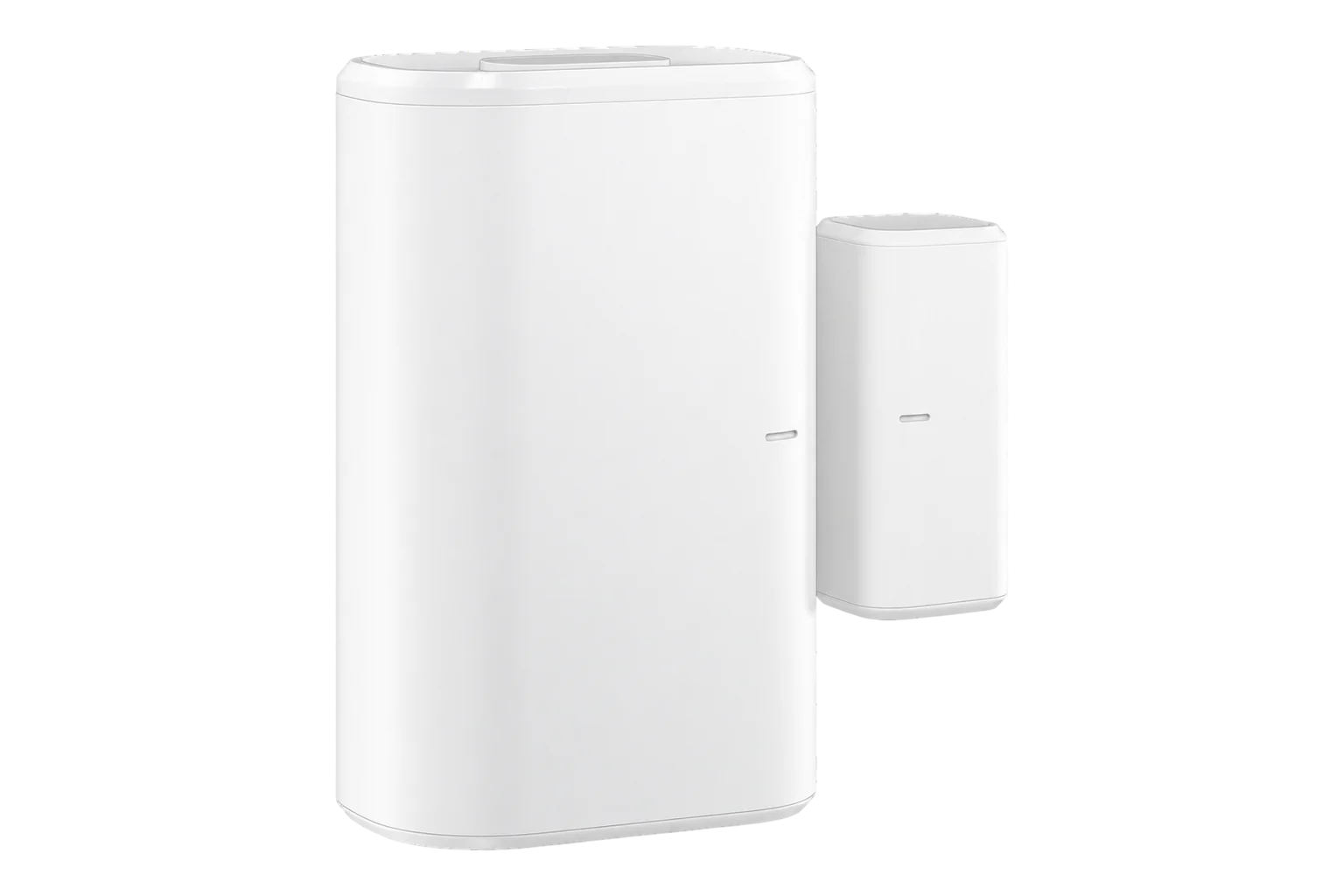
A battery-powered Zigbee 3.0 magnetic contact for doors, windows and cabinets, with a tamper switch on its back and one CR2477 coin cell that SONOFF rates for over five years.
- Zigbee
Door and window contact sensor
Compatibility
Compatible with EpiSensor Edge over Zigbee.
Pair it with the Zigbee radio on an EpiSensor Gateway. Edge reads it locally on the Gateway.
Edge reads 5 values from it, listed under Interface.
Connect it with
-
Gateway ZGW-20From €899 ex VAT Configure Gateway

Specifications
The SNZB-04P is a two-part contact sensor: a transmitter and a separate magnet. It reports open when the magnet moves away from the transmitter and closed when the two are back within 20 mm of each other. It uses a Silicon Labs EFR32MG22 radio on Zigbee 3.0 and runs on a single CR2477 coin cell.1
- Power
- Battery. One CR2477 3 V coin cell, rated for over five years at 25 °C and 50 triggers a day.2
- Sensing
- Magnetic contact, transmitter and separate magnet1
- Maximum gap when closed
- 20 mm1
- Wireless
- Zigbee 3.0 (IEEE 802.15.4)1
- Radio chip
- Silicon Labs EFR32MG221
- Indoor range
- 30 m1
- Working temperature
- -10 to 60 °C1
- Working humidity
- 5 to 95 % RH, non-condensing1
- Transmitter size
- 50.5 × 32 × 21.9 mm1
- Magnet size
- 27 × 12 × 12.4 mm1
- Weight
- 33 g1
- Enclosure
- PC, indoor use only1
- Certification
- CE, FCC, ISED, RoHS; EN IEC 62368-11
Where it is used
Cold room and chiller doors, so a temperature excursion can be matched to the door being left open. It is rated down to -10 °C, so mount it on chillers rather than inside freezers.
Cold room and cold store temperature monitoringWindows and external doors in offices and classrooms, to explain heating and ventilation readings that a window left open would otherwise leave unexplained.
Indoor environmental monitoringComms room, plant room and equipment cabinet doors, with the tamper switch reporting if the sensor is pulled off.
Server room and rack temperature monitoring
Interface
Readings and settings, with units and ranges where SONOFF publishes them.3
| Reading | Unit | Range or values | Access |
|---|---|---|---|
| Measurements 1 | |||
| ContactTrue while the magnet is within 20 mm of the transmitter (closed), false when it moves away (open). | - | Binary state | Read only |
| Diagnostics 4 | |||
| TamperTrue when the tamper switch on the back lifts off the mounting surface. | - | Binary state | Read only |
| Battery lowTrue when the coin cell is almost empty. | - | Binary state | Read only |
| Battery | % | 0 to 100 % | Read only |
| Battery voltage | mV | - | Read only |
Contact, tamper and the low-battery flag arrive as state changes from the sensor. Battery level in % and battery voltage in mV can also be read on request.3
The sensor accepts firmware updates over the Zigbee network.3
Setup
-
Open pairing in Edge
In Edge, open pairing on the Gateway’s Zigbee network. The Gateway accepts new devices while pairing is open.
-
Power it on
Pull out the battery insulation sheet. On its first power-up the sensor enters pairing mode by itself and its red LED flashes slowly for up to 180 seconds.1
-
Or start pairing by hand
On a sensor that has been paired before, press and hold the button for 5 seconds until the LED flashes slowly. If it will not join, hold the button for 10 seconds to reset it and try again.1
-
Confirm the join
The LED stays on for 3 seconds and then goes out when the sensor has joined. Check that Edge identifies it as SONOFF SNZB-04P.1
-
Mount it and check range
Fix the transmitter to the frame and the magnet to the moving part, with the alignment marks level and no more than 20 mm apart when closed. Press the button once: two quick flashes mean it can reach the Gateway or a Zigbee router from there.1
-
Check one reading
Open and close the door and watch the contact state change in Edge. Then lift the transmitter slightly from the surface to confirm the tamper alarm.
Common questions
- Does the SNZB-04P need a SONOFF hub to work with Edge?
- No. It is a Zigbee 3.0 device, so it joins the Zigbee radio on an EpiSensor Gateway directly, and Edge reads it without a SONOFF hub or the eWeLink app.1
- How long does the battery last?
- SONOFF rates the CR2477 cell for over five years, measured in its laboratory at 25 °C with 50 triggers a day. Busier doors, colder rooms and a weak Zigbee signal all shorten that. Edge reports the battery level and a low-battery flag.12
- How far apart can the magnet and the sensor be?
- No more than 20 mm when the door or window is closed. Line up the marks on the magnet and the transmitter when you fix them.1
- Why does it report tamper when nobody has touched it?
- The tamper switch on the back is not pressed fully against the mounting surface. Mount the transmitter on a flat, rigid surface with the adhesive pad or screws so the switch stays closed.1
- Can it be used outdoors?
- No. SONOFF rates it for indoor use only, and rain or direct sunlight may damage it.1
- How do I check the signal after mounting it?
- Press the button once. Two quick flashes mean it can reach the Gateway or a Zigbee router from where it is mounted. Slow flashing for 30 seconds means communication is failing, so add a mains-powered Zigbee router nearer to it.1
Related devices


Sources
- SNZB-04P user guide and specifications (opens in a new tab)
- Zigbee Door/Window Sensor SNZB-04P (opens in a new tab)
- SONOFF SNZB-04P device documentation (opens in a new tab)
- SONOFF SNZB-04P Zigbee definition (opens in a new tab)
Further reading
Product names and trademarks belong to their owners. Publication does not imply endorsement or a commercial relationship.