Aqara MCCGQ11LM
Door and window sensor
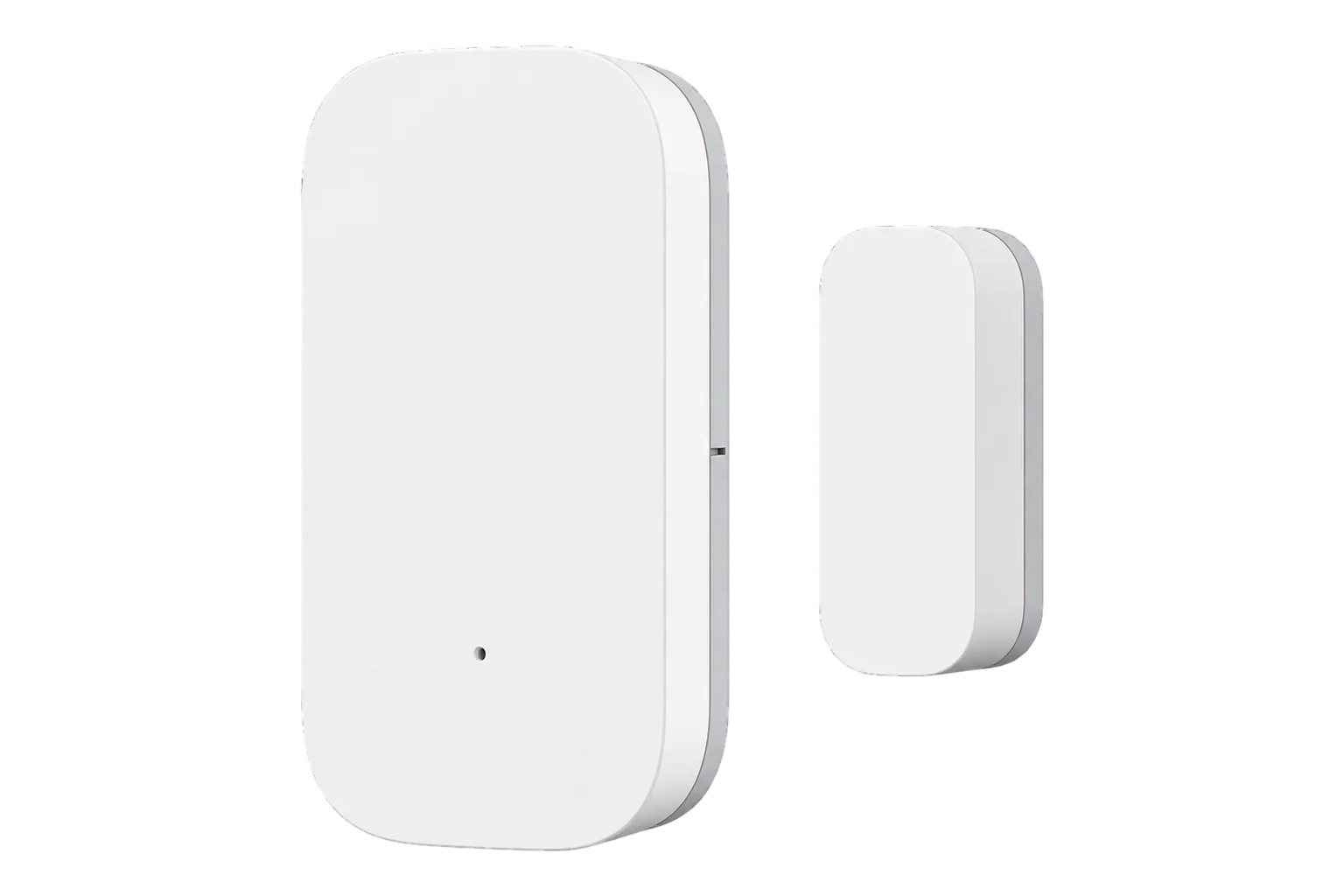
A small battery-powered Zigbee contact sensor for doors and windows, 41 × 22 × 11 mm, with a 22 mm magnet gap and a CR1632 coin cell that Aqara rates for over two years.
Also sold asAqara Door and Window Sensor
- Zigbee
Door and window sensor
Compatibility
Compatible with EpiSensor Edge over Zigbee.
Pair it with the Zigbee radio on an EpiSensor Gateway. Edge reads it locally on the Gateway.
Edge reads 7 values from it, listed under Interface.
Connect it with
-
Gateway ZGW-20From €899 ex VAT Configure Gateway

Specifications
Besides the contact state it reports battery level and battery voltage, the temperature inside the device, a count of restarts and a count of triggers since its last scheduled report. The internal temperature is the device's own and is no substitute for a room sensor.4
- Power
- Battery. One CR1632 coin cell, rated for over two years under normal use.2
- Sensing
- Magnetic contact, sensor unit and separate magnet3
- Maximum detection distance
- 22 mm1
- Wireless
- Zigbee, 2400 to 2483.5 MHz3
- Maximum transmit power
- 9.99 dBm3
- Operating temperature
- -10 to 45 °C1
- Operating humidity
- 0 to 95 % RH, non-condensing1
- Dimensions
- 41 × 22 × 11 mm1
- Mounting
- Adhesive pads, no tools3
- Environment
- Indoor use only3
- FCC ID
- 2AKIT-MCCGQ11LM3
Where it is used
Chiller and cold room doors, to match temperature excursions to the door being open. Its lowest rated temperature is -10 °C, so it suits chillers, not freezers.
Cold room and cold store temperature monitoringOpening windows and external doors in offices, to explain temperature and ventilation readings in the same room.
Indoor environmental monitoringPlant room and comms room doors, where an open door changes the room temperature that the rack and plant readings depend on.
Server room and rack temperature monitoring
Interface
Readings and settings, with units and ranges where Aqara publishes them. readable, writable only.4
| Reading | Unit | Range or values | Access |
|---|---|---|---|
| Measurements 1 | |||
| ContactTrue when the magnet is beside the sensor unit (closed), false when open. | - | Binary state | Read only |
| Controls 1 | |||
| IdentifyFlashes the LED. The sensor sleeps, so wake it with a button press first. | - | identify |
Write only |
| Diagnostics 5 | |||
| BatteryThe first value can take up to 24 hours to arrive after pairing. | % | 0 to 100 % | Read only |
| Battery voltage | mV | - | Read only |
| Device temperatureTemperature inside the device, not the room. | °C | - | Read only |
| Power outage countHow many times the device has lost power. | - | - | Read only |
| Trigger countTriggers since the last scheduled report. | - | - | Read only |
The sensor sleeps between events, so its readings cannot be requested on demand. Contact changes arrive at once; battery, voltage and the counters arrive with its periodic reports.4
On a sliding door, where the magnet passes the sensor sideways, it can send several conflicting states for one movement. Mount it where the magnet moves straight away from the sensor, or allow for a short settling time before acting on a change.4
Setup
-
Open pairing in Edge
In Edge, open pairing on the Gateway’s Zigbee network, with the sensor close to the Gateway so it joins it directly.
-
Put it into pairing mode
Press and hold the reset button on the sensor unit until its blue LED starts blinking, about 3 to 5 seconds.3
-
Keep it awake
If the join stalls, keep short-pressing the button about once a second until Edge has finished identifying the device.4
-
Confirm the join
Check that Edge identifies it as Aqara MCCGQ11LM. Battery level may take up to 24 hours to appear.4
-
Mount it
Fix the sensor unit to the frame and the magnet to the moving part, with the marker lines aligned and less than 22 mm apart when closed. Avoid metal surfaces, which weaken the signal.3
-
Check one reading
Press the button once where it is mounted to wake it, then open and close the door and watch the contact state change in Edge.
Common questions
- Does the MCCGQ11LM need an Aqara hub to work with Edge?
- No. Aqara needs its own hub for the Aqara Home app and Apple Home, but the sensor is a Zigbee device and joins the Zigbee radio on an EpiSensor Gateway, where Edge reads it locally.34
- How long does the battery last?
- Aqara rates the CR1632 coin cell for over two years under normal use. A low cell can make the sensor drop off the network before the battery level looks low, so watch the battery voltage as well.24
- How far apart can the magnet and the sensor be?
- Less than 22 mm when the door or window is closed, with the marker lines on the two parts aligned.3
- Can it be used for security?
- Aqara says it should not be used as security equipment. Use it to record when doors and windows are open, and use certified alarm equipment for intruder detection.3
- Why does it drop off the network?
- Usually a weak signal or a low battery, even one that still shows as full. Some routers from other manufacturers do not handle Aqara devices well. Re-pair it close to the Gateway so it joins the Gateway directly, and try a fresh cell.4
Related devices

Sources
- Door and Window Sensor specifications (opens in a new tab)
- Aqara Door and Window Sensor (opens in a new tab)
- Door and Window Sensor quick start guide (EU) (opens in a new tab) (PDF)
- Aqara MCCGQ11LM device documentation (opens in a new tab)
- Aqara MCCGQ11LM Zigbee definition (opens in a new tab)
Further reading
Product names and trademarks belong to their owners. Publication does not imply endorsement or a commercial relationship.