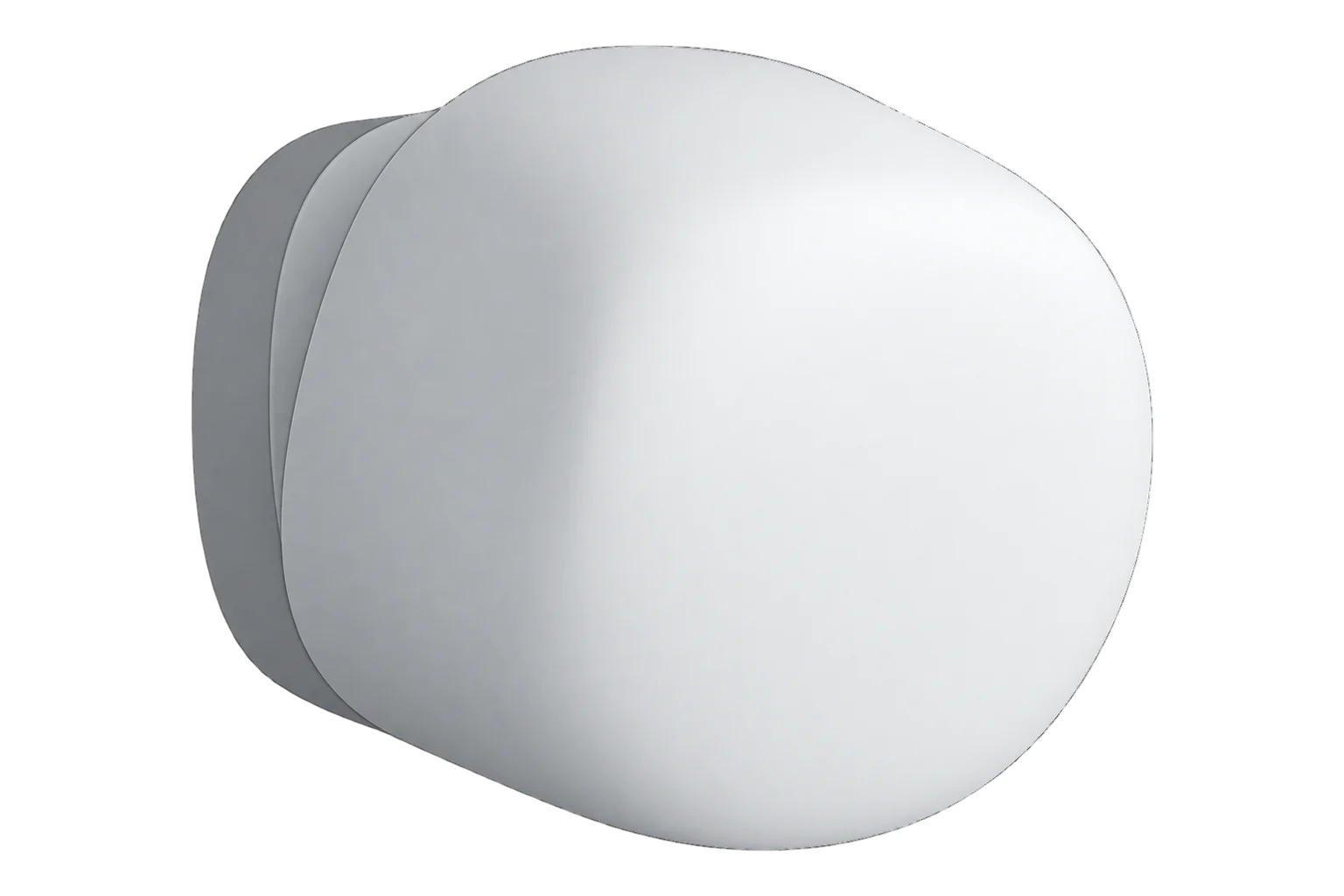
Aqara FP1E
Radar presence sensor
A USB-powered Zigbee presence sensor using 60 GHz mmWave radar. It detects people moving or still up to 6 m away, reports whether they are moving and how far off they are, and its range can be trimmed in 30 cm steps.
Also sold asPresence Sensor FP1EPS-S03DPS-S03E
- Zigbee
Radar presence sensor
Compatibility
Compatible with EpiSensor Edge over Zigbee.
Pair it with the Zigbee radio on an EpiSensor Gateway. Edge reads it locally on the Gateway.
Edge reads 12 values from it, listed under Interface.
Connect it with
-
Gateway ZGW-20From €899 ex VAT Configure Gateway

Specifications
The FP1E is Aqara’s mmWave presence sensor. It combines 60 to 61 GHz radar with on-device processing that learns the room’s background, identifies interference sources and adapts its sensitivity. Because radar picks up the small movements of breathing, it keeps reporting a person who sits or lies still, where a PIR motion sensor would time out.1
- Power
- DC supply. 5 V at 1 A through a USB-A connection. There is no battery.2
- Model
- PS-S03D / PS-S03E2
- Sensor
- mmWave radar, 60 to 61 GHz2
- Detection distance
- Up to 6 m, adjustable in 30 cm steps1
- Field of view, wall mounted
- 120°, up to 180° at close range; up to 35 m²1
- Coverage, ceiling mounted
- About 4 m radius at 2.8 m height; up to 50 m²1
- Wireless
- Zigbee, 2405 to 2480 MHz, up to 13 dBm2
- Radar output power
- Up to 20 dBm (EU)2
- Operating temperature
- -10 to 40 °C2
- Operating humidity
- 0 to 95 % RH, non-condensing1
- Dimensions
- 57 × 50 × 37 mm2
- Mounting
- Magnetic mount, base and adhesive sticker supplied; indoor use only1
Where it is used
Presence in meeting rooms and offices, to show heating, cooling and lighting running when nobody is there.
HVAC energy monitoring for commercial buildingsRoom use beside temperature, humidity and CO₂ readings, so comfort and ventilation can be judged against who was in the room.
Indoor environmental monitoringDesk and room utilisation, where the moving or still state separates people passing through from people working.
Interface
Readings and settings, with units and ranges where Aqara publishes them. readable, readable and writable, writable only.13
| Reading | Unit | Range or values | Access |
|---|---|---|---|
| Measurements 3 | |||
| PresenceTrue while a person is detected, moving or still. | - | Binary state | Read only |
| Movement stateWhether the person present is moving or still. The definition also lists two unknown states. | - | no_presencemovementno_movement |
Read only |
| Target distanceDistance to the nearest detected person, as a reference. | m | - | Read only |
| Settings 7 | |||
| Detection rangePeople beyond this distance are ignored. Set in 0.3 m steps. | m | 0 to 6 m | Read and write |
| Sensitivity | - | lowmediumhigh |
Read and write |
| AI interference detectionIdentifies fans, air conditioners and similar sources so they are not reported as people. | - | ONOFF |
Read and write |
| Adaptive sensitivity | - | ONOFF |
Read and write |
| Spatial learningLearns the empty room’s background. Start it with nobody present; it takes about 30 seconds. | - | Start Learning |
Write only |
| Restart | - | Restart Device |
Write only |
| Identify | - | identify |
Write only |
| Diagnostics 2 | |||
| Internal temperatureTemperature inside the sensor, not a room reading. | °C | - | Read only |
| Power outagesPower losses since the sensor was paired. | - | - | Read only |
Presence, movement, target distance and the detection range are Aqara manufacturer-specific attributes on cluster 0xFCC0 (0x0142, 0x0160, 0x015F and 0x015B). Distance and range travel in centimetres and are shown in metres.4
The target distance is the straight-line distance to the point where the nearest person reflects most energy, not their exact horizontal position. Aqara treats it as a reference for setting the range.1
Presence changes quickly in both directions. Aqara suggests acting on absence that has lasted for a set time, not on the first absent report, so lights and HVAC do not switch back and forth.1
Setup
-
Open pairing in Edge
In Edge, open pairing on the Gateway’s Zigbee network. The Gateway accepts new devices while pairing is open.
-
Power it on
Connect it to a 5 V, 1 A USB supply. Two blue flashes at power-up mean the supply is normal.1
-
Start the join
Press and hold the button for 5 seconds until the LED starts blinking, then release it. Three blue flashes mean it has started searching, and it flashes blue every 2 seconds while it searches.1
-
Confirm the join
Two blue flashes mean it has joined. Blue for 1 second means the join failed: move it closer to the Gateway and try again. Check that Edge identifies it as Aqara FP1E.1
-
Set the range, then learn the room
With one person in the room, walk slowly in from the edge you want covered and set the detection range to the target distance Edge shows there. Then empty the room and start spatial learning, which takes about 30 seconds.1
-
Check the empty room
Confirm presence clears after everyone leaves. If it does not, move it away from air-conditioning outlets, air purifiers and fans, and run spatial learning again.1
Common questions
- Does the FP1E need an Aqara hub to work with Edge?
- No. Aqara sells it for its own hub and app, but it is a Zigbee device that joins a Zigbee coordinator directly, so it pairs with the Zigbee radio on an EpiSensor Gateway without an Aqara hub.13
- Will it detect someone sitting still?
- Yes. Its mmWave radar detects a person moving or still, and it reports which, so a seated meeting stays occupied.1
- Does it need a battery?
- No. It has no battery and runs from 5 V at 1 A over USB-A, so plan a USB supply near where it will be mounted.2
- Can it measure room temperature?
- No. The temperature it reports is its own internal temperature. Use it as a diagnostic, and a temperature sensor for the room.3
Related devices

Sources
- Presence Sensor FP1E user manual (opens in a new tab) (PDF)
- Presence Sensor FP1E specifications (opens in a new tab)
- Aqara FP1E device documentation (opens in a new tab)
- Aqara FP1E presence attributes (lib/lumi.ts, v26.111.0) (opens in a new tab)
- Aqara FP1E Zigbee definition (opens in a new tab)
Further reading
Product names and trademarks belong to their owners. Publication does not imply endorsement or a commercial relationship.