SONOFF S60ZBTPF
Metering smart plug
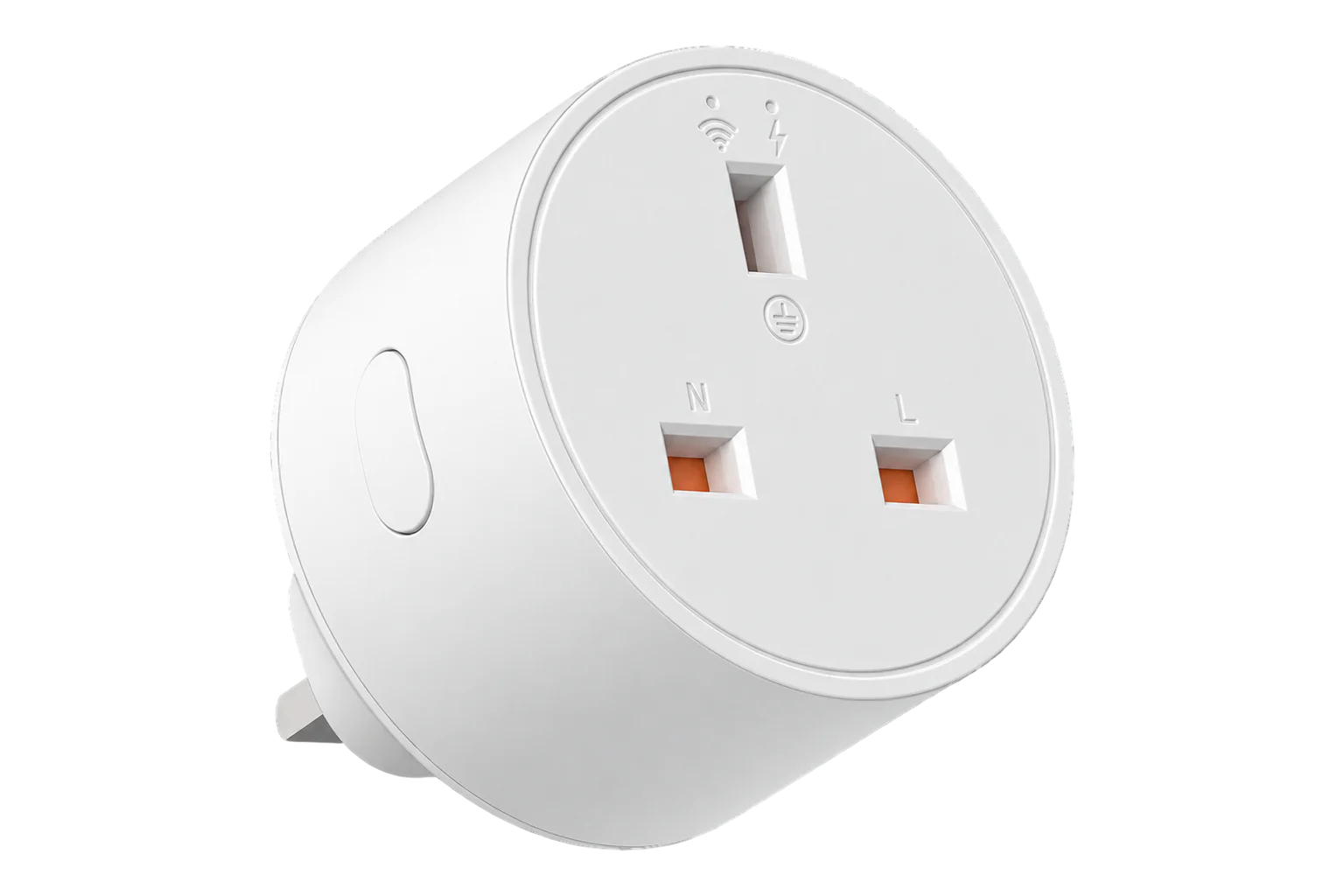
A 16 A Zigbee 3.0 smart plug for Type C, E and F sockets. It switches a load of up to 4000 W and reports its power, current, voltage and energy. On mains power it also acts as a Zigbee router.

Compatibility
Compatible with EpiSensor Edge over Zigbee.
Pair it with the Zigbee radio on an EpiSensor Gateway. Edge reads it locally on the Gateway.
Edge reads 18 values from it, listed under Interface.
Connect it with

Specifications
The S60ZBTPF is a single-outlet plug-in switch with an energy meter, made for Type C, E and F sockets. SONOFF rates it at 250 V, 50/60 Hz and 16 A, with a maximum resistive load of 4000 W and a standby consumption below 1 W. It uses a Telink TLSR8656 Zigbee 3.0 chip and repeats Zigbee traffic for other devices on the network.1
- Power
- Mains. Powered from the socket it plugs into: 250 V AC, 50/60 Hz, drawing below 1 W in standby.1
- Rated input
- 250 V AC, 50/60 Hz, 16 A maximum1
- Maximum load
- 4000 W resistive1
- Standby consumption
- Below 1 W1
- Socket and plug
- Type C, E and F1
- Wireless
- Zigbee 3.0, repeats traffic for other devices1
- Zigbee chip
- Telink TLSR86561
- Working temperature
- -10 to 40 °C1
- Working humidity
- 5 to 95 % RH, non-condensing1
- Dimensions
- 50 × 50 × 61.5 mm1
- Weight
- 79 g1
- Enclosure
- PC V0, indoor use only1
- Certification
- CE, RoHS1
Where it is used
Consumption of individual plug-in loads, such as water heaters, printers and vending machines, alongside the site meters that show the total.
Multi-site energy monitoringSwitching equipment off outside working hours to cut standby consumption, with the energy counters showing what was saved.
Checking when an appliance actually runs and how much it draws before deciding whether it needs a dedicated circuit meter.
Interface
On the Zigbee network it joins as a router and extends the mesh for other devices.1
Readings and settings, with units and ranges where SONOFF publishes them. readable, readable and writable, writable only.3
| Reading | Unit | Range or values | Access |
|---|---|---|---|
| Measurements 7 | |||
| PowerActive power drawn by the load | W | - | Read only |
| CurrentLoad current | A | - | Read only |
| VoltageSupply voltage at the socket | V | - | Read only |
| EnergyCumulative energy delivered to the load | kWh | - | Read only |
| Energy today | kWh | - | Read only |
| Energy yesterday | kWh | - | Read only |
| Energy this month | kWh | - | Read only |
| Controls 1 | |||
| RelaySwitches the outlet | - | ONOFFTOGGLE |
Read and write |
| Settings 10 | |||
| Power-on behaviourRelay state when mains returns after an outage | - | offontoggleprevious |
Read and write |
| Inching timeTurns the outlet back off (or on) this long after each switch, when inching is enabled | s | 0.5 to 3,599.5 s | Write only |
| Overload protectionEnables the configurable protection limits below | - | ONOFF |
Read and write |
| Maximum power | W | 0.1 to 4,000 W | Write only |
| Minimum powerOptional lower limit | W | 0.1 to 4,000 W | Write only |
| Maximum current | A | 0.1 to 17 A | Write only |
| Minimum currentOptional lower limit | A | 0.1 to 17 A | Write only |
| Maximum voltageOptional upper limit | V | 165 to 277 V | Write only |
| Minimum voltageOptional lower limit | V | 165 to 277 V | Write only |
| Network indicatorTurns the blue status LED on or off | - | ONOFF |
Read and write |
Power, current and voltage come from a SONOFF manufacturer-specific cluster (0xFC11), as do the daily and monthly energy counters. The cumulative energy total uses the standard Zigbee Simple Metering cluster.4
The plug's public Zigbee definition asks for power and current reports no more often than every 10 seconds, and for the three energy counters every 60 to 3,600 seconds or after a 0.05 kWh change.4
The plug can keep reporting a small current and power after the relay opens. The definition forces both to zero while the plug is off, so read a standby figure together with the relay state.4
Edge template
This JSON file applies the settings described below to a paired device. Edge supplies the device mapping; the file does not install a Zigbee driver or pair the device.
| Model | Connection | Points | Version | Updated | Download |
|---|---|---|---|---|---|
| S60ZBTPF | Zigbee | 8 + 2 settings | 1.0.0 | Download |
Downloads need a signed-in account with Edge download access.
Settings applied to S60ZBTPF
Restores the S60ZBTPF's last relay state when power returns and keeps outlet control protection on. Overload thresholds and export names are left for the site to set.
- Power On Behavior
- previous
- Outlet Control Protect
- Enabled
Use the template in Edge
- Import the JSON file
In Edge, open Settings, then Devices and Templates. Choose Import JSON and select the downloaded file. Confirm that the model and template name match your device.
- Pair the device, then apply its settings
Follow the pairing steps in Setup below. Once Edge identifies the exact model, choose Apply for the imported template and select the paired device. Check any firmware or manufacturer warning before applying.
- Confirm the result
Check the apply result and the settings on the device. Battery devices may need to wake before a command completes. Confirm a fresh reading or a deliberate sensor event before using it in an alarm or automation.
What Edge creates from the S60ZBTPF template8 sensors, 2 settings
Edge recognises the device by either identity below and creates these sensors and settings for it. The template file changes only the 2 settings it lists.
Zigbee identitieseWeLink/S60ZBTPFSONOFF/S60ZBTPF
Sensors 8
| Sensor | Edge ID | Unit | Reading | Registry property |
|---|---|---|---|---|
| Relay Statewritable | 6507 | - | Binary | state |
| Current | 6510 | A | Instantaneous | current |
| Voltage | 6511 | V | Instantaneous | voltage |
| Power | 6512 | W | Instantaneous | power |
| Energy | 6513 | kWh | Cumulative | energy |
| Energy Today | 6514 | kWh | Integrated | energy_today |
| Energy Yesterday | 6515 | kWh | Integrated | energy_yesterday |
| Energy Month | 6516 | kWh | Integrated | energy_month |
Settings 18
| Setting | Type | Accepts | Registry field |
|---|---|---|---|
| Power On Behavior | Choice | Off, On, Toggle, Previous | exposes.power_on_behavior |
| Network Indicator | On/off | On or off | exposes.network_indicator |
| Outlet Control Protect | On/off | On or off | exposes.outlet_control_protect |
| Inching Enabled | Choice | Disabled, Enabled | exposes.inching_control |
| Inching Mode | Choice | Off after delay, On after delay | exposes.inching_mode |
| Inching Time | Number | 0.5 to 3599.5 s, step 0.5 | exposes.inching_time |
| Enable Min Power Limit | Choice | Disabled, Enabled | exposes.enable_min_power |
| Min Power | Number | 0.1 to 4000 W, step 0.1 | exposes.min_power |
| Max Power | Number | 0.1 to 4000 W, step 0.1 | exposes.max_power |
| Enable Min Voltage Limit | Choice | Disabled, Enabled | exposes.enable_min_voltage |
| Min Voltage | Number | 165 to 277 V, step 1 | exposes.min_voltage |
| Enable Max Voltage Limit | Choice | Disabled, Enabled | exposes.enable_max_voltage |
| Max Voltage | Number | 165 to 277 V, step 1 | exposes.max_voltage |
| Enable Min Current Limit | Choice | Disabled, Enabled | exposes.enable_min_current |
| Min Current | Number | 0.1 to 17 A, step 0.1 | exposes.min_current |
| Max Current | Number | 0.1 to 17 A, step 0.1 | exposes.max_current |
| Inching Control Setread only | Text | - | exposes.inching_control_set |
| Overload Protection Raw Configread only | Text | - | exposes.overload_protection |
Export enabled and the export identifier stay site-specific on every mapped sensor: the template leaves both to the site.
Commands 1
| Command | Applies to | Sends | Registry command |
|---|---|---|---|
| Switch | 6507 Relay State | Enabled = 0, Disabled = 1 | set-sensor |
Setup
-
Open pairing in Edge
In Edge, open pairing on the Gateway's Zigbee network. The Gateway accepts new devices while pairing is open.
-
Plug it in
Plug the S60ZBTPF into a socket. On its first power-up it enters pairing mode by itself and the blue network LED flashes slowly. Pairing mode lasts 180 seconds.1
-
Or start pairing by hand
On a plug that has been paired before, press and hold the button for 5 seconds until the blue LED flashes slowly.1
-
Confirm the join
The blue LED stays on once the plug is connected. A fast flash means the connection is not working. Check that Edge identifies it as SONOFF S60ZBTPF.1
-
Check one reading
Switch the relay from Edge and check that the red power LED follows it. Then run a load of known rating, such as a heater, and compare the power reading with its rating.
Common questions
- Does the S60ZBTPF need a SONOFF hub to work with Edge?
- No. It is a Zigbee 3.0 device, so it joins the Zigbee radio on an EpiSensor Gateway directly, and Edge reads it on the Gateway without a SONOFF hub or the eWeLink cloud.1
- Why did the plug switch itself off?
- Its protection opened the relay. The maximum current and power limits are always active, even with overload protection turned off, and the blue LED flashes quickly and continuously while the plug is locked out. Remove the excess load, then switch it back on remotely.1
- Does it extend the Zigbee network?
- Yes. It is mains powered and acts as a Zigbee repeater, so battery sensors further from the Gateway can route through it.1
Related devices


Sources
- S60ZBTPF product guide and specifications (opens in a new tab)
- S60ZBTPG product guide and specifications (opens in a new tab)
- SONOFF S60ZBTPF device documentation (opens in a new tab)
- SONOFF S60ZBTPF Zigbee definition (opens in a new tab)
Further reading
Product names and trademarks belong to their owners. Publication does not imply endorsement or a commercial relationship.