SONOFF SWV
Smart water valve
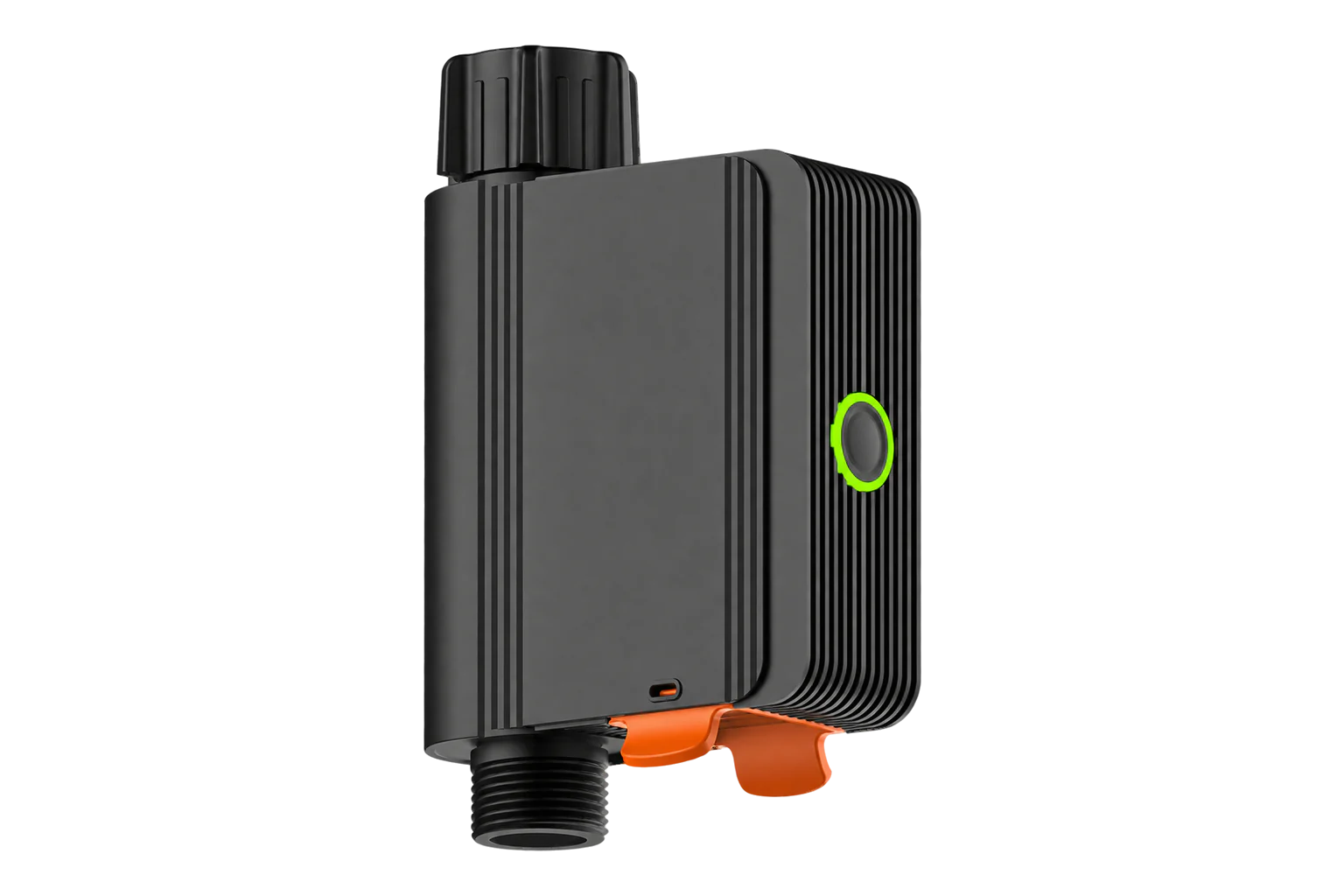
A battery-powered Zigbee 3.0 valve that fits between a tap and a hose, with a built-in flow meter for 2 to 39 L/min. It opens and closes on command, runs timed or volume-limited watering cycles and reports flow, volume and water-shortage alarms.
Also sold asSONOFF SWV-BSPSONOFF SWV-NH
Compatibility
Compatible with EpiSensor Edge over Zigbee.
Pair it with the Zigbee radio on an EpiSensor Gateway. Edge reads it locally on the Gateway.
Edge reads 19 values from it, listed under Interface.
Connect it with

Specifications
The SWV is a motorised valve that screws onto an outdoor tap, with the hose connected to its outlet. It comes in two thread versions: the SWV-BSP with a G3/4 British Standard Pipe thread for the UK, Europe and most other regions, and the SWV-NH with an NH3/4-11.5 hose thread for North America. Apart from the threads they are the same device.1
- Power
- Battery. Four 1.5 V AA cells (6 V), not included. SONOFF measured up to 20 months with 2,800 mAh cells and one hour of watering a day.1
- Flow measurement range
- 2 to 39 L/min1
- Working pressure
- 0.06 to 0.8 MPa1
- Threads
- G3/4 BSP (SWV-BSP) or NH3/4-11.5 (SWV-NH)1
- Ingress protection
- IP551
- Working temperature
- 5 to 60 °C; not for freezing conditions1
- Working humidity
- 5 to 95 % RH, non-condensing1
- Wireless
- Zigbee 3.0, 130 m in open space1
- Radio chip
- Silicon Labs EFR32MG221
- Dimensions
- 152 × 100 × 46 mm1
- Weight
- 278 g1
- Volume cycle
- Up to 6,500 L per run, up to 100 runs2
- Certification
- CE, FCC, ISED; EN 62368-11
Where it is used
Irrigation on a commercial site metered as its own branch: the daily volume separates garden and landscape watering from building water use.
Water consumption monitoring for commercial buildingsFilling a tank or pond to a set volume, with the valve closing itself when the volume cycle completes.
Remote shut-off of an outdoor tap supply, with a water-shortage alarm when the supply fails.
Interface
Readings and settings, with units and ranges where SONOFF publishes them. readable, readable and writable.
| Reading | Unit | Range or values | Access |
|---|---|---|---|
| Measurements 10 | |||
| Flow | m³/h | - | Read only |
| Switch | - | - | Read only |
| Current device status | - | normal_statewater_shortagewater_leakagewater_shortage & water_leakage |
Read only |
| Current count | times | - | Read only |
| Real time irrigation duration | s | - | Read only |
| Real time irrigation volume | L | - | Read only |
| Irrigation start time | - | - | Read only |
| Irrigation end time | - | - | Read only |
| Daily irrigation volume | L | - | Read only |
| Valve work state | - | Binary state | Read only |
| Controls 1 | |||
| State | - | Binary state | Read and write |
| Settings 7 | |||
| Auto close when water shortage | - | Binary state | Read and write |
| Cyclic timed irrigation | - | - | Read and write |
| Total number | times | 0 to 100 times | Read and write |
| Irrigation duration | seconds | 0 to 86,400 seconds | Read and write |
| Irrigation interval | seconds | 0 to 86,400 seconds | Read and write |
| Cyclic quantitative irrigation | - | - | Read and write |
| Irrigation capacity | liter | 0 to 6,500 liter | Read and write |
| Diagnostics 1 | |||
| Battery | % | 0 to 100 % | Read only |
Flow is reported in m³/h. Run and daily volumes are in litres, run duration in seconds, and the start and end times of a run as Unix timestamps.2
Automatic shut-off on water shortage needs valve firmware 1.0.4 or later. It closes the valve after 30 minutes below 2 L/min.12
The valve work state is on while a timed or volume cycle is running and turns off when the program finishes.2
Setup
-
Fit it to the tap
Wrap thread seal tape around the tap thread and screw the valve’s inlet nut onto it. Open the tap and check for leaks, then connect the hose to the outlet. Mount it vertically for the most accurate flow reading.1
-
Load the batteries
Pull out the battery slot, fit four AA cells and press the slot back until the snap at the arrow is visible. The button LED flashes when it powers on.1
-
Open pairing in Edge
In Edge, open pairing on the Gateway’s Zigbee network. The Gateway accepts new devices while pairing is open.
-
Put the valve into pairing mode
Press and hold the button for 5 seconds until the green LED flashes. The valve stays in pairing mode for 180 seconds.1
-
Check one control
Confirm Edge identifies it as SONOFF SWV. Open the valve from Edge, check that the flow reading rises, then close it.2
Common questions
- Does the SWV need a SONOFF hub to work with Edge?
- No. SONOFF states it works with Zigbee 3.0 hubs, including open-source platforms. It joins the Zigbee radio on an EpiSensor Gateway, and Edge reads and controls it there without the eWeLink app.1
- Why does it report no water and close while water is flowing?
- Below 2 L/min the flow meter treats the flow as a water shortage, and with automatic shut-off enabled the valve closes after 30 minutes. Increase the flow, or switch automatic shut-off off from Edge.12
- How long do the batteries last?
- SONOFF measured up to 20 months with 2,800 mAh AA cells and one hour of watering a day. Battery quality and how the valve is used change it. Edge reports the battery level.1
- Can it stay outside over winter?
- No. It is rated for 5 to 60 °C, and its inlet and outlet can freeze, which stops the valve and the volume count. SONOFF recommends bringing it indoors for the winter.1
Related devices


Sources
- SWV-BSP/SWV-NH user guide and specifications (opens in a new tab)
- SONOFF SWV device documentation (opens in a new tab)
- SONOFF SWV Zigbee definition (opens in a new tab)
Further reading
Product names and trademarks belong to their owners. Publication does not imply endorsement or a commercial relationship.