Sinopé SP2600ZB
Metering smart plug
A 120 V, 15 A Zigbee plug for North American sockets that switches one appliance and meters its power and energy. It is rated for 1800 W resistive, 960 W incandescent and ½ HP motor loads.
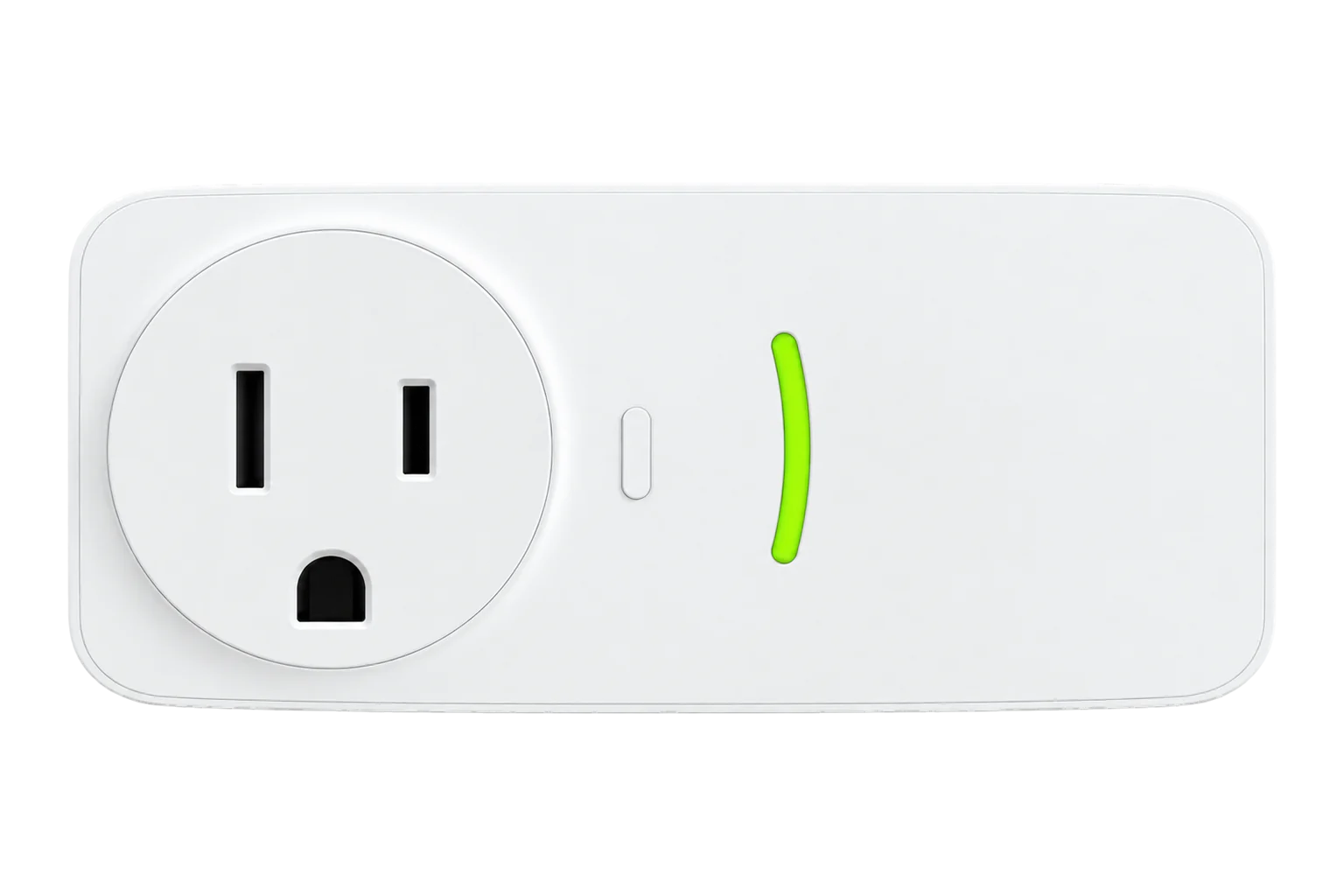
- Zigbee
Metering smart plug
Compatibility
Compatible with EpiSensor Edge over Zigbee.
Pair it with the Zigbee radio on an EpiSensor Gateway. Edge reads it locally on the Gateway.
Edge reads 7 values from it, listed under Interface.
Connect it with
-
Gateway ZGW-20From €899 ex VAT Configure Gateway

Specifications
The SP2600ZB is Sinopé Technologies' Zigbee smart plug for 120 V, 60 Hz North American outlets. It plugs into the wall, takes one appliance, switches it through a relay and measures the power and kilowatt-hours it uses. Sinopé sells it for its own GT130 gateway and states that it works with other compatible Zigbee gateways.13
- Power
- Mains. Powered from the 120 V AC, 60 Hz outlet it plugs into.3
- Supply
- 120 V AC, 60 Hz3
- Maximum current
- 15 A at 120 V3
- Resistive load
- 1800 W1
- Incandescent load
- 960 W1
- Electronic ballast
- 500 VA1
- Motor load
- ½ HP1
- Wireless
- Zigbee HA 1.2, 2.4 GHz, +8 dBm1
- Encryption
- AES-1282
- Radio module
- EM3585 (FCC ID NHS-EM3585)3
- Operating temperature
- 0 to 40 °C, indoor only1
- Storage temperature
- -20 to 50 °C1
- Safety
- UL 60730-1, CSA E60730-11
- Warranty
- 3 years, limited1
Where it is used
Plug-in refrigeration on North American sites, such as bottle coolers and display fridges, metered one by one to see which run longest.
Refrigeration energy monitoringPortable heaters and dehumidifiers up to 1800 W, metered and switched off outside occupied hours.
HVAC energy monitoring for commercial buildings
Interface
Readings and settings, with units and ranges where Sinopé publishes them. readable, readable and writable.
| Reading | Unit | Range or values | Access |
|---|---|---|---|
| Measurements 5 | |||
| Switch | - | - | Read only |
| Power | W | - | Read only |
| Voltage | V | - | Read only |
| Current | A | - | Read only |
| Energy | kWh | - | Read only |
| Controls 1 | |||
| State | - | Binary state | Read and write |
| Settings 1 | |||
| Power on behaviour | - | offontoggleprevious |
Read and write |
Switching uses the standard On/Off cluster, including the power-on behaviour attribute that decides whether the load comes back on after a power cut.4
Power, voltage and current come from the Electrical Measurement cluster and energy from Simple Metering. The energy value arrives in Wh with a divisor of 1000 applied to give kWh.4
The plug also carries a Sinopé manufacturer cluster, which is bound when the plug is configured.4
Setup
-
Open pairing in Edge
In Edge, open pairing on the Gateway’s Zigbee network. The Gateway accepts new devices while pairing is open.
-
Plug it in near the Gateway
Plug the SP2600ZB into a 120 V outlet where its ON / OFF button stays easy to reach. Pair the plugs closest to the Gateway first, then work outwards.3
-
Start the connection
Press the ON / OFF button for 5 seconds. The connection light blinks green while it connects and stays green for 5 seconds when it has joined. If it has not reached the network after 20 seconds, try again.3
-
Confirm the join
Check that Edge identifies it as Sinopé SP2600ZB, then close pairing.
-
Check one reading
Switch the relay from Edge, then run a load with a known rating, such as a heater with a rating plate, and compare the reported power with it.
Common questions
- Does the SP2600ZB need the Sinopé GT130 gateway?
- No. Sinopé lists the GT130, a compatible Zigbee gateway or its Sedna valve as the options. On an EpiSensor Gateway it joins the Zigbee radio directly and Edge reads it there, without Neviweb.1
- How do I reset it?
- Press and hold the ON / OFF button for 5 seconds. The indicator stays on for 5 seconds to confirm the reset.3
- What does it do after a power cut?
- That is a setting. Edge can set the power-on behaviour to off, on, toggle or the previous state.4
Related devices

Sources
- Zigbee smart plug SP2600ZB (opens in a new tab)
- Smart Plug SP2600ZB product sheet (opens in a new tab) (PDF)
- SP2600ZB Smart Plug quick start guide (opens in a new tab) (PDF)
- Sinopé device definitions (sinope.ts) (opens in a new tab)
- Sinopé SP2600ZB device documentation (opens in a new tab)
Further reading
Product names and trademarks belong to their owners. Publication does not imply endorsement or a commercial relationship.