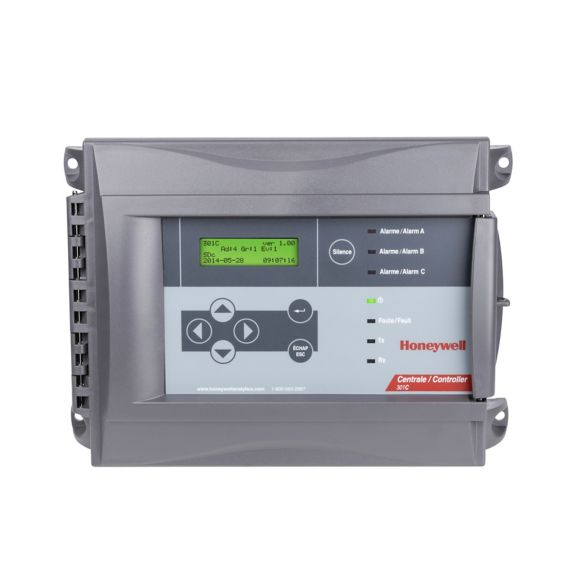
Honeywell 301-C-DLC-BIP
Gas detection controller
For a car park or plant room, ask for the detector schedule as well as the controller model. The BIP option presents connected detector readings over BACnet/IP. The gas, engineering unit and physical location belong to each detector.
Compatibility
Compatible with Edge over BACnet/IP
Edge reads the detector objects published by the BIP interface on the building network.
Use a read-only monitoring scope agreed with the gas system maintainer. Local alarm and ventilation functions remain under the commissioned panel.
Connect it with

For a commissioned Ethernet connection
- BACnet
- Edge
- Platforms
Models
| Models | Interface | Route into Edge |
|---|---|---|
| 301-C-DLC-BIP | BACnet/IP with the BIP option. | The panel maps supported downstream detectors such as E3Point and SensePoint XCD. |
| 301-C-DLC-BIP | BTL B-SS profile. | The listing names software version 1.4.9. Record the installed version alongside the point list. |
Interface
Documented measurements and integration boundaries for 301-C-DLC-BIP.
- For an E3Point gas detector, match the detector address, gas and location in the panel inventory to its published concentration object. Retain the unit shown for that detector.
- A value from a 301ADI analog input defaults to mA unless the channel has been scaled. Confirm the scaling before assigning a concentration unit.
Assessment
301-C-DLC-BIP on the commissioned BACnet interface.
- InteroperabilityWell supported
- The BTL listing identifies the exact model and software version.3
- AccuracySupported with conditions
- For an E3Point gas detector, match the detector address, gas and location in the panel inventory to its published concentration object. Retain the unit shown for that detector.2
- SecurityNot yet assessed
- Site access controls depend on the installed network.2
- ReliabilityNot yet assessed
- The listing covers BACnet interoperability.3
- RuggednessNot yet assessed
- Confirm installation conditions for the host enclosure.2
- ScalabilityNot yet assessed
- Point coverage depends on the connected equipment and its commissioned configuration.2
- LifecycleNot yet assessed
- Record the installed software with the commissioning schedule.2
Setup
-
Choose one detector already visible on the gas panel.
Ask the maintainer for its tag, gas, address and BACnet object identifier.
-
Read Present_Value and Units from the mapped concentration object and compare with the normal panel reading at the same time.
Keep the detector tag with the result.
-
Use the existing commissioning record to document detector maintenance and alarm testing separately from this read-only data check.
Related devices
More from Honeywell
Sources
- 301C gas detection controller and ordering options (opens in a new tab)
- 301C user manual, revision 4, BACnet/IP module (opens in a new tab) (PDF)
- BTL listing 24261 (opens in a new tab) (PDF)
Product names and trademarks belong to their owners. Publication does not imply endorsement or a commercial relationship.