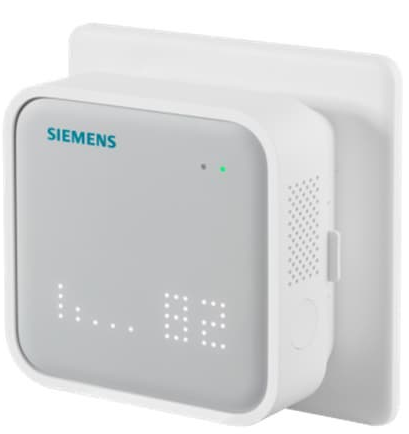
Siemens QNA2700D
Indoor air quality sensor
For an Ethernet drop, specify the BA1 version. For a room on an existing MS/TP trunk, specify BA2 and identify the BACnet router serving that trunk. Both supply the same room measurements to Edge.
Compatibility
Compatible with Edge over BACnet/IP
BA1 exposes its objects directly over IP. Edge reaches BA2 on a serial trunk through a BACnet router.
Check the complete suffix on the installed unit and match the Device instance to the room before collecting measurements.
Connect it with

For S55720-S572 on the building IP network
- Wired
- Edge
- Platforms
For S55720-S573 on an MS/TP trunk
- BACnet
- Edge
- Platforms
Models
| Models | Interface | Route into Edge |
|---|---|---|
| QNA2700D.BA1 / S55720-S572 | BACnet/IP with IEEE 802.3af PoE or a dedicated 5 V, 2 A USB-C supply. | Ethernet path to the BACnet/IP client. |
| QNA2700D.BA2 / S55720-S573 | BACnet MS/TP with 12–24 V AC/DC or a dedicated 5 V, 2 A USB-C supply. | MS/TP trunk through the site BACnet router to IP. |
| QNA2820D.EU, .US and .AU | Regional LoRaWAN versions. | These ordering codes use a different radio network. |
Interface
Documented measurements and integration boundaries for QNA2700D.
- Room temperature is available in Celsius on AI 0 and Fahrenheit on AI 8. Choose one for the trend.
- AI 1 reports relative humidity, AI 2 carbon dioxide and AI 3 total volatile organic compounds. Retain their distinct units.
- AI 4 measures PM2.5. AI 5 measures light and AI 6 measures A-weighted sound pressure. AI 7 is a proprietary score.
Assessment
Read-only collection from the two BACnet versions of the Siemens indoor multi-sensor.
- InteroperabilityWell supported
- Siemens identifies the object instances and supports individual and multiple property reads.2
- AccuracySupported with conditions
- For CO₂ the specified error is the greater of 75 ppm and 10% of the reading. Check that against the project tolerance.3
- SecuritySupported with conditions
- Plan the route inside the managed building network. The type summary specifies BACnet/IP or MS/TP.1
- ReliabilitySupported with conditions
- The sensor module provides up to four hours of battery backup. The switch or router needs its own power continuity.1
- RuggednessSupported with conditions
- The IP30 enclosure is rated for indoor operation at −5 to 40 °C under non-condensing conditions.3
- ScalabilitySupported with conditions
- Plan room trends around the ten-second BACnet transmission rate and account for the serial trunk on BA2.3
- LifecycleSupported with conditions
- Use the stock number when replacing a unit to preserve the installed network and power arrangement.1
Setup
Read a particulate measurement
Use the object table in Siemens document A6V13589454.
- Service
- ReadProperty
- Object
- Analog Input instance 4
- Property
- Present_Value
- Unit
- Micrograms per cubic metre
Acceptance: Record the value and time beside the display reading. If they differ, check room identity and the ten-second transmission interval.
-
Match the stock number to the network and power supply.
-
Read the installed Device instance and the selected Analog Input properties.
-
Compare PM2.5 at the sensor display with the same room in Edge at the same time.
Related devices


Sources
- Ordering codes and supply options (opens in a new tab)
- BACnet services and object table (opens in a new tab)
- Sensor accuracy and environmental limits (opens in a new tab)
Further reading
Product names and trademarks belong to their owners. Publication does not imply endorsement or a commercial relationship.