Develco ZHEMI101
External meter interface
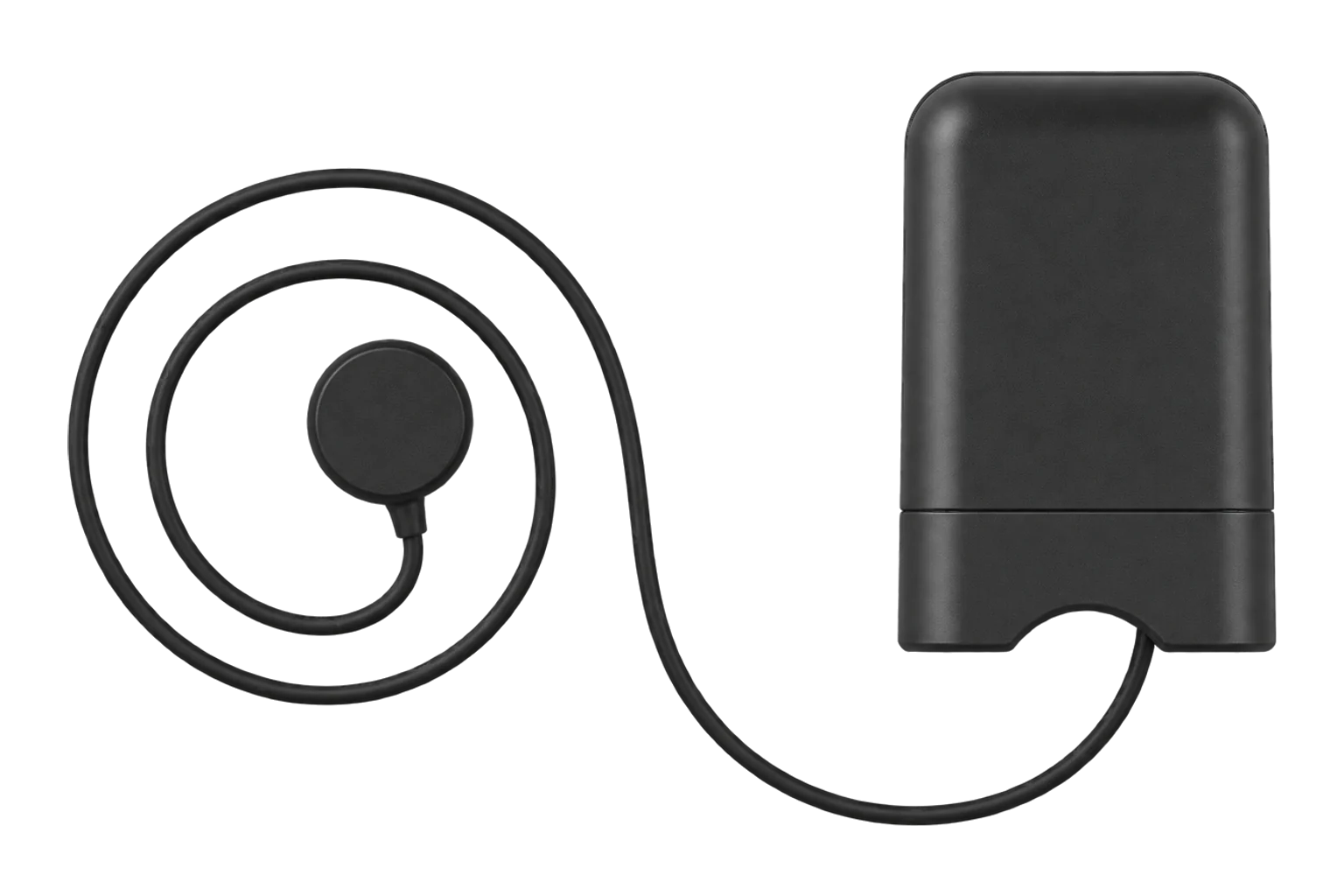
A battery-powered Zigbee interface that reads an existing utility meter through an optical probe: the pulse LED on an electricity meter, or the IR port of meters that speak IEC 62056-21 or Kamstrup KMP. With a pulse probe it counts gas or water pulses too.
Compatibility
Compatible with EpiSensor Edge over Zigbee.
Pair it with the Zigbee radio on an EpiSensor Gateway. Edge reads it locally on the Gateway.
Edge reads 17 values from it, listed under Interface.
Connect it with

Specifications
The ZHEMI101, which Develco Products sold as the External Meter Interface, adds Zigbee to a meter that is already installed. An optical probe on an 800 mm cable is held on the meter by a magnet or Velcro, and the interface turns what it reads into power and cumulative consumption. Develco listed LED and IR probes as standard, with S0, pulse and P1 interfaces available to order.1
- Power
- Battery. Three AA alkaline cells, rated for 2 years with updates every 5 seconds at room temperature.1
- Meter interfaces
- LED and IR probes; S0, pulse and P1 to order1
- Pulse rate
- 50 to 10,000 pulses per kWh1
- IR protocols
- IEC 62056-21 mode A, Kamstrup KMP2
- IR probe speed
- 300 to 1200 baud (9600 baud probe on request)2
- Probe cable
- About 800 mm, magnet or Velcro attachment1
- Battery
- 3 × AA alkaline, exchangeable; optional 5 V supply2
- Battery life
- 2 years, updating every 5 s at room temperature1
- Wireless
- Zigbee Home Automation 1.2, sensitivity -98 dBm, output +8 dBm1
- Operating temperature
- -20 to 60 °C1
- Humidity
- 5 to 85 % RH, non-condensing1
- Protection
- IP221
- Dimensions
- 115 × 35 × 70 mm1
- Weight
- 113.4 g1
Where it is used
Electricity meters with a pulse LED and no wired pulse output, read without opening the meter.
Pulse meter remote monitoringGas or water meters with a pulse output, counted in m³ with the pulse probe.
Water consumption monitoring for commercial buildingsMain meters at small sites across a portfolio, where a battery interface avoids any wiring.
Multi-site energy monitoring
Interface
Readings and settings, with units and ranges where Develco publishes them. readable, readable and writable, writable only.6
| Reading | Unit | Range or values | Access |
|---|---|---|---|
| Measurements 6 | |||
| EnergyElectricity modes; converted to kWh from the meter’s unit | kWh | - | Read only |
| Produced energyOnly when the meter reports it | kWh | - | Read only |
| PowerInstantaneous demand, converted to W | W | - | Read only |
| Gas volumeGas pulse mode | m³ | - | Read only |
| Water volumeWater pulse mode | m³ | - | Read only |
| Flow rateGas or water pulse mode | m³/h | - | Read only |
| Settings 3 | |||
| Interface modeWhich meter and probe the interface reads | - | electricitygaswaterkamstrup-kmplinkyIEC62056-21DSMR-2.3DSMR-4.0 |
Read and write |
| Pulses per unitPulses per kWh or m³; 1000 by default | - | 0 to 65,535 | Read and write |
| Preset totalSets the running total, in kWh or m³, to match the meter | - | - | Write only |
| Diagnostics 8 | |||
| Meter communication faultTrue when the interface cannot read the meter | - | Binary state | Read only |
| Battery low | - | Binary state | Read only |
| Unit of measureRaw metering cluster attribute | - | - | Read only |
| Metering device typeRaw metering cluster attribute | - | - | Read only |
| Summation formattingRaw metering cluster attribute | - | - | Read only |
| Demand formattingRaw metering cluster attribute | - | - | Read only |
| MultiplierRaw metering cluster attribute | - | - | Read only |
| DivisorRaw metering cluster attribute | - | - | Read only |
Set the interface mode before anything else. Electricity is 0x0000, gas 0x0001, water 0x0002, Kamstrup KMP 0x0100 and IEC 62056-21 0x0102. Develco’s manual marks the Linky mode as not supported.2
Set the pulses per unit before presetting the total, because the interface uses the pulse setting to convert its count. The default is 1000 imp/kWh.2
Once bound, the interface reports its default attributes every 60 seconds, and it sends a keep-alive to the coordinator every 15 minutes.2
The meter communication fault flag is set when the interface has trouble reading the meter; there is no LED warning for a low battery.2
Setup
-
Fit the probe
Attach the optical probe over the meter’s pulse LED, or over its IR port for an IEC 62056-21 or Kamstrup meter.1
-
Open pairing in Edge
In Edge, open pairing on the Gateway’s Zigbee network.
-
Power it up or reset it
A new interface searches for a network as soon as it has batteries, flashing its LED once a second. One that has been joined before needs a reset: hold the button through the menu until the LED flashes continuously, then release it.2
-
Confirm the join
After joining, the LED flashes once every 3 seconds for 15 minutes while the interface is in identify mode. Check that Edge identifies it as Develco ZHEMI101.2
-
Set the mode and check one reading
Write the interface mode and the pulses per unit for the meter, then compare the total with the meter’s register, and preset it if needed.2
Common questions
- Is it Zigbee 3.0?
- No. Develco certified it to Zigbee Home Automation 1.2. Its successors from Onics, the EMIZB-141 and EMIZB-151, are Zigbee 3.0.14
- How long do the batteries last?
- Develco rated three AA alkaline cells for two years with an update every 5 seconds at room temperature. The interface flags a low battery in its metering status, but not on its LED.12
- Does it read French Linky meters?
- No. The Linky interface mode exists in the attribute list, but Develco’s technical manual marks it as not supported.2
- How do I reset it?
- Hold the button: the LED blinks once to show identify mode, then flashes continuously to show the factory reset. Release it while it flashes continuously and the interface clears its network settings and searches again.2
Related devices
Sources
- External Meter Interface (opens in a new tab)
- External Meter Interface ZHEMI-101 technical manual (opens in a new tab) (PDF)
- EMI 2, LED (EMIZB-141) technical manual (opens in a new tab) (PDF)
- Electricity Meter Interface 2, LED (opens in a new tab)
- Develco ZHEMI101 device documentation (opens in a new tab)
- Develco ZHEMI101 Zigbee definition (opens in a new tab)
Further reading
Product names and trademarks belong to their owners. Publication does not imply endorsement or a commercial relationship.