OWON PC311-Z-TY
Single-phase power clamp
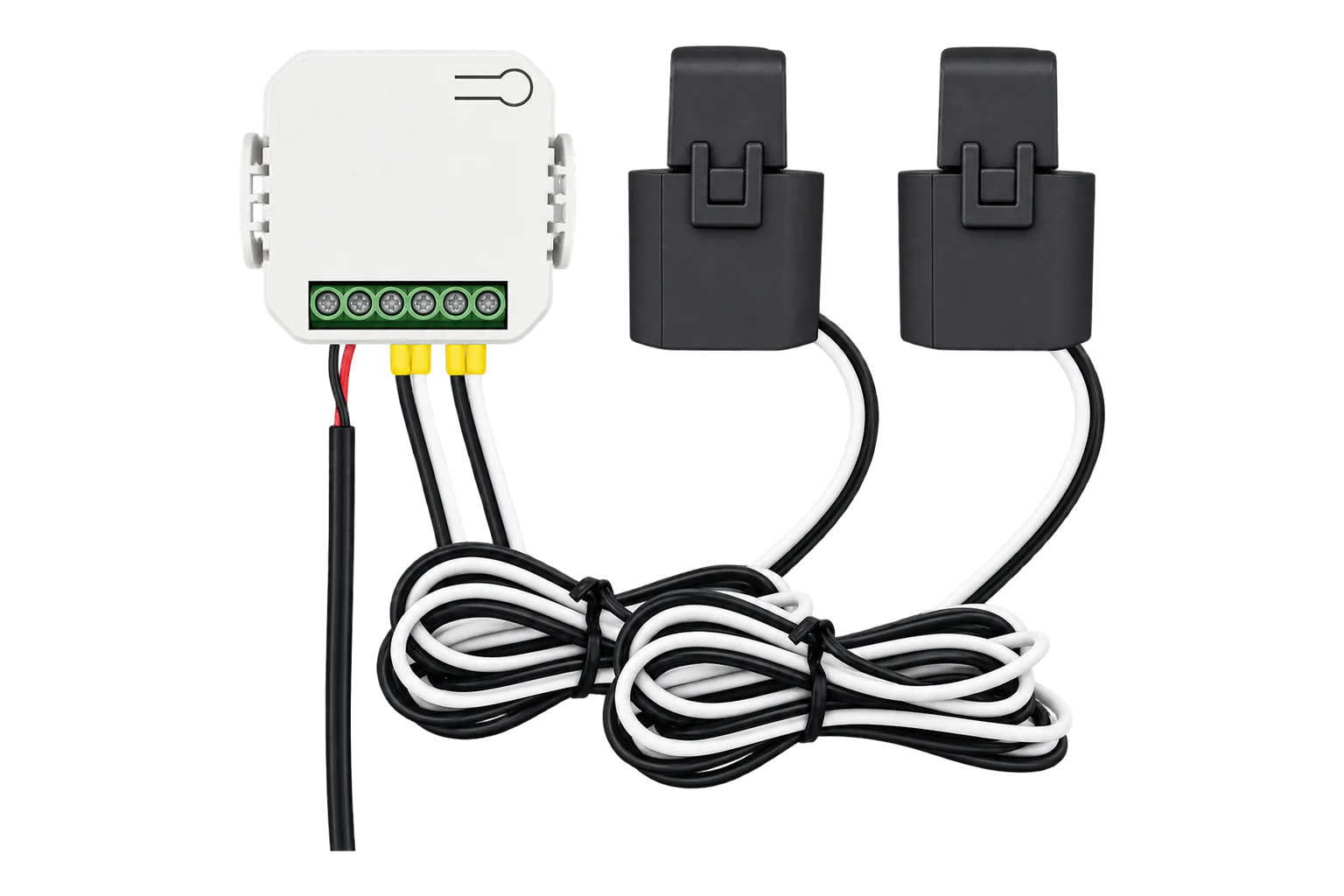
A single-phase Zigbee 3.0 energy clamp with one 80 A current transformer and room for a second, measuring voltage, current, power factor, active power and energy in both directions, to ±2 % above 100 W.
Also sold asTuya PC311-Z-TY
Compatibility
Compatible with EpiSensor Edge over Zigbee.
Pair it with the Zigbee radio on an EpiSensor Gateway. Edge reads it locally on the Gateway.
Edge reads 16 values from it, listed under Interface.
Connect it with

Specifications
The PC311-Z-TY is a DIN-rail energy monitor made by OWON for single-phase supplies. It takes its own supply and voltage reference from an L and N lead, and measures current through a split-core clamp on the conductor. It reports voltage, current, power factor, active power, frequency and accumulated energy over Zigbee 3.0. A second clamp is optional, so one unit can measure two loads on the same phase.12
- Power
- Mains. Powered from the single-phase supply it measures, 90 to 250 V AC at 50/60 Hz, through its L and N leads.1
- Measurement accuracy
- ±2 W up to 100 W, ±2 % above 100 W1
- Operating voltage
- 90 to 250 V AC, 50/60 Hz1
- Current range
- 80 A to 120 A, depending on the clamp3
- Current clamps
- One 80 A clamp as standard, a second optional1
- Clamp aperture
- 10.6 mm (80 A), 16.7 mm (120 A option)1
- Clamp cable length
- 1 m1
- Reporting cycle
- Every minute1
- Wireless
- Zigbee 3.0 (IEEE 802.15.4, 2.4 GHz), internal antenna1
- Operating conditions
- -20 to 55 °C, up to 90 % RH non-condensing1
- Dimensions
- 51.6 × 23.3 × 46 mm2
- Weight
- 85 g with one 80 A clamp, 150 g with two1
- Mounting
- 35 mm DIN rail or wall, on the supplied bracket2
- Certification
- CE1
Where it is used
Solar output and grid import and export on a single-phase site, with one clamp on the inverter feed and one on the incomer.
Solar PV monitoringThe electrical input of a single-phase heat pump or immersion heater, alongside its thermal readings.
Heat pump performance monitoringSub-circuits across a portfolio of small shops or offices, where a clip-on clamp avoids rewiring each board.
Multi-site energy monitoring
Interface
Readings and settings, with units and ranges where OWON publishes them.
| Reading | Unit | Range or values | Access |
|---|---|---|---|
| Measurements 16 | |||
| AC frequency | Hz | - | Read only |
| Voltage | V | - | Read only |
| Power | W | - | Read only |
| Current | A | - | Read only |
| Energy | kWh | - | Read only |
| Energy produced | kWh | - | Read only |
| Power a | W | - | Read only |
| Power b | W | - | Read only |
| Current a | A | - | Read only |
| Current b | A | - | Read only |
| Power factor a | % | - | Read only |
| Power factor b | % | - | Read only |
| Energy a | kWh | - | Read only |
| Energy b | kWh | - | Read only |
| Energy produced a | kWh | - | Read only |
| Energy produced b | kWh | - | Read only |
Power and current carry a sign: a clamp fitted against the direction of flow reports negative power, and the energy it measures is counted as produced (exported) energy rather than consumed energy.24
Channel A is the clamp on terminals 1+ and 1-, channel B the clamp on 2+ and 2-. The totals are reported alongside the per-channel values.24
Energy is reported in steps of 0.01 kWh, voltage in 0.1 V and current in 0.001 A.4
Setup
-
Wire it with the supply off
Switch off the main breaker. Connect the red lead to L and the black lead to N. Connect clamp 1 with its white wire to 1+ and black wire to 1-, and clamp 2, if fitted, to 2+ and 2-.2
-
Fit the clamps the right way round
Close each clamp around a conductor on the same phase that powers the PC311, with the arrow (P1 to P2, or K to L) pointing towards the load. On a grid incomer or an inverter feed, current against the arrow is counted as export or generation.2
-
Put it into pairing mode
Open pairing on the Gateway's Zigbee network in Edge. A unit that has not joined a network blinks its LED red. On a unit that has, hold the reset button for 5 seconds until the LED flashes red three times quickly; it then blinks red and waits to join. Energy totals are kept.2
-
Confirm the join
The LED stays green once the clamp has joined. Check that Edge identifies it as PC311-Z-TY.2
-
Check one reading
Switch on a known load and check that power on that channel is positive and close to the load's rating. A negative value on a consumption circuit means the clamp is reversed.
Common questions
- Does the PC311-Z-TY need a Tuya hub or the Smart Life app?
- No. It is a Zigbee 3.0 device, so it joins the Zigbee radio on an EpiSensor Gateway directly. OWON's quick start describes setup in the Smart Life app, but that is only one way to use it.12
- Can it measure solar generation and export?
- Yes. The clamps sense current in both directions. On an inverter feed, fit the clamp with its arrow facing the inverter and generation is counted from the negative power. On the grid incomer, current from the grid counts as import and current to the grid as export.2
- How do I clear the energy totals?
- Reset the clamp twice in a row, less than 10 seconds apart. The LED flashes red and green alternately three times when the totals have been cleared. A single 5-second reset leaves the network but keeps the energy data.2
Related devices
Sources
- PC311-Z-TY Single phase Power Clamp datasheet (opens in a new tab) (PDF)
- PC311-Z-TY Single-Phase Power Clamp quick start guide (opens in a new tab) (PDF)
- PC311-Z-TY Single-Phase Zigbee Smart Energy Clamp (opens in a new tab)
- Tuya device definitions, PC311-Z-TY (opens in a new tab)
- Tuya PC311-Z-TY device documentation (opens in a new tab)
Further reading
Product names and trademarks belong to their owners. Publication does not imply endorsement or a commercial relationship.