Shelly S4PL-00416EU
Power strip with energy metering
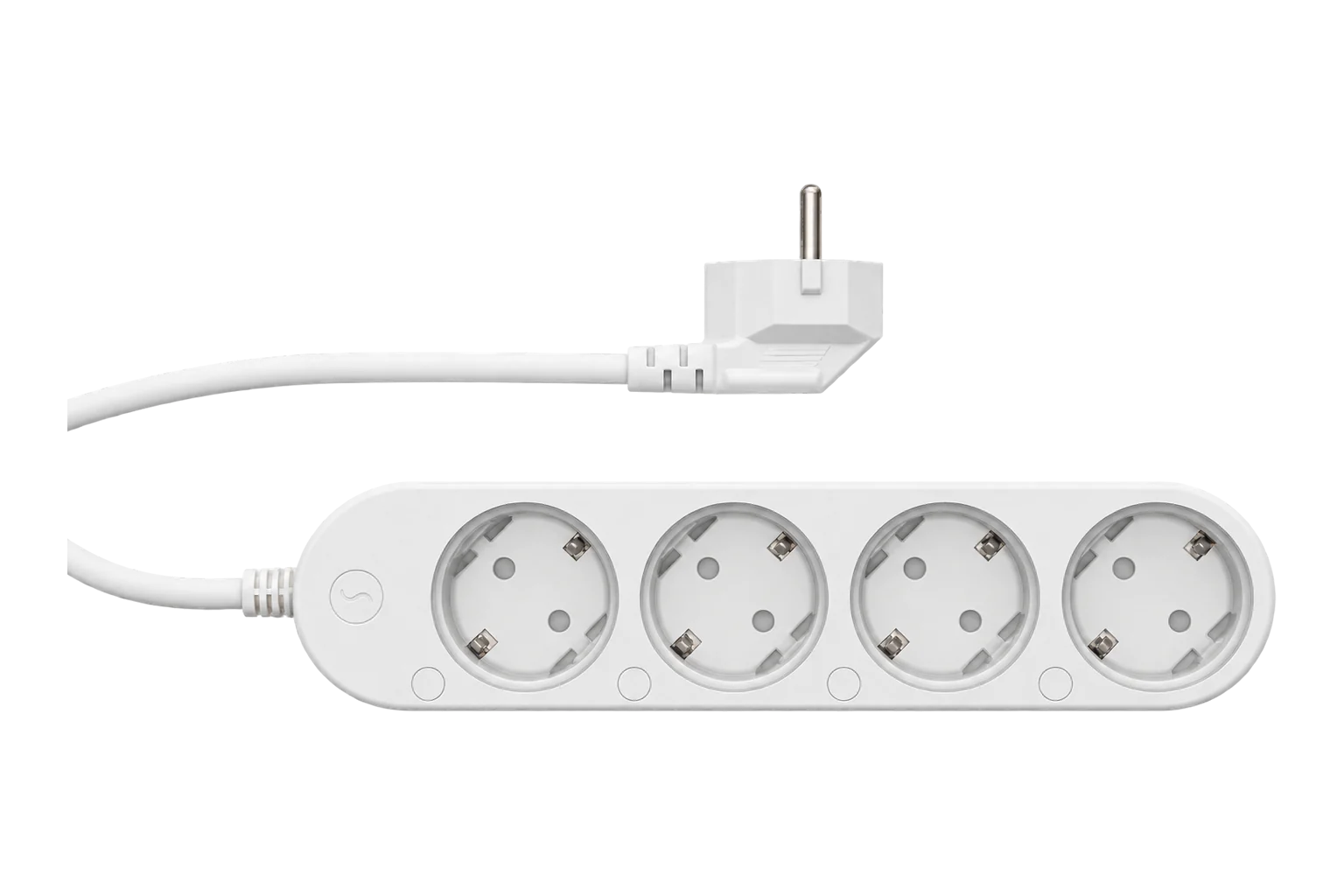
A four-socket Schuko power strip that meters and switches each socket on its own: voltage, current, power, frequency and energy per socket, 16 A in total and 12 A per socket, over Zigbee once it is switched out of its default Matter firmware.
Also sold asShelly Power Strip 4 Gen4
Compatibility
Compatible with EpiSensor Edge over Zigbee.
Pair it with the Zigbee radio on an EpiSensor Gateway. Edge reads it locally on the Gateway.
Edge reads 16 values from it, listed under Interface.
Connect it with

Specifications
The Power Strip 4 Gen4 is a 230 V extension strip with four Schuko sockets, each switched by its own relay and measured by its own power meter. Shelly rates it at 16 A across all four sockets, 12 A on any one socket and 3680 W in total, with overheating, overvoltage, overcurrent and overpower protection.1
- Power
- Mains. Powered from its own plug at 220 to 240 V~, 50/60 Hz, drawing less than 1 W itself.1
- Rated current
- 16 A total across four sockets, 12 A per socket1
- Maximum output power
- 3680 W1
- Metering
- Voltage, current, power and energy on each socket2
- Plug and sockets
- CEE 7/7 plug; four CEE 7/3 (Type F, Schuko) sockets1
- Cord
- 1.5 m, H05VV-F 3G 1.5 mm²1
- Relays
- Single-pole, normally open; 10,000 switching cycles1
- Protection
- Overheating, overvoltage, overcurrent and overpower1
- Zigbee radio
- IEEE 802.15.4, 2400 to 2483.5 MHz, < 20 dBm1
- Other radios
- Wi-Fi 802.11 b/g/n/ax and Bluetooth 5.01
- Operating conditions
- -20 to 40 °C, 30 to 70 % RH, up to 2000 m1
- Dimensions
- 43 × 237 × 56 mm (H × W × D)1
- Weight
- 560 g1
Where it is used
Per-device power and energy for the IT and network equipment in a comms cabinet, alongside the meters on the cabinet's supply.
Data centre power monitoring and PUE inputsPlug-in display fridges, bottle coolers and ice machines in shops and kitchens, where each appliance's consumption and duty cycle is worth seeing on its own.
Refrigeration energy monitoringSwitching groups of office or kiosk equipment off out of hours, and proving the saving from the energy readings of each socket.
Interface
On the Zigbee network it joins as a router and extends the mesh for other devices.3
Readings and settings, with units and ranges where Shelly publishes them. readable, readable and writable, writable only.45
| Reading | Unit | Range or values | Access |
|---|---|---|---|
| Measurements 5 | |||
| Power, each socketActive power through each socket, reported as power_1 to power_4. | W | - | Read only |
| Energy, each socketCumulative energy through each socket, reported as energy_1 to energy_4. | kWh | - | Read only |
| Current, each socketReported as current_1 to current_4. | A | - | Read only |
| Voltage, each socketReported as voltage_1 to voltage_4. | V | - | Read only |
| Frequency, each socketReported as ac_frequency_1 to ac_frequency_4. | Hz | - | Read only |
| Controls 1 | |||
| Socket on or offSwitches each socket on its own, as state_1 to state_4. | - | ONOFFTOGGLE |
Read and write |
| Settings 7 | |||
| After power lossSet per socket as power_on_behavior_1 to power_on_behavior_4. Off by default; previous restores the last state. | - | offonpreviousmatch_input |
Write only |
| Socket buttonsWhether each socket's button switches its socket or is detached from it. | - | - | Write only |
| LED ringsOff, show the socket state, or show the socket's load. | - | offswitchpower |
Write only |
| LED coloursColour and brightness of the rings for on and off in switch mode. | - | - | Write only |
| LED night modeDimmed ring brightness between two times of day (hh:mm). | - | - | Write only |
| Wi-Fi settingsSSID, password and IP settings for the strip's Wi-Fi interface, set over Zigbee. | - | - | Read and write |
| IdentifyFlashes the strip so it can be found on site. | - | - | Write only |
| Diagnostics 3 | |||
| Wi-Fi status | - | - | Read only |
| IP address | - | - | Read only |
| DHCP | - | Binary state | Read only |
Each socket is its own Zigbee endpoint (1 to 4) with On/Off (0x0006), Metering (0x0702) and Electrical Measurement (0x0B04) clusters. The measurements, the on and off control and the power-loss setting therefore exist once per socket, numbered 1 to 4.3
The LED, button and power-on settings are written through Shelly's own RPC cluster. The strip applies them but cannot report them back over Zigbee, so they are write-only.5
The strip reports often. Several strips on one network can load it, so set coarser reporting thresholds than the defaults if you install more than a few.45
Setup
-
Update the firmware first
While the strip is still on Wi-Fi, update its firmware in the Shelly app. It cannot yet take firmware updates over Zigbee.4
-
Switch it to Zigbee
Press and hold the button of socket 1, and press the button of socket 4 five times in quick succession. The strip switches from its default Matter firmware to Zigbee.1
-
Open pairing in Edge
In Edge, open pairing on the Gateway's Zigbee network.
-
Start Zigbee pairing
Press the button of socket 4 three times in quick succession.1
-
Check each socket
Plug a load you know into each socket in turn, switch it from Edge and compare the power reading with the load's rating. Then set each socket's behaviour after a power loss: they all stay off after an outage unless you set them to previous or on.4
Common questions
- Does the Power Strip 4 Gen4 need a Shelly hub or the Shelly cloud to work over Zigbee?
- No. Once it is switched to its Zigbee firmware it joins the Zigbee network on an EpiSensor Gateway directly as a router, and Edge reads and switches it locally.13
- What happens to the sockets after a power cut?
- By default every socket stays off after power returns. Set each socket's power-on behaviour to previous if the loads must come back on by themselves, which matters for fridges and network equipment.45
- How do I factory reset it?
- Within 60 seconds of plugging it in, press and hold the buttons of sockets 1 and 4 together for 10 seconds.1
Related devices
Sources
- Shelly Power Strip 4 Gen4: specifications and user guide (opens in a new tab)
- Shelly PowerStrip Gen4 device documentation (opens in a new tab)
- Zigbee device features and clusters (opens in a new tab)
- Shelly S4PL-00416EU device documentation (opens in a new tab)
- Shelly device definitions (opens in a new tab)
Further reading
Product names and trademarks belong to their owners. Publication does not imply endorsement or a commercial relationship.