Develco MOSZB-140
Motion, temperature and light sensor
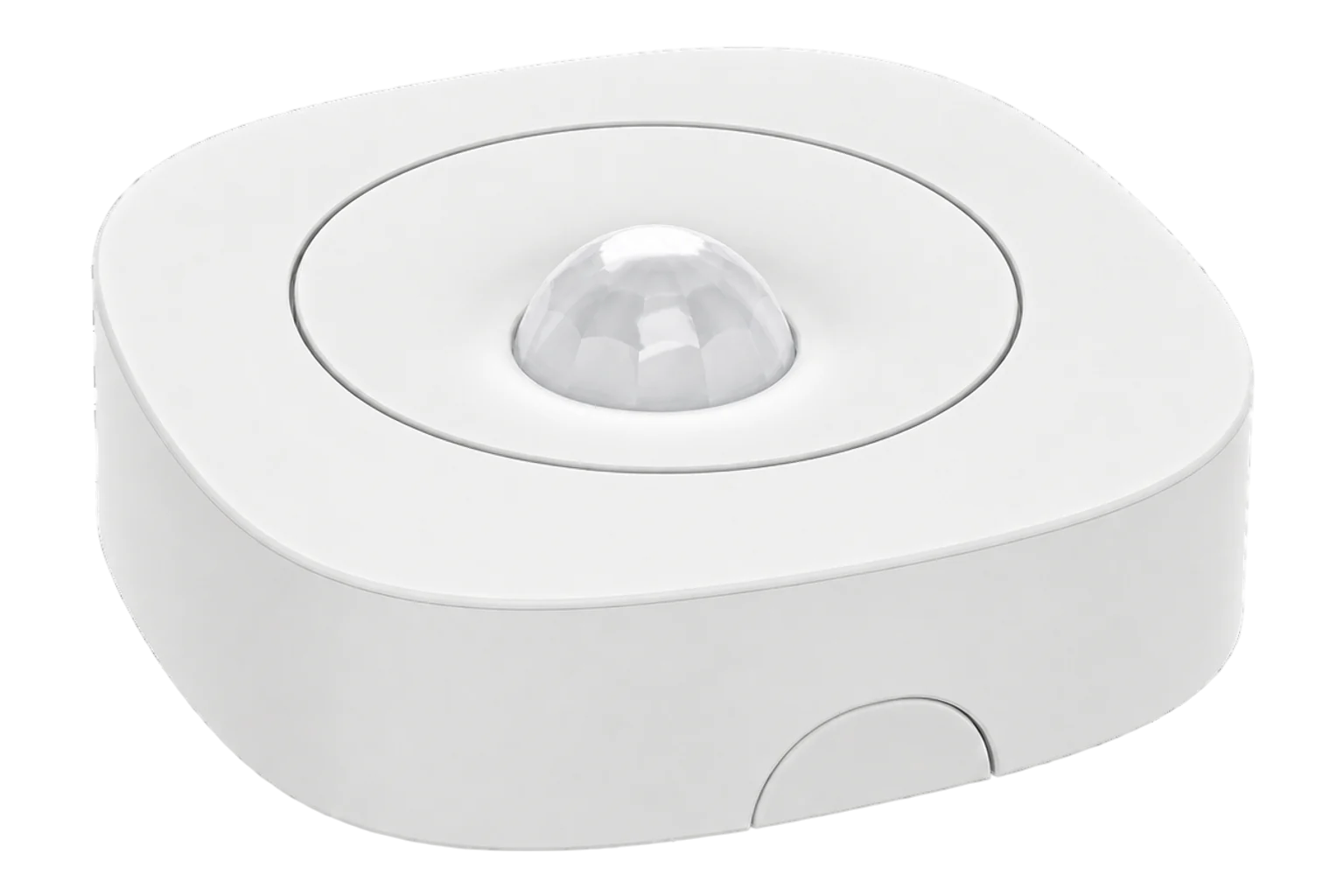
A battery-powered Zigbee PIR sensor that reports motion, room temperature and light level from one housing, with a 9 m detection range and two AA cells rated for three years.
Also sold asfrient Motion Sensor Pro
- Zigbee
Motion, temperature and light sensor
Compatibility
Compatible with EpiSensor Edge over Zigbee.
Pair it with the Zigbee radio on an EpiSensor Gateway. Edge reads it locally on the Gateway.
Edge reads 9 values from it, listed under Interface.
Connect it with
-
Gateway ZGW-20From €899 ex VAT Configure Gateway

Specifications
The MOSZB-140 is sold by frient as the Motion Sensor Pro. It combines a PIR occupancy sensor with a temperature sensor, a light sensor and a tamper switch. frient rates the PIR for 9 m with a view angle of 45° up, down, left and right. The temperature sensor covers 0 to 50 °C at 0.1 °C resolution, with ±0.5 °C typical and ±2 °C maximum accuracy.1
- Power
- Battery. Two replaceable AA alkaline cells, rated for three years when reporting every 2 minutes. It reports battery level and a low-battery warning.1
- Motion detection range
- 9 m1
- View angle
- 45° up, down, left and right1
- Occupancy off-time
- 2 to 65,000 s, configurable1
- Temperature range
- 0 to 50 °C1
- Temperature accuracy
- ±0.5 °C typical, ±2 °C maximum, 0.1 °C resolution1
- Light sensor resolution
- Dark, light and bright1
- Operating environment
- 0 to 50 °C, 5 to 85 % RH, non-condensing1
- Enclosure
- IP30, indoor use1
- Wireless
- Zigbee Home Automation 1.2, end device1
- Radio
- -92 dBm sensitivity, +3 dBm output power1
- Dimensions
- 70 × 70 × 21 mm1
- Weight
- 31.4 g1
- Mounting
- Flat on a wall or ceiling with screws or tape, corner bracket, magnet or table stand3
- Conformity
- CE, FCC, IC, ISED, RED, RoHS and REACH1
Where it is used
Occupancy in offices, meeting rooms and classrooms, to compare heating, cooling and lighting run hours with the hours a space is actually used.
HVAC energy monitoring for commercial buildingsRoom temperature and light level beside occupancy, for comfort checks where one battery sensor per room is enough.
Indoor environmental monitoringOut-of-hours activity in stores, plant rooms and back offices, with the tamper alarm showing when a sensor has been opened or moved.
Interface
On the Zigbee network it joins as an end device.1
Readings and settings, with units and ranges where Develco publishes them. readable, readable and writable.15
| Reading | Unit | Range or values | Access |
|---|---|---|---|
| Measurements 3 | |||
| OccupancyTrue while motion is detected. Clears when the occupancy timeout runs out. | - | - | Read only |
| Temperature0.1 °C resolution, ±0.5 °C typical | °C | 0 to 50 °C | Read only |
| IlluminanceAmbient light level | lx | - | Read only |
| Settings 2 | |||
| Occupancy timeoutTime without motion before occupancy clears. Firmware 3 and later. | s | 5 to 65,535 s | Read and write |
| LED indicatorWhen the LED lights. Firmware 4 and later. | - | offfault_onlymotion_onlyboth |
Read and write |
| Diagnostics 4 | |||
| BatteryFrom cell voltage, 2.5 V empty to 3.0 V full | % | 0 to 100 % | Read only |
| Battery voltage | mV | - | Read only |
| Battery low | - | - | Read only |
| TamperTamper switch state | - | - | Read only |
Motion and tamper arrive as Zigbee IAS zone alarms. Temperature, light level and battery use the standard measurement clusters.45
The occupancy timeout needs firmware 3 or later and the LED setting needs firmware 4 or later. Older units do not offer either setting.5
Battery percentage is calculated from the cell voltage, with 2.5 V as empty and 3.0 V as full. The voltage is reported too.5
Setup
-
Open pairing in Edge
In Edge, open pairing on the Gateway’s Zigbee network. The Gateway accepts new devices while pairing is open.
-
Fit the batteries
Open the housing and insert the two AA cells. The sensor starts searching for a Zigbee network by itself, and its LED flashes red while it searches.3
-
Confirm the join
The LED stops flashing when the sensor has joined. Check that Edge identifies it as Develco MOSZB-140.3
-
Reset it if it will not join
Open the housing and check the batteries are seated. Press and hold the button: the LED flashes once, then twice, then repeatedly. Release the button when it flashes repeatedly, then pair it again.3
-
Mount it and check one reading
Mount it indoors, away from heaters, coolers and direct sun, with the area to cover inside its 45° view angle. Walk through the area and confirm occupancy changes in Edge, then compare temperature with a reference instrument.3
Common questions
Related devices

Sources
- Motion Sensor and Motion Sensor Pro technical specifications, version 1.0 (opens in a new tab) (PDF)
- Motion Sensor Pro (opens in a new tab)
- Motion Sensor/Pro installation manual, version 1.2 (archived copy) (opens in a new tab) (PDF)
- EU Data Act factsheet for Motion Sensor Pro (opens in a new tab) (PDF)
- Develco MOSZB-140 device definition (opens in a new tab)
- Develco MOSZB-140 device documentation (opens in a new tab)
Further reading
Product names and trademarks belong to their owners. Publication does not imply endorsement or a commercial relationship.