Frient EMIZB-141
Electricity meter LED reader
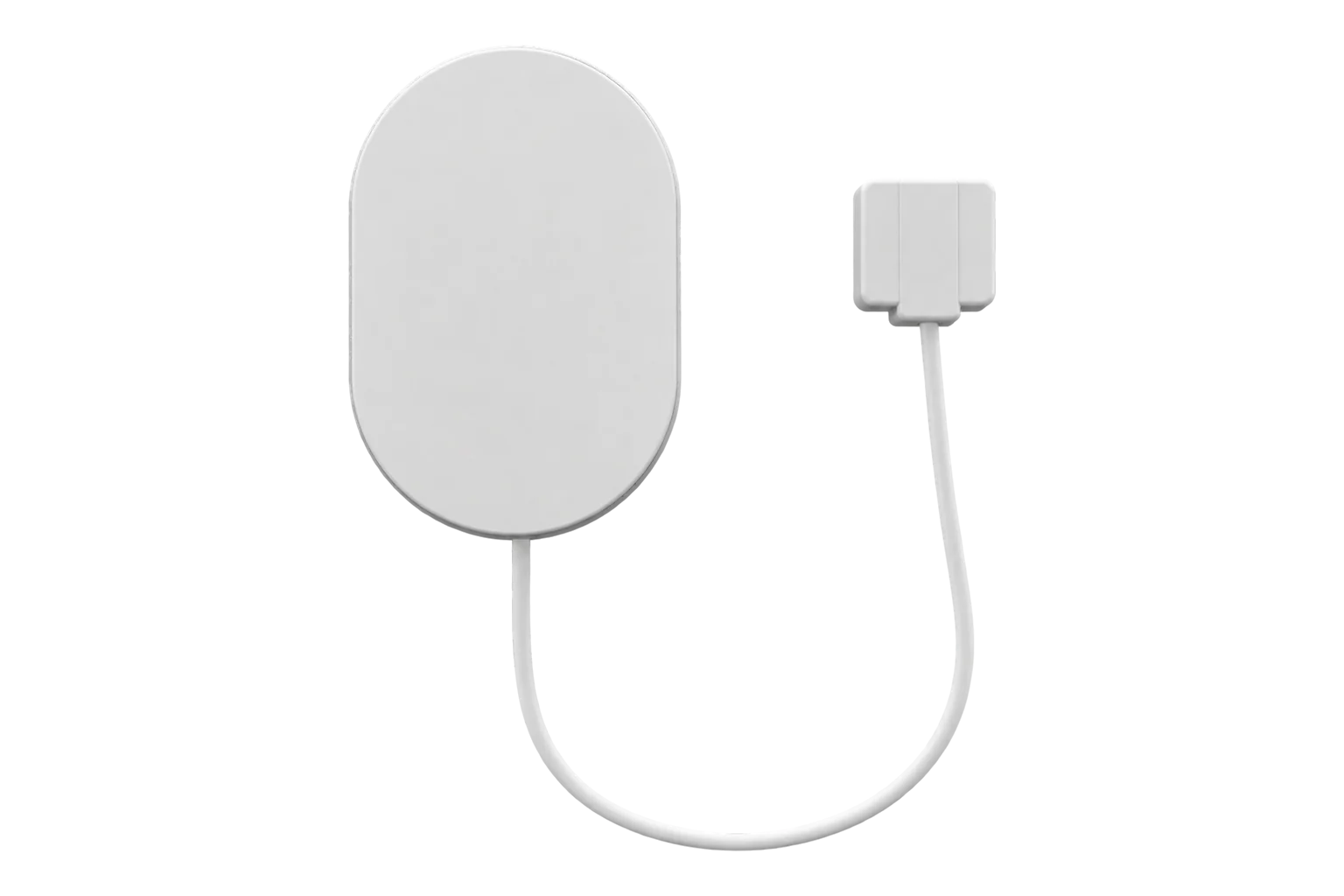
A battery-powered Zigbee 3.0 interface with an optical probe that reads the pulse LED on an electricity meter and reports power and cumulative energy. It works with meters from 50 to 10,000 pulses per kWh and runs for about two years on two AA cells.
- Zigbee
Electricity meter LED reader
Compatibility
Compatible with EpiSensor Edge over Zigbee.
Pair it with the Zigbee radio on an EpiSensor Gateway. Edge reads it locally on the Gateway.
Edge reads 5 values from it, listed under Interface.
Connect it with
-
Gateway ZGW-20From €899 ex VAT Configure Gateway

Specifications
The EMIZB-141, sold by Frient as the Electricity Meter Interface 2, LED, turns the flashing consumption LED on an electronic electricity meter into Zigbee readings. A small optical probe on an 800 mm cable is held over the LED by a magnet, and the main unit counts the flashes. With the meter’s pulse rate set, it reports instantaneous power and cumulative energy in kWh.1
- Power
- Battery. Two AA alkaline cells, rated for 2 years with updates every 5 seconds at room temperature.1
- Meter interface
- Optical probe over the meter’s consumption LED1
- Pulse rate
- 50 to 10,000 pulses per kWh, 1000 by default1
- Probe cable
- About 800 mm, magnetic attachment1
- Battery
- 2 × AA alkaline, exchangeable1
- Battery life
- 2 years, updating every 5 s at room temperature1
- Wireless
- Zigbee 3.0 end device, sensitivity -100 dBm1
- Output power
- 10 dBm (EU), 19 dBm (US)1
- Operating temperature
- -20 to 60 °C1
- Humidity
- 5 to 85 % RH, non-condensing1
- Protection
- IP221
- Dimensions
- Sensor 95 × 65 × 22.3 mm; probe 25.4 × 28.4 × 11.6 mm1
- Approvals
- CE, FCC, IC, ISED, RED and RoHS; Zigbee 3.0 certified1
Where it is used
Existing electricity meters and sub-meters with a pulse LED but no wired pulse output.
Pulse meter remote monitoringLandlord and tenant sub-meters in shared buildings, read without opening the meter.
Tenant submetering and cost allocationMain meters at small sites across a portfolio, where a battery reader avoids any wiring.
Multi-site energy monitoring
Interface
On the Zigbee network it joins as an end device.1
Readings and settings, with units and ranges where Frient publishes them. readable, readable and writable, writable only.12
| Reading | Unit | Range or values | Access |
|---|---|---|---|
| Measurements 2 | |||
| PowerFrom the LED pulse rate | W | - | Read only |
| EnergyPulse count divided by the pulse setting | kWh | - | Read only |
| Settings 2 | |||
| Pulses per kWhSet to the rate printed on the meter; 1000 by default | imp/kWh | 50 to 10,000 imp/kWh | Read and write |
| Preset energy totalSets the energy total to match the meter’s register | Wh | - | Write only |
| Diagnostics 1 | |||
| Battery | % | 0 to 100 % | Read only |
Set the pulse configuration before presetting the energy total: the interface uses the pulse rate to convert its pulse count into energy.2
The metering cluster divides by 1000, so a preset of 570 sets the total to 0.570 kWh.2
It polls its parent every 7.5 seconds by default, so reads and writes from Edge are answered without waiting for the next report.2
Setup
-
Fit the probe
Place the optical probe over the meter’s consumption LED; the magnet holds it in place. Note the pulse rate printed on the meter, in imp/kWh.1
-
Open pairing in Edge
In Edge, open pairing on the Gateway’s Zigbee network.
-
Start pairing on the interface
Open the casing to reach the button on the circuit board. Hold it until the LED flashes continuously, then release it: the interface resets and its yellow LED flashes while it searches for a network.3
-
Set the pulse rate and total
Once Edge identifies it as Frient EMIZB-141, write the meter’s pulse rate to pulses per kWh, then preset the energy total to the meter’s current register.2
-
Check one reading
Switch on a known load and compare the power in Edge with it, or compare the energy total with the meter’s display after a day.
Common questions
- Can it be used at a site with solar PV?
- No. Frient states it cannot be used in installations with power production such as PV systems. It counts LED pulses in one direction only.1
- Which pulse rate should I set?
- The rate printed on the meter beside its LED, in impulses per kWh. The interface accepts 50 to 10,000 pulses per kWh and starts at 1000.12
- Can the energy reading match the meter’s register?
- Yes. Set the pulse rate first, then write the meter’s current register to the preset energy total. The value is in Wh, so 570 sets 0.570 kWh.2
- Can it read a gas or water meter?
- No. Its only interface mode is pulse counting on an electricity meter with the LED probe.2
Related devices
Sources
- Electricity Meter Interface 2, LED datasheet (opens in a new tab) (PDF)
- EMI 2, LED (EMIZB-141) technical manual (opens in a new tab) (PDF)
- Frient EMIZB-141 device documentation (opens in a new tab)
- Frient EMIZB-141 Zigbee definition (opens in a new tab)
Further reading
Product names and trademarks belong to their owners. Publication does not imply endorsement or a commercial relationship.