Aqara WP-P09D
Wall outlet with energy metering
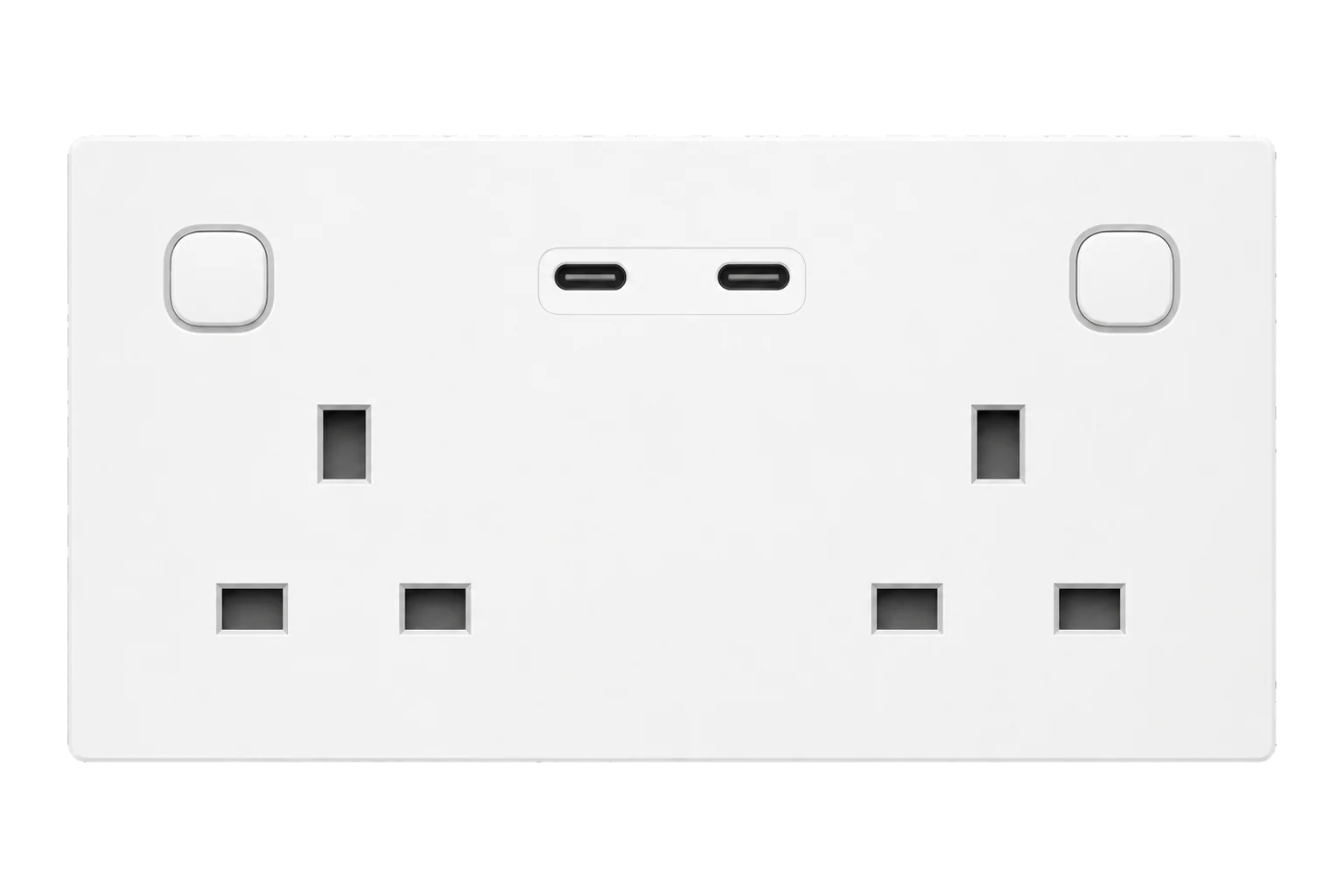
A hard-wired UK double socket, 13 A, with two switched outlets and two USB-C ports. In Zigbee mode it reports power for each outlet as well as total energy and current.
Also sold asAqara Wall Outlet H2 UK (Dual USB-C)
Compatibility
Compatible with EpiSensor Edge over Zigbee.
Pair it with the Zigbee radio on an EpiSensor Gateway. Edge reads it locally on the Gateway.
Edge reads 19 values from it, listed under Interface.
Connect it with

Specifications
The WP-P09D is the dual USB-C version of Aqara's Wall Outlet H2 UK: a double socket that replaces a standard UK twin outlet in a double-gang back box. Each of the two outlets is switched by its own button and relay, and the USB-C ports can be switched too. Aqara rates it at 230 to 250 V AC, 50/60 Hz and 13 A maximum, with overload and overheat protection.12
- Power
- Mains. Wired to the socket circuit it serves: live, neutral and earth, 230 to 250 V AC.1
- Electrical rating
- 230 to 250 V AC, 50/60 Hz, 13 A maximum1
- Outlets
- Two switched UK sockets and two USB-C ports2
- USB-C output
- One port in use: up to 30 W (20 V, 1.5 A). Both in use: 15 W shared (5 V, 3 A)1
- Metering
- Power per outlet in Zigbee mode, combined in Thread mode2
- Protection
- Overload and overheat cut-off; child lock on the buttons2
- Wireless
- Thread (default), Zigbee and Bluetooth1
- Zigbee radio
- 2405 to 2480 MHz, ≤ 8 dBm1
- Back box
- Double-gang UK, 35 mm deep, or 25 mm with the 10 mm spacer supplied1
- Operating conditions
- -5 to 40 °C, 0 to 95 % RH, non-condensing1
- Dimensions
- 146 × 86 × 38.4 mm1
- Single USB-C version
- WP-P09E, one port up to 20 W2
Where it is used
Fridges, water boilers and coffee machines in UK office kitchenettes, metered at the socket they are plugged into.
Refrigeration energy monitoringSocket loads in meeting rooms, classrooms and hotel rooms across an estate, switched off out of hours from Edge.
Multi-site energy monitoringPermanent socket-level metering where plug-in monitors tend to be unplugged or moved.
Interface
Readings and settings, with units and ranges where Aqara publishes them. readable, readable and writable, writable only.34
| Reading | Unit | Range or values | Access |
|---|---|---|---|
| Measurements 6 | |||
| Power, whole outletTotal active power of both sockets and the USB-C ports. | W | - | Read only |
| Power, socket 1 and USB-CSocket 1 and the USB-C ports combined. | W | - | Read only |
| Power, socket 2Socket 2 only, despite the property name. | W | - | Read only |
| Energy, whole outletCumulative energy. | kWh | - | Read only |
| Current | A | - | Read only |
| Button pressPresses of each button, for use in automations when multi-click mode is on. | - | single_1single_2double_1double_2hold_1hold_2release_1release_2 |
Read only |
| Controls 3 | |||
| Socket 1 | - | ONOFFTOGGLE |
Read and write |
| Socket 2 | - | ONOFFTOGGLE |
Read and write |
| USB-C ports | - | ONOFFTOGGLE |
Read and write |
| Settings 9 | |||
| After power loss | - | onpreviousoffinverted |
Read and write |
| Overload thresholdSwitches off above this load. Cannot be read back. | W | 100 to 3,250 W | Write only |
| Button lock, socket 1 | - | LOCKUNLOCK |
Read and write |
| Button lock, socket 2 | - | LOCKUNLOCK |
Read and write |
| Multi-click, socket 1 buttonDouble and long presses send events instead of only switching. | - | Binary state | Read and write |
| Multi-click, socket 2 button | - | Binary state | Read and write |
| LED indicator | - | Binary state | Read and write |
| Invert LED indicator | - | Binary state | Read and write |
| Identify | - | - | Write only |
| Diagnostics 1 | |||
| Power outagesCounted since the outlet was paired. | - | - | Read only |
Power endpoint 1 is the whole outlet, endpoint 2 is socket 1 plus the USB-C ports, and endpoint 3 is socket 2. The switches use their own numbering: socket 1, socket 2 and the USB-C ports.4
The overload threshold can be written but not read back from this model, so treat the value you set as the only record of it.4
The outlet has no voltage reading and no internal temperature sensor over Zigbee.4
Setup
-
Have it wired
With the circuit isolated, an electrician connects live to L, neutral to N and earth to the earth terminal, fits the 10 mm spacer if the back box is only 25 mm deep, and mounts the outlet.1
-
Open pairing in Edge
In Edge, open pairing on the Gateway's Zigbee network.
-
Start Zigbee pairing
Double-press either button, then within 3 seconds press and hold it for 5 seconds until the indicator flashes purple, Aqara's signal for Zigbee pairing. A quickly flashing blue indicator means Thread pairing instead.1
-
Check each outlet
Plug a load of known rating into socket 1, then socket 2, and compare it with the matching power reading: socket 1 appears in the socket 1 and USB-C reading, socket 2 in its own.4
-
Set the protections
Choose what the sockets do after a power cut, and lock the buttons where occupants should not switch loads off.3
Common questions
- Does the WP-P09D need an Aqara hub to work with Edge?
- No. In Zigbee mode it pairs with the Zigbee radio on an EpiSensor Gateway, and Edge reads and switches it locally. It ships in Thread mode, so start Zigbee pairing with the purple indicator sequence.1
- Can it meter each socket separately?
- Yes, in Zigbee mode. It reports the whole outlet, socket 1 with the USB-C ports, and socket 2 as three power readings. Energy is reported for the whole outlet.24
- Does it report voltage?
- No. Over Zigbee it reports power, energy and current, but not voltage.4
- How do I factory reset it?
- Press either button 10 times in a row. That restores factory settings and opens pairing again.1
Related devices

Sources
- Wall Outlet H2 UK user manual (opens in a new tab)
- Wall Outlet H2 UK (opens in a new tab)
- Aqara WP-P09D device documentation (opens in a new tab)
- Aqara and Xiaomi device definitions (opens in a new tab)
Further reading
Product names and trademarks belong to their owners. Publication does not imply endorsement or a commercial relationship.