Frient SMRZB-342
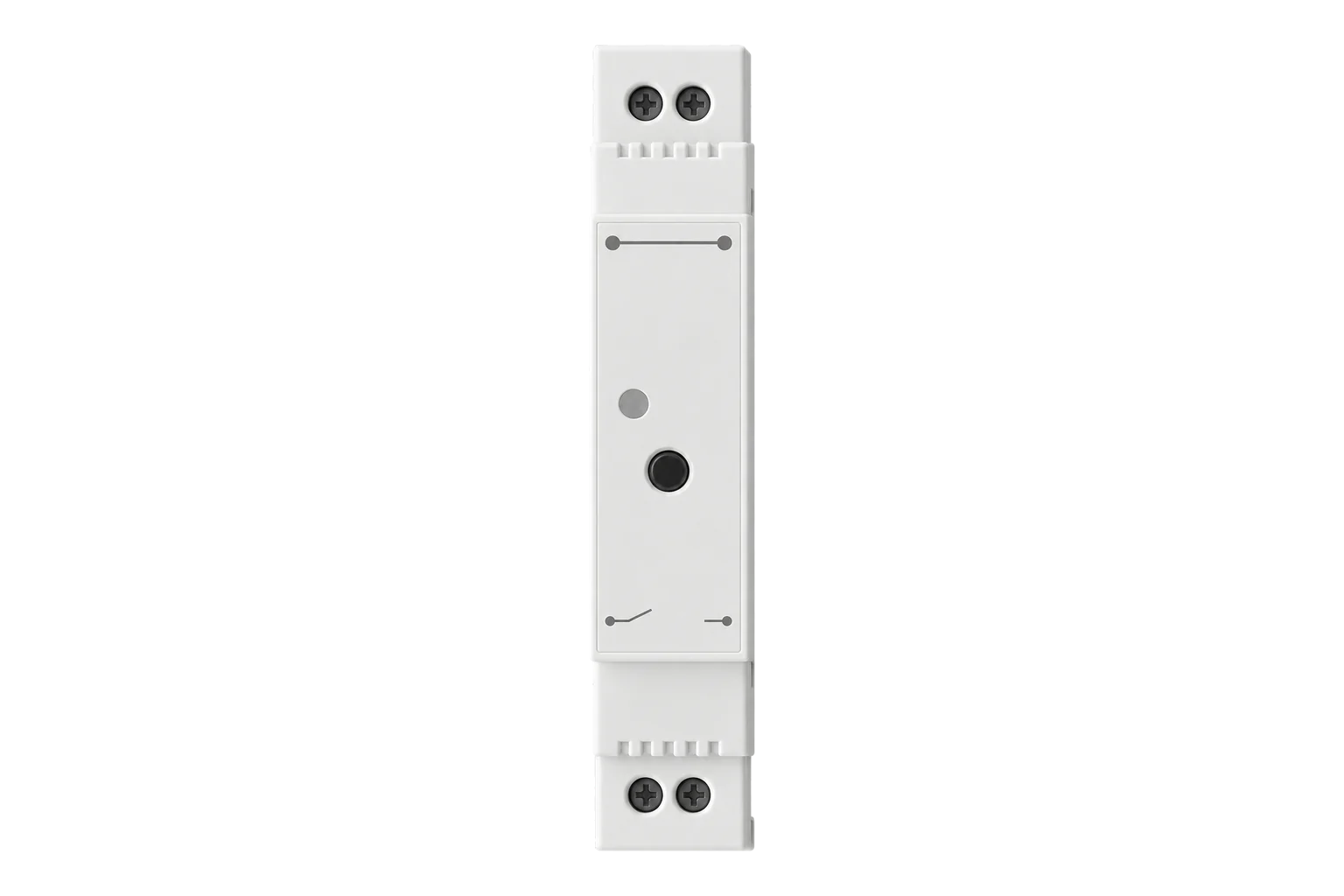
DIN rail relay with metering
A DIN rail relay that switches a 16 A circuit over Zigbee 3.0 and meters its voltage, current, power and energy to a typical ±1 %, with overload and over-temperature protection built in.
Also sold asSmart DIN Relay 2
- Zigbee
DIN rail relay with metering
Compatibility
Compatible with EpiSensor Edge over Zigbee.
Pair it with the Zigbee radio on an EpiSensor Gateway. Edge reads it locally on the Gateway.
Edge reads 6 values from it, listed under Interface.
Connect it with
-
Gateway ZGW-20From €899 ex VAT Configure Gateway

Specifications
The SMRZB-342 is Frient's Smart DIN Relay 2, made by Develco Products. It clips onto a standard DIN rail in a distribution board, switches one 230 V circuit of up to 16 A and meters the load on that circuit. Frient describes it for switching a group of appliances on one circuit, rather than each appliance on its own.12
- Power
- Mains. 230 V ±10 %, 50 Hz from the switched circuit's supply, with 0.4 W own consumption.1
- Supply
- 230 V ±10 %, 50 Hz1
- Switching
- 250 V AC and 16 A maximum1
- Meter voltage range
- 207 to 253 V AC1
- Meter current range
- 16 A1
- Meter accuracy
- ±1 % typical (Class 2)1
- Power resolution
- 1 W1
- Frequency
- 45 to 65 Hz, 0.01 Hz resolution1
- Own consumption
- 0.4 W1
- Wireless
- Zigbee 3.0, router, +10 dBm output, -101 dBm sensitivity1
- Operating conditions
- 0 to 50 °C, 5 to 85 % RH non-condensing1
- Protection
- IP30; overload and over-temperature cut-out1
- Dimensions
- 90 × 65 × 17.5 mm1
- Weight
- 57 g1
- Certification
- Zigbee 3.0 certified; CE, RED, Low Voltage and RoHS1
Where it is used
Switching and metering a heating or hot water circuit from the distribution board, so it can be scheduled or shed without touching the appliance.
Electric boiler demand responseMetering and scheduling small HVAC, ventilation or lighting circuits up to 16 A in offices and branches.
HVAC energy monitoring for commercial buildingsA phase dropout alarm on a critical circuit, reported to Edge over Zigbee.
Interface
On the Zigbee network it joins as a router and extends the mesh for other devices.1
Readings and settings, with units and ranges where Frient publishes them. readable, readable and writable.5
| Reading | Unit | Range or values | Access |
|---|---|---|---|
| Measurements 4 | |||
| PowerInstantaneous power on the switched circuit. | W | - | Read only |
| VoltageSupply voltage. | V | - | Read only |
| CurrentCurrent on the switched circuit. | A | - | Read only |
| EnergyCumulative energy delivered to the circuit. | kWh | - | Read only |
| Controls 1 | |||
| RelaySwitches the output circuit. | - | ONOFFTOGGLE |
Read and write |
| Diagnostics 1 | |||
| Internal temperatureTemperature inside the relay. | °C | - | Read only |
The relay and the meter sit on endpoint 2. Voltage, current, power and energy use the standard Zigbee electrical measurement and metering clusters, and the internal temperature uses the device temperature cluster.6
The relay's power-on state is fixed by the device, which restores its last state, so there is no power-on behaviour setting to write.36
Setup
-
Mount and wire it
Isolate the circuit at the main switch. Snap the relay onto the DIN rail, strip the cables to 5 mm, connect neutral (blue) and live (brown) supply and the load to the marked terminals, and tighten the screws to 0.8 Nm.3
-
Open pairing in Edge
Open pairing on the Gateway's Zigbee network in Edge before you restore power.
-
Power it up
Turn the main power back on. The relay searches for an open Zigbee network for up to 15 minutes and its LED flashes red while it searches. The LED stops flashing when it has joined.3
-
Restart or reset if needed
If the search has timed out, a short press on the button starts it again. To move it to another network, hold the button until the red LED flashes continuously, release it, and leave the power on while the LED stays red for 2 to 5 seconds.3
-
Check one reading
Switch the relay on from Edge and confirm the green LED lights. Then compare voltage and power with a clamp meter on the outgoing circuit before you rely on the energy total.3
Common questions
- Does the SMRZB-342 need a Frient hub?
- No. It is a Zigbee 3.0 certified device, so it joins the Zigbee radio on an EpiSensor Gateway, and Edge reads and switches it locally without a Frient hub or app.12
- What happens after a power cut?
- The relay restores the on or off state it had before the power failure.3
- What happens if the load goes above 16 A?
- It switches itself off. It does the same if its internal temperature gets too high. It must still be protected by fuses on the incoming side.3
Related devices

Sources
- Smart DIN Relay 2 datasheet, version 1.0 (SMRZB-342) (opens in a new tab) (PDF)
- Smart DIN Relay 2 help and installation guide (opens in a new tab)
- Smart DIN Relay installation manual (H6500256 v1.1) (opens in a new tab) (PDF)
- Smart DIN Relay technical specifications, version 1.0 (SMRZB-332) (opens in a new tab) (PDF)
- Frient SMRZB-342 device documentation (opens in a new tab)
- Frient device definitions (frient.ts, v26.111.0) (opens in a new tab)
Further reading
Product names and trademarks belong to their owners. Publication does not imply endorsement or a commercial relationship.