Aqara SSM-U01
Relay switch module with metering
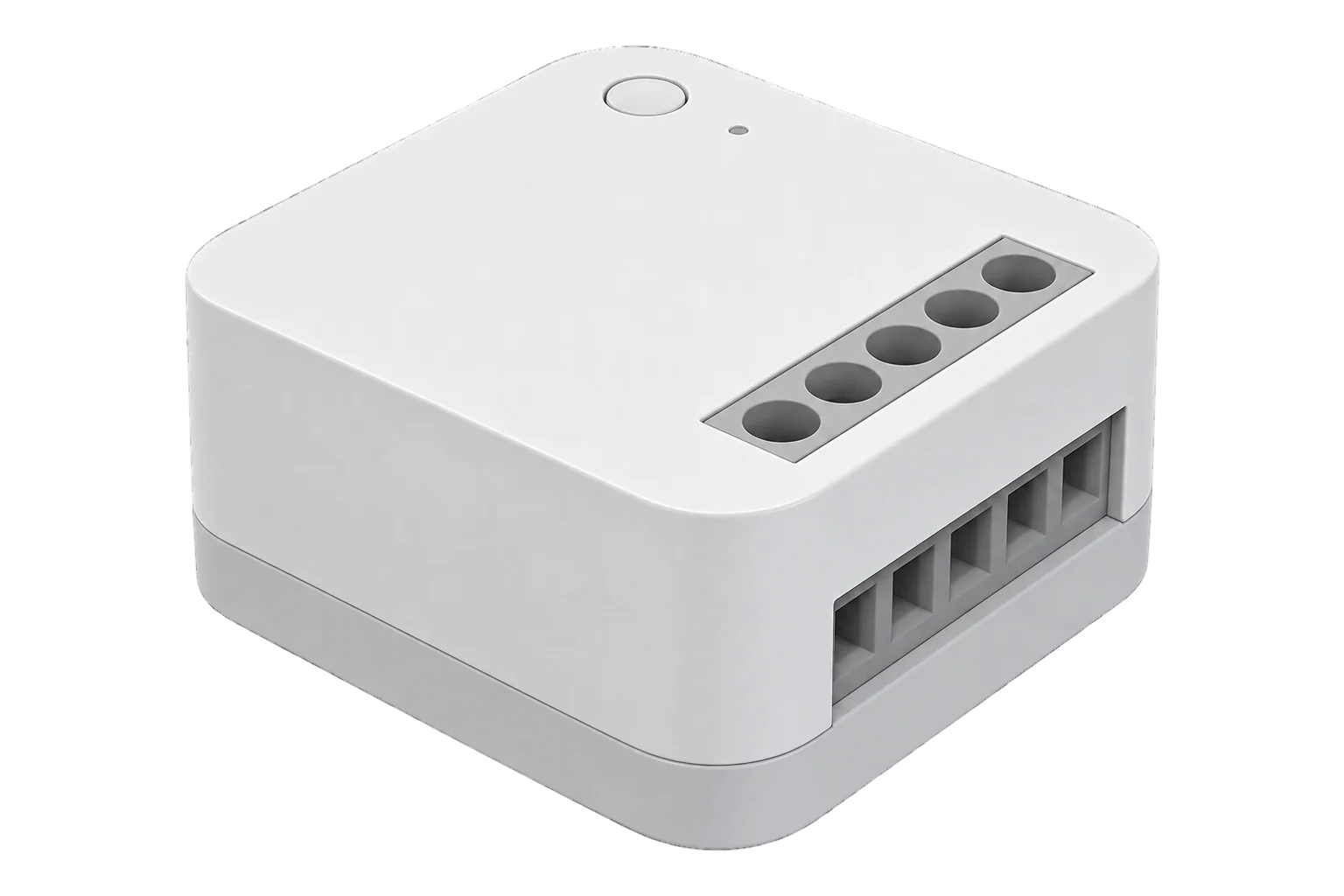
A small in-wall Zigbee 3.0 relay for loads up to 10 A and 2500 W resistive that needs a neutral, meters voltage, current, power and energy, and keeps an existing wall switch in use.
Also sold asSingle Switch Module T1 (With Neutral)
- Zigbee
Relay switch module with metering
Compatibility
Compatible with EpiSensor Edge over Zigbee.
Pair it with the Zigbee radio on an EpiSensor Gateway. Edge reads it locally on the Gateway.
Edge reads 9 values from it, listed under Interface.
Connect it with
-
Gateway ZGW-20From €899 ex VAT Configure Gateway

Specifications
The SSM-U01 is Aqara's Single Switch Module T1 (With Neutral), made by Lumi United. It is a 42.9 × 40 × 19.9 mm relay module that sits behind a wall switch, in a back box or inside a light fitting, and switches one load on the L1 terminal. It needs both live and neutral, runs on 100 to 250 V AC at 50 or 60 Hz and is rated for 10 A and 2500 W resistive, with a 3 W minimum load.12
- Power
- Mains. 100 to 250 V AC, 50/60 Hz, with live and neutral both connected.2
- Supply
- 100 to 250 V AC, 50/60 Hz, live and neutral2
- Maximum load
- 10 A, 2500 W resistive2
- Minimum load
- 3 W2
- Upstream protection
- 10 A over-current circuit breaker2
- Wireless
- Zigbee 3.0 (IEEE 802.15.4), 2.4 GHz2
- Receiver sensitivity
- -102 dBm2
- Maximum output power
- 13 dBm or less1
- Indoor range
- 30 m2
- Operating conditions
- 0 to 35 °C, 5 to 95 % RH non-condensing2
- Dimensions
- 42.9 × 40 × 19.9 mm2
- Terminals
- Up to 2.5 mm² conductors, stripped 6 to 8 mm1
- Zigbee model identifier
- lumi.switch.n0agl14
Where it is used
Switching and metering a fan, towel rail or small heater up to 2500 W behind its existing wall switch.
HVAC energy monitoring for commercial buildingsScheduling a lighting circuit in a meeting room or small office, with the power it draws recorded.
Interface
Readings and settings, with units and ranges where Aqara publishes them. readable, readable and writable.3
| Reading | Unit | Range or values | Access |
|---|---|---|---|
| Measurements 4 | |||
| PowerInstantaneous power of the switched load. | W | - | Read only |
| VoltageSupply voltage. | V | - | Read only |
| CurrentCurrent drawn by the load. | A | - | Read only |
| EnergyCumulative energy delivered to the load. | kWh | - | Read only |
| Controls 1 | |||
| RelaySwitches the load on L1. | - | ONOFFTOGGLE |
Read and write |
| Settings 2 | |||
| Power outage memoryWhen on, the relay returns to its last state after a power cut. | - | ONOFF |
Read and write |
| Wired switch typeMatches the switch wired to S0 and S1. | - | togglemomentary |
Read and write |
| Diagnostics 2 | |||
| Internal temperatureTemperature inside the module. | °C | - | Read only |
| Power outagesOutages since the module was last paired. | - | - | Read only |
Voltage, current, power and energy come from Aqara's manufacturer-specific cluster. The Zigbee2MQTT definition ignores the module's standard metering and electrical measurement reports and reads these values from that cluster instead.4
The power outage count covers the outages since the module was last paired.3
Setup
-
Wire it with the power off
Switch off at the board. Connect live to L, neutral to N and the load to L1. Wire an existing switch across S0 and S1, or between live and S0, or leave S0 and S1 unused. Strip conductors to 6 to 8 mm.1
-
Place the antenna
Stick the antenna to the side of a plastic back box, parallel to the wall, and keep it away from metal and cables. It is live when the module is powered.1
-
Open pairing in Edge
Open pairing on the Gateway's Zigbee network in Edge and switch the power back on.
-
Hold the button for 8 seconds
Press and hold the module's button for 8 seconds. The LED blinks blue quickly while it joins and stays blue once it is on the network. With a wired switch fitted, switching it on and off 5 times puts the module into pairing too.1
-
Check one reading
Switch the load from Edge and from the wall switch, and check that power reads close to the load's rating. A slowly blinking red LED means it is not connected.1
Common questions
- Does the SSM-U01 need an Aqara hub?
- No. Aqara says it needs a compatible Zigbee 3.0 hub. An EpiSensor Gateway's Zigbee radio is one, and Edge reads and switches it locally without the Aqara app.1
- Can it be installed without a neutral wire?
- No. This is the version with neutral, and both live and neutral must be connected to L and N.12
- What do the LED colours mean?
- A single blue flash is power on. Fast blue blinking means it is joining, steady blue means the network is working, slow red blinking means it is not connected, and fast red blinking is a high-temperature alarm.1
- Can I use a push-button instead of a light switch?
- Yes. The switch type can be set to toggle or momentary to match what is wired to S0 and S1.3
Related devices

Sources
- Single Switch Module T1 (With Neutral) quick start guide (opens in a new tab) (PDF)
- Single Switch Module T1 (With Neutral) specifications (opens in a new tab)
- Aqara SSM-U01 device documentation (opens in a new tab)
- Aqara and Lumi device definitions (lumi.ts, v26.111.0) (opens in a new tab)
Further reading
Product names and trademarks belong to their owners. Publication does not imply endorsement or a commercial relationship.