IKEA E1525/E1745
Wireless motion sensor
IKEA’s TRÅDFRI motion sensor: a battery-powered Zigbee sensor that sees about 10 m across a 60 to 120° view and runs for about two years on two CR2032 coin cells. It reports motion as light-switching commands, which shapes how Edge reads it.
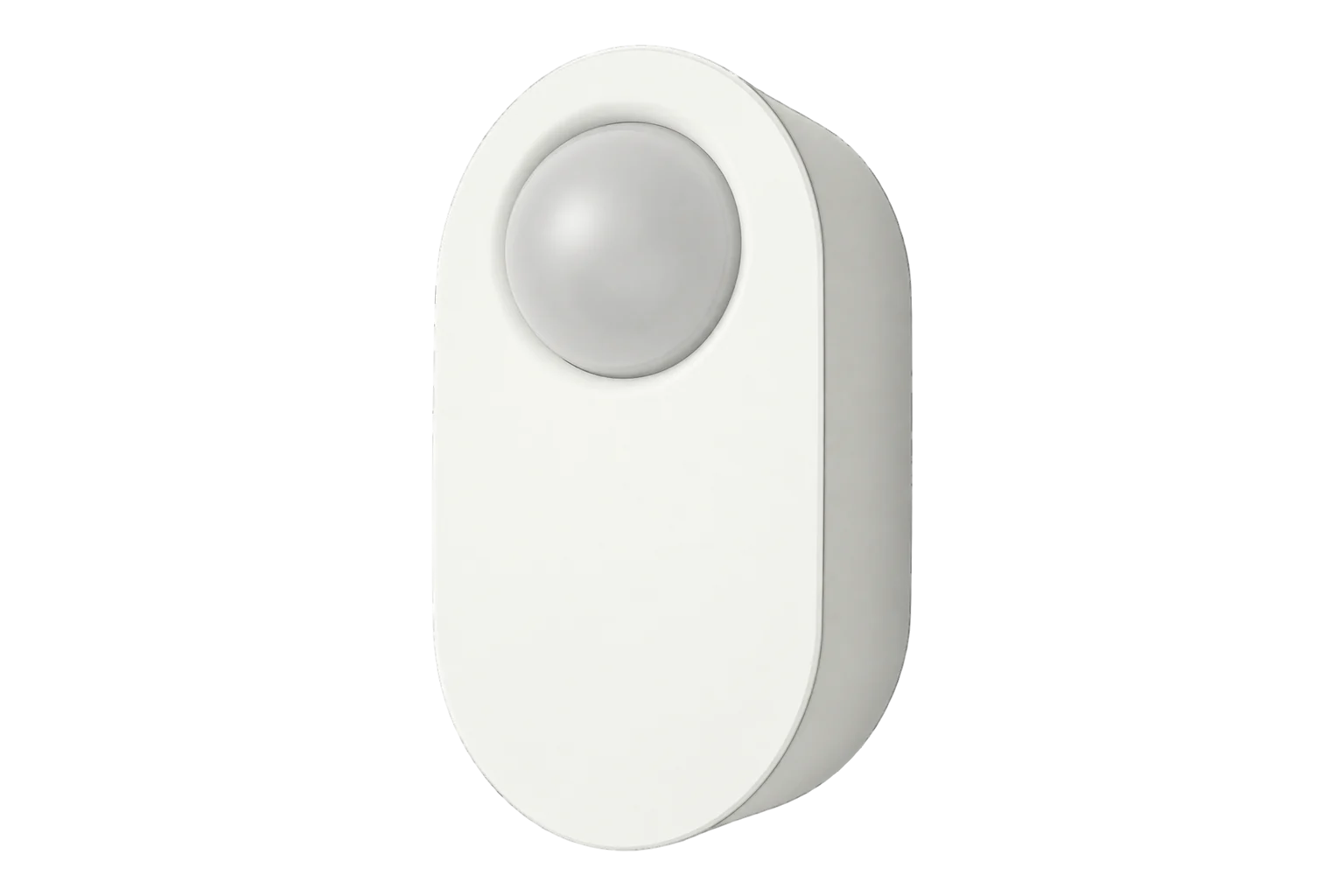
- Zigbee
Wireless motion sensor
Compatibility
Compatible with EpiSensor Edge over Zigbee.
Pair it with the Zigbee radio on an EpiSensor Gateway. Edge reads it locally on the Gateway.
Edge reads 6 values from it, listed under Interface.
Connect it with
-
Gateway ZGW-20From €899 ex VAT Configure Gateway

Specifications
A switch on the sensor picks day or night mode: in day mode it triggers on any motion, and in night mode only when it is dark. A second setting picks 30 % or 100 % brightness for the lights it controls. It is rated IP44 and for 0 to 40 °C, and IKEA says to keep it out of wet or very dusty places and direct sunlight.1
- Power
- Battery. Two CR2032 3 V coin cells, which IKEA says last about two years in regular use. The LED shines red steadily when they need replacing.1
- Type
- E1745 TRÅDFRI motion sensor1
- Detection range
- About 10 m1
- Detection angle
- 60 to 120°1
- Coverage at 2 m mounting height
- About 5 m across 120°, 10 m across 60°2
- Light settings
- Day or night mode; 30 % or 100 % brightness1
- Radio
- Zigbee, 2405 to 2480 MHz, 3 dBm1
- Radio range
- 10 m in open air1
- Operating temperature
- 0 to 40 °C1
- Ingress protection
- IP441
- Manufacturer
- IKEA of Sweden AB1
Where it is used
Occupancy in corridors, toilets and stores, to show lighting and ventilation running in spaces nobody is using.
HVAC energy monitoring for commercial buildingsRoom use beside temperature, humidity and CO₂ readings in small offices, where a battery sensor avoids new cabling.
Indoor environmental monitoring
Interface
Readings and settings, with units and ranges where IKEA publishes them. readable, writable only.34
| Reading | Unit | Range or values | Access |
|---|---|---|---|
| Measurements 2 | |||
| OccupancyTrue on motion; clears when the on-time in the sensor’s command runs out. | - | Binary state | Read only |
| Bright at last motionNight mode only: true when the sensor saw bright light at the last motion. | - | Binary state | Read only |
| Settings 1 | |||
| IdentifyFlashes the LED so you can find the sensor. It only arrives while the sensor is awake. | - | identify |
Write only |
| Diagnostics 3 | |||
| Requested brightness levelLevel the sensor asks its lights for: 76 or 254. | - | 76 to 254 | Read only |
| Requested brightnessThe same request as a percentage: 30 % or 100 %. | % | 30 to 100 % | Read only |
| Battery | % | 0 to 100 % | Read only |
Occupancy comes from on-with-timed-off commands on the on/off cluster, not from an occupancy-sensing cluster. Occupancy becomes true on each command and clears when the command’s on-time runs out.4
The requested brightness follows the switch on the sensor: level 76 is 30 % and level 254 is 100 %.14
Clearing occupancy sooner than 90 seconds does not make it respond sooner: after a trigger the sensor ignores motion until 90 seconds have passed.3
It sleeps between triggers. Identify and binding requests only reach it straight after it has detected motion.3
Setup
-
Open pairing in Edge
In Edge, open pairing on the Gateway’s Zigbee network. The Gateway accepts new devices while pairing is open.
-
Fit the batteries
Open the battery lid on the back and fit two CR2032 coin cells.1
-
Press the pairing button four times
Press the pairing button four short times. The red light flashes a few times and goes off, then comes back and pulses while the sensor joins. It goes off when the sensor has joined.3
-
Do not hold the button
Holding the pairing button for 10 seconds starts IKEA’s direct pairing to a light held within 5 cm, not a network join.1
-
Confirm the join
Check that Edge identifies it as IKEA E1525/E1745, then trigger it once by walking past so Edge sees its first occupancy.3
-
Mount and walk test
IKEA’s drawing shows it mounted at 2 m. Walk through the zone you want to cover and confirm Edge shows occupancy, then wait at least 90 seconds before testing again.2
Common questions
- Does it need an IKEA hub to work with Edge?
- No. It joins a Zigbee coordinator directly when you press its pairing button four times, so it joins the Zigbee radio on an EpiSensor Gateway without an IKEA hub or app.3
- How long do the batteries last?
- IKEA says about two years in regular use, on two CR2032 coin cells. The LED shines red steadily when they need replacing, and Edge reports the battery level.1
Related devices
Sources
- TRÅDFRI wireless motion sensor manual (AA-2145280-3) (opens in a new tab) (PDF)
- TRÅDFRI wireless motion sensor installation instructions (AA-2140131-5) (opens in a new tab) (PDF)
- IKEA E1525/E1745 device documentation (opens in a new tab)
- IKEA occupancy and brightness handling (lib/ikea.ts, v26.111.0) (opens in a new tab)
- IKEA E1525/E1745 Zigbee definition (opens in a new tab)
Further reading
Product names and trademarks belong to their owners. Publication does not imply endorsement or a commercial relationship.