Ubisys S1
In-wall power switch with metering
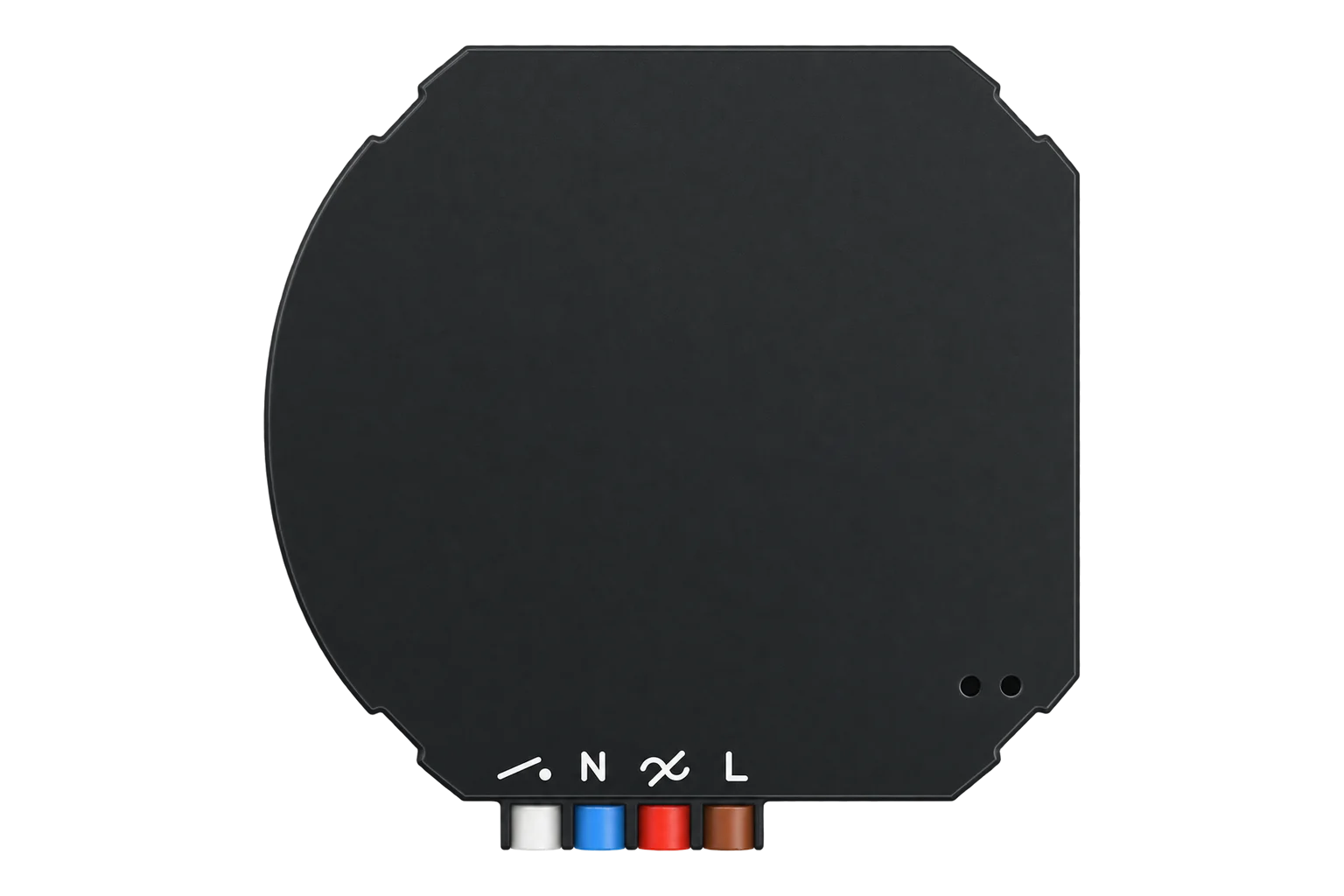
A German-made flush-mount Zigbee 3.0 switch for 230 V loads up to 16 A (3680 VA) with a latching relay, an integrated smart meter and a wired switch input that keeps working without a network.
Also sold asSwitching Actuator S1Power Switch S1
- Zigbee
In-wall power switch with metering
Compatibility
Compatible with EpiSensor Edge over Zigbee.
Pair it with the Zigbee radio on an EpiSensor Gateway. Edge reads it locally on the Gateway.
Edge reads 6 values from it, listed under Interface.
Connect it with
-
Gateway ZGW-20From €899 ex VAT Configure Gateway

Specifications
The S1 is Ubisys' in-wall Zigbee power switch, sold as the Switching Actuator S1 (order code 1052). It switches a 230 V load of up to 16 A or 3680 VA through a bistable latching relay that switches in sync with the mains, and it fits a sufficiently deep DIN 49073 box behind a socket, a light switch or a ceiling outlet. The rail-mounted S1-R is its DIN rail sibling.12
- Power
- Mains. 230 V~ from the switched circuit, with 0.3 W dissipation. For bench commissioning it also runs from 12 to 48 V DC, with the radio working and the input and output disabled.1
- Output
- 230 V~, 50 Hz, 16 A maximum, 3680 VA2
- Relay
- Bistable latching relay, mains-synchronised switching1
- Inputs
- One configurable 230 V~ input1
- Metering
- Energy delivered and received, power, RMS voltage and current, power factor, frequency1
- Own dissipation
- 0.3 W1
- Radio
- TI CC2520, 5 dBm transmit, -98 dBm receiver sensitivity1
- Channels
- 2.4 GHz, channels 11 to 261
- Zigbee role
- Zigbee 3.0 certified router1
- Mounting
- Flush mount in a DIN 49073 box2
- Housing
- Flame retardant V-0, black RAL 90051
- Order code
- 1052 (S1); 1151 for the S1-R rail version1
- Zigbee model identifier
- S1 (5501)1
Where it is used
Switching and metering individual electric heaters, fans or small HVAC loads up to 16 A behind an existing wall switch.
HVAC energy monitoring for commercial buildingsScheduling an immersion or small water heater outside peak periods, with its energy measured.
Electric boiler demand responseMetering a comms cabinet or server feed where the relay must hold its state through a firmware update.
Interface
On the Zigbee network it joins as a router and extends the mesh for other devices.1
Readings and settings, with units and ranges where Ubisys publishes them. readable, readable and writable, writable only.3
| Reading | Unit | Range or values | Access |
|---|---|---|---|
| Measurements 2 | |||
| PowerInstantaneous demand of the load. | W | - | Read only |
| EnergyEnergy delivered to the load. | kWh | - | Read only |
| Controls 1 | |||
| RelaySwitches the output. | - | ONOFFTOGGLE |
Read and write |
| Settings 1 | |||
| Power-on behaviourOutput state when mains returns. | - | offontoggleprevious |
Read and write |
| Diagnostics 2 | |||
| Input actionCommands from the wired input on endpoint 2, including level and colour commands when the input is reconfigured. | - | on_2off_2toggle_2brightness_move_up_2brightness_move_down_2brightness_stop_2 |
Read only |
| IdentifyMakes the switch identify itself. | - | identify |
Write only |
The output relay is on endpoint 1, the wired input's switch commands on endpoint 2 and the meter on endpoint 3. On the S1-R the meter moves to endpoint 4.1
The metering and electrical measurement clusters start with no reporting configured. The Zigbee2MQTT definition sets up instantaneous demand reporting and polls the energy total, and a new integration has to do one or the other.14
The input can be reconfigured through Ubisys' device setup cluster, for example for a toggle switch instead of a push-button, or decoupled from the output so a press only sends an action.13
Setup
-
Open pairing in Edge first
Open pairing on the Gateway's Zigbee network in Edge. The S1 looks for an open network as soon as it is first powered.1
-
Power it up
Apply power. The LED blinks quickly while it searches. Five slow blinks mean it has joined; three quick blinks mean the attempt failed, and it keeps searching.1
-
Reset it if it was paired before
Hold the push-button behind the small hole in the front for about 10 seconds until the LED starts to flash. Without access to the button, power it for at least 4 seconds, then give it three short power cycles of 0.5 to 2 seconds with at least 1 second off between them, and leave it on.1
-
Set up reporting
The meter has no default reporting. Check in Edge that power updates when the load changes and that the energy total advances, before you build anything on them.1
-
Check one reading
Switch a known load from Edge and from the wired switch, and compare power with the load's rating.
Common questions
- Does the S1 need a Ubisys gateway?
- No. It is a Zigbee 3.0 certified device, so it joins the Zigbee radio on an EpiSensor Gateway, and Edge reads and switches it locally without the Ubisys gateway or app.1
- Why do power and energy not update?
- The S1's metering clusters have no default reporting configuration. Reporting has to be configured, or the values polled, after pairing.1
- Does the load switch off during a firmware update?
- No. The S1 keeps its output state through a reboot, including the one after a firmware update, which is why Ubisys says it can be used for critical loads.1
- What is the difference between the S1 and the S1-R?
- The S1 is a flush-mount unit with one configurable input. The S1-R is the DIN rail version with two inputs. The switching rating is the same, and the meter sits on endpoint 3 on the S1 and endpoint 4 on the S1-R.1
Related devices

Sources
- Zigbee Power Switch S1(-R) reference manual (opens in a new tab) (PDF)
- Switching Actuator S1 (opens in a new tab)
- Ubisys S1 device documentation (opens in a new tab)
- Ubisys device definitions (ubisys.ts, v26.111.0) (opens in a new tab)
Further reading
Product names and trademarks belong to their owners. Publication does not imply endorsement or a commercial relationship.