Schneider Electric PowerLogic PM5560
Power and energy meter
The PM5560 is a panel meter for 1 A or 5 A current transformers, with RS-485 and two Ethernet ports. Read its own electrical measurements over Modbus, while keeping downstream serial meters separate from the PM5560 endpoint.
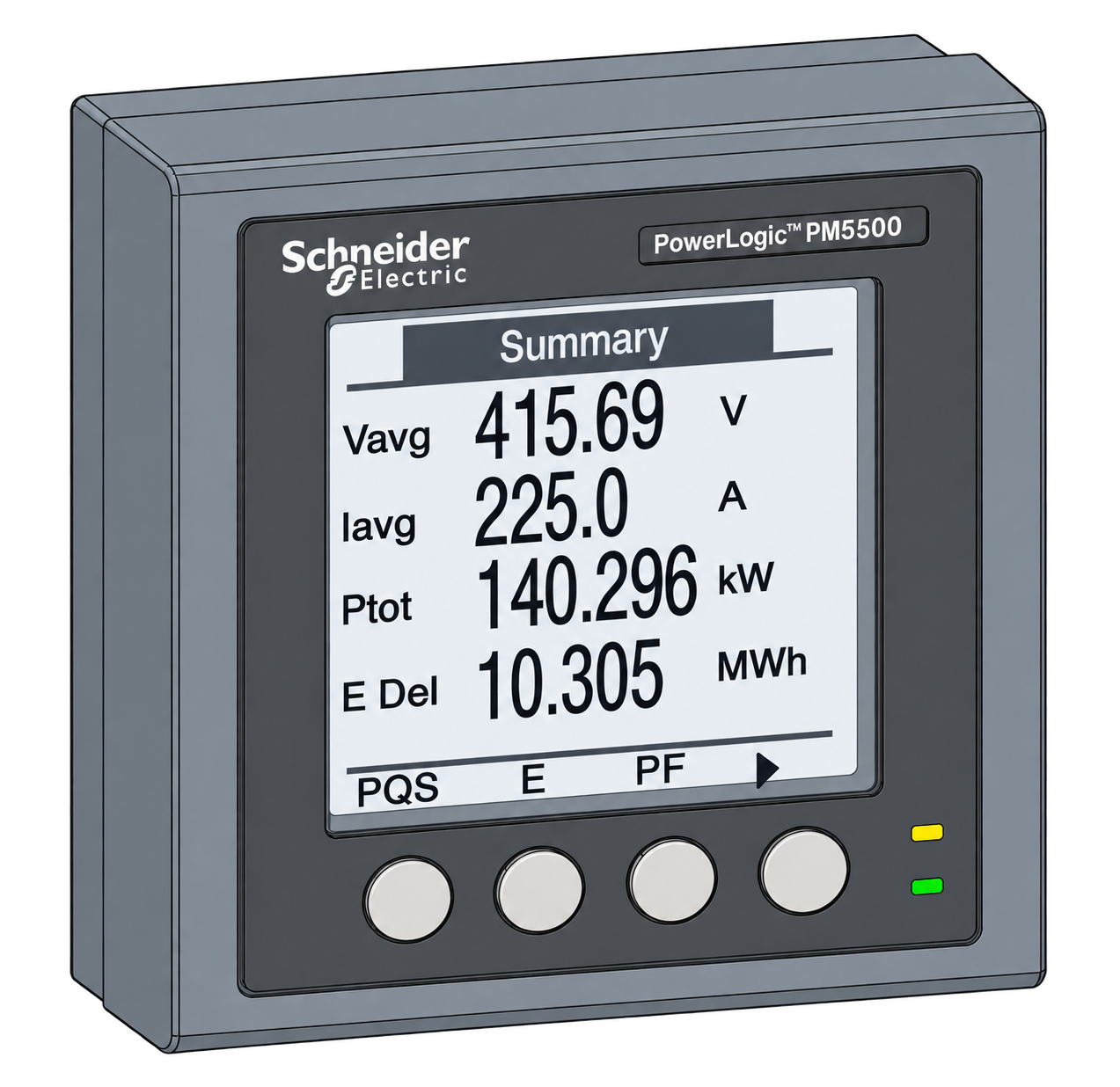
- Modbus TCP
- Modbus RTU
Power and energy meter
Compatibility
Compatible through Modbus TCP or Modbus RTU
Edge reads the documented local Modbus interface through the connection path below. This is protocol compatibility, not a claim of a built-in device mapping.
METSEPM5560 only. PM5110, PM5330, PM5561, PM5563 and later PM56xx/PM57xx meters have different capabilities. Match the PM5560 column and firmware in the PM556x register list.
Connect it with
-
Modbus Interface ZMB-3XFrom €399 ex VAT Configure Modbus Interface
-
Gateway ZGW-20From €899 ex VAT Configure Gateway
-
Evaluation Gateway on a Raspberry Pi Edge with one device licensedFree Set up Evaluation Gateway on a Raspberry Pi


For a PM5560 on the site IP network
- Modbus
- Edge
- Platforms
For direct serial access to the meter
- Modbus
- Wireless
- Edge
- Platforms
Models
| Models | Interface | Route into Edge |
|---|---|---|
| METSEPM5560 | 1 A / 5 A CT inputs; RS-485 and two Ethernet ports | Use the PM5560 support column in the PM556x workbook. |
| PM5100 / PM5300 family | Separate manufacturer register-list file | Use the broad PM5000 guide to select the family, not as a substitute for this model’s map. |
| Meters downstream of a PM5560 | Separate physical devices reached through gateway unit IDs | Keep their identities and register maps separate from the gateway meter. |
Specifications
The PM5560 adds a useful gateway role to electrical metering: one Ethernet endpoint can expose the meter itself and additional RS-485 devices. That convenience also creates an identity trap. A valid response from the IP address does not by itself prove that the reading came from the PM5560.1
- Current inputs
- External current transformers with 1 A or 5 A secondary3
- Meter accuracy
- Active energy class 0.2S to IEC 62053-22; the installed CTs and wiring contribute additional error3
- Communications
- Modbus RTU/ASCII on RS-485; Modbus TCP and BACnet/IP on Ethernet3
- Network hardware
- Two RJ45 Ethernet ports; Ethernet-to-serial gateway function3
- Digital points
- Four digital inputs and two digital outputs3
- Unavailable FLOAT32
- The register-list N/A pattern is 0xFFC00000; preserve unavailable data rather than recording zero2
Interface
Documented measurements and integration boundaries for PowerLogic PM5560.
- Current A/B/C and average: FLOAT32 values in amperes; Current A is listed at register 3000.
- Phase-neutral and phase-phase voltages: confirm the configured wiring system before expecting all values.
- Active, reactive and apparent power, frequency and power factor: preserve sign and the manufacturer’s power-factor encoding.
- Import/export energy: use the specified multi-register data type rather than reusing the instantaneous FLOAT32 decoder.
- Product ID, model and serial number to distinguish the PM5560 from downstream meters.
- Status and diagnostic information alongside fresh measurement timestamps.
Assessment
METSEPM5560 only. PM5110, PM5330, PM5561, PM5563 and later PM56xx/PM57xx meters have different capabilities. Match the PM5560 column and firmware in the PM556x register list.
- InteroperabilityWell supported
- Public model-specific register workbook and documented TCP/RTU access support a bounded local integration.12
- AccuracySupported with conditions
- Class 0.2S active-energy meter with external CTs; system accuracy depends on transformers, ratios and wiring.3
- SecuritySupported with conditions
- The manual documents Modbus TCP filtering; configure it for the installed firmware and protect the site network.1
- ReliabilitySupported with conditions
- The datasheet publishes supply and ride-through characteristics; communications loss still requires explicit stale-data handling.3
- RuggednessSupported with conditions
- Panel-mounted instrument with documented installation and environmental limits, not an exposed outdoor enclosure.3
- ScalabilitySupported with conditions
- Ethernet gateway access can reach multiple serial devices, but each unit ID and map must remain distinct.1
Setup
Read the PM5560 product ID
This one-register identity read avoids a floating-point or word-order assumption. The PM556x workbook assigns PM5560 product ID 15235.
- Function
- FC03 Read Holding Registers
- Register reference
- 90, Product ID Number, INT16U, one register
- Zero-based PDU address
- 89 decimal, 0x0059; subtract one from the listed register number
- Request PDU
- 03 00 59 00 01
- Expected data for this model
- 3B 83, unsigned 16-bit integer 15235, no multiplier and no physical unit
- Ethernet target
- The PM5560 itself: unit ID 255 or the configured meter ID in gateway mode; record the actual endpoint
- Acceptance
- Compare the returned identity, serial number and nameplate before reading electrical quantities
Acceptance: 15235 identifies the documented PM5560 model. This is an independently encoded expected response, not a captured meter transaction. A different value or exception requires an address, endpoint and model check; do not shift the whole map until the identity is resolved.
-
Identify the exact PM5560
Record METSEPM5560, serial number, firmware, wiring system and CT/PT ratios. Use the PM556x list and its PM5560 applicability column; the PM5100/PM5300 workbook is a different document.
-
Choose direct access or gateway access
For Ethernet, record the configured IP and port and whether serial gateway mode is active. Address the PM5560 itself with the documented unit ID rather than accidentally polling a downstream meter. For RTU, match the meter’s actual serial settings.
-
Prove the product identity
Read the single product-ID register below before adding measurements. Also compare model and serial number with the meter. A product ID alone cannot distinguish two PM5560s at different locations.
-
Add current, power and frequency
After the product-ID check, add phase 1 current at register 3000, PDU address 2999 / 0x0BB7, total active power at 3060, address 3059 / 0x0BF3, and frequency at 3110, address 3109 / 0x0C25. Use FC03 and two registers per Float32 value: A, kW and Hz respectively. Start with separate reads and one consistent Float32 decoder, compare the display, then group points. Keep kW as kW; multiply by 1000 only when the destination requires W.
-
Protect the endpoint and verify totals
Use the meter’s documented Modbus TCP filtering where supported by its firmware and limit network access to authorised clients. Compare an energy-counter increase over a known interval with the display. Keep resets, time changes, output commands and setup registers outside the read-only polling group.
Common questions
- Why can the same IP address return another meter’s values?
- In gateway mode the PM5560 forwards requests for other unit IDs to its RS-485 bus. Use the documented self-address and verify model and serial number before collecting energy.1
- Can I use the PM5110 template?
- Do not assume it is complete or correct for PM5560. Schneider provides separate PM5100/PM5300 and PM5500/PM5600/PM5700 register lists. Some quantities overlap, but data availability and functions still depend on the model and firmware.24
- Does class 0.2S describe the whole installation?
- It is the meter’s specified active-energy class. CT accuracy, ratios, burden, wiring and the measurement boundary affect the system result.3
- Should unavailable data become zero?
- No. The list defines special N/A patterns, including 0xFFC00000 for FLOAT32. Preserve unavailable or stale status so a failed reading cannot look like zero consumption.2
Related devices

Sources
- PowerLogic PM5500 / PM5600 / PM5700 user manual, HRB1684301 (opens in a new tab)
- PM556x public Modbus register list, 10 August 2023 file (opens in a new tab)
- METSEPM5560 product datasheet (opens in a new tab) (PDF)
- Which PM5000 Modbus register list applies, FAQ FA234017 (opens in a new tab)
Further reading
Product names and trademarks belong to their owners. Publication does not imply endorsement or a commercial relationship.