Schneider Electric AS-P-NLS
Building automation controller
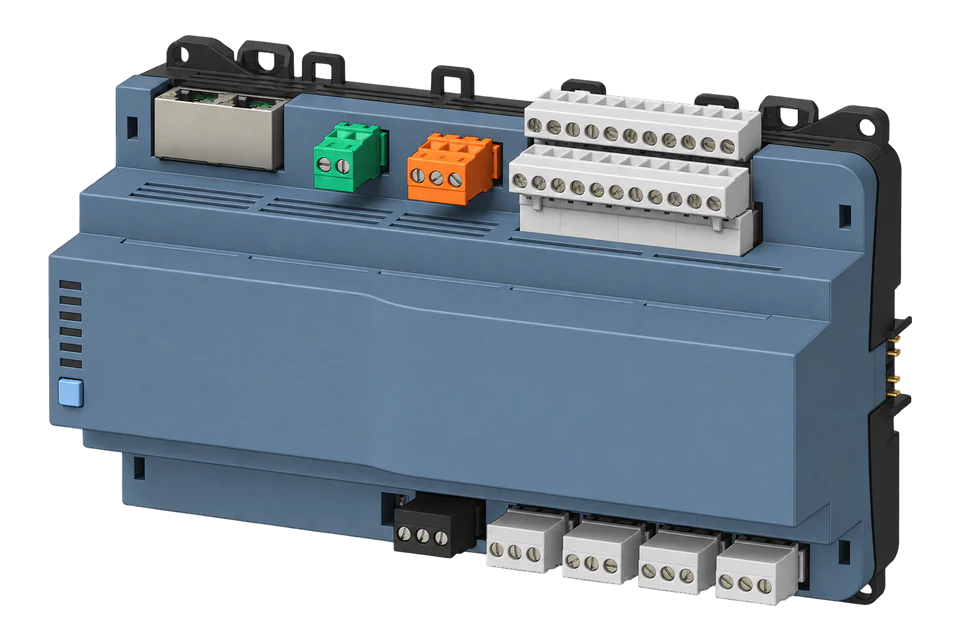
SXWASPSBX10002 is the AS-P-NLS: a secure-boot SpaceLogic automation server without LonWorks. It runs the building application and exposes project-defined BACnet objects. Read an agreed set of those objects alongside the existing BMS; the hardware does not have a universal meter register map.
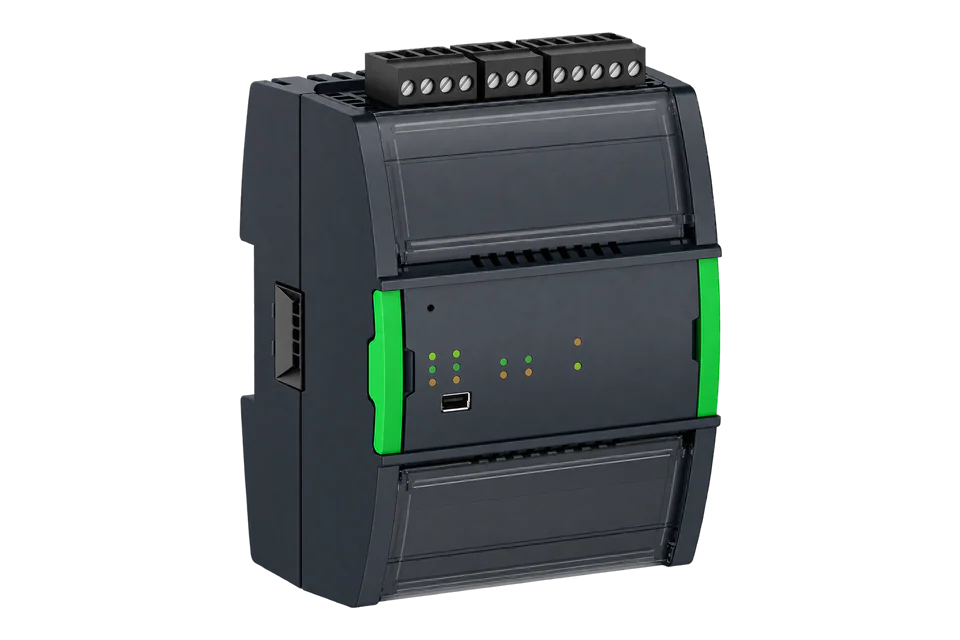
- BACnet/IP
Building automation controller
Compatibility
BACnet/IP integration, build check required
The manufacturer documents BACnet/IP and the inspected Edge source contains a BACnet client. This guide applies only to Edge builds containing that client; a minimum released Edge version and physical controller pairing have not been verified.
Scope: AS-P-NLS SXWASPSBX10002 with a commissioned BACnet/IP interface and an approved object list. Confirm the installed EBO software and licence: EBO 7.0 uses centralized system licensing, while older versions use different bundles. BACnet/SC support on the AS-P is not proof of BACnet/SC support in Edge. No universal template or physical qualification is claimed.
Connect it with
-
Gateway ZGW-20From €899 ex VAT Configure Gateway
-
Evaluation Gateway on a Raspberry Pi Edge with one device licensedFree Set up Evaluation Gateway on a Raspberry Pi

The BMS engineer has exposed the required measurements as BACnet objects
- BACnet
- Edge
- Platforms
Models
| Models | Interface | Route into Edge |
|---|---|---|
| AS-P-NLS · SXWASPSBX10002 | Secure boot; no LonWorks; dual Ethernet and dual RS-485 | This guide covers read-only BACnet/IP objects on this exact variant. |
| AS-P-S · SXWASPSBX10001 | Secure-boot model with LonWorks support | Different order code; confirm its installed software and project separately. |
| AS-P-NLS-SMK · SXWASPSBX1S002 | Smoke-control variant with validated software restrictions | Outside this guide. Do not transfer ordinary automation-server procedures to a smoke-control system. |
Specifications
AS-P-NLS runs the local application, serves operator access and connects field networks. The two Ethernet ports are 10/100BASE-TX; two RS-485 ports serve serial networks. The NL suffix removes LonWorks. A separate terminal base and suitable 24 VDC supply are required.1
- Exact hardware
- AS-P-NLS SXWASPSBX10002; secure boot; no LonWorks1
- Power and mounting
- 24 VDC, 10 W; DIN rail; TB-ASP-W1 SXWTBASW110002 terminal base required1
- Environment
- 0 to 50 °C, IP20; up to 95% RH non-condensing1
- BACnet interface
- BACnet/IP, configurable UDP port, default 47808; B-BC profile. Check the BTL listing for the installed firmware.1
- EBO 7.0 licence
- Hardware has no preinstalled software. Essential, Advanced and Advanced Plus system tiers are activated at the top-level server and inherited across the system; select with the Schneider partner.1
- Other protocol roles
- The hardware also supports BACnet/SC and configured Modbus interfaces. OPC UA is a client role here, not evidence of an OPC UA server for Edge.1
Interface
Documented measurements and integration boundaries for AS-P-NLS.
- Building measurements deliberately bound to exposed BACnet objects, such as temperature, power or cumulative energy.
- Device instance, object type and instance, descriptive name, unit and the upstream source of each reading.
- A source-health or freshness indication agreed with the BMS engineer; a responsive server can still hold an old field value.
Assessment
Exact AS-P-NLS hardware with a commissioned EBO BACnet/IP export; release availability and physical Edge pairing remain unverified.
- InteroperabilitySupported with conditions
- BACnet/IP and external server objects are documented; the project defines which values are exposed.12
- AccuracyNot applicable
- Measurement accuracy belongs to the source instrument and project scaling, not the automation-server chassis.1
- SecuritySupported with conditions
- This exact S model supports secure boot. The proposed plain BACnet/IP path still needs the approved site network; the server’s SC capability does not establish an Edge SC path.1
- ReliabilitySupported with conditions
- The specification documents local backup storage and manual or scheduled backups. Retain a compatible application backup and the exposed-object schedule.1
- RuggednessSupported with conditions
- The published IP20, 0 to 50 °C, non-condensing indoor envelope requires a suitable control-panel installation.1
Setup
Read one commissioned measurement
Select one existing measured object from the BACnet Application folder and record its project-assigned identity. There is no fixed register address or preconfigured import; an engineer-supplied export is useful when objects are missing, not a prerequisite to inspecting existing ones.
- Identity
- Match the controller model, firmware, IP endpoint and BACnet device instance before selecting a point.
- Object
- Use the actual discovered Analog Input or Analog Value type and instance, with its name, engineering unit and source binding.
- Operation
- Read Present_Value only through the inspected Edge client path. Do not issue WriteProperty or change a command priority.
- Reference
- Compare with EBO WorkStation or WebStation and the original instrument. Synthetic example: Present_Value 23.4 with a degrees-celsius unit is 23.4 °C; do not apply a meter register scale or CT ratio again.
- Quality
- Check source freshness and reliability in the controller. This guide does not claim Edge automatically imports Status_Flags, Reliability, trend history or alarms.
Acceptance: Accept when object identity, unit, sign, value and update timing agree with the controller and original measurement. Discovery alone is not acceptance. If the BACnet client is absent from the installed Edge build, stop here and confirm build availability before planning the connection.
-
Identify the server and software
Record SXWASPSBX10002, the installed EBO version and software entitlement. For EBO 7.0, check the system tier; older Standalone or Standard bundle limits do not describe 7.0. Inspect existing objects without changing the project or licence.
-
Inspect the existing exported objects
In WorkStation, open the server BACnet Interface and its Application folder. Schneider FAQ FA371613 identifies this as the location of objects visible to external BACnet clients. Select a required measurement and record device instance, object type and instance, name, unit and source binding. If the object is absent, ask the BMS owner to expose it through the normal project process; do not create objects or change bindings during this read-only survey.
-
Confirm the network and Edge build
Use the existing permitted BACnet/IP network and configured UDP port. Confirm the installed Edge build contains the BACnet client before proceeding; source-code support is not a released-version guarantee. An SC-only network requires an approved integration design, not an assumption that Edge accepts SC certificates.
-
Read a single object
In that Edge build, configure the local BACnet network, discover the intended device and identify the agreed object. Read Present_Value and compare it with WorkStation or WebStation and the original meter or sensor. Use the engineering unit already assigned to the object; do not apply the source meter’s CT ratio a second time.
-
Check quality and retain the schedule
Compare at a known update interval and inspect source health in EBO. Have the site engineer identify how stale field data is indicated without interrupting operational control. Save the approved object list with the project backup and recheck it after application or firmware changes.
Common questions
- Does every EBO value appear automatically in BACnet?
- No. Open the existing BACnet Interface and inspect its Application folder objects and source bindings. These are the objects Schneider identifies as visible to external clients. If the required value is absent, ask the BMS owner to expose it through the normal engineering process; a graphics value alone is not an export.2
- Can I use a ready-made Modbus template instead?
- A configured Modbus TCP server is another documented EBO export mechanism, but its mapping is engineered in the project. Obtain that map and the installed-version licence conditions before using it. This guide does not supply fixed Modbus addresses.23
- Is the software included with the hardware?
- The EBO 7.0 specification says the server hardware is supplied without preinstalled software. Its centralized system licence differs from older per-server bundle arrangements. Check the installed version and partner-selected entitlement rather than assuming that the part number includes the application licence.13
Related devices
Sources
- SpaceLogic AS-P specification and EBO 7.0 licensing (opens in a new tab)
- How EcoStruxure BMS servers serve data to external systems, FA371613 (opens in a new tab)
- AS-P hardware and software licensing for EBO 2022 (opens in a new tab)
Further reading
Product names and trademarks belong to their owners. Publication does not imply endorsement or a commercial relationship.