NodOn SEM-4-1-00
Single-phase energy meter
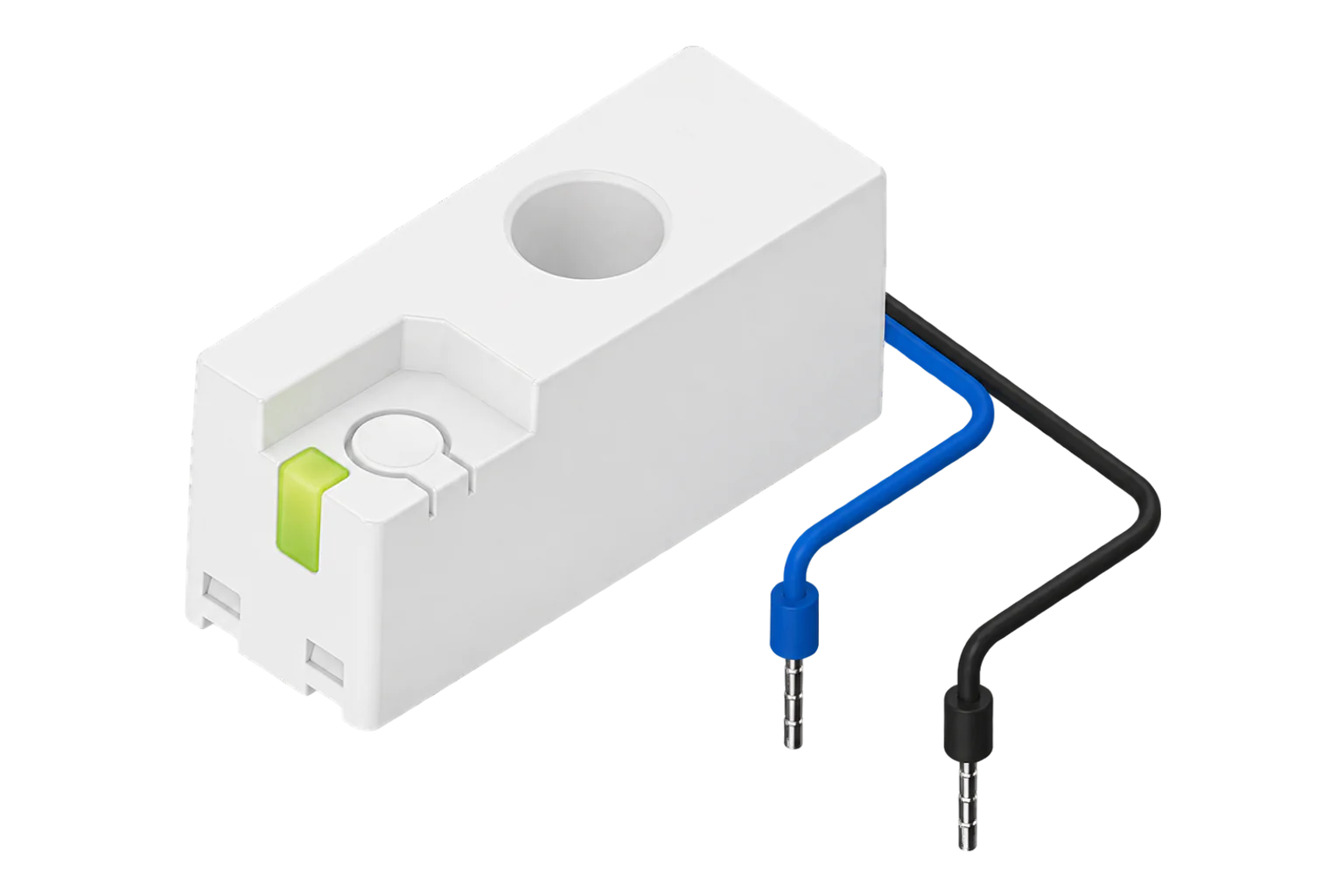
A single-phase Zigbee 3.0 energy sensor that sits under a circuit breaker with the line conductor passing through it. NodOn rates it class 1 (±1 %) to IEC 61557-12 from 50 mA to 63 A, and it counts consumed and produced energy separately.
- Zigbee
Single-phase energy meter
Compatibility
Compatible with EpiSensor Edge over Zigbee.
Pair it with the Zigbee radio on an EpiSensor Gateway. Edge reads it locally on the Gateway.
Edge reads 10 values from it, listed under Interface.
Connect it with
-
Gateway ZGW-20From €899 ex VAT Configure Gateway

Specifications
The SEM-4-1-00 measures one single-phase circuit. The line conductor passes through a hole in the sensor body, and two flying leads connect it to L and N for its supply and voltage reference. At 46.8 × 17.8 × 21.3 mm it fits under a modular circuit breaker on the circuit it measures, so it can go into an existing board without an extra DIN slot.2
- Power
- Self-powered from the measured supply. Through its L and N leads from the circuit it measures, 110 to 240 V AC, 0.5 W.2
- Poles
- 1P+N1
- Basic current
- 10 A1
- Measurement range
- 50 mA to 63 A1
- Accuracy
- Class 1.0 (±1 %), IEC 61557-121
- Overvoltage category
- III1
- Rated insulation voltage
- 250 V1
- Wireless
- Zigbee 3.0, 2.4 GHz, +10 dBm maximum1
- Current input
- Through hole for the line conductor2
- Operating temperature
- -25 to 60 °C1
- Protection
- IP20, indoor use1
- Dimensions
- 46.8 × 17.8 × 21.3 mm (H × W × D)1
- Weight
- 22 g1
- Order code
- SEM-4-1-00, EAN 37003139262151
Where it is used
Individual final circuits in a distribution board, such as lighting, heating or a kitchen supply, fitted under the existing breaker.
Transformer and distribution board monitoringTenant, zone or office circuits in a shared building, for recharging energy costs.
Tenant submetering and cost allocationA single-phase inverter or grid connection, where separate consumed and produced counters show import and export.
Solar PV monitoringA dedicated EV charge point circuit, to track what the car draws and adapt charging to the available supply.
EV charging load management
Interface
Readings and settings, with units and ranges where NodOn publishes them. readable, writable only.5
| Reading | Unit | Range or values | Access |
|---|---|---|---|
| Measurements 8 | |||
| Active powerPositive in the direction of the arrow on the housing | W | - | Read only |
| Consumed energyForward energy, in the direction of the arrow | kWh | - | Read only |
| Produced energyReverse energy, against the arrow | kWh | - | Read only |
| VoltageLine to neutral, from the L and N leads | V | - | Read only |
| Current | A | - | Read only |
| Apparent power | VA | - | Read only |
| Power factor | - | - | Read only |
| Frequency | Hz | - | Read only |
| Controls 2 | |||
| Reset energy countersSets both counters to zero; the sensor stays on the network | - | reset |
Write only |
| IdentifyFlashes the LED so the sensor can be found in a panel | - | identify |
Write only |
Direction follows the arrow on the housing: energy flowing the way the arrow points is forward energy and reads as consumed energy, and energy flowing the other way reads as produced energy.2
Energy reset uses the Basic cluster’s reset-to-factory-defaults command, which clears the energy counters but keeps the sensor on the network with its bindings and reporting.5
Setup
-
Fit it with the circuit isolated
Switch off at the breaker. Pass the line conductor through the sensor’s hole with the arrow pointing towards the load, then connect the blue lead to neutral and the black lead to line.2
-
Open pairing in Edge
Switch the circuit back on and, in Edge, open pairing on the Gateway’s Zigbee network.
-
Put the sensor into pairing mode
Press the button briefly until the LED flashes quickly, twice a second. The LED stays on steadily once the sensor has joined.2
-
Read the LED if it does not join
A flash every second means a wireless communication failure and a flash every 4 seconds means no network connection. Hold the button for 3 to 5 seconds to reset the sensor, then pair it again.2
-
Check one reading
Confirm Edge identifies it as NodOn SEM-4-1-00 and compare current with a clamp meter. Power that reads as export while the load is running means the conductor passes through against the arrow.2
Common questions
- Does the SEM-4-1-00 need a NodOn hub to work with Edge?
- No. It is a Zigbee 3.0 device and NodOn lists it as working with Zigbee gateways generally, so it joins the Zigbee radio on an EpiSensor Gateway directly.13
- Does it measure solar export?
- Yes. It measures in both directions: energy in the direction of the arrow on the housing counts as forward energy and the rest as produced energy, so fit it with the arrow pointing from the supply to the load.12
- Can it be fitted after a contactor or a motor drive?
- No. NodOn forbids installing it downstream of a contactor, variable frequency drive or motor starter because it can damage the sensor. Fit it upstream of those devices.2
- How do I reset it?
- Hold the button for 3 to 5 seconds. Then press it briefly to put the sensor back into pairing mode, shown by the LED flashing twice a second.2
Related devices
Sources
- Zigbee Energy Meter Sensor SEM-4-1-00 datasheet (opens in a new tab)
- Energy Meter Sensor SEM-4-1-00 user guide (opens in a new tab)
- Zigbee Smart Energy Monitor (opens in a new tab)
- NodOn SEM-4-1-00 device documentation (opens in a new tab)
- NodOn SEM-4-1-00 Zigbee definition (opens in a new tab)
Further reading
Product names and trademarks belong to their owners. Publication does not imply endorsement or a commercial relationship.