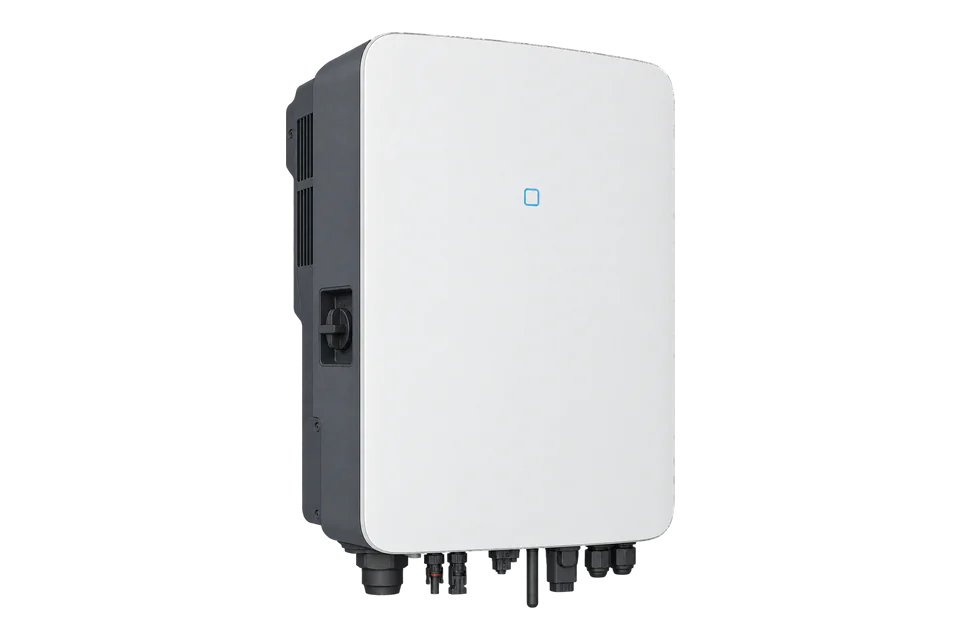
Sungrow SH10RT
Three-phase hybrid solar inverter
SH10RT is a three-phase hybrid inverter combining solar production, battery charging and backup capability. Its Modbus data includes several different energy boundaries: PV production, battery exchange, inverter output and the connected site meter. Read the device type before applying a map because SH10RT, SH10RT-20 and the V112/V122 revisions have distinct identifiers.
- Modbus TCP
Three-phase hybrid solar inverter
Compatibility
Compatible through local Modbus TCP
Sungrow publishes the hybrid inverter protocol and explicitly includes SH10RT. Edge can read supported input registers through the configured Modbus endpoint.
Original SH10RT, identified by device code 0x0E03. This guide uses Sungrow hybrid protocol V1.1.17 dated 30 September 2026 and the SH5.0–10RT/RT-20 manual revision 24. Confirm the installed firmware and communication module. Read-only monitoring; no export-limit, battery-dispatch or backup-control writes.
Connect it with
-
Gateway ZGW-20From €899 ex VAT Configure Gateway
-
Evaluation Gateway on a Raspberry Pi Edge with one device licensedFree Set up Evaluation Gateway on a Raspberry Pi

When the installed inverter or supported communication module exposes the documented local server
- Modbus
- Edge
- Platforms
Models
| Models | Interface | Route into Edge |
|---|---|---|
| SH10RT | Original three-phase hybrid model, device type 0x0E03 | Use the original SH10RT specifications and verify identity with FC04. |
| SH10RT-20 / SH10RT-V112 / SH10RT-V122 | Distinct device types 0x0E13 / 0x0E0F / 0x0E0B in the protocol appendix | Do not relabel these variants as the original SH10RT or inherit its ratings without checking the matching manual. |
| SG10RT and SH10RS | Different grid-tied and single-phase hybrid platforms | Do not select this map from a similar power rating or model suffix. |
Specifications
The original SH10RT is rated at 10 kW AC, with a 9,999 W Australian rating in the cited manual. The same manual also covers RT-20 products, so use the SH10RT column. The communication protocol separates input-register running data from holding-register settings.12
- Device identity
- SH10RT: code 0x0E03 at input register 50002
- AC connection
- Three-phase; 10,000 W rated output, 9,999 W for Australia in this manual1
- Battery voltage
- 150–600 V for original SH10RT; battery compatibility remains model-specific1
- Read function
- FC04 for running information; register number minus one gives the PDU address2
- 32-bit word order
- Low 16-bit word first, high byte first within each word; not an ordinary high-word-first U322
- Environment
- IP65; -25 to +60 °C; natural convection and mounting/altitude limits1
Interface
Documented measurements and integration boundaries for SH10RT.
- Device type, serial number and firmware information to bind the returned data to the installed inverter.
- PV generation and DC power, distinguished from inverter AC output and household consumption.
- Battery voltage and state of charge; supported points depend on the installed battery and firmware.
- Battery power together with direction/state information; do not assume every power field is a signed value.
- Connected meter power and energy for the grid measurement boundary, with the documented sign convention.
- Running state and fault information so shutdown, standby and unavailable readings are not treated as ordinary zero production.
Assessment
Original SH10RT, read-only local Modbus. Variant identity and firmware/module differences are checked explicitly.
- InteroperabilitySupported with conditions
- The current public hybrid protocol includes SH10RT identities, function codes, types, scaling, byte order and supported module paths. Endpoint selection depends on installed hardware.12
- AccuracySupported with conditions
- PV, battery and meter quantities are separately defined. SOC scaling and unavailable sentinels are explicit, but the connected meter and battery determine which measurements exist.2
- SecuritySupported with conditions
- The manual flags network risks and disables the network port by default on newer firmware. The interface can write control settings, requiring network restriction and a read-only client policy.12
- ReliabilitySupported with conditions
- The manual specifies protection functions, operating conditions and fault recovery. The protocol defines unavailable values and timing; applications must preserve those states during interruption.12
- RuggednessWell supported
- IP65, -25 to +60 °C and explicit mounting and altitude conditions provide a clear outdoor installation envelope.1
- ScalabilitySupported with conditions
- Addresses are configurable from 1 to 247. Per-model identity codes and documented request timing support controlled polling; module forwarding and parameter registers impose further limits.2
Setup
Confirm the original SH10RT identity
One read-only input-register request distinguishes the original model from similarly named revisions. The expected response bytes below are derived from Sungrow’s device-code table, not a captured installation.
- Target
- Configured inverter address, default 1; local TCP port 502 by default
- Function
- FC04 Read Input Registers, not FC03
- Document register
- 5000: device type code, U16
- PDU address and length
- 4999 decimal = 0x1387; 1 register
- Request PDU
- 04 13 87 00 01; the TCP client adds its MBAP header
- Expected original-model response PDU
- 04 02 0E 03: one U16 value 0x0E03
- Variant rejection
- 0x0E13 is SH10RT-20; 0x0E0F is V112; 0x0E0B is V122
- Independent scaling check
- SOC register 13023 uses PDU address 13022 (0x32DE). Bytes 02 DF decode to U16 735, then 735 × 0.1 = 73.5%. U16 0xFFFF means unavailable.
Acceptance: Accept the original model only when the code and nameplate agree. Then compare the SOC point with the local battery display. Identity, scaling and measurement agreement are separate checks; none of these synthetic bytes claims physical-device qualification.
-
Identify the exact inverter and endpoint
Record the complete nameplate, firmware and communication module. Use the original SH10RT manual column, not the RT-20 column. The inverter LAN, a WiNet module and a Logger are different network endpoints; do not substitute a cloud account address for a local server.
-
Enable and protect the supported LAN path
The manual states that the network port is disabled by default starting at version 95.05 and that an on-site upgrade does not change its existing state. Have the authorised installer check the relevant firmware setting. Restrict the local port to monitoring hosts; the same protocol also defines control writes.
-
Verify the model before measurements
Create a read-only Modbus TCP connection using the endpoint IP, TCP port and configured inverter address. Read input register 5000 with FC04 as shown below. A holding-register read at the same number addresses a setting instead, so function code is part of the point identity.
-
Decode a small set of running data
Use only registers documented for this model. Battery SOC is input register 13023, U16 with a 0.1% scale: raw 735 means 73.5%. For U32/S32 points, swap the two 16-bit words while retaining high-byte-first order within each word. Reject the documented unavailable sentinels before applying scales.
-
Check against local measurements
Compare battery SOC and power with the local inverter interface at the same time. Confirm the connected meter location and power direction under a known import or export condition. Use the protocol’s request timing guidance, avoid unsupported address gaps, and keep failed polls stale rather than zero. Recheck after firmware or module replacement.
Common questions
- Why can FC03 return a plausible but wrong value?
- Sungrow uses separate input and holding-register spaces. In the protocol examples, input register 5000 is a device type, while holding register 5000 is the system year. Always bind function code as well as address.2
- Can iHomeManager replace WiNet for this connection?
- The current protocol explicitly excludes iHomeManager and other unnamed communication modules from this interface. Use the documented inverter/module path and verify it against the installed firmware.12
- Why does a copied battery-power point disagree with iSolarCloud?
- Check the exact register, model, firmware, word order, scale and direction flags. Some power fields are magnitudes rather than signed net flows. Cloud values may also represent a different aggregation time or energy boundary. Compare the documented point with the local interface before treating it as a site total.2
Related devices
Sources
- SH5.0–10RT and SH5.0–10RT-20 user manual, revision 24 (March 2025) (opens in a new tab) (PDF)
- Residential and Small Industrial Hybrid Inverter communication protocol V1.1.17 (30 September 2026) (opens in a new tab) (PDF)
Further reading
Product names and trademarks belong to their owners. Publication does not imply endorsement or a commercial relationship.