Siemens SENTRON PAC5200
Power quality analyser
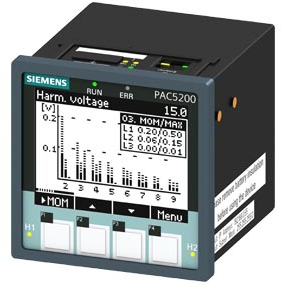
The SENTRON PAC5200 is Siemens' 96 mm power monitoring device and power quality recorder, ordered as 7KM5412 with a graphic display for panel mounting or as a DIN-rail unit without a display. It measures voltage, current, power, energy, harmonics to the 40th and flicker to IEC 61000-4-15, with power quality measurement to IEC 61000-4-30 class S, and records power quality events in 2 GB of memory. Its only data interface is an RJ45 Ethernet port with Modbus TCP. Siemens' communication manual lists every measured value as a 32-bit IEEE 754 float in two holding registers, most significant register first, so L1 voltage at register 0201 arrives directly in volts. Energy is the exception: the counters are pulse counts that are multiplied by the conversion factor at register 0801.
Compatibility
Compatible with EpiSensor Edge over Modbus TCP
The PAC5200 is compatible with EpiSensor Edge over its built-in Ethernet port: Edge reads it as a Modbus TCP client with function 03. Siemens publishes the holding register map, the Float32 format and the register order, so a voltage read can be checked against the display before more points are added.
SENTRON PAC5200, 7KM5412-6BA00-1EA2 (panel, graphic display) and 7KM5412-6CA00-1EA8 (DIN rail, no display), using communication manual E50417-C1040-C568-A1 edition 03.2015. Site check: read L1 voltage at register 0201 and compare it with the display, which also settles the register offset. Read-only monitoring: set the Modbus TCP port to read-only access and write nothing to the clock or the controllable indications.
Connect it with

For every PAC5200: the RJ45 Ethernet port on the top of the device is its only data interface
- Modbus
- Edge
- Platforms
Models
| Models | Interface | Route into Edge |
|---|---|---|
| 7KM5412-6BA00-1EA2 | Flush-mounted 96 × 96 mm device with graphic display and four keys, IP40 front; RJ45 Ethernet with Modbus TCP and web server | Read the communication manual registers over Modbus TCP. Compare the first voltage read with the display. |
| 7KM5412-6CA00-1EA8 | Snap-on DIN-rail device without a display, IP20; the same Ethernet port and register map | Same Modbus TCP read. With no display, compare the first voltage read with the web server's measured values or a reference instrument. |
| SENTRON PAC5100 (7KM5212) | Sibling with basic measurements and harmonics to the 40th, without the PAC5200 recorder, flicker and power quality functions; shares the communication manual | The basic measured values and energy counters use the same registers. The power quality registers apply to the PAC5200 only. |
| SENTRON PAC4200 and PAC3220 | Different Siemens meter families with their own manuals and offset tables | Do not reuse PAC4200 or PAC3220 offsets on a PAC5200. Use their own guides. |
Specifications
The PAC5200 is the recorder version of the SENTRON PAC5100/5200 family: on top of the basic measured values and harmonics to the 40th it adds power quality measurement to IEC 61000-4-30 class S, minimum, maximum and mean values, flicker to IEC 61000-4-15, event detection, EN 50160 reporting and 2 GB of internal memory. It is set up through its web server and reports over Modbus TCP on one RJ45 port; it has no serial interface.2
- Order codes
- 7KM5412-6BA00-1EA2: panel flush mounting with graphic display, IP40 front. 7KM5412-6CA00-1EA8: snap-on DIN-rail device without display, IP20. 96 × 96 × 100 mm.2
- Voltage inputs
- Four inputs. Rated phase-to-neutral 63.5, 110, 230 or 400 V (347 V under UL) and phase-to-phase 110, 190, 400 or 690 V (600 V under UL); maximum 480 V phase-to-neutral and 831 V phase-to-phase; 42.5 to 69 Hz.2
- Current inputs
- Three inputs for external current transformers, rated 1 A or 5 A by parameterization, maximum 2 × rated current.2
- Accuracy
- Current class 0.2; active, reactive and apparent power class 0.5 to IEC 61557-12; active energy class 0.5S to IEC 62053-22 and reactive energy class 2 to IEC 62053-23. Power quality measurement to IEC 61000-4-30 class S.2
- Ethernet
- RJ45, 10/100Base-T on the top of the device, Modbus TCP. Default address 192.168.0.55; port 502 plus an optional user port from 10000 to 65535; up to four TCP connections; full or read-only access per port.12
- Auxiliary supply
- 24 to 250 V DC or 110 to 230 V AC, each ±20%; at most 5 W on DC and 16 VA on AC.2
- Outputs
- Two binary outputs. No digital inputs.2
- Environment
- Operating -25 to +55 °C (the display is harder to read below 0 °C); storage -40 to +70 °C; up to 95% relative humidity 30 days a year, 75% annual mean, no condensation in operation; terminals IP2x.2
Interface
Documented measurements and integration boundaries for SENTRON PAC5200.
- Registers are numbered in decimal from 0001 and are all holding registers, read with FC03 only, up to 125 registers per request. Siemens does not say whether register 0201 goes on the wire as PDU address 200 or 201, so settle it once with the read below.
- Every measured value is a 32-bit IEEE 754 float in two registers. The manual states that the lower register holds the most significant byte, so decode high word first (ABCD). Values are in V, A, W, var, VA, Hz and %, not kilo-units.
- Phase voltages Va, Vb and Vc at 0201, 0203 and 0205, neutral voltage VN at 0207, line voltages Vab, Vbc and Vca at 0217, 0219 and 0221, and the mean phase voltage at 0223.
- Currents Ia, Ib and Ic at 0209, 0211 and 0213, neutral current at 0215 and the mean current at 0225.
- Active power Pa, Pb, Pc and total P at 0227, 0229, 0231 and 0233 in W, positive for demand and negative for supply. Reactive power Qa to Q at 0235 to 0241 (var, positive inductive) and apparent power Sa to S at 0243 to 0249 (VA).
- Active power factor cos φ a, b, c and total at 0251 to 0257, power factor PFa to PF at 0259 to 0265, power frequency at 0275 (Hz), voltage unbalance at 0277 and current unbalance at 0279 (%). Registers 0281 to 0292 are not part of the map.
- Voltage THDS a, b and c at 0295, 0297 and 0299 and current THDS at 0301, 0303 and 0305. Which phase-to-neutral or phase-to-phase values exist depends on the connection type set on the device.
- Three float codes carry status instead of a value: 7F800000 is an overflow (above 1.2 × rated voltage or 2 × rated current), 7F800001 is invalid (for example frequency with the voltage below 15% of rated) and 7F800002 is not calculated for the selected network type. Record these as missing data.
- Energy counters are signed 32-bit pulse counts in two registers, most significant register first: total active energy demand at 0813 and supply at 0821, per phase at 0807 to 0811 and 0815 to 0819, total reactive inductive at 0829, capacitive at 0837 and total apparent at 0845. Multiply by the float at 0801 (Wh, varh or VAh per pulse) for the energy.
- Counter status bits sit at 0803 to 0806: overflow, and invalid for one minute after a reset or device start. At rated voltage and current the device counts 60 000 pulses an hour, and Siemens puts the overflow about four years after a reset at continuous rated load.
- The clock at 0065 to 0068 and the controllable indications at 0141, which include an energy counter reset, are writable with FC06 and FC16. Keep them out of the poll.
Assessment
SENTRON PAC5200, 7KM5412-6BA00-1EA2 (panel, graphic display) and 7KM5412-6CA00-1EA8 (DIN rail, no display), using communication manual E50417-C1040-C568-A1 edition 03.2015. Site check: read L1 voltage at register 0201 and compare it with the display, which also settles the register offset. Read-only monitoring: set the Modbus TCP port to read-only access and write nothing to the clock or the controllable indications.
- InteroperabilitySupported with conditions
- Siemens documents Modbus TCP with FC03, the full holding register map, the Float32 format and the register order. The one gap is the register-number to PDU address offset, which the identity and voltage reads settle once per site.1
- AccuracySupported with conditions
- Current class 0.2, power class 0.5, active energy class 0.5S and power quality measurement to IEC 61000-4-30 class S. Readings depend on the current and voltage transformer settings on the device, and energy needs the pulse conversion factor.12
- SecuritySupported with conditions
- Each Modbus TCP port can be set to full or read-only access, an activation password protects parameter changes, and SNMP is off by default. The site still has to set the read-only right and keep the device on a protected network.12
- ReliabilitySupported with conditions
- The map flags overflow, invalid and not-calculated values with defined float codes, the energy counters carry overflow and invalid bits, and the server answers bad requests with documented exception codes. A keep-alive and a communication supervision time are configurable. Treat flagged values and failed reads as missing data.1
- RuggednessSupported with conditions
- Rated -25 to +55 °C with vibration, shock, EMC and climatic type tests listed. The front is IP40 on the panel version and IP20 on the DIN-rail version, so it belongs in a closed panel.2
- ScalabilitySupported with conditions
- Up to four TCP connections and 125 registers per read, so the measured values from 0201 to 0280 fit in one request. An existing SCADA or energy system shares the same connection budget.1
Setup
Read L1 voltage Va from register 0201
Communication manual E50417-C1040-C568-A1 (edition 03.2015), table 1-13, lists Va, voltage a-N, at register 0201 as a measured value: a 32-bit float in two holding registers, in volts. Use that map as the starting point and compare the result with the display.
- Function
- FC03, read holding registers. It is the only read function the PAC5200 supports.
- Address convention
- Register 0201 is decimal. Zero-based, it is PDU address 200 (0x00C8); taken literally, it is 201 (0x00C9). The manual does not say which, so send 200 first and use 201 only if the identity read or this read shows the offset is wrong.
- Request
- PDU 03 00 C8 00 02: two registers from address 200. With the literal convention the PDU is 03 00 C9 00 02. The MBAP header carries the unit identifier set in the client; the manual does not fix one.
- Synthetic response
- PDU 03 04 43 66 00 00: four data bytes, 43 66 00 00.
- Decode
- IEEE 754 single precision, register 0201 first and most significant byte first, as the manual states: 0x43660000 = 230.0 V. 7F800000, 7F800001 or 7F800002 is a status code, not a voltage.
- Acceptance
- Keep the point when it agrees with L1 voltage on the display or the web server at the same moment. A read that starts one register off splits two floats and gives a value that is far from the display, or an exception; Siemens lists exception 03 for a request that reads part of a value.
Acceptance: The response bytes are a synthetic decoder check, not a captured meter reply. Record the offset that worked and the firmware version with the point list before adding current, power and energy.
-
Identify the device
Read the order code on the label: 7KM5412 is a PAC5200, 7KM5212 a PAC5100. Note whether it is the panel version with a display (6BA00-1EA2) or the DIN-rail version (6CA00-1EA8), and record the firmware version, which the device reports at registers 0077 to 0082.
-
Check the network and access settings
In the web server, note the IP address, the Modbus TCP port and the number of clients already connected. Set the access right for the port Edge uses to read-only; Siemens allows full or read-only access per port.
-
Settle the register offset
Read the device type string at registers 0001 to 0008 with FC03. If PDU address 0 returns readable text such as SENTRON_PAC, the register numbers are one-based and 0201 is sent as 200. If address 0 is refused, send each register number as printed.
-
Make one voltage read
Read two registers for Va at register 0201, as in the worked read below, decode them as a big-endian Float32 and compare the result with L1 voltage on the display or the web server.
-
Add the points you need
Add current, power, frequency and power factor from the same table, then the energy counters with the conversion factor at 0801. Treat the status float codes and the counter status bits as missing data, and keep FC06 and FC16 out of the configuration.
Common questions
- What byte order does the PAC5200 use for floats?
- Big-endian with the most significant register first. The communication manual says data larger than one byte is stored with the most significant byte at the lowest register address and transmitted first, which is ABCD order for a Float32. A PAC4200 or PAC3220 decoder setting is not evidence for this device.1
- How do I get kWh from the energy registers?
- The counters at 0807 to 0846 are signed 32-bit pulse counts. Read the float at 0801, the energy per pulse in Wh, varh or VAh, and multiply. For example, total active energy demand is the count at 0813 times the value at 0801, divided by 1000 for kWh. Check the counter status bits at 0803 to 0806 before trusting a value.1
- Which counter is import and which is export?
- Siemens names them demand and supply. Active power is positive for demand and negative for supply, so WP_dmd at 0813 counts energy drawn from the network and WP_sup at 0821 counts energy fed back. If they appear swapped, check the current transformer direction and the connection settings on the device.12
- Does the PAC5200 have RS-485?
- No. Its only data interface is the RJ45 Ethernet port with Modbus TCP, so Edge reads it over the site IP network rather than through a ZMB-31 or a Gateway serial port.12
- Can Edge and an existing SCADA system read the meter at the same time?
- Yes, within the connection limit. The PAC5200 accepts four TCP connections on port 502, or two on port 502 and two on the user port when one is configured. Give Edge its own connection and a read-only port.1
Related devices



Sources
- SENTRON PAC5100/5200 7KM5212/5412 Communication Manual E50417-C1040-C568-A1, edition 03.2015, chapter 1.2 Modbus (opens in a new tab) (PDF)
- SENTRON PAC5100/5200 7KM5212/5412 Device Manual E50417-H1040-C568-A1, edition 03.2015 (opens in a new tab) (PDF)
Further reading
Product names and trademarks belong to their owners. Publication does not imply endorsement or a commercial relationship.