Siemens PXC4.E16-2
Building automation controller
PXC4.E16-2, order S55375-C150, combines 16 onboard I/O points with TXM expansion and field-device integration. ABT Site defines the application and BACnet objects. Use the commissioned object schedule to read measurements; the limited E16S-2 variant and earlier E16 hardware are not interchangeable.
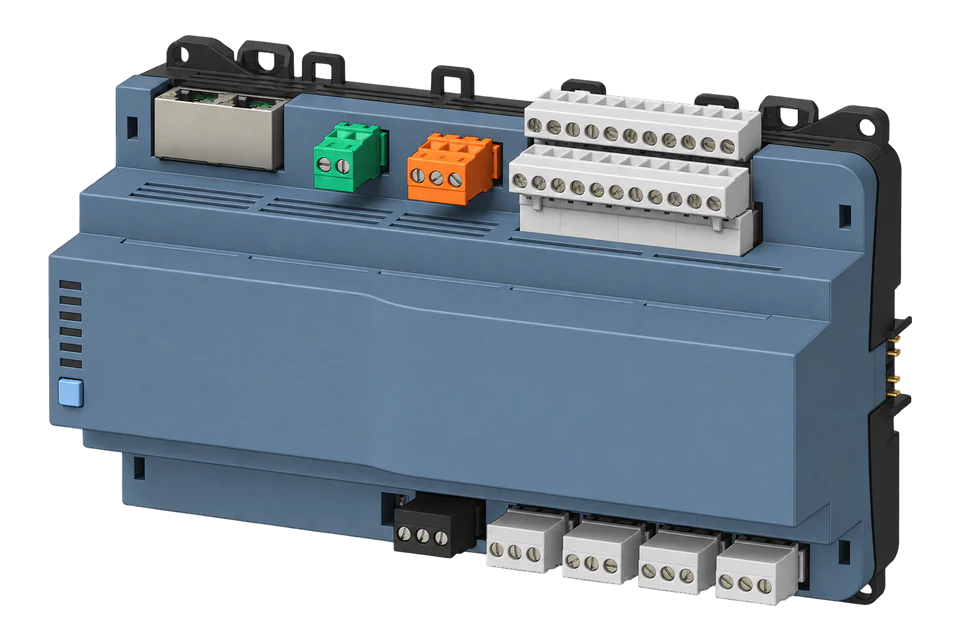
- BACnet/IP
Building automation controller
Compatibility
BACnet/IP integration, build check required
The manufacturer documents BACnet/IP and the inspected Edge source contains a BACnet client. This guide applies only to Edge builds containing that client; a minimum released Edge version and physical controller pairing have not been verified.
Exact PXC4.E16-2 S55375-C150 with a commissioned BACnet/IP application. PXC4.E16S-2 has different field-integration limits. The supplied guide has no fixed object instances or Modbus register template. Edge build availability and physical pairing are not verified; this path requires a build containing its BACnet client. BACnet/SC is outside the proposed connection.
Connect it with
-
Gateway ZGW-20From €899 ex VAT Configure Gateway
-
Evaluation Gateway on a Raspberry Pi Edge with one device licensedFree Set up Evaluation Gateway on a Raspberry Pi

The commissioned controller exposes the required local or integrated points
- BACnet
- Edge
- Platforms
Models
| Models | Interface | Route into Edge |
|---|---|---|
| PXC4.E16-2 · S55375-C150 | 16 onboard points; TXM expansion; up to 40 M-Bus/Modbus integration points; KNX PL-Link | This guide covers commissioned BACnet/IP measurements from the full -2 variant. |
| PXC4.E16S-2 · S55375-C152 | 16 onboard points and TXM expansion; zero listed M-Bus/Modbus integration points and no KNX PL-Link devices | Do not use the full variant’s field-meter integration capacity for this limited variant. |
| Earlier PXC4.E16 and regional variants | Different hardware/order codes and documentation | Confirm the exact datasheet and application; this guide is limited to the -2 generation. |
Specifications
The full E16-2 has 12 universal I/O and 4 relay outputs. Its point budget separates physical I/O from integrated field data: up to 50 onboard plus TXM points and up to 40 integration points, for 90 combined. The apparent 250 M-Bus device address capacity does not create 250 freely usable measurement points.1
- Exact hardware
- PXC4.E16-2, S55375-C150; not PXC4.E16S-2 S55375-C1521
- Supply and installation
- AC or DC 24 V; DIN-rail or screw mounting; plug-in screw terminals1
- Physical I/O
- 16 onboard: 12 UIO and 4 relays. Up to 50 onboard plus TXM points.1
- Integrated measurements
- Up to 40 total M-Bus, Modbus TCP and Modbus RTU data points; up to 90 combined I/O and integration points1
- Serial field network
- One configured RS-485 network for Modbus RTU or M-Bus level converters. M-Bus needs a level converter; device count is constrained by point and object capacity.1
- KNX PL-Link
- Up to 64 devices on the full E16-2. These do not count as integration points, but BACnet object limits still apply.1
- BACnet and engineering
- BACnet/IP or BACnet/SC; B-BC Rev 1.20. SC node only, not hub. ABT Site engineers and commissions the application.1
- Networking
- Two-port Ethernet switch and WLAN for engineering/commissioning; this guide uses the commissioned wired BACnet/IP network1
- Installation envelope
- Front parts in DIN cut-out: IP30; terminals: IP20. Operating ambient -5 to +45 °C or +50 °C depending on mounting orientation; follow the datasheet mounting table. Humidity 5–95%, non-condensing.1
Interface
Documented measurements and integration boundaries for PXC4.E16-2.
- Measured temperatures or other local inputs exposed by the commissioned application.
- Meter readings integrated over Modbus or M-Bus and mapped by the engineer to BACnet objects.
- Object name, description, type, instance, engineering unit and source refresh interval.
- Controller-side reliability or quality information used to distinguish a source failure from a valid reading.
Assessment
PXC4.E16-2 S55375-C150 over BACnet/IP. This is source-qualified guidance, not physical Edge/controller validation.
- InteroperabilitySupported with conditions
- BACnet/IP and conversion of integrated Modbus data into BACnet I/O are documented; identities belong to the engineered application.12
- AccuracyNot applicable
- Meter accuracy and local input suitability must be checked for the source measurement. The controller’s integration capacity is not a meter accuracy class.1
- SecuritySupported with conditions
- The controller documents HTTPS and BACnet/SC capability. This proposed BACnet/IP path needs the approved network boundary and does not claim Edge SC support.1
- ReliabilitySupported with conditions
- Object view exposes quality and reliability information for commissioning; retain those checks when identifying source failures rather than accepting discovery alone.34
- RuggednessSupported with conditions
- The datasheet distinguishes IP30 front parts from IP20 terminals and reduces the ambient ceiling for some mounting orientations. Use its mounting table rather than assuming every installation permits +50 °C.1
- ScalabilitySupported with conditions
- The full variant documents 50 physical I/O, 40 integration points and 64 KNX PL-Link devices with separate object constraints.1
- LifecycleSupported with conditions
- Current manufacturer documentation identifies the -2 order codes and ABT Site engineering path. Keep the versioned project and exact hardware identity for replacement.1
Setup
Read one commissioned measurement
Use the project’s actual measured object identified in Object view. V6.1 documents the value, unit and quality properties below; object instances are assigned by the application. Record installed firmware and compare one reading before expanding the point list.
- Identity
- Match the controller model, firmware, IP endpoint and BACnet device instance before selecting a point.
- Object
- Use the Analog Input or Analog Value type and instance found in Object view. Object name is not a Modbus register address.
- Operation
- Read Present_Value (85) and Units (117). These are property IDs, not object instances. Keep WriteProperty and command-priority changes disabled.
- Reference
- The controller web interface’s Object view and, for an integrated point, the corresponding field meter or sensor.
- Quality
- Inspect Reliability (103) and Out_Of_Service (81) in the client when available, or in Object view. Retain timestamps and source refresh timing; Edge does not automatically import every diagnostic property.
Acceptance: Accept when object identity, unit, sign, value and update timing agree with the controller and original measurement. Discovery alone is not acceptance. If the BACnet client is absent from the installed Edge build, stop here and confirm build availability before planning the connection.
-
Check the exact controller
Confirm PXC4.E16-2 S55375-C150 and record firmware and ABT Site project version. Obtain authorised access and the project backup. The E16S-2 has no listed M-Bus/Modbus integration capacity; a visually similar controller is not enough to establish this route.
-
Trace the source of each measurement
Identify whether each requested point comes from onboard I/O, TXM, Modbus or M-Bus. For field meters retain their original map, scale and update interval. Siemens documents mapping integrated Modbus data to BACnet I/O objects; the mapping is application-specific, not a fixed controller register table.
-
Identify the commissioned object
In Object view, open Application for plant points or Field bus for onboard, TX-I/O and integrated meters. The search filters only the selected hierarchy level: use Description, Object name or Object type there. Open the point’s properties and record its object type, instance, name, unit and source. If a search finds nothing, return to the root or the appropriate branch before assuming the point is missing.
-
Check the network and Edge build
Confirm that the approved network uses BACnet/IP and that the installed Edge build contains its BACnet client. Source inspection does not establish the minimum released version. Do not connect this path directly to BACnet/SC or assume an MS/TP serial client. Retain the existing BMS security design.
-
Compare one read before adding more
Discover the intended BACnet device and select a measured Analog Input or Analog Value identified in Object view. Read Present_Value and Units. In the V6.1 property reference these are property IDs 85 and 117; these IDs identify properties, not project object instances. A synthetic value of 23.4 with degrees-celsius means 23.4 °C. Compare the value with Object view and the original sensor or meter, using the reported engineering unit rather than applying the source meter’s register scale a second time.
-
Keep source quality with the measurement
Inspect Reliability (property 103) and Out_Of_Service (81) alongside the reading. Siemens documents that Out_Of_Service stops normal updates to Present_Value and Reliability, so a plausible value can be held or manually simulated. Keep the reading timestamp and source update interval; treat a timeout as stale data rather than zero. Observe these properties without changing outputs, overrides or command priorities.
Common questions
- Can it collect 250 M-Bus meters?
- The datasheet lists addressing capacity of up to 250 meters via level converters, but also limits the full controller to 40 integration data points and applies BACnet object limits. Size the actual points needed from every meter; 250 addresses is not 250 unrestricted meter integrations.1
- Is PXC4.E16S-2 equivalent for metering integration?
- No. The type-summary table gives the S variant zero M-Bus/Modbus integration points, zero KNX PL-Link devices and zero configurable RS-485 field networks. Use the exact order code when selecting a controller for existing field meters.1
- Does a downstream Modbus register become the same-numbered BACnet object?
- No. Siemens maps integrated data into BACnet I/O objects in the engineered application. Use the project’s object list and property view to identify the measurement; do not convert a register address into an object instance by arithmetic.23
- Does this require Building X?
- The specification documents a local embedded web interface and BACnet/IP alongside Building X connectivity. This guide uses the commissioned local interface, not a cloud connection. Obtain ABT Site engineering access and applicable project entitlements from the system owner; no free engineering-tool licence is implied.1
Related devices
Sources
- PXC4.E16-2 automation stations, A6V15239325, 11 December 2025 (opens in a new tab)
- PXC4/5/7 planning: Modbus data mapped to BACnet I/O (opens in a new tab)
- Desigo PXC4/5/7 commissioning V6.1: Object view (opens in a new tab)
- Desigo PXC4/5/7 commissioning V6.1: I/O properties (opens in a new tab)
Further reading
Product names and trademarks belong to their owners. Publication does not imply endorsement or a commercial relationship.