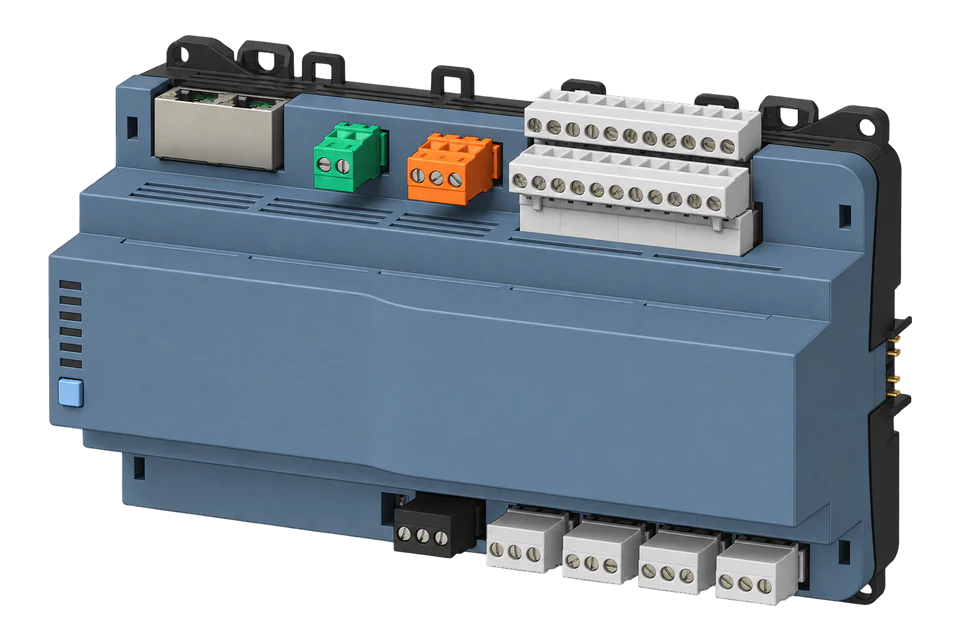
Siemens PXC5.E24.A
Building automation controller
PXC5.E24.A S55375-C120 exposes commissioned BACnet objects for temperatures, equipment states and other building measurements, and it is compatible with EpiSensor Edge over BACnet/IP. The public PXC.A manual and PICS describe identity, property reads, engineering units and quality. Discover the installed object list, select a measurement and compare it with Desigo before expanding monitoring. The controller and its PPCL application retain control.
Compatibility
Compatible with EpiSensor Edge over BACnet/IP
Edge’s BACnet/IP client reads the controller’s commissioned objects over its Ethernet interface. Siemens documents BACnet/IP over UDP/IP, and the current PICS lists ReadProperty and ReadPropertyMultiple; the live Device object and Object_List give the starting inventory. BACnet/SC and BACnet MS/TP are not Edge routes.
PXC5.E24.A S55375-C120, with reference manual A6V12954388_en--_e and the April 2026 PICS. Site check: confirm the commissioned system runs BACnet/IP rather than BACnet/SC only, then compare one selected reading with Desigo. Keep the external client read-only; no PPCL, schedule, priority or output changes.
Connect it with

When the commissioned system runs BACnet/IP on the controller’s Ethernet interface
- BACnet
- Edge
- Platforms
Models
| Models | Interface | Route into Edge |
|---|---|---|
| PXC5.E24.A, S55375-C120 | 24 onboard I/O, up to six TX-I/O modules, three Ethernet ports and two configurable EIA-485 field-level interfaces. | Edge’s BACnet/IP client discovers the Device object and reads selected measurements on the commissioned BACnet/IP network. |
| PXC5.E24-N.A, S55375-C131 | No-WLAN hardware variant with its own order number. | Treat it as a distinct hardware identity even where BACnet functions are shared. |
| Earlier PXC5.E24 and other PXC4, PXC5 or PXC7 controllers | Separate order codes, hardware generations, datasheets and capacity limits. | Do not transfer the S55375-C120 identity, firmware assumptions or project object schedule to another controller. |
Specifications
Siemens identifies PXC5.E24.A S55375-C120 as a compact 24-point automation station with BACnet/IP and BACnet/SC, system-management functions and up to six TX-I/O modules.1
- Exact hardware
- PXC5.E24.A, order number S55375-C1201
- Onboard and expansion I/O
- 24 onboard points: 2 DI, 8 UIO, 8 XIO and 6 relay outputs; up to 120 points with six TX-I/O modules1
- Ethernet BACnet
- BACnet/IP over UDP/IP and BACnet/SC over WSS and HTTPS with TLS 1.32
- Field-level interfaces
- Two EIA-485 ports configurable for Siemens P1, BACnet MS/TP or Modbus RTU2
- BACnet profile evidence
- Current PICS includes ReadProperty and ReadPropertyMultiple services and standard analog and binary input and value object types3
Interface
Documented measurements and integration boundaries for PXC5.E24.A.
- Potential temperatures, pressures, flows, equipment states and energy values can appear as project-defined BACnet input or value objects.
- For each approved object retain device and object identifiers, object type, name, description, engineering unit, source, update behavior and reliability or status information.
- A value integrated from Modbus RTU or BACnet MS/TP must retain its original field-device identity, scale, unit and communications status.
- Commandable values, priority-array writes, schedules, alarm acknowledgements, PPCL logic, parameters and physical outputs remain outside this guide.
Assessment
Read-only observation of commissioned PXC5.E24.A S55375-C120 objects over BACnet/IP by Edge’s BACnet/IP client, using public properties and an initial display comparison.
- InteroperabilitySupported with conditions
- Siemens publishes exact-model BACnet/IP, BACnet/SC and BACnet MS/TP support and a current PICS with read-property services; Edge reads BACnet/IP. Object identities come from the project.23
- AccuracyNot yet assessed
- The controller supports diverse local and integrated points, but source accuracy, scale, unit and update behavior belong to each commissioned object and field device.1
- SecuritySupported with conditions
- Siemens documents BACnet/SC with TLS 1.3 and protected engineering interfaces. The BACnet/IP route Edge uses has no transport encryption, so keep it on a segmented controls network.2
- ReliabilitySupported with conditions
- The manual documents Status_Flags, Reliability, Out_Of_Service, input Tracking_Value and Device APDU limits. These support quality-aware observation and bounded property reads; timestamps and stale-data handling belong to the reader.456
- RuggednessSupported with conditions
- Siemens publishes the controller's supply, mounting and environmental specifications; the installation must follow the exact data-sheet orientation and enclosure requirements.1
Setup
-
Confirm the exact controller and project
Record PXC5.E24.A S55375-C120, serial number, firmware, DT+ and ABT Site versions, project backup, device instance and current PICS. Do not substitute the no-WLAN or earlier PXC5.E24 hardware.
-
Identify the active BACnet transport
Confirm whether the commissioned system uses BACnet/IP, BACnet/SC or BACnet MS/TP. Edge reads BACnet/IP. BACnet/SC and MS/TP are separate transports; do not switch a BACnet/SC system to BACnet/IP without the controls owner’s approval.
-
Discover identity and the installed point list
On the commissioned BACnet/IP subnet, use Who-Is/I-Am discovery and record the returned Device instance and address. Read Model_Name, Firmware_Revision, Application_Software_Version and Protocol_Revision from that Device object. Read Object_List to obtain actual object identifiers, then select by Object_Name and Description. Retain the selected type, instance, unit and source; the order code does not assign site point instances. Keep the existing routed-network arrangement and use its approved discovery path.
-
Read one measurement and its quality
Select an Analog Input and read Present_Value, Units, Status_Flags, Reliability and Out_Of_Service. Siemens defines Present_Value in engineering units: a synthetic 23.4 with degrees-celsius means 23.4 °C, not a raw Modbus register needing another scale. Compare it with Desigo and the source sensor. Out_Of_Service decouples the value from the physical input; the proprietary Tracking_Value retains the measured input for diagnosis where exposed. Keep timestamps and mark timeouts as stale, not zero. Use ReadPropertyMultiple for small batches where supported, reducing reply size to the Device APDU and segmentation limits. Issue no WriteProperty request.
Common questions
- Does Edge use BACnet/SC on PXC5.E24.A?
- No. Edge reads the controller over BACnet/IP, which the same Ethernet interface supports. BACnet/SC is a separate transport with its own certificates and trust configuration, and it must not be treated as BACnet/IP.23
- Can an external client read every configured point?
- The installed application determines the point list. Read Object_List from the Device object, then inspect names, units and quality for the measurements needed. A project export can help identify sources but is not the only starting point. Read access follows the site’s network policy; writable properties can be observed without commanding them.13456
- Can this guide write setpoints or outputs?
- No. The PICS includes write services, but this guide releases no WriteProperty operation, priority-array change, schedule edit, alarm acknowledgement, parameter change or physical output command.3
Related devices


Sources
- Desigo Modular automation station PXC5.E24.A datasheet A6V14319960 (opens in a new tab)
- PXC5.E24.A datasheet: Interfaces (opens in a new tab)
- Desigo PXC.A BACnet PICS A6V13495554 (opens in a new tab)
- PXC.A reference manual: Device properties (opens in a new tab)
- PXC.A reference manual: I/O quality (opens in a new tab)
- PXC.A reference manual: Analog Input (opens in a new tab)
Further reading
Product names and trademarks belong to their owners. Publication does not imply endorsement or a commercial relationship.