Milesight EM300-DI
Pulse counter
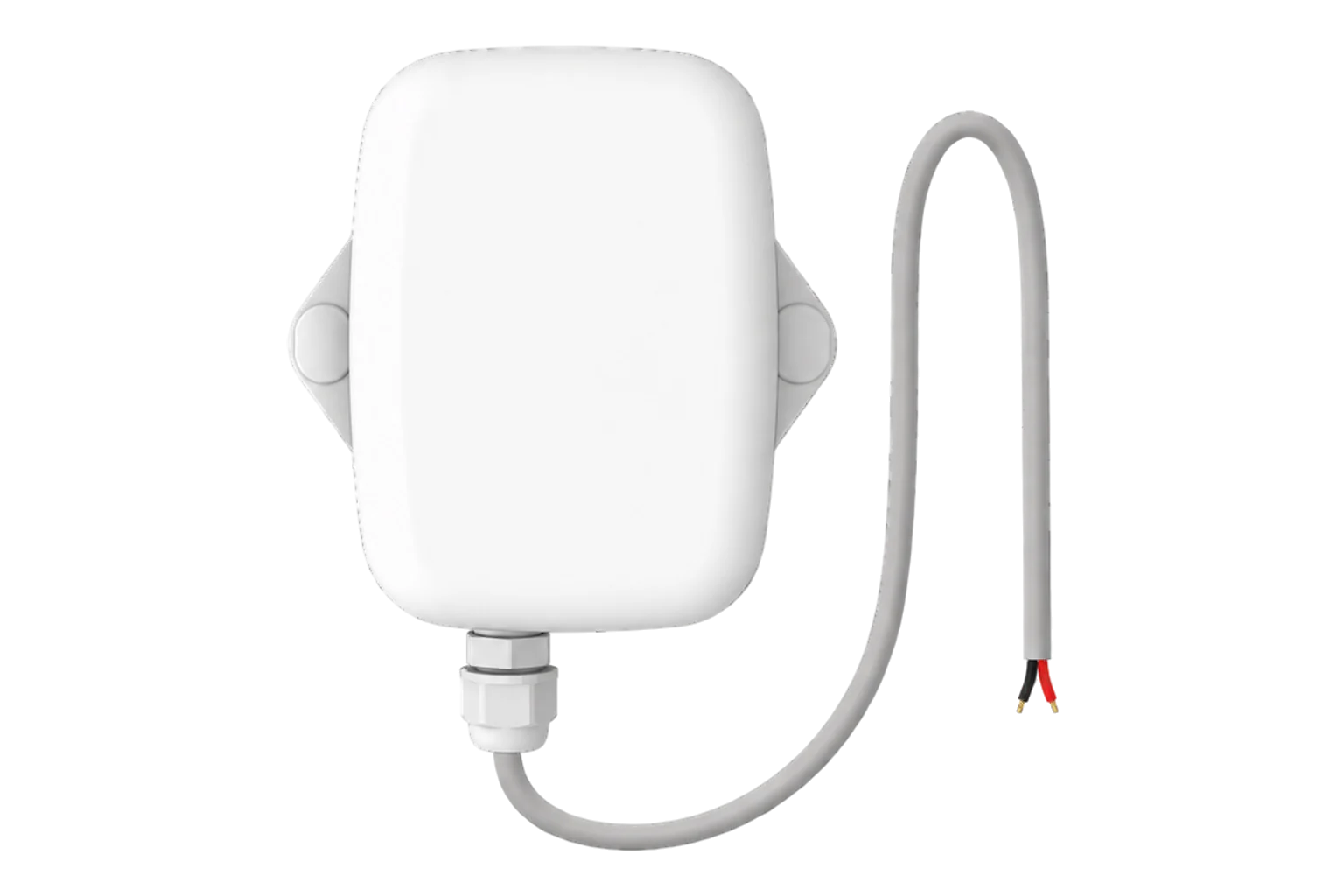
A battery-powered LoRaWAN pulse counter for water, gas and energy meters with a reed switch or passive pulse output. It counts up to 2,000 Hz, converts pulses to litres or other units, and also reports temperature and humidity.
- LoRaWAN
Pulse counter
Compatibility
Compatible with EpiSensor Edge over LoRaWAN.
Register it on your LoRaWAN network server with its DevEUI and keys. Edge, on the Gateway, reads its decoded uplinks from that server.
Edge reads 10 values from it, listed under Interface.
Connect it with
-
Gateway ZGW-20From €899 ex VAT Configure Gateway

Specifications
The EM300-DI reads one dry-contact input on a 1 m cable. It works as a pulse counter or as a digital input. As a counter it takes pulses up to 2,000 Hz with a minimum width of 250 μs, from reed-switch meters or any other passive pulse output. An optional digital pulse filter rejects interference on the line; with it on, pulses longer than 250 μs are counted.12
- Power
- Battery. One replaceable 4000 mAh ER18505 Li-SOCl₂ cell (8000 mAh version available). Milesight quotes 5 years at a 10-minute interval and 25 °C (a laboratory figure). Alkaline cells are not supported.1
- Input
- 1 × GPIO, dry contact, pulse counter or digital input1
- Pulse frequency
- Up to 2,000 Hz, minimum pulse width 250 μs1
- Applicable meters
- Reed-switch meters and other passive pulse outputs1
- Cable
- 1 m, customisable, 3.5 mm connection1
- Temperature
- -30 to 70 °C, ±0.3 °C (0 to 70 °C), ±0.6 °C (-30 to 0 °C), 0.1 °C resolution1
- Humidity
- 0 to 100 % RH, ±3 % RH (10 to 90 % RH), ±5 % RH outside that band, 0.5 % RH resolution1
- Local storage
- 1,000 records, with retransmission after an outage1
- LoRaWAN
- Class A, OTAA or ABP, versions 1.0.2 and 1.0.32
- Frequency plans
- CN470, IN865, RU864, EU868, US915, AU915, KR920, AS923-1 to AS923-41
- Transmit power
- 16 dBm (868 MHz), 20 dBm (915 MHz), 19 dBm (470 MHz)1
- Ingress protection
- IP671
- Dimensions
- 105.6 × 85.2 × 27 mm, 114.2 g with battery and cable1
- Mounting
- Wall screws, 3M tape or cable ties to a pole1
- Approvals
- CE, FCC, ISED, RCM, Telec, RoHS1
Where it is used
Main and branch water meters with a reed-switch output in basements, meter pits and risers, where running a cable to a wired counter is not practical.
Water consumption monitoring for commercial buildingsGas and other meters with a passive pulse output, read into Edge beside the site's electricity metering.
Pulse meter remote monitoringOvernight leak detection on a water supply, using the flow timeout alarm when the count never stops rising.
Water consumption monitoring for commercial buildings
Interface
- Device class
- Class A2
- Regional plans
- EU868, US915, AU915, AS923, KR920, IN865, RU864, CN470
- Activation
- OTAA or ABP
- LoRaWAN version
- 1.0.2 or 1.0.3
- Default uplink interval
- 10 minutes (1 to 1,080 minutes)
Ports
| FPort | Direction | Carries |
|---|---|---|
| 85 | Uplink | Pulse total or input state, temperature, humidity, battery, alarms, stored history and the information packet sent on joining |
| 85 | Downlink | Reporting interval, interface type, pulse conversion, count value, counter start, stop and clear, flow and outage alarms, temperature thresholds, time zone and storage |
Decoded fields
Readings and settings, with units and ranges where Milesight publishes them. readable, readable and writable, writable only.23
| Reading | Unit | Range or values | Access |
|---|---|---|---|
| Measurements 6 | |||
| Converted totalChannel 05, type E1: 32-bit float. Equals the raw pulse count when conversion is off; otherwise in the unit set on the device | - | - | Read only |
| Pulse countChannel 05, type C8: unsigned 32-bit. Sent only by firmware 1.2 and earlier | pulses | - | Read only |
| Digital inputChannel 05, type 00, when the input is set as a digital input | - | lowhigh |
Read only |
| TemperatureChannel 03, type 67: signed 16-bit, divided by 10 | °C | -30 to 70 °C | Read only |
| Relative humidityChannel 04, type 68: unsigned 8-bit, divided by 2 | % RH | 0 to 100 % RH | Read only |
| Flow or outage alarmChannel 85, type E1: the converted total followed by the alarm code 01 to 04 | - | water outage timeoutwater outage clearedwater flow timeoutwater flow cleared |
Read only |
| Settings 3 | |||
| Water conversion valueSent with every total: unsigned 16-bit, divided by 10. Set with downlink FF A2 | - | - | Read and write |
| Pulse conversion valueSent with every total: unsigned 16-bit, divided by 10. Set with downlink FF A2 | pulses | - | Read and write |
| Reporting intervalDownlink channel FF, type 03: unsigned 16-bit | s | 60 to 64,800 s | Write only |
| Diagnostics 1 | |||
| Battery levelChannel 01, type 75. An alarm uplink is sent when it reaches 1 % | % | 0 to 100 % | Read only |
Each uplink is a run of channel, type and value fields, with multi-byte values in little-endian order. On current firmware the count arrives as channel 05, type E1: the water and pulse conversion values (unsigned 16-bit, divided by 10) followed by the converted total as a 32-bit float. Firmware 1.2 and earlier sends the raw count as channel 05, type C8, an unsigned 32-bit value.23
The converted total is water conversion ÷ pulse conversion × pulse count. The unit you set is stored in the device and is not sent in the periodic uplink, so record it with the meter's pulse weight when you set up the point in Edge.2
Stored and retransmitted records arrive as channel 21, type CE, with a Unix timestamp, temperature, humidity, alarm type, input state and the converted total. The device needs its clock set, from the ToolBox app or by DeviceTimeReq on LoRaWAN 1.0.3, for those timestamps to be right.2
Setup
-
Register it on the network server
Add the EM300-DI as a Class A device using OTAA, with the device EUI from its label, the join EUI 24E124C0002A0001 and its application key.2
-
Power it on and set the input
In the Milesight ToolBox app, read the device over NFC and power it on. Set the interface type to Counter, match the frequency plan to the network, and for US915 or AU915 with Milesight gateway defaults enable channels 8 to 15.2
-
Enter the pulse weight and starting count
Turn on pulse conversion and enter the meter's pulse weight and unit, for example 1 L per 40 pulses. Set the count to the reading on the meter's register so the two agree from the start.2
-
Wire the meter
Connect the cable to the meter's reed switch or passive pulse output. The input is a dry contact, for a volt-free switch output.1
-
Check one pulse and the total
Draw a known volume through the meter, or wait for the next pulses, and confirm the converted total rises by the matching amount on port 85. Note the meter's register reading beside the decoded total before you connect it to Edge.
Common questions
- Does it send pulses or litres?
- On current firmware it sends a converted total as a 32-bit float, together with the two conversion values. With conversion off the total is the raw count. Firmware 1.2 and earlier sends the raw count as an unsigned 32-bit value instead.2
- Can it detect a leak?
- Yes, indirectly. The water flow timeout alarm fires when the count keeps rising for longer than the time you set, and repeats until the flow stops. The outage timeout does the opposite for a supply that should always be flowing.2
Related devices
Sources
- EM300-DI datasheet (opens in a new tab) (PDF)
- EM300-DI user guide (opens in a new tab) (PDF)
- EM300-DI payload decoder (opens in a new tab)
- EM300-DI product page (opens in a new tab)
- Milesight EM300-DI device type definition (opens in a new tab)
Further reading
Product names and trademarks belong to their owners. Publication does not imply endorsement or a commercial relationship.