Decentlab DL-IAM
Indoor air quality sensor
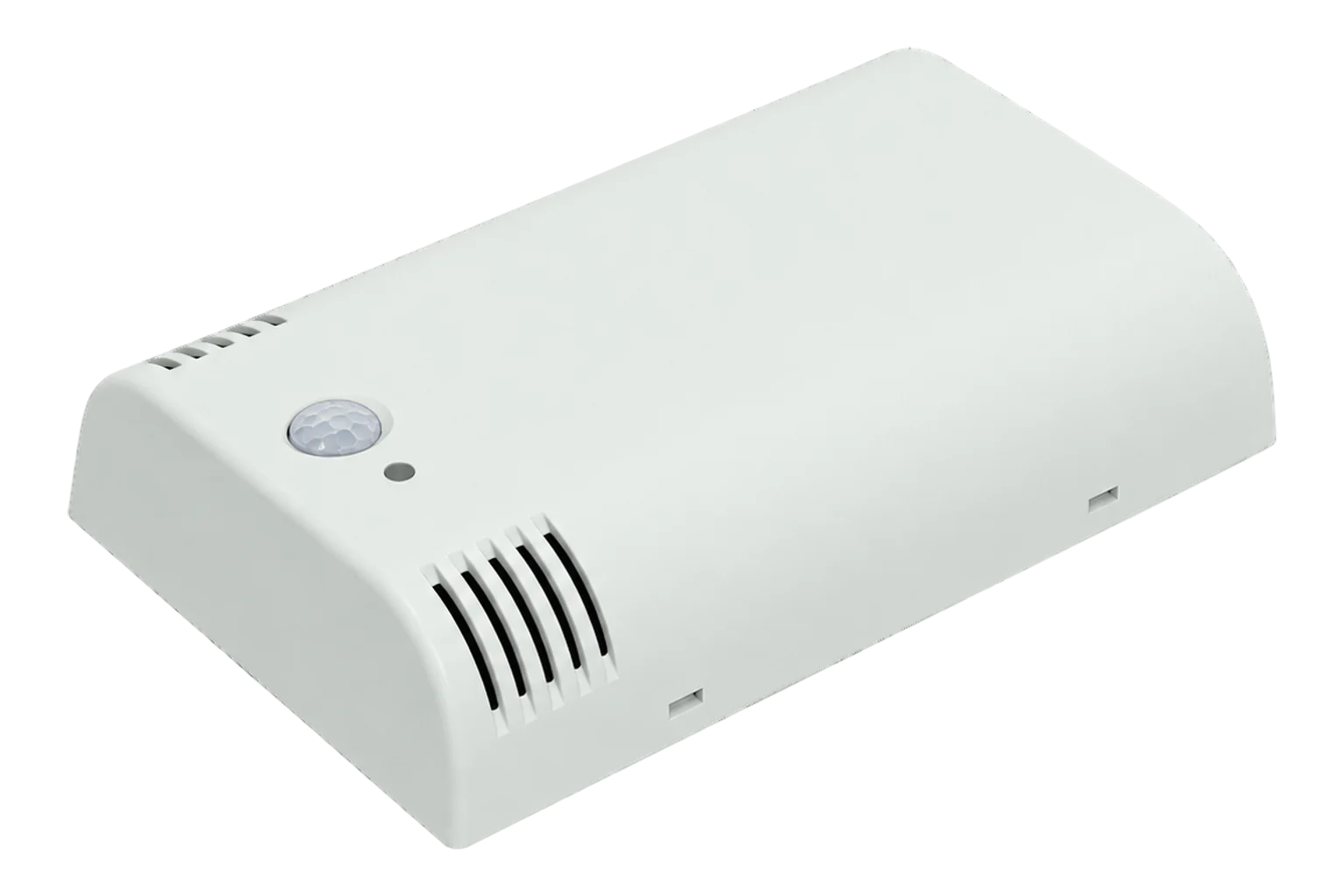
A battery-powered LoRaWAN room sensor for CO₂, total VOC, temperature, humidity, air pressure, light and motion, sampling every 30 seconds and sending the averages every 10 minutes.
Compatibility
Compatible with EpiSensor Edge over LoRaWAN.
Register it on your LoRaWAN network server with its DevEUI and keys. Edge, on the Gateway, reads its decoded uplinks from that server.
Edge reads 12 values from it, listed under Interface.
Connect it with

Specifications
The DL-IAM puts seven sensors in one wall-mounted box: an NDIR CO₂ sensor for 0 to 10,000 ppm, a metal-oxide VOC sensor for total VOC from 0 to 60,000 ppb, temperature and humidity sensors, a barometric pressure sensor, a two-channel ambient light sensor and a passive infrared motion sensor. Decentlab rates CO₂ at ±50 ppm or ±3 % of reading, temperature at ±0.2 °C and humidity at ±2 % RH, typical.1
- Power
- Battery. Two alkaline AA (LR6) cells. About 1.4 years at SF7 and 0.9 years at SF12; 2.7 and 1.2 years with the VOC sensor off. The device runs until the cells fall to 2.0 V; always change both together.1
- CO₂
- NDIR, 0 to 10,000 ppm, ±50 ppm or ±3 % of reading (10 to 40 °C, 20 to 60 % RH; ±10 % above 2,000 ppm)1
- Total VOC
- Metal oxide, 0 to 60,000 ppb, ±15 % of reading, 1.3 % drift per year1
- Temperature
- -40 to 125 °C, ±0.2 °C typical1
- Humidity
- 0 to 100 % RH, ±2 % RH typical1
- Barometric pressure
- 300 to 1,100 hPa, ±1 hPa typical1
- Ambient light
- Up to 100,000 lx, ±30 % typical depending on light source and angle1
- Motion
- PIR activity counter, 94° horizontal and 82° vertical, 5 m1
- Sampling and upload
- 30 s sampling (CO₂ 120 s), 10 min upload1
- LoRaWAN
- Class A; OTAA, ABP, ADR; 14 dBm transmit power, -146 dBm sensitivity1
- Order codes
- DL-IAM-001-EU868, DL-IAM-001-US915, DL-IAM-001-AS923, DL-IAM-001-AU9151
- Operating conditions
- -10 to 50 °C, 0 to 95 % RH non-condensing1
- Enclosure
- White ABS wall-mount, 120 × 80 × 27 mm, 144 g with batteries1
Where it is used
Offices, classrooms, hospitals and shops, where CO₂ and VOC show air quality and the PIR count shows how busy the room is.
Indoor environmental monitoringDemand-controlled ventilation and heating, where room CO₂ and occupancy show when air handling can be turned down.
HVAC energy monitoring for commercial buildingsGreenhouses, mushroom farms and incubators, where CO₂, humidity and temperature drive the process.
Interface
- Device class
- Class A2
- Regional plans
- EU868, US915, AS923, AU915
- Activation
- OTAA or ABP
- Default uplink interval
- 10 minutes (20 samples of 30 s averaged)
Ports
| FPort | Direction | Carries |
|---|---|---|
| 1 | Uplink | Sensor data message; the port can be set from 1 to 223 on firmware 1.6.0 and later |
| 1 | Downlink | Downlink commands to read and change parameters |
Decoded fields
Readings and settings, with units and ranges where Decentlab publishes them.1
| Reading | Unit | Range or values | Access |
|---|---|---|---|
| Measurements 7 | |||
| CO₂Sensor 4: x - 32768 | ppm | 0 to 10,000 ppm | Read only |
| Total VOCSensor 6 | ppb | 0 to 60,000 ppb | Read only |
| TemperatureSensor 1: x / 65535 × 175 - 45 | °C | -40 to 125 °C | Read only |
| Relative humiditySensor 1: x / 65535 × 100 | % RH | 0 to 100 % RH | Read only |
| Barometric pressureSensor 2: x × 2 | Pa | 30,000 to 110,000 Pa | Read only |
| IlluminanceCalculated from the two light channels | lx | - | Read only |
| Motion activitySensor 5: PIR activity count | - | 0 to 65,535 | Read only |
| Diagnostics 5 | |||
| Light, visible and infraredSensor 3, channel 0, raw | - | - | Read only |
| Light, infraredSensor 3, channel 1, raw | - | - | Read only |
| CO₂ sensor statusSensor 4, second value; 0 when normal | - | - | Read only |
| CO₂ raw IR readingSensor 4, third value | - | - | Read only |
| Battery voltageSensor 0: x / 1000 | V | - | Read only |
Each message starts with a 5-byte header: protocol version (2), a 16-bit device ID and 16 flag bits. Flag n set means sensor block n follows. Values are big-endian 16-bit integers, converted as in the table; a message can be as short as the header and the battery voltage.1
Illuminance is worked out from the two light channels: the larger of (CH0 - 1.64 × CH1) × 1.5504 and (0.59 × CH0 - 0.86 × CH1) × 1.5504, in lux. Decentlab says it is not a precision lux meter.1
Setup
-
Fit the batteries
Insert two fresh, identical alkaline AA (LR6) cells into the holder on top of the sensor unit.1
-
Register it on the network server
Add the DL-IAM to the site’s LoRaWAN network server with its keys for OTAA, and load Decentlab’s DL-IAM decoder for the version 2 message format.1
-
Switch it on
Press and hold the button for 3 seconds until the LEDs fade in and out. In active mode the green LED flashes at each measurement, and the device tries to join up to three times per sampling period until it succeeds.1
-
Test the link
Press the button for 1 second to enter test mode (blue LED on), which sends as fast as possible and returns to active mode after 20 minutes. Two green flashes after a transmission mean it was sent; four mean it failed.1
-
Leave the periods alone
Keep the 30-second sampling period and the send period at their defaults. Changing the sampling period invalidates the VOC sensor’s calibration.1
Common questions
- Does the CO₂ sensor need calibrating?
- Not by hand. Every 8 days it recalibrates from the readings of the last 8 days, on the assumption that the room got fresh air at 400 ppm for a few minutes in that time. The period can be changed, or the routine turned off, with the command set param 2.1
- How long do the batteries last?
- About 1.4 years at SF7 and 0.9 years at SF12 on two alkaline AA cells, including self-discharge. With the VOC sensor turned off that rises to 2.7 and 1.2 years.1
- Can the reporting interval be shortened?
- Decentlab advises against it. The 30-second sampling period must not change, or the VOC calibration becomes invalid, and it recommends leaving the 10-minute send period too.1
- Why is a value missing from some messages?
- Each message carries flag bits that say which sensor blocks are included, so a message can leave a sensor out, for example the CO₂ block. A decoder must read the flags rather than assume fixed positions.1
- Which LoRaWAN port does it use?
- Port 1 for uplinks by default, which can be changed from 1 to 223 on firmware 1.6.0 and later. Downlink commands go on port 1.2
Related devices
Sources
- DL-IAM indoor ambiance monitor datasheet (opens in a new tab) (PDF)
- Configuration interfaces, firmware 1.6.0 (opens in a new tab) (PDF)
- Indoor ambiance monitor including CO₂, TVOC and motion sensor for LoRaWAN (opens in a new tab)
- Decentlab DL-IAM device profile (opens in a new tab)
- Decentlab DL-IAM device type definition (opens in a new tab)
- Decentlab DL-IAM payload decoder (opens in a new tab)
Further reading
Product names and trademarks belong to their owners. Publication does not imply endorsement or a commercial relationship.