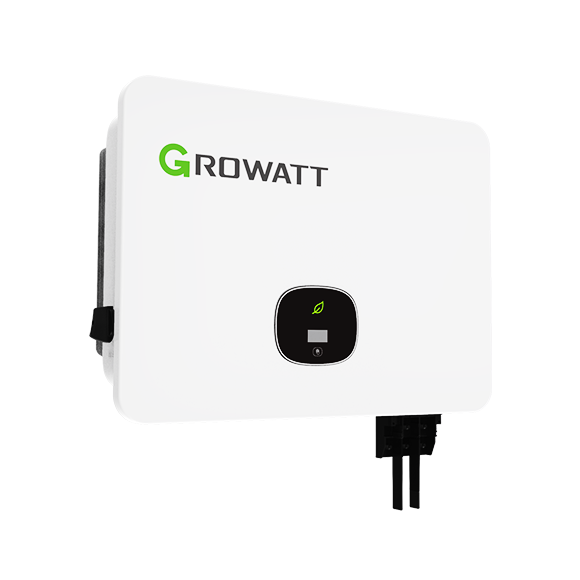
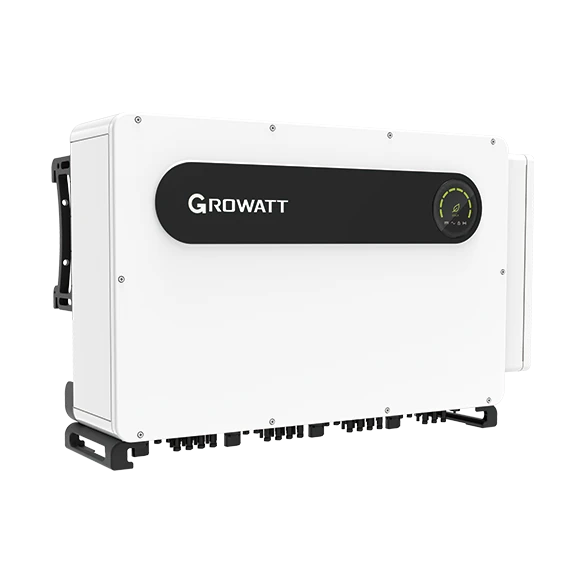
Growatt MID 36-60KTL3-X3
Commercial PV inverter
The standard MID 36/40/50/60KTL3-X3 models separate inverter monitoring on RS485 pins 3/4 from the meter on pins 7/8 and DRMS contacts. Growatt V1.24 lists MID in its TL3-X family, giving a useful best-effort starting read for serial identity, state, AC output and frequency. The procedure below retains the X3 connector and its four/five-MPPT model differences.
- Modbus RTU
Commercial PV inverter
Compatibility
Documented MID/TL3-X starting map
Growatt V1.24 explicitly lists MID/TL3-X registers but predates the X3 suffix. Use the documented serial, state, power and frequency as a best-effort starting set. Compare returned identity with the nameplate and fresh values with the local display before extending polling.
Standard MID 36KTL3-X3, MID 40KTL3-X3, MID 50KTL3-X3 and MID 60KTL3-X3 only. Record the exact nameplate, firmware, regional grid setting, monitoring accessory, meter and occupied connector pins. The 36KTL3-X3 LV and 50/60/70KTL3-X3 MV variants have different electrical specifications and are outside this guide.
Connect it with
-
Modbus Interface ZMB-3XFrom €399 ex VAT Configure Modbus Interface
-
Gateway ZGW-20From €899 ex VAT Configure Gateway


The MID X3 monitoring port is available and the inverter responds with the documented MID/TL3-X layout
- Wired
- Edge
- Platforms
Models
| Models | Interface | Route into Edge |
|---|---|---|
| MID 36KTL3-X3 and MID 40KTL3-X3 | Four MPPTs; 16-pin socket with separate monitoring and meter RS-485 pairs | Use monitoring pins 3/4 and the MID/TL3-X starting read below; retain the standard X3 model and local display comparison. |
| MID 50KTL3-X3 | Four MPPTs and eight PV strings; the standard 400 V-class variant | Do not substitute the 50KTL3-X3 MV rating or its electrical limits. |
| MID 60KTL3-X3 | Five MPPTs and nine PV strings; the standard 400 V-class variant | Confirm the meter and monitoring topology separately from the 60KTL3-X3 MV variant. |
Specifications
The August 2026 manual lists four standard three-phase ratings of 36, 40, 50 and 60 kW at nominal 230/400 V. The 36, 40 and 50 kW units have four MPPTs; the 60 kW unit has five. Its separate LV and MV tables must not be applied to these standard variants.12
- Rated AC output
- 36, 40, 50 and 60 kW respectively; nominal three-phase 230/400 V1
- PV trackers and strings
- Four MPPTs and eight strings on 36/40/50 kW; five MPPTs and nine strings on 60 kW1
- Monitoring connection
- 16-pin socket pins 3/4: RS485A1/B1 for inverter monitoring1
- Meter connection
- 16-pin socket pins 7/8: RS485A3/B3 for the commissioned meter1
- DRMS contacts
- Pins 9-12: DRM1/5 through DRM4/8; pin 13 REF/GEN; pin 14 DRM0/COM1
- Optional monitoring
- USB-A Shine WiFi, 4G and LAN accessory families listed in section 10.21
- Enclosure
- IP66; 579 × 429 × 224 mm; -25 to +60 °C with derating above 45 °C1
Interface
Documented measurements and integration boundaries for MID 36-60KTL3-X3.
- The manual’s 16-pin socket assigns monitoring RS485A1/B1 to pins 3/4 and meter RS485A3/B3 to pins 7/8. Growatt V1.24 separately supplies the MID/TL3-X starting registers below; the meter’s map is a different interface.
- DRMS uses dry-contact inputs on pins 9-12, REF/GEN on pin 13 and DRM0/COM on pin 14. These are grid-response inputs, not a general-purpose serial or software dispatch API.
- Growatt describes optional USB-A Shine monitoring modules, including WiFi, 4G and LAN types. A module's network uplink does not establish a local Modbus TCP server or grant third-party access.
- The manual discusses SDM630CT-Modbus V3 and other meter communication. Those Modbus details describe the inverter-to-meter arrangement and cannot be copied into an inverter read template.
- A point-of-connection import or export value comes from a correctly installed meter, not from inverter AC production alone. Grid-code settings, export limitation and DRMS contacts remain under the commissioned plant design.
Assessment
Standard MID 36/40/50/60KTL3-X3 monitoring pair and V1.24 MID/TL3-X best-effort starting read. Separate meter and DRMS functions remain under their commissioned design.
- InteroperabilitySupported with conditions
- The exact X3 manual defines monitoring pins 3/4; V1.24 lists MID/TL3-X registers. Serial identity and local display comparison qualify the starting set on an installed X3.14
- AccuracyLimited
- The starting map gives inverter AC generation and frequency with integer scaling. It does not replace net import/export from the separate site meter.14
- SecurityNot yet assessed
- Third-party serial access control and client permissions are not specified.1
- ReliabilityNot yet assessed
- Third-party polling capacity, recovery and stale-value behavior are not documented.1
- RuggednessSupported with conditions
- The manual specifies IP66 and a -25 to +60 °C operating range, derating above 45 °C. Preserve ventilation, sealed connectors and the installed environmental limits.1
- ScalabilityNot yet assessed
- The documentation does not establish bus loading or simultaneous third-party clients across a fleet.1
Setup
Read MID X3 identity, AC power and frequency
Best-effort TL3-X layout from Growatt V1.24. Use an individually addressed inverter (1–254), the configured serial framing and standard RTU CRC16. Register numbers below are literal PDU offsets, not 40001-style references.
- Identity and state
- FC03 holding 23, quantity 5: PDU 03 00 17 00 05. Ten serial characters are stored two ASCII characters per word. Compare with the nameplate. FC04 input 0, quantity 1: 04 00 00 00 01; status 0 waiting, 1 normal, 3 fault in this map.
- AC output power
- FC04 input 35, quantity 3: PDU 04 00 23 00 03. Registers 35/36 are the high/low words of AC output power, unsigned, at 0.1 W per count; 37 is frequency at 0.01 Hz. Join power high word first and multiply by 0.1. Synthetic 00 01 E2 40 gives 123456 × 0.1 = 12345.6 W, not Float 32.
- Frequency and bank selection
- Synthetic frequency 13 88 is 5000 × 0.01 = 50.00 Hz. This TL3-X table places AC power at 35/36; 11/12 are PV3 voltage/current, not AC power. MIN/TL-X and MOD TL3-XH use other register banks. Compare values with the inverter display rather than silently changing banks.
- Response and measurement boundary
- The PDUs omit slave address and CRC. If identity fails, check address, framing, polarity and bus ownership first. Keep exceptions, incomplete responses and timeouts unavailable, not zero. AC inverter output is not grid-point import/export; leave meter, DRM, export-limit and grid-protection control with their commissioned owner.
Acceptance: Use V1.24 as the starting revision and record installed firmware once. Compare serial, status, AC power and frequency with the local display; a failed comparison calls for checking framing, address, polarity and the applicable MID map. Physical Edge polling has not been tested.
-
Identify the standard X3 variant
Record the complete nameplate, firmware and grid code. Check that the suffix does not identify an LV or MV model, and note the installed meter, logger and DRMS wiring.
-
Trace the 16-pin socket
Use section 10.1 of the manual for the installed hardware. Distinguish monitoring pins 3/4, meter pins 7/8 and dry contacts 9-14 before proposing any independent connection.
-
Start with serial, state and AC power
Use the configured slave address and serial framing. Read FC03 holding 23–27 for serial identity, FC04 input 0 for state and FC04 input 35–37 for AC power/frequency. The worked check gives literal offsets, request bytes and integer scaling. Compare this small set with the local display.
-
Compare generation and site measurements
Check fresh inverter power, state and frequency against the local display or existing Growatt view. Keep exceptions and timeouts unavailable rather than zero. Use the separate site meter for point-of-connection import/export.
-
Keep control under the commissioned design
Retain grid protection, export limits and DRMS on the installed control scheme. A flexibility connection requires a separate documented control path, authority and fail-safe acceptance.
Common questions
- Can Edge read the MID X3 directly over RS-485?
- The manual identifies monitoring pins 3/4, and V1.24 documents the MID/TL3-X register layout. Use an isolated RS485 interface and one monitoring master, then compare serial and live output with the local display using the bounded first read below.14
- Can the meter Modbus examples be used for inverter production?
- No. The meter examples describe a separate inverter-to-meter interface on pins 7/8. They do not define inverter production registers on monitoring pins 3/4.1
- Are DRMS contacts a VPP command interface?
- The documented DRMS pins are dry-contact grid-response inputs. A VPP dispatch design needs its own authority, command, acknowledgement and fail-safe specification; this guide establishes none of those software functions.1
Related devices
Sources
- MID 36-60KTL3-X3 user manual, August 2026 (opens in a new tab) (PDF)
- MID 36-60KTL3-X3 datasheet, August 2026 (opens in a new tab) (PDF)
- MID 36-60KTL3-X3 product page (opens in a new tab)
- Growatt Inverter Modbus RTU Protocol V1.24 (public mirror) (opens in a new tab)
Further reading
Product names and trademarks belong to their owners. Publication does not imply endorsement or a commercial relationship.