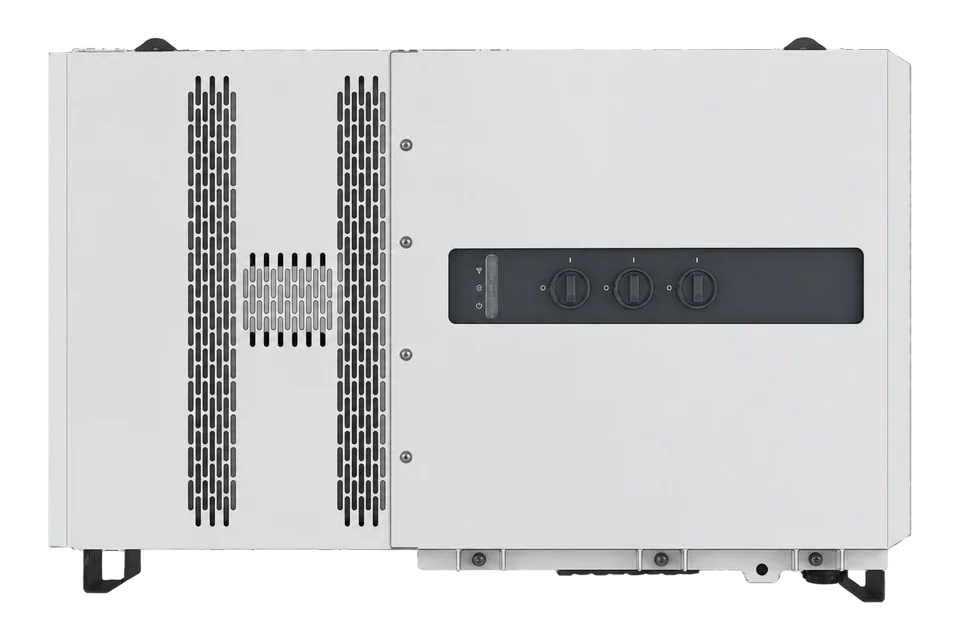
Fronius Tauro Eco 100-3-D
Commercial PV inverter
Tauro Eco 100-3-D is a 100 kW commercial PV inverter with direct string inputs and one MPP controller. Its three DC input groups must not be mistaken for independent trackers. The P variant accepts pre-combined inputs and has different input limits. Use the D variant’s own technical table when comparing array design, fuses and current limits. The monitoring connection described here does not change the approved PV design or grid settings.
- Modbus TCP
Commercial PV inverter
Compatibility
Compatible through Modbus TCP
The manufacturer documents a local SunSpec Modbus interface. Discover the installed model list and verify the exact inverter identity before selecting measurement offsets.
Fronius Tauro Eco 100-3-D: direct-string 100 kW variant on a 380/400 V three-phase grid. Record the installed firmware and discover its SunSpec models using the documented local interface. Eco 100-3-P pre-combined inputs, Eco 99 and Tauro 50 are separate variants.
Connect it with
-
Gateway ZGW-20From €899 ex VAT Configure Gateway
-
Evaluation Gateway on a Raspberry Pi Edge with one device licensedFree Set up Evaluation Gateway on a Raspberry Pi

For read-only measurements from the individual inverter
- Modbus
- Edge
- Platforms
Models
| Models | Interface | Route into Edge |
|---|---|---|
| Eco 100-3-D | 100 kW, direct-string, one MPPT | Use the exact D-variant manual and discovered SunSpec models. |
| Eco 100-3-P | Pre-combined DC inputs | Different input limits and array topology; not the direct-string variant. |
| Tauro 50 / Eco 99 | Different rating and PV topology | Do not substitute their technical tables for Eco 100-3-D. |
Specifications
Each Tauro needs its own direct LAN connection to use Modbus TCP. The communication settings expose the selected SunSpec model type, the configured TCP port and distinct inverter and meter identities. The inverter endpoint uses unit ID 1, while the attached meter is separate. Reading the inverter therefore does not automatically give the site’s import, export or net consumption; those require the correct meter endpoint and measurement location.1
- Exact variant
- Tauro Eco 100-3-D; direct string connection, 100 kW AC1
- PV topology
- One MPP controller; three DC input groups do not mean three independent MPPTs1
- PV limits
- 1000 V maximum DC; 580–930 V MPP range; 150 kWp maximum total PV field power1
- Grid
- Three-phase 380/220 V or 400/230 V; regional grid settings remain installer-controlled1
- Connection
- Direct LAN connection for each inverter; use the configured Modbus TCP port1
- Inverter identity
- TCP inverter unit ID fixed at 1; meter default 200 is a different endpoint1
- SunSpec selection
- float or int + SF changes the measurement model; discover before decoding1
- Environment
- IP65; -40 to +65 °C, or -30 to +65 °C with the built-in AC disconnector option1
Interface
Documented measurements and integration boundaries for Tauro Eco 100-3-D.
- Inverter AC power, voltage and current from supported SunSpec measurement models.
- Generation energy and operating state where implemented by the installed firmware.
- Common-model identity used to bind the point schedule to the exact inverter.
Assessment
Fronius Tauro Eco 100-3-D: direct-string 100 kW variant on a 380/400 V three-phase grid. Record the installed firmware and discover its SunSpec models using the documented local interface. Eco 100-3-P pre-combined inputs, Eco 99 and Tauro 50 are separate variants.
- InteroperabilitySupported with conditions
- The exact model documentation establishes the local interface and identity checks. The installed configuration and existing site controller must be preserved.1
- AccuracySupported with conditions
- The measurement representation and units are documented, but inverter telemetry does not establish revenue-meter accuracy.1
- SecurityNot yet assessed
- The proposed local monitoring path does not establish authenticated or encrypted measurements. Restrict access to the approved site network.1
- ReliabilityNot yet assessed
- No measured availability or guaranteed historical backfill is established for this direct monitoring connection.1
- RuggednessSupported with conditions
- The exact manual specifies the enclosure rating and temperature limits, with option or derating conditions that must be retained.1
- ScalabilitySupported with conditions
- Each Tauro requires its own direct LAN endpoint and identity. Preserve the existing representation and control configuration.1
- LifecycleNot yet assessed
- Versioned documentation is available, but a guaranteed support term or replacement lifetime is not established by the retained sources.1
Setup
Verify the SunSpec map before selecting power
This synthetic discovery example explains the wire request and model traversal. It does not claim a fixed power address for every Tauro firmware.
- Endpoint
- Use the configured TCP port and inverter unit ID 1. The meter endpoint is separate.
- Signature request
- FC03 PDU 03 9C 40 00 02 reads wire address 40000, quantity 2. SunSpec also defines alternate bases 0 and 50000; continue only at the base returning the signature.
- Synthetic signature
- 53 75 6E 53 spells SunS. A successful TCP connection alone does not prove the intended map.
- Synthetic header
- 00 01 00 42 means common model 1 with 66 following data registers. At wire header 40002, the next model begins at 40002 + 2 + 66 = 40070.
- Representation check
- 00 67 means model 103; 00 71 means model 113. Their layouts differ. Use the model actually returned, not the synthetic header as a fixed layout.
- Conditional power request
- For returned SunSpec model 103 only, let H be its discovered header address. FC03 at H + 14, quantity 2, reads signed int16 W and signed W_SF. If H = 40070, read wire address 40084 (0x9C94), PDU 03 9C 94 00 02. This is an example header position; models 113/203/213 use their own layouts.
- Signed scaling example
- Synthetic bytes 30 39 FF FF decode to W = 12345 and W_SF = -1: 12345 × 10^-1 = 1234.5 W. These are two signed integer registers, not Float32. Value 0x8000 means unavailable, not zero. Compare decoded power with the inverter interface.
Acceptance: Accept only after the common identity matches this Tauro and the measurement model, unit and live reference agree. No dispatch or control write is part of this check.
-
Confirm the direct-string variant
Fronius Tauro Eco 100-3-D: direct-string 100 kW variant on a 380/400 V three-phase grid. Record the installed firmware and discover its SunSpec models using the documented local interface. Eco 100-3-P pre-combined inputs, Eco 99 and Tauro 50 are separate variants.
-
Keep the existing controls intact
Record the site controller and current inverter settings before adding a reader. Do not change feed-in limits, I/O priorities, power control or protection. The dedicated inverter-control option is separate from the TCP server configuration; do not enable control for this read-only procedure.
-
Connect to the individual inverter
Use the inverter’s direct LAN endpoint, configured TCP port and fixed inverter unit ID 1. The default meter identity 200 refers to a different device. Do not treat an RS-485 connector or the inverter’s downstream control wiring as an Ethernet monitoring path.
-
Record the SunSpec representation
The manual offers float and int + SF model types. Preserve the commissioned choice; changing it can invalidate another client’s point map. Discover the signature and model headers, then select only models actually returned by this inverter.
-
Verify identity before a measurement
Read the common model and compare manufacturer, model, serial number and firmware with the inverter. Traverse each model using its own length and stop at the end marker. Do not paste fixed power-register addresses from GEN24, Datamanager or a different Tauro setup.
-
Compare a correctly decoded read
Use the discovered model’s data type and units. Integer models require their associated signed scale factor; floating-point models require the corresponding complete float value. Keep unavailable values separate from zero and compare with the inverter’s live display before adding further points.
-
Read model-103 power
When discovery returns model 103, read FC03 at its header +14, two registers, for W and W_SF. Decode both as signed 16-bit integers and calculate W × 10^W_SF in watts. Use the returned model’s own definition for another representation; the worked example below gives the wire request and a scaling check.
Common questions
- Are three DC input groups three MPPTs?
- No. The Eco 100 technical table specifies one MPP controller. Its D-variant input groups have their own current and fuse limits, but they are not three independently tracked arrays.1
- Does TCP monitoring require enabling inverter control?
- The interface and inverter-control settings are separate in the operating instructions. Keep the control option and existing control priorities unchanged for a monitoring-only connection.1
- Can I use the meter endpoint for inverter production?
- No. The manual fixes the inverter TCP identity at 1 and separately shows meter identity 200 by default. Verify which device and measurement location a value represents.1
Related devices
Sources
- Fronius Tauro and Tauro Eco operating instructions (opens in a new tab)
- SunSpec Device Information Model Specification 1.1 (opens in a new tab) (PDF)
- SunSpec three-phase inverter model 103 definition (opens in a new tab)
Further reading
Product names and trademarks belong to their owners. Publication does not imply endorsement or a commercial relationship.