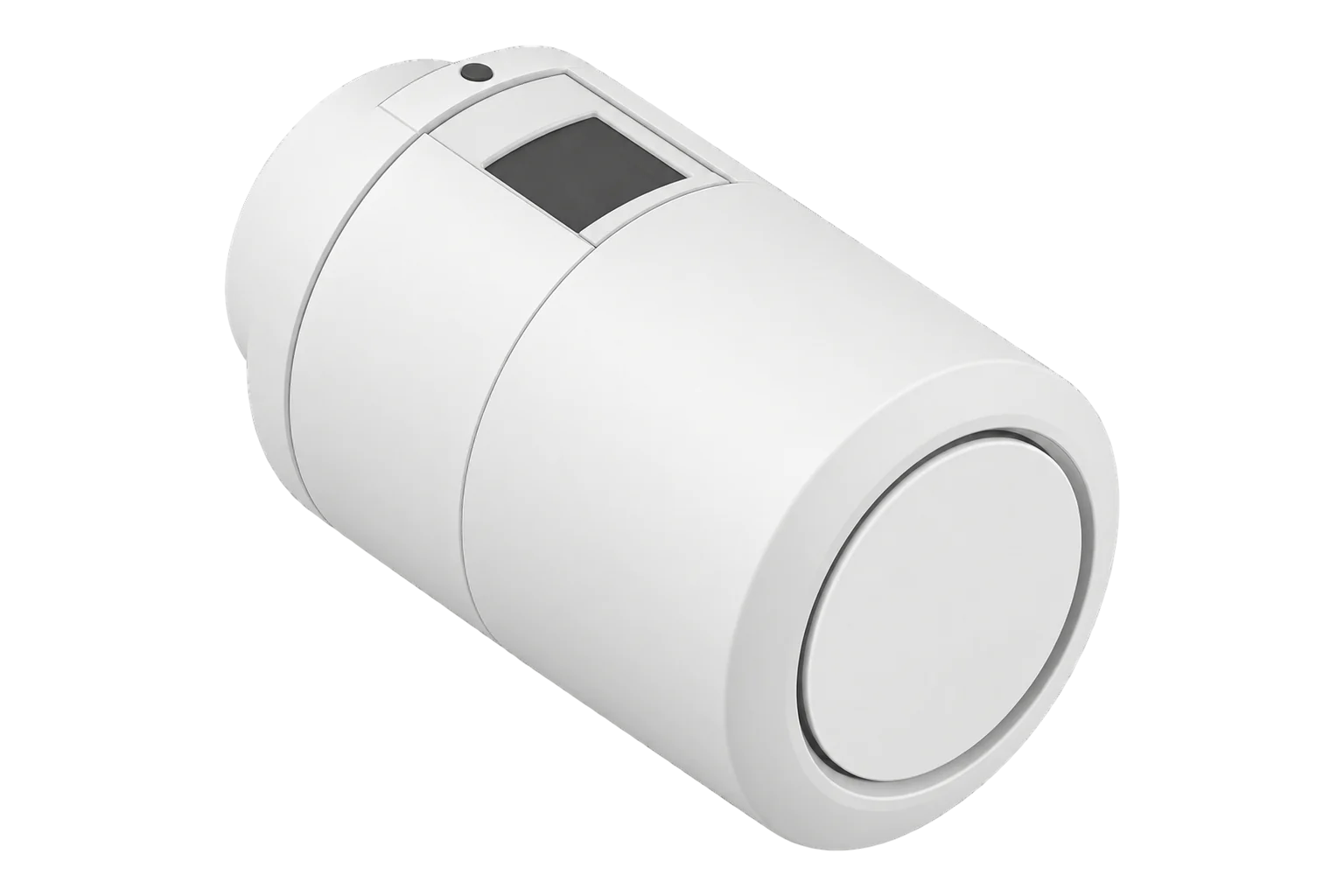
Danfoss Ally 014G2461
Radiator thermostat
The Danfoss Ally radiator thermostat is a Zigbee 3.0 certified valve head with PID control. It sets 5 to 35 °C in 0.5 °C steps, measures every minute, runs about two years on two AA cells and accepts a room temperature from Edge.
Also sold asDanfoss 014G2463Hive UK7004240Popp 701721
Compatibility
Compatible with EpiSensor Edge over Zigbee.
Pair it with the Zigbee radio on an EpiSensor Gateway. Edge reads it locally on the Gateway.
Edge reads 37 values from it, listed under Interface.
Connect it with

Specifications
Danfoss states that the Ally is Zigbee 3.0 certified and speaks the same wireless language as other Zigbee devices. It is also sold under other names: Zigbee2MQTT lists the Danfoss 014G2463, the Hive UK7004240 radiator valve and the Popp 701721 on the same definition. The box includes adapters for Danfoss RA and M30 valves, Caleffi and Giacomini, and Danfoss lists further adapters for RAV, RAVL, RTD and M28 valves.1235
- Power
- Battery. Two AA (LR6) alkaline cells, rated for two years.1
- Order code
- 014G24611
- Wireless
- Zigbee 3.0 certified, 2.4 GHz2
- Setpoint range
- 5 to 35 °C1
- Setpoint step
- 0.5 °C5
- Control
- PID1
- Measurement interval
- 1 minute1
- Spindle stroke
- Linear, up to 4.5 mm; at most 2 mm on the valve, at 1 mm/s1
- Maximum water temperature
- 90 °C1
- Adapters in the box
- RA, M30, Caleffi, Giacomini1
- Ambient temperature
- 0 to 40 °C1
- Protection
- IP201
- Power consumption
- 3 mW standby, 1.2 W in operation1
- Display
- LCD with backlight1
- Width
- 55 mm1
Where it is used
Room-by-room heating control in offices, schools and hotels with wet radiators, regulated on a room sensor where the radiator is boxed in.
Indoor environmental monitoringFinding rooms that heat outside occupied hours by trending each head’s heating demand beside the heating plant’s energy data.
HVAC energy monitoring for commercial buildingsLarge rooms with several radiators, where load balancing keeps the heads from fighting each other.
Interface
Readings and settings, with units and ranges where Danfoss publishes them. readable, readable and writable.
| Reading | Unit | Range or values | Access |
|---|---|---|---|
| Measurements 14 | |||
| System status code | - | - | Read only |
| Climate | - | - | Read only |
| Local temperature | °C | - | Read only |
| Pi heating demand | % | 0 to 100 % | Read only |
| Running state | - | idleheat |
Read only |
| Abs max heat setpoint limit | °C | - | Read only |
| Mounted mode active | - | Binary state | Read only |
| Heat required | - | Binary state | Read only |
| Setpoint change source | - | manualscheduleexternally |
Read only |
| Window open internal | - | quarantineclosedholdopenexternal_open |
Read only |
| Load estimate | - | -8,000 to 3,600 | Read only |
| Preheat status | - | Binary state | Read only |
| Preheat time | - | - | Read only |
| Adaptation run status | - | nonein_progressfoundlostlost_in_progress |
Read only |
| Controls 2 | |||
| Occupied heating setpoint | °C | 5 to 35 °C | Read and write |
| System mode | - | heat |
Read and write |
| Settings 20 | |||
| Max heat setpoint limit | °C | 5 to 35 °C | Read and write |
| Programming operation mode | - | setpointscheduleschedule_with_preheateco |
Read and write |
| Occupied heating setpoint scheduled | °C | 5 to 35 °C | Read and write |
| Keypad lockout | - | unlocklock |
Read and write |
| Mounted mode control | - | Binary state | Read and write |
| Thermostat orientation | - | Binary state | Read and write |
| Viewing direction | - | Binary state | Read and write |
| Heat available | - | Binary state | Read and write |
| External measured room sensor | - | -8,000 to 3,500 | Read and write |
| Radiator covered | - | Binary state | Read and write |
| Window open feature | - | Binary state | Read and write |
| Window open external | - | Binary state | Read and write |
| Day of week | - | sundaymondaytuesdaywednesdaythursdayfridaysaturdayaway_or_vacation |
Read and write |
| Trigger time | - | - | Read and write |
| Algorithm scale factor | - | 1 to 10 | Read and write |
| Load balancing enable | - | Binary state | Read and write |
| Load room mean | - | -8,000 to 3,600 | Read and write |
| Adaptation run settings | - | Binary state | Read and write |
| Adaptation run control | - | idleinitiate_adaptationcancel_adaptation |
Read and write |
| Regulation setpoint offset | °C | -2.5 to 2.5 °C | Read and write |
| Diagnostics 1 | |||
| Battery | % | 0 to 100 % | Read only |
external_measured_room_sensor takes the room temperature in hundredths of a degree (2150 is 21.5 °C). With radiator_covered false, send it at least every 3 hours and ideally every 30 minutes or on a 0.1 °C change. With radiator_covered true, send it at least every 30 minutes and ideally every 5 minutes. After a timeout the head reverts to -8000, meaning no external value.5
For load balancing, enable load_balancing_enable on each head in a room and write the room’s mean to load_room_mean. Each head reports its own load_estimate.5
adaptation_run_status shows whether the head has found the valve’s closing point: none, in_progress, found, lost or lost_in_progress. adaptation_run_control starts or cancels a run.5
Setup
-
Insert the batteries
Insert the batteries and press the o button for 3 seconds until M appears on the display. M is mounting mode, ready for fitting to the valve.5
-
Fit it to the valve
Identify the valve by comparing its body with the outlines in Danfoss’s quick guide, fit the matching adapter and screw the head on.3
-
Open pairing in Edge
Open pairing on the Gateway’s Zigbee network in Edge, then press the o button briefly to put the thermostat into pairing mode.5
-
Finish the installation
When Edge shows the thermostat, press and hold the o button for 3 seconds to complete the installation.5
-
Check one reading
Confirm that Edge identifies it as Danfoss 014G2461, check that adaptation_run_status reaches found, then raise the setpoint and watch heating demand rise.
Common questions
- Does the Danfoss Ally need the Danfoss Ally Gateway?
- No. Danfoss states the Ally is Zigbee 3.0 certified, so it joins the Gateway’s Zigbee network directly and Edge reads and controls it without the Ally app or cloud.2
- Is the Hive radiator valve the same device?
- The Hive UK7004240 radiator valve uses the same Zigbee definition as the Ally, as do the Danfoss 014G2463 and the Popp 701721, so Edge exposes the same readings and controls for them.5
- How often must Edge send the room temperature?
- It depends on radiator_covered. When it is false, at least every 3 hours; when it is true, at least every 30 minutes. Sending every 5 to 30 minutes, or on each 0.1 °C change, keeps control tight.5
- What do the E codes on the display mean?
- E1 and E2 are temperature sensor faults. E6 is a jammed motor; the head retries after 20 minutes. E8 is a communication fault, and E9 means the valve cannot close properly, so check the installation.4
- How do I factory reset it?
- Remove the cover and take out one battery. Hold the black button next to the display while you refit the battery, release it after 10 seconds, then refit the cover.5
Related devices

Sources
- Radiator thermostat, Danfoss Ally, 014G2461 (opens in a new tab)
- Danfoss Ally smart heating (opens in a new tab)
- Danfoss Ally Radiator Thermostat quick guide (opens in a new tab) (PDF)
- Danfoss eTRV E-error codes description (opens in a new tab) (PDF)
- Danfoss 014G2461 device documentation (opens in a new tab)
- Danfoss Ally 014G2461 Zigbee definition (opens in a new tab)
Further reading
Product names and trademarks belong to their owners. Publication does not imply endorsement or a commercial relationship.