Eurotronic SPZB0001
Radiator thermostat
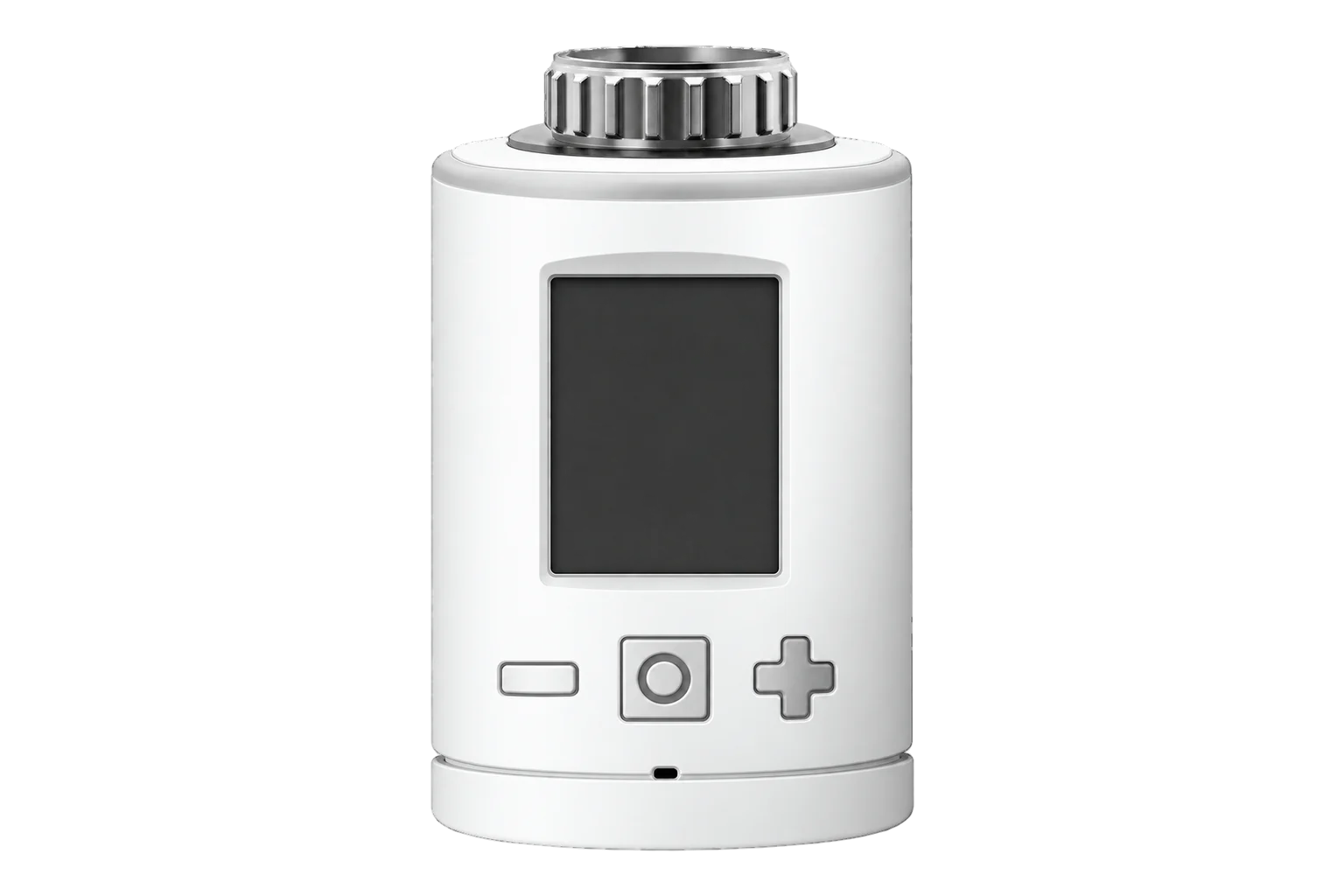
The Eurotronic Spirit Zigbee is a German-made radiator thermostat on the Zigbee Home Automation 1.2 profile. It holds 5 to 30 °C, can hand direct control of the valve position to Edge, and fits M30 × 1.5 valves or Danfoss RA, RAV and RAVL with the supplied adapter.
Also sold asEurotronic Spirit Zigbee
- Zigbee
Radiator thermostat
Compatibility
Compatible with EpiSensor Edge over Zigbee.
Pair it with the Zigbee radio on an EpiSensor Gateway. Edge reads it locally on the Gateway.
Edge reads 12 values from it, listed under Interface.
Connect it with
-
Gateway ZGW-20From €899 ex VAT Configure Gateway

Specifications
The Spirit Zigbee (SPZB0001) is Eurotronic’s Zigbee version of its Spirit energy-saving radiator thermostat, made in Germany. It uses the Zigbee Home Automation Profile 1.2 as a heating device, and Eurotronic states that it can join any Zigbee network and work with Zigbee-certified devices from other manufacturers, with encrypted communication where the network supports it. It runs on two AA cells and takes firmware updates over the air.1
- Power
- Battery. Two 1.5 V LR6 (AA) cells. The battery symbol lights below 15 %. Settings are kept when the cells are changed.1
- Article number
- 7000451
- Wireless
- Zigbee, Home Automation Profile 1.2, 2.4 GHz1
- Transmit power
- +8 dBm1
- Setpoint range
- 5 to 30 °C, 0.5 °C steps on the buttons1
- Calibration offset
- -2.5 to +2.5 °C2
- Valve position control
- 0 to 255 in manual valve mode2
- Valve connection
- M30 × 1.5 mm1
- Adapters in the box
- Danfoss RA, RAV and RAVL (RAV also needs a RAV pin)1
- Default reporting
- Temperature every 20 minutes, battery every 12 hours1
- Protection
- IP201
- Dimensions (W × H × D)
- 56 × 68 × 89 mm1
- Weight
- 176 g with batteries1
Where it is used
Room heating setpoints in offices, schools and guest rooms with wet radiators, with room temperature logged beside them.
Indoor environmental monitoringHeating control run from Edge on a separate room sensor, with the thermostat in manual valve mode as a simple actuator.
HVAC energy monitoring for commercial buildingsTurning heating off in ventilated rooms, from the thermostat’s own window detection or a window contact.
Interface
Readings and settings, with units and ranges where Eurotronic publishes them. readable, readable and writable, writable only.2
| Reading | Unit | Range or values | Access |
|---|---|---|---|
| Measurements 3 | |||
| Room temperatureMeasured at the thermostat. | °C | - | Read only |
| Heating demandThe valve opening. | % | 0 to 100 % | Read only |
| Heating state | - | idleheat |
Read only |
| Controls 5 | |||
| Heating setpoint | °C | 5 to 30 °C | Read and write |
| Current setpointFollows any occupied or unoccupied setpoint written to the thermostat. | °C | 5 to 30 °C | Read and write |
| System modeheat sets boost; off sets the window-open flag and shows OFF. | - | offautoheat |
Read and write |
| Operating mode1: manual valve position. 2: thermostat, the default. | - | 12 |
Read and write |
| Valve positionUsed in operating mode 1 only. 0 is closed, 255 fully open. | - | 0 to 255 | Read and write |
| Settings 3 | |||
| Calibration offset0.1 °C steps. | °C | -2.5 to 2.5 °C | Read and write |
| Child lock | - | LOCKUNLOCK |
Write only |
| Mirror display | - | ONOFF |
Read and write |
| Diagnostics 1 | |||
| Battery | % | 0 to 100 % | Read only |
trv_mode 2 is thermostat mode, the default. trv_mode 1 is manual valve mode: write valve_position from 0 (closed) to 255 (fully open). In manual mode the buttons are disabled and the display shows the valve position.2
system_mode heat sets the boost flag and off sets the window-open flag, which the display shows as OFF.2
The thermostat sends several identical messages in quick succession. A debounce of about 0.5 seconds removes the repeats.2
Error bits: E1 valve adaptation failed, E2 valve movement too slow, E3 valve not moving.1
Setup
-
Open pairing in Edge
Open pairing on the Gateway’s Zigbee network in Edge. The thermostat can only join while the network is accepting devices.1
-
Insert the batteries
Insert the batteries. The display shows PrP, then a flashing radio symbol: a new Spirit is in join mode from the factory. When it has joined, the radio symbol stays on and the Boost button flashes green. ERR means the join failed.1
-
Mount it
Press Boost. When the display shows INS, fit the adapter if the valve needs one and screw the thermostat onto the valve.1
-
Adapt to the valve
Press Boost again. ADA shows while it learns the valve, then the display shows the target temperature. ER1 means no valve was found; check the mounting and the adapter.1
-
Check one reading
Confirm that Edge identifies it as Eurotronic SPZB0001, then raise the setpoint from Edge and watch heating demand rise. Compare the room temperature with a reference thermometer.
Common questions
- Can Edge set the valve position directly?
- Yes. Set trv_mode to 1 and write valve_position from 0 (closed) to 255 (fully open). The thermostat stops regulating and its buttons are disabled until trv_mode goes back to 2.2
- How do I reset it?
- Hold Boost, plus and minus together until the counter on the display reaches 10, and release when RES appears. The display then shows PrP and the valve stem moves to the mounting position. Eurotronic advises a factory reset only when the old Zigbee controller no longer exists.1
- What do ER1, ER2 and ER3 mean?
- ER1: no valve detected. ER2: the closing point was not found. ER3: the valve cannot be positioned; check that the valve pin moves freely. Press Boost to clear the message.1
Related devices

Sources
- Spirit Zigbee installation and operation guide (opens in a new tab) (PDF)
- Eurotronic SPZB0001 device documentation (opens in a new tab)
- Eurotronic SPZB0001 Zigbee definition (opens in a new tab)
Further reading
Product names and trademarks belong to their owners. Publication does not imply endorsement or a commercial relationship.