Third Reality 3RTHS24BZ
Temperature and humidity sensor with display
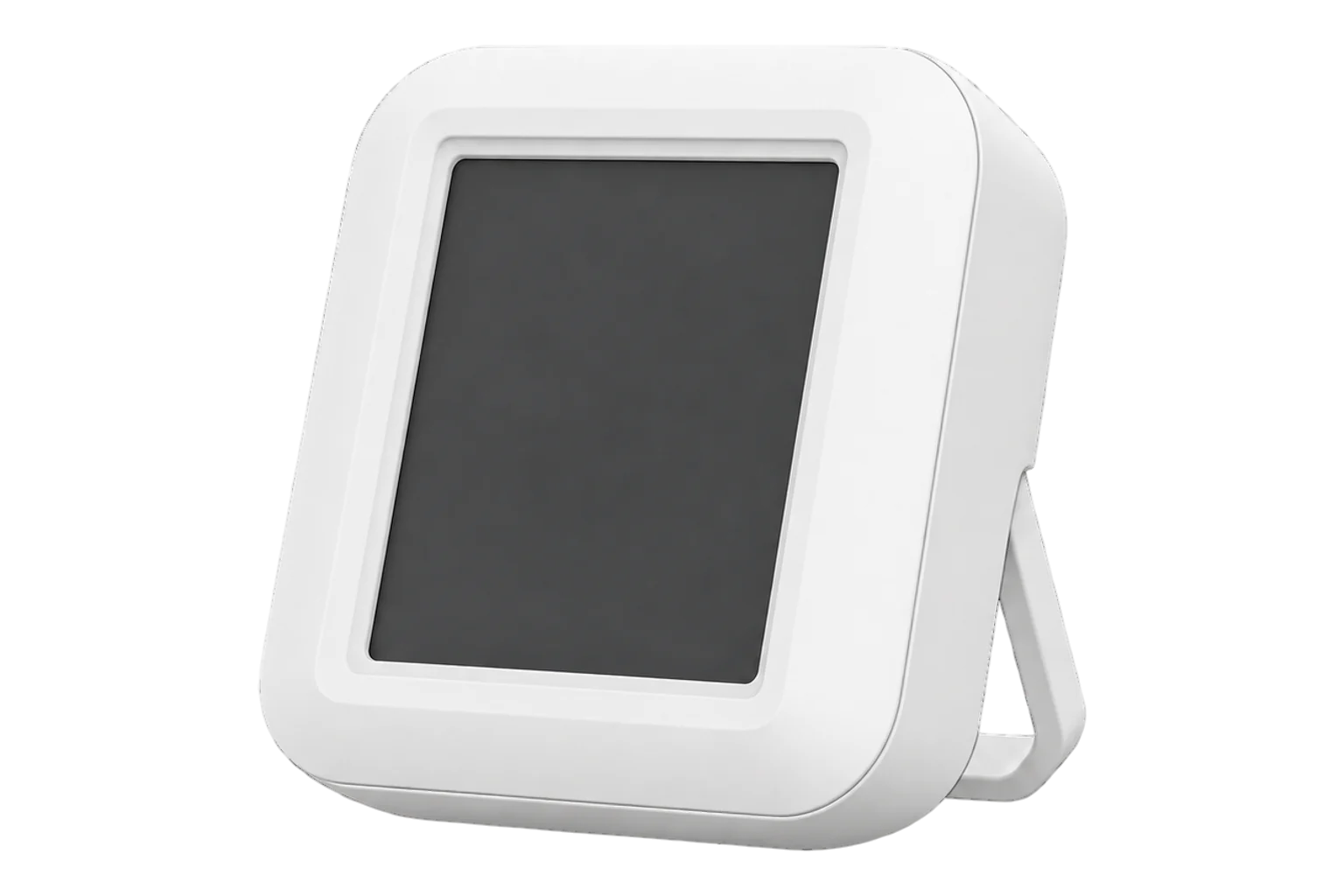
A Zigbee 3.0 room sensor with a 41.5 × 38.0 mm LCD that shows temperature and humidity where it stands. Third Reality rates it at ±1 °C and ±2 % RH across -10 to 50 °C, running on two AAA cells for about a year.
Also sold asThird Reality Temperature and Humidity Sensor with Digital LCD Display
- Zigbee
Temperature and humidity sensor with display
Compatibility
Compatible with EpiSensor Edge over Zigbee.
Pair it with the Zigbee radio on an EpiSensor Gateway. Edge reads it locally on the Gateway.
Edge reads 3 values from it, listed under Interface.
Connect it with
-
Gateway ZGW-20From €899 ex VAT Configure Gateway

Specifications
The 3RTHS24BZ is Third Reality's Zigbee 3.0 temperature and humidity sensor with a built-in LCD. The screen shows the current temperature and humidity, a battery bar and a cloud icon for the network connection, and it refreshes every 20 seconds. A side button switches the display between Celsius and Fahrenheit.12
- Power
- Battery. Two AAA cells, included, rated for about one year in typical use.1
- Temperature range
- -10 to 50 °C1
- Temperature accuracy
- ±1 °C1
- Humidity range
- 0 to 95 % RH1
- Humidity accuracy
- ±2 % RH1
- Display
- LCD, 41.5 × 38.0 mm1
- Display refresh
- Every 20 s2
- Wireless
- Zigbee 3.01
- Operating voltage
- 3 V DC1
- Dimensions
- 61.5 × 61.5 × 18 mm1
- Weight
- 64 g1
- Mounting
- Fold-out kickstand1
- Environment
- Indoor use only1
Where it is used
Room temperature and humidity in offices, meeting rooms, classrooms and homes, where occupants benefit from seeing the reading on the device.
Indoor environmental monitoringA visible check on comms cupboards and small server rooms, where anyone opening the door can read the conditions without a phone or a screen.
Server room and rack temperature monitoringHeating checks in let or managed properties, confirming that rooms reach temperature and that humidity stays low enough to avoid condensation.
Interface
Readings and settings, with units and ranges where Third Reality publishes them.
| Reading | Unit | Range or values | Access |
|---|---|---|---|
| Measurements 2 | |||
| Temperature | °C | - | Read only |
| Humidity | % | - | Read only |
| Diagnostics 1 | |||
| Battery | % | 0 to 100 % | Read only |
Temperature and humidity are reported in the standard Zigbee Temperature Measurement and Relative Humidity Measurement clusters, and battery level in the Power Configuration cluster.3
Temperature and humidity calibration offsets sit in a Third Reality manufacturer-specific cluster (0xFF01), not in the standard measurement clusters.3
Setup
-
Open pairing in Edge
In Edge, open pairing on the Gateway's Zigbee network. The Gateway accepts new devices while pairing is open.
-
Power it on
Peel the protective film off the ventilation holes, fold the kickstand away, open the battery cover and pull out the plastic insulation sheet. The sensor powers up in pairing mode and the cloud icon on the LCD blinks.1
-
Or start pairing by hand
On a sensor that has been paired before, press and hold the side button for 5 seconds and release it. This also resets it, and the blinking cloud icon shows it is in pairing mode.1
-
Confirm the join
The cloud icon turns solid when pairing has finished. If it has not paired within 3 minutes the sensor leaves pairing mode; hold the side button for 5 seconds again. Check that Edge identifies it as Third Reality 3RTHS24BZ.1
-
Check one reading
Compare the LCD, the value in Edge and a reference thermometer placed beside it. Keep your hand away from the side button while you compare: pressing it warms the sensor for about 20 seconds.1
Common questions
- Does the 3RTHS24BZ need a Third Reality hub to work with Edge?
- No. It is a Zigbee 3.0 device, so it pairs with the Zigbee radio on an EpiSensor Gateway directly, and Edge reads it without the Third Reality hub or app.1
- How long do the batteries last?
- Third Reality rates the two AAA cells for about one year in typical use. Edge reports the battery level, so low cells can be changed before the readings stop.1
- How do I factory reset it?
- Press and hold the side button on the left side for 5 seconds and release it. The cloud icon on the LCD blinks to show the sensor is in pairing mode, ready to join a Gateway.1
- Why does the temperature jump when I press the button?
- The side button is next to the ventilation holes, so your finger warms the sensor. The reading returns to normal after about 20 seconds.1
Related devices

Sources
- Temperature and Humidity Sensor user manual (3RTHS24BZ), v1.00.37 (opens in a new tab) (PDF)
- Temperature and Humidity Sensor with Digital LCD Display (opens in a new tab)
- Third Reality device definitions (3RTHS24BZ) (opens in a new tab)
- Third Reality 3RTHS24BZ device documentation (opens in a new tab)
Further reading
Product names and trademarks belong to their owners. Publication does not imply endorsement or a commercial relationship.