SMA Sunny Tripower X 60
Commercial PV inverter
The current Sunny Tripower X 60 manual documents a Modbus interface for remote measurement, parameters and setpoints, disabled by default. Confirm whether this STP 60-80 is the system manager or a subordinate device before adding a read-only Edge connection. Keep the site's meter and existing SMA control path separate.
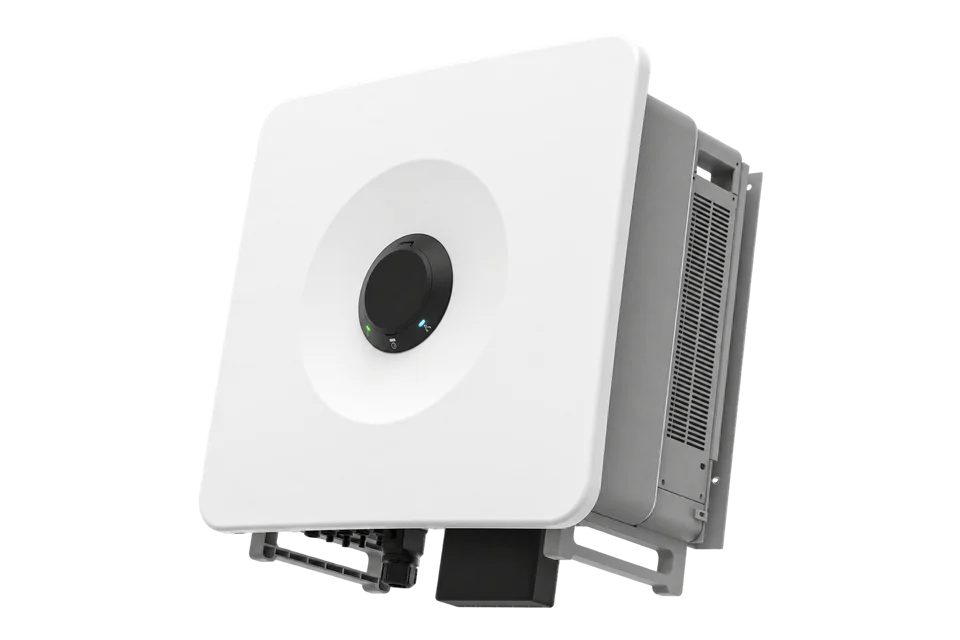
- Modbus TCP
Commercial PV inverter
Compatibility
Local Modbus monitoring after commissioning
SMA's STPxx-80 operating manual describes industrial Modbus remote measurement and states that the interface is deactivated by default. SMA's ennexOS SunSpec information specifies TCP transport; the installed endpoint, supported models and existing system-manager ownership must be confirmed before reading.
STP 60-80, not the earlier Sunny Tripower 60 or the STP 50-80 sibling. An installer must approve enabling Modbus and record the actual firmware, profile and endpoint. Do not overwrite System Manager or Data Manager ownership, meter location, grid settings or setpoints. This guide approves only read-only observations.
Connect it with
-
Gateway ZGW-20From €899 ex VAT Configure Gateway
-
Evaluation Gateway on a Raspberry Pi Edge with one device licensedFree Set up Evaluation Gateway on a Raspberry Pi

After the installer confirms the STP 60-80's enabled Modbus service and existing manager topology
- Modbus
- Edge
- Platforms
Models
| Models | Interface | Route into Edge |
|---|---|---|
| STP 60-80 | Sunny Tripower X 60; up to 60 kW and five independent MPP trackers | Confirm the disabled-by-default Modbus interface is enabled by the installer for a read-only reader. |
| STP 50-80 | Sibling rating in the same current operating-manual family | Do not apply the 60 kW nameplate or PV limits without checking the exact variant. |
| Older Sunny Tripower 60 / CORE1 | Different generations and communication contracts | Do not reuse their registers or topology for this STPxx-80 product. |
Specifications
SMA identifies STP 60-80 as the Sunny Tripower X 60's 60 kW variant with five independent MPP trackers and an integrated system-manager option. The STPxx-80 manual says its industrial Modbus interface can query measurements and can also change parameters or setpoints, but is deactivated by default. SMA's ennexOS SunSpec information specifies TCP transport and requires discovery of the models supported by the installed product.124
- Exact variant
- STP 60-80, Sunny Tripower X 60; check the installed regional nameplate1
- PV tracking
- Five independent MPP trackers with two string inputs each1
- Modbus state
- Deactivated by default; commissioning approval is required before a reader can connect2
- Modbus functions
- Remote measured-value queries, parameter changes and setpoints are documented; ennexOS SunSpec uses TCP; use read-only queries here24
- Electrical ratings
- STP 60-80: 60000 W rated AC at 230 V / 50 Hz, 90000 Wp STC maximum PV array, five MPPTs with two strings each. These are different AC/DC ratings.7
- Enclosure and temperature
- IP65, -25 to +60 °C; OptiCool cooling and manufacturer mounting limits apply.7
- Network interfaces
- Two Ethernet ports and Wi-Fi; SMA Modbus, SunSpec Modbus and Speedwire are listed as standard features in datasheet version 11.7
- Warranty options
- Five years standard; 10, 15 and 20 years optional. Apply the terms for the ordered product and region.7
Interface
Documented measurements and integration boundaries for Sunny Tripower X 60.
- SMA documents remote measured-value queries through the X 60 Modbus interface, but the exact installed point list and register representation must be checked against its firmware and model profile.
- The X 60 can act as a System Manager; alternatively an SMA Data Manager can own the system. Record that hierarchy before connecting an observer.
- Production at the inverter is different from grid import or export at the feed-in meter. Identify each value's source and physical measurement boundary.
- Remote parameter changes, setpoints, active or reactive power control and direct-marketing dispatch are outside this read-only guide.
Assessment
Current STP 60-80 on an approved site network, with existing SMA manager and energy-meter ownership preserved.
- InteroperabilitySupported with conditions
- The exact-family manual documents industrial Modbus measured-value queries; the disabled interface and installed profile need commissioning.2
- AccuracySupported with conditions
- Inverter production can be observed, while site import and export require a separately qualified feed-in meter.13
- SecurityLimited
- The manufacturer lists access controls and encrypted Speedwire, while enabled Modbus data is accessible without a password under the SunSpec instructions. Keep the read endpoint on a restricted network; Speedwire encryption does not establish encrypted Modbus.47
- ReliabilityNot yet assessed
- No measured availability, stale-value or historical-backfill behavior is established for an Edge reader.2
- RuggednessSupported with conditions
- The datasheet specifies IP65 and -25 to +60 °C operation, with active cooling. Use the stated mounting, ventilation and temperature limits.7
- ScalabilitySupported with conditions
- SMA describes system-manager and Data Manager hierarchies; each monitored endpoint and its meter identity must remain explicit.13
- LifecycleSupported with conditions
- The datasheet offers a five-year standard warranty and optional 10/15/20-year terms. Warranty coverage and firmware maintenance are separate; retain the applicable regional service terms.7
Setup
Discover the SunSpec identity before reading power
Use the configured local TCP endpoint after enabling the interface. This is a standards-based monitoring starting point. The common header, model position and power bytes below are synthetic examples.
- Target and profile
- Configured inverter IP and TCP port, normally 502. The retained ennexOS SunSpec instructions specify unit 126. Confirm the installed SunSpec profile and unit in the manager configuration; CORE2 unit 1 and SMA-profile unit 3 are different cases.
- Signature request
- FC03 at wire address 40000, quantity 2: PDU 03 9C 40 00 02. Expected data 53 75 6E 53 spells SunS. If absent, check the unit/profile and server setting; SunSpec also permits bases 0 and 50000.
- Model traversal
- Read the two-register header after the signature. Synthetic header 00 01 00 42 identifies common model 1 with 66 following registers. Header 40002 advances to 40002 + 2 + 66 = 40070. Read the common manufacturer, model and serial fields to identify the actual inverter.
- Conditional power read
- Only if the returned model is 103: let H be its discovered header address. W is at H + 14 and W_SF at H + 15, both signed 16-bit. Read FC03 quantity 2. Example H = 40070 gives wire address 40084 (0x9C94) and PDU 03 9C 94 00 02. Other models use their own definitions.
- Synthetic scaling
- Bytes 30 39 FF FF decode to W = 12345 and W_SF = -1: 12345 × 10^-1 = 1234.5 W. This pair is not Float32. Signed 0x8000 is unavailable, not zero power.
Acceptance: Compare a fresh decoded reading with the SMA local interface. Preserve the existing manager, meter and control configuration. These examples are based on published documents, not a physical SMA/Edge test.
-
Identify the installation
Identify STP 60-80, firmware, regional variant and the existing SMA manager hierarchy.
-
Record the interface settings
Document who enabled the disabled-by-default Modbus interface and the actual endpoint/profile.
-
Preserve network and control roles
Use a restricted site network; leave all parameter, setpoint and grid-control writes outside Edge's monitoring role.
-
Compare the first values
Compare a live identity and production reading with the installed SMA display or manager before storing more points.
-
Identify the grid meter
Identify the feed-in meter separately; do not infer site import or export from inverter production.
-
Read the documented starting points
Use the discovery and conditional power read below as the best-effort starting point. Name inverter production separately from grid exchange, and keep failed polls missing rather than zero.
Common questions
- Is Modbus ready on a factory-default Sunny Tripower X 60?
- No. The STPxx-80 operating manual says the interface is deactivated by default. Its commissioning and secure site access must be arranged before local monitoring.2
- Can Edge replace the SMA System Manager?
- This guide adds only an observer. SMA describes deployments where the inverter acts as System Manager and others where a Data Manager owns the system; the existing hierarchy and energy meter must be recorded and preserved.13
- Does the Modbus interface imply approved VPP dispatch?
- No. SMA documents parameter and setpoint functions, but this guide approves no writes or trading activity. Control needs its own commissioned hierarchy, grid rules, fail-safe design and acceptance evidence.2
Related devices
Sources
- Sunny Tripower X 60 product and STP 60-80 identity (opens in a new tab)
- Sunny Tripower X 60 operating manual: Modbus (opens in a new tab)
- Sunny Tripower X 60 with SMA Data Manager as System Manager (opens in a new tab)
- SunSpec Modbus interface for SMA products powered by ennexOS (opens in a new tab) (PDF)
- SunSpec Device Information Model Specification 1.1 (opens in a new tab) (PDF)
- SunSpec three-phase inverter model 103 definition (opens in a new tab)
- Sunny Tripower X 50 / X 60 datasheet, version 11 (opens in a new tab) (PDF)
Further reading
Product names and trademarks belong to their owners. Publication does not imply endorsement or a commercial relationship.