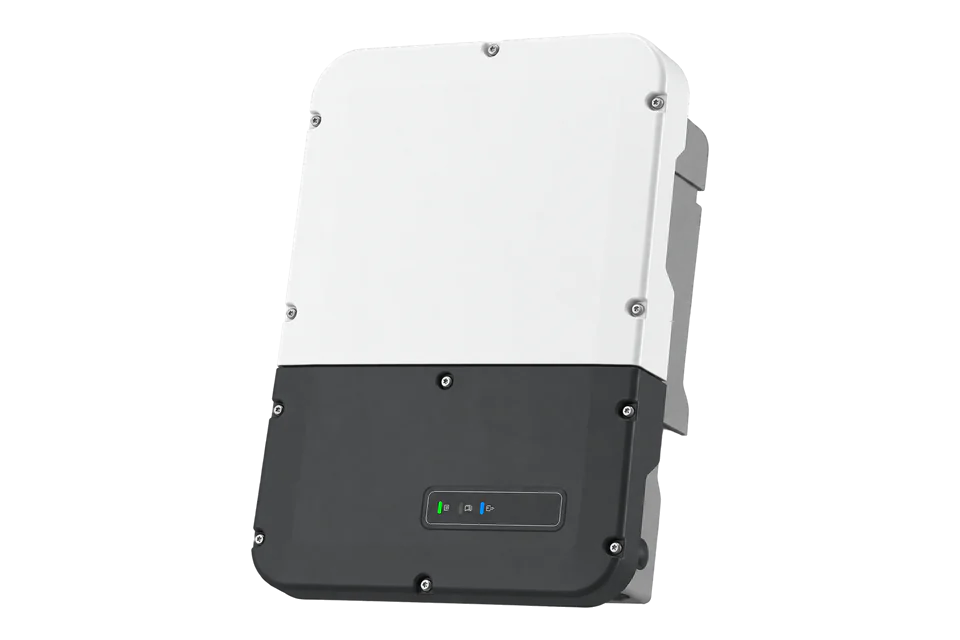
SMA Sunny Boy Storage SBS5.0-10
Battery inverter
Sunny Boy Storage 5.0 adds high-voltage battery storage on the AC side of an existing PV installation. It supplies 5 kW on a single phase and has three separately managed battery inputs. It is a battery inverter, not a PV string inverter: keep the existing solar inverter and distinguish the manual emergency outlet from an automatic battery-backup installation.
- Modbus TCP
Battery inverter
Compatibility
Documented monitoring interface with conditions
SMA documents the local Modbus interface and publishes SBS-specific V13 point maps. Edge can read the documented SOC, voltage, current and AC power points after the interface is enabled and the SMA-profile endpoint selected.
SBS5.0-10 is the 230 V single-phase AC-coupled battery inverter, not Sunny Boy Smart Energy or SBS2.5. The online operating manual starts at firmware 3.00.00.R; the V13 map examples start at 3.12.33.R. Modbus is disabled by default. These examples are read-only; battery dispatch and grid settings retain their existing configuration.
Connect it with
-
Gateway ZGW-20From €899 ex VAT Configure Gateway
-
Evaluation Gateway on a Raspberry Pi Edge with one device licensedFree Set up Evaluation Gateway on a Raspberry Pi

An installed SBS5.0-10 is commissioned and its supported register list is available
- Modbus
- Edge
- Platforms
Models
| Models | Interface | Route into Edge |
|---|---|---|
| SBS5.0-10 | 5 kW single-phase battery inverter; Ethernet/Speedwire, WLAN where fitted and configurable Modbus | Read the enabled local Modbus service using the exact supported register list. |
| SBS3.7-10 and SBS6.0-10 | Related models with different AC ratings | Shared manual does not make the 5 kW specification valid for every model. |
| Sunny Boy Smart Energy | A different hybrid PV-and-battery platform | Do not substitute its solar-input specifications or mapping. |
| SBS2.5 | Earlier, separate Sunny Boy Storage platform | Outside the SBSxx-10 manual and this guide. |
Specifications
AC coupling can add storage without replacing the existing PV inverter. Battery-side DC limits, the selected battery’s approval and the AC connection determine the usable system power; a 5 kW rating does not establish stored energy capacity.3
- AC rating
- 5000 W at 230 V, 50 Hz; one feed-in phase and one connection phase.3
- Battery DC inputs
- Three inputs, maximum 10 A per input; 100–550 V operating range and 600 V maximum DC voltage.3
- Battery power window
- SMA identifies 220–500 V charging/discharging voltage for optimum inverter power. Approved battery combinations remain mandatory.3
- Secure power supply outlet
- Maximum 3680 W, 230 V, 16 A. This is distinct from the 5 kW grid-connected rating.3
- Communications
- Ethernet/Speedwire and WLAN where fitted; CAN for battery and automatic-transfer-switch communication, not Ethernet on the CAN connection.3
- Mounting and environment
- Wall-mounted enclosure 535 × 730 × 198 mm, 26 kg; IP65, −25 to +60 °C within installation limits.3
- Efficiency and standby
- Maximum efficiency 97.5%; standby consumption below 5 W excluding battery supply requirements.3
Interface
Documented measurements and integration boundaries for Sunny Boy Storage SBS5.0-10.
- Battery charge state and energy-throughput information are visible in the local user interface.
- The configured Modbus service supports queries of implemented measured values; verify the exact SBS firmware register list.
- Record battery, inverter and grid-side measurements separately. An AC-coupled PV inverter is a separate device.
- Keep unavailable or disconnected-battery values distinct from zero. Read complete SMA values and reject the documented type-specific invalid markers before scaling.
Assessment
SBS5.0-10 is the 230 V single-phase AC-coupled battery inverter, not Sunny Boy Smart Energy or SBS2.5. The online operating manual starts at firmware 3.00.00.R; the V13 map examples start at 3.12.33.R. Modbus is disabled by default. These examples are read-only; battery dispatch and grid settings retain their existing configuration.
- InteroperabilitySupported with conditions
- The exact manual documents a configurable local Modbus service. The installed firmware’s supported register list is needed for point mapping.15
- AccuracySupported with conditions
- Battery charge state and energy-throughput monitoring are documented; distinguish AC conversion measurements from stored DC energy.4
- SecuritySupported with conditions
- Modbus is disabled by default and SMA specifies firewall/VPN protections. Do not expose the service publicly.5
- ReliabilitySupported with conditions
- Local status, stored energy yields and events provide diagnostic information independently of a remote monitoring client.34
- RuggednessSupported with conditions
- IP65 and the specified outdoor temperature envelope are documented, subject to mounting conditions.3
- ScalabilityNot yet assessed
- The retained manual does not establish a tested concurrent-client or fleet polling capacity.5
- LifecycleSupported with conditions
- The manual identifies its minimum firmware and provides update procedures; future support duration is not promised.1
Setup
Read SBS battery state and AC power
The published SBS V13 maps give these read-only starting points from firmware 3.12.33.R. The legacy table applies to country data sets dated before 2018; GG10 applies from 2018. These four measurement rows agree in both maps. Record installed firmware and country data set, then compare live values with the inverter display.
- Profile and identity
- Use the enabled local server and configured SMA-profile unit ID. These addresses belong to SMA, not SunSpec. Read FC03 wire 30053, quantity 2: PDU 03 75 65 00 02. U32 model code 9358 identifies SBS5.0-10; compare with its nameplate. No Grid Guard write or control mode change is needed for these RO measurements.
- SOC and voltage
- SMA-profile FC03 at wire 30845, quantity 2 reads SOC U32 FIX0 in %. Wire 30851, quantity 2 reads battery voltage U32 FIX2 in V. Read each complete value as high word then low word. Synthetic SOC data 00 00 00 49 gives 73%; voltage is raw ÷100. U32 0xFFFFFFFF is unavailable, not zero.
- AC power
- SMA-profile FC03 wire 30775, quantity 2 reads AC power S32 FIX0 in W. This is inverter AC power, not DC battery power or whole-site import/export. Preserve the signed value and compare its direction with the local inverter view. S32 0x80000000 is unavailable.
- Battery current request
- FC03 wire 30843, quantity 2: PDU 03 78 7B 00 02. Battery current is S32 FIX3 in A. Synthetic FF FF CF 2C gives -12500 ÷1000 = -12.5 A. Decode the complete signed 32-bit value before scaling; establish charge/discharge direction against the inverter interface.
Acceptance: Use the published maps as best-effort starting points. Compare fresh SOC, voltage and current with the same battery view and AC power with the inverter view. These document-based and synthetic examples do not change dispatch or test physical battery operation.
-
Confirm the AC-coupled platform
Read SBS5.0-10 and firmware from the inverter. The online manual applies from 3.00.00.R. Confirm that the PV inverter and battery inverter are separate equipment before interpreting production, consumption or battery power.
-
Check approved batteries and input arrangement
Use SMA’s current approved-battery list and the installation diagram for the actual battery current limit. Three 10 A input terminals are not permission to connect an arbitrary battery or apply 30 A to one input. Battery interconnection and protection belong to the qualified installer.
-
Identify the backup arrangement
A wired secure-power outlet is manually enabled by its switch after a grid failure. Automatic backup requires the complete documented transfer-switch and system arrangement. Record which arrangement is actually installed before assuming loads remain supplied.
-
Enable monitoring on a protected network
A qualified person enables the Modbus interface and confirms its port, normally 502. Follow SMA’s firewall and VPN guidance; do not expose the service through internet port forwarding. Do not change active-power limitation or battery-control settings just to read measurements.
-
Map only supported measured values
Use the cited V13 maps as a starting point. Select SMA versus SunSpec explicitly: the examples below use SMA FC03 addresses. Read SOC 30845, current 30843, voltage 30851 and AC power 30775 as complete two-register values with their declared scales and invalid markers; compare with the local display.
-
Keep monitoring separate from control
Confirm freshness, battery identity and current direction before recording values. Recheck the mapping after firmware or battery changes. Keep grid-code, charge/discharge setpoints and transfer-switch controls outside the read-only configuration.
Common questions
- Can solar panels connect directly to the battery inputs?
- No. This is an AC-coupled battery inverter. Its DC inputs are for approved high-voltage batteries; solar generation uses a separate PV inverter.2
- Is the secure power supply outlet an automatic whole-home backup?
- No. The emergency outlet uses a manual switch and has its own 3680 W limit. Automatic battery backup needs the specified transfer-switch system, suitable loads and the correct commissioning.34
- Does enabling Modbus require battery dispatch control?
- No. The interface supports both measurements and controls, but a monitoring client can issue reads only. Enabling access does not justify changing the inverter’s operating strategy.4
Related devices
Sources
- Sunny Boy Storage manual: exact models and minimum firmware (opens in a new tab)
- Sunny Boy Storage manual: intended use and approved batteries (opens in a new tab)
- Sunny Boy Storage manual: technical data (opens in a new tab)
- Sunny Boy Storage manual: interfaces and backup functions (opens in a new tab)
- Sunny Boy Storage manual: configuring Modbus (opens in a new tab)
- Sunny Boy Storage manual: separate 10 A battery connections (opens in a new tab)
- SBS3.7-10 / SBS5.0-10 / SBS6.0-10 Modbus map V13, legacy country data sets (opens in a new tab)
- SBS3.7-10 / SBS5.0-10 / SBS6.0-10 Modbus map V13, Grid Guard 10 (opens in a new tab)
Further reading
- ToolBattery runtime calculator
- ToolModbus register decoder
- GuideCommercial DC-coupled alternative: Solis 50 kW hybrid
- ToolModbus register address converter
- ToolRS-485 termination and bias
- GuideModbus RS-485 commissioning
- ManufacturerSMA devices
- ProtocolModbus devices and register maps
- CategoryInverters and charge controllers
- CategoryBattery systems and controls
Product names and trademarks belong to their owners. Publication does not imply endorsement or a commercial relationship.