Milesight AM319
Indoor air quality monitor
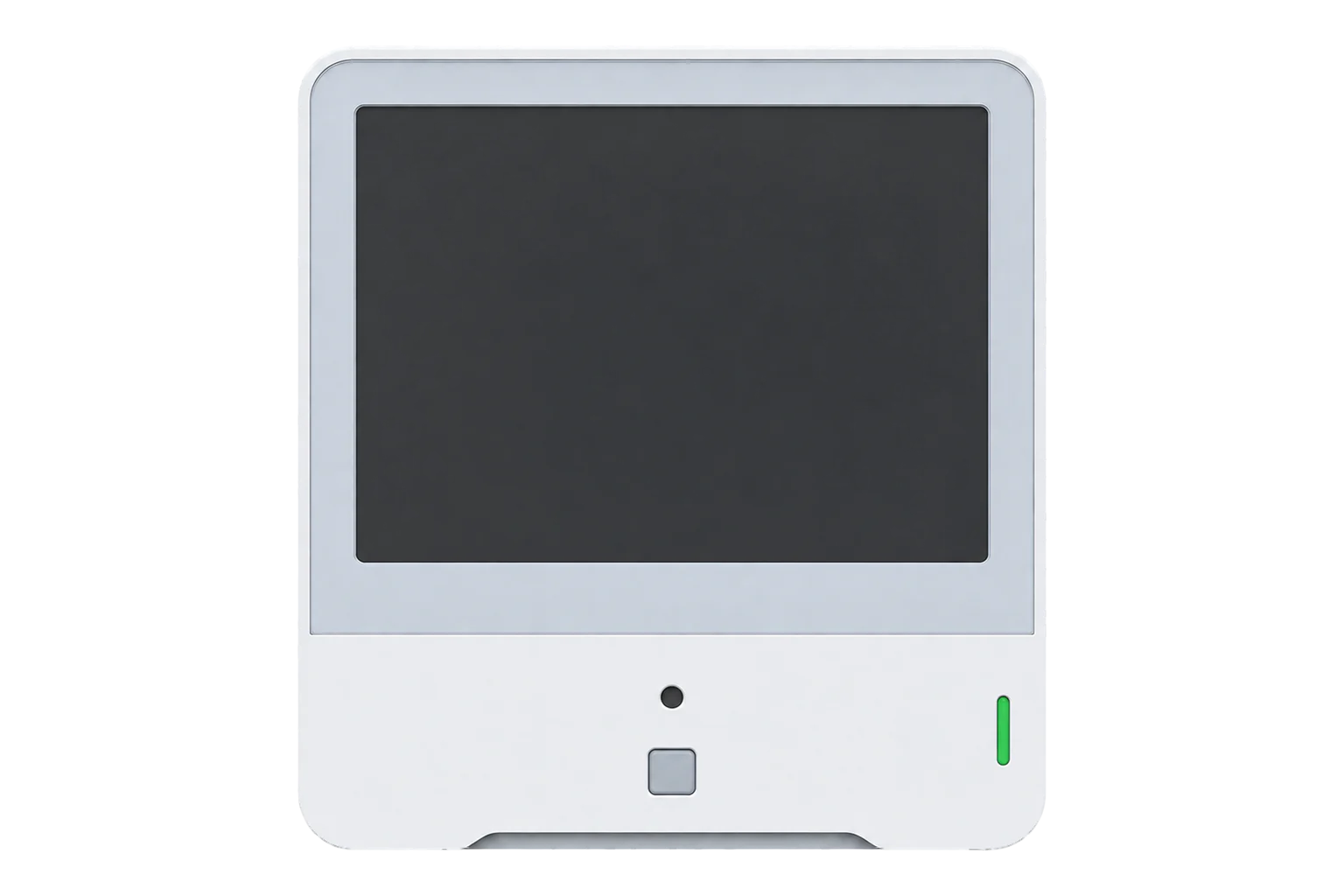
A mains-powered LoRaWAN room monitor with an E-ink screen that measures CO₂, PM2.5, PM10, TVOC, formaldehyde or ozone, temperature, humidity, pressure, light and occupancy. It runs from a 5 V USB-C supply as a Class C device.
- LoRaWAN
Indoor air quality monitor
Compatibility
Compatible with EpiSensor Edge over LoRaWAN.
Register it on your LoRaWAN network server with its DevEUI and keys. Edge, on the Gateway, reads its decoded uplinks from that server.
Edge reads 14 values from it, listed under Interface.
Connect it with
-
Gateway ZGW-20From €899 ex VAT Configure Gateway

Specifications
The AM319 is the fullest model in Milesight's AM300 series. Beside the AM307's temperature, humidity, CO₂, TVOC, barometric pressure, light level and PIR occupancy, it adds laser-scattering particulate matter and an electrochemical formaldehyde or ozone cell. A 4.2-inch E-ink screen shows the readings in the room, and a traffic-light LED and buzzer warn when a pollutant passes the thresholds you set.12
- Power
- DC supply. 5 V 1 A through the USB-C port, with a 1.2 m cable and power adapter in the box. There is no battery option.1
- CO₂
- Photoacoustic, 400 to 2,000 ppm, ±(50 ppm + 5 % of reading) at -10 to 60 °C, 1 ppm resolution1
- PM2.5 and PM10
- Laser scattering, 0 to 1,000 µg/m³, ±10 µg/m³ (0 to 100) and ±10 % (100 to 500), 1 µg/m³ resolution (O3 and HCHO-IR)1
- PM2.5, HCHO-IR-W
- 0 to 1,000 µg/m³, ±(5 µg/m³ + 5 % of reading) to 100, ±10 % of reading to 1,0001
- Formaldehyde
- Electrochemical, ±10 %; 0 to 1.25 mg/m³ at 0.01 mg/m³ (HCHO-IR), 0 to 1 ppm at 0.001 ppm (HCHO-IR-W); 6-year cell life1
- Ozone
- Electrochemical, 0 to 10 ppm, ±5 % FS, 0.01 ppm resolution; 2-year cell life (O3 version)1
- TVOC
- Metal-oxide, IAQ rating 1.00 to 5.00 (±1), or 0 to 2,000 µg/m³ (±(20 µg/m³ + 15 %) from 1 to 500 µg/m³)1
- Temperature
- -20 to 60 °C, typical ±0.3 °C (-20 to 0 °C), ±0.2 °C (0 to 60 °C)1
- Humidity
- 0 to 100 % RH, typical ±2 % RH at 25 °C, 0.5 % RH resolution1
- Barometric pressure
- 260 to 1,260 hPa, ±0.5 hPa1
- Light and occupancy
- Photodiode, 0 to 60,000 lux in six levels; PIR, 80° × 55°, up to 5 m1
- LoRaWAN
- Class C, OTAA or ABP, versions 1.0.2 and 1.0.32
- Frequency plans
- CN470, RU864, IN865, EU868, US915, AU915, KR920, AS923-1 to AS923-41
- Transmit power
- 16 dBm (868 MHz), 22 dBm (915 MHz), 19 dBm (470 MHz)1
- Local storage
- 18,000 records, retransmission and retrieval1
- Operating conditions
- -20 to 60 °C (screen 0 to 40 °C), 10 to 90 % RH non-condensing, IP301
- Dimensions
- 100.8 × 114 × 22 mm, 148 g1
- Approvals
- CE, CE (RED), FCC, ISED, RoHS, Works with WELL1
Where it is used
Offices, schools and hospitals that report indoor air quality against a building standard, where CO₂, PM2.5 and formaldehyde come from one device.
Indoor environmental monitoringChecking that ventilation changes made to save energy keep CO₂ and particulates within limits.
HVAC energy monitoring for commercial buildingsNewly fitted-out spaces, where formaldehyde from furniture and finishes is the concern.
Interface
- Device class
- Class C2
- Regional plans
- EU868, US915, AU915, AS923, KR920, IN865, RU864, CN470
- Activation
- OTAA or ABP
- LoRaWAN version
- 1.0.2 or 1.0.3
- Default uplink interval
- 10 minutes (1 to 1,080 minutes)
Ports
| FPort | Direction | Carries |
|---|---|---|
| 85 | Uplink | Every reading, buzzer state, threshold alarms, stored history and the information packet sent on joining |
| 85 | Downlink | Reporting interval, TVOC mode, LED and buzzer, screen, thresholds, CO₂ calibration, time, storage and retransmission |
Decoded fields
Readings and settings, with units and ranges where Milesight publishes them. readable, writable only.2
| Reading | Unit | Range or values | Access |
|---|---|---|---|
| Measurements 11 | |||
| CO₂Channel 07, type 7D: unsigned 16-bit | ppm | 400 to 2,000 ppm | Read only |
| PM2.5Channel 0B, type 7D: unsigned 16-bit | µg/m³ | 0 to 1,000 µg/m³ | Read only |
| PM10Channel 0C, type 7D: unsigned 16-bit. Not on the HCHO-IR-W | µg/m³ | 0 to 1,000 µg/m³ | Read only |
| FormaldehydeChannel 0A, type 7D: unsigned 16-bit, divided by 100 (HCHO-IR). The HCHO-IR-W sends channel 0F, type 7D in ppm, divided by 1,000 | mg/m³ | 0 to 1.25 mg/m³ | Read only |
| OzoneChannel 0D, type 7D: unsigned 16-bit, divided by 100 (O3 version) | ppm | 0 to 10 ppm | Read only |
| TVOCChannel 08, type 7D: unsigned 16-bit, divided by 100. In concentration mode, channel 08, type E6 in µg/m³ | IAQ | 1 to 5 IAQ | Read only |
| TemperatureChannel 03, type 67: signed 16-bit, divided by 10 | °C | -20 to 60 °C | Read only |
| Relative humidityChannel 04, type 68: unsigned 8-bit, divided by 2 | % RH | 0 to 100 % RH | Read only |
| Barometric pressureChannel 09, type 73: unsigned 16-bit, divided by 10 | hPa | 260 to 1,260 hPa | Read only |
| Light levelChannel 06, type CB: 0 is up to 5 lux, 5 is over 2,000 lux | - | 0 to 5 | Read only |
| OccupancyChannel 05, type 00: 00 vacant, 01 occupied | - | vacantoccupied |
Read only |
| Settings 2 | |||
| Reporting intervalDownlink channel FF, type 03: unsigned 16-bit | s | 60 to 64,800 s | Write only |
| TVOC modeDownlink channel FF, type EB: 00 IAQ level, 01 concentration in µg/m³ | - | levelconcentration |
Write only |
| Diagnostics 1 | |||
| BuzzerChannel 0E, type 01: sent with an alarm | - | offbeeping |
Read only |
Each uplink is a run of channel, type and value fields, with multi-byte values in little-endian order. The HCHO-IR sends formaldehyde as channel 0A, type 7D in mg/m³; the HCHO-IR-W sends it as channel 0F, type 7D in ppm and has no PM10 field; the O3 version sends ozone as channel 0D, type 7D in ppm. Set up the decoder for the version you have.23
CO₂ needs calibrating. Either calibrate manually outdoors to 400 ppm before installing, or enable automatic background calibration, which takes the lowest level over 7 days as 400 ppm and suits rooms that are well or partly ventilated.2
When CO₂, TVOC, PM2.5, PM10 or formaldehyde or ozone passes its Bad threshold, the device sends that value at once as an alarm uplink with the buzzer state.2
Setup
-
Register it on the network server
Add the AM319 as a Class C device using OTAA, with the device EUI from its label, the join EUI 24E124C0002A0001 and its application key. Use the decoder for your version: HCHO-IR, HCHO-IR-W or O3.2
-
Power it on
Remove the rear cover, plug in the USB-C cable, pass it through the opening in the side and refit the cover. Hold the power button for more than 3 seconds until the LED lights.2
-
Calibrate CO₂ and match the frequency plan
Read the sensor over NFC with the Milesight ToolBox app. Leave it outdoors for more than 10 minutes and run manual CO₂ calibration to 400 ppm, or enable automatic background calibration. Set the frequency plan to match the network; for US915 or AU915 with Milesight gateway defaults, enable channels 8 to 15.2
-
Mount it where people breathe
Fix the bracket with the 3M tape or screws at least 1.5 m above the floor, away from windows, doors, vents and heat sources, and do not cover the air inlets.2
-
Check the decode
Confirm the network server decodes CO₂, particulate matter and the formaldehyde or ozone field from the next uplink on port 85 before you connect it to Edge. After storage, leave it powered in clean air so the TVOC reading settles: at least 2 days after under a month, 3 days after up to 6 months, 7 days after longer.2
Common questions
- Which AM319 version should I choose?
- The HCHO-IR for formaldehyde in mg/m³ with PM2.5 and PM10, the O3 for ozone with PM2.5 and PM10, or the HCHO-IR-W for formaldehyde in ppm at finer resolution with PM2.5 only.1
- Can it run on batteries?
- No. The AM319 is powered only by 5 V 1 A through USB-C. The battery models in the series are the AM307 and AM308.1
- How long do the gas sensors last?
- Milesight gives the formaldehyde cell a working life of 6 years and the ozone cell 2 years. Both can be replaced with chips from Milesight.12
- Why is it a Class C device?
- It is powered from USB-C rather than a battery, so it can keep its receiver open between uplinks, which is what Class C means. Configuration downlinks then reach it without waiting for its next report.15
- Does the CO₂ sensor need calibrating?
- Yes. Use manual calibration outdoors to 400 ppm before installing, or enable automatic background calibration over 7 days. The device reports 400 ppm for any value below 400 after calibration.2
Related devices
Sources
- AM319 datasheet (opens in a new tab) (PDF)
- AM300(L) series user guide (opens in a new tab) (PDF)
- AM319 payload decoders (opens in a new tab)
- AM300 series product page (opens in a new tab)
- LoRaWAN 1.0.3 specification (opens in a new tab)
- Milesight AM319 device type definition (opens in a new tab)
Further reading
Product names and trademarks belong to their owners. Publication does not imply endorsement or a commercial relationship.