Legrand 412015
Single-phase energy meter
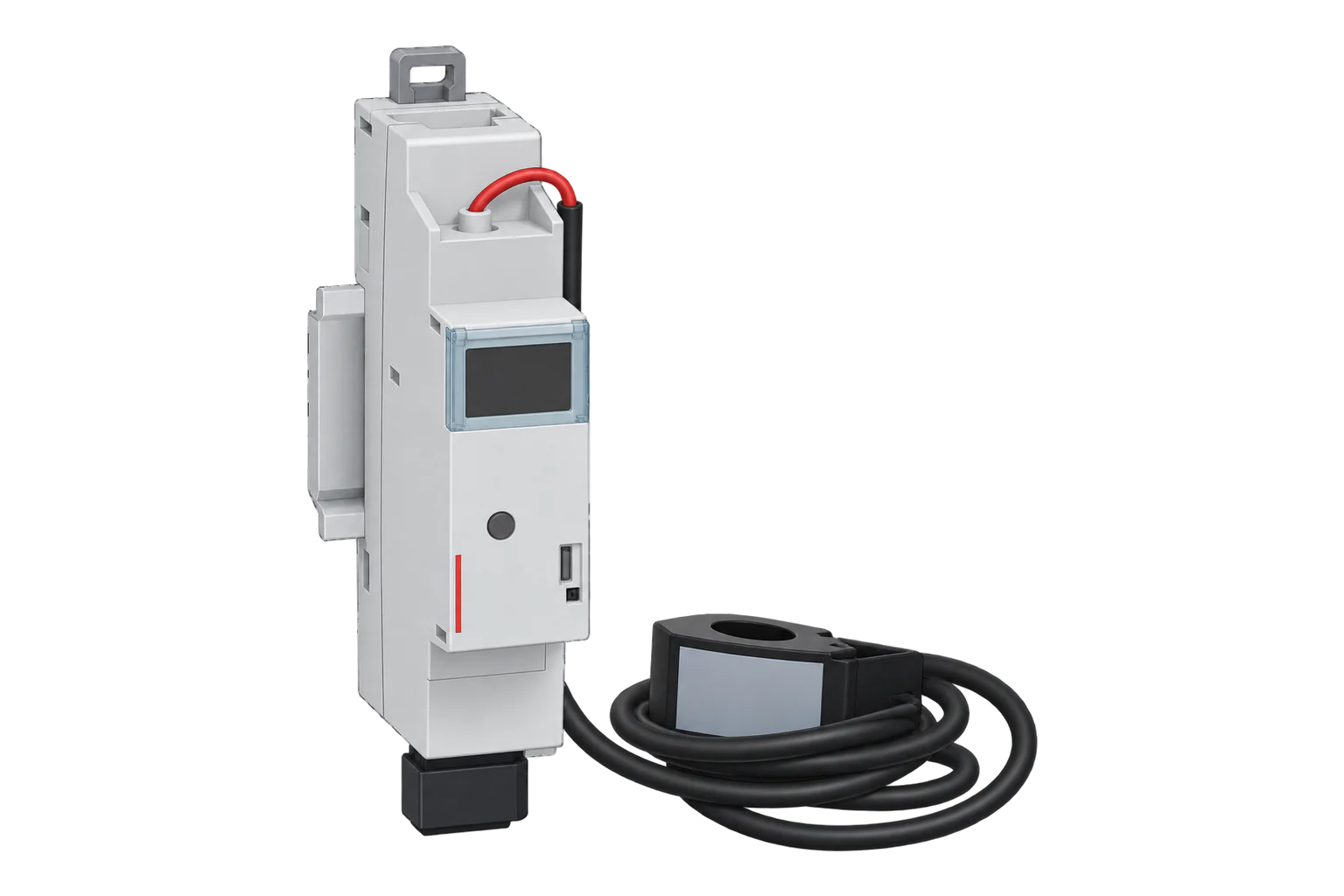
A one-module DIN-rail meter for a single-phase circuit up to 80 A, measured through a closed current transformer to ±1 %. Over Zigbee it reports active and apparent power and a power alarm.
Also sold asDrivia with Netatmo connected energy meterBTicino F20T60A
- Zigbee
Single-phase energy meter
Compatibility
Compatible with EpiSensor Edge over Zigbee.
Pair it with the Zigbee radio on an EpiSensor Gateway. Edge reads it locally on the Gateway.
Edge reads 5 values from it, listed under Interface.
Connect it with
-
Gateway ZGW-20From €899 ex VAT Configure Gateway

Specifications
The 412015 is Legrand's connected single-phase energy meter in the Drivia with Netatmo range. It is one DIN module (17.7 mm) wide and comes with a closed current transformer rated 80 A AC on an 800 mm lead that clips into the module. The transformer takes one conductor of 10 to 25 mm², or up to eight 1.5 mm² conductors, so one meter can cover a single circuit or a whole supply.23
- Power
- Mains. Powered at 100 to 240 V AC from the single-phase line, through its own C2 to C16 breaker, 0.3 W maximum.2
- Maximum current
- 80 A AC, closed current transformer2
- Accuracy
- ±1 % for module and transformer, above 2 A and cos φ ≥ 0.82
- Accuracy class
- 11
- Transformer capacity
- 1 × 10 to 25 mm², 3 × 6 mm², 5 × 2.5 mm² or 8 × 1.5 mm²2
- Transformer lead
- 800 mm, clip-in connector3
- Supply
- 100 to 240 V AC, 50/60 Hz, single-phase only2
- Own consumption
- 0.3 W maximum2
- Supply protection
- Circuit breaker, C2 to C163
- Radio
- IEEE 802.15.4, 2.4 to 2.4835 GHz, under 100 mW3
- Operating temperature
- 5 to 45 °C2
- Terminals
- Cage, 1 to 2.5 mm², 8 mm stripped, 0.5 Nm2
- Dimensions (W × H × D)
- 17.7 × 101.9 × 67.2 mm1
- Weight
- 91 g2
- Protection
- IP2X terminals, IP3XD front face, IK04, Class II front face2
- Standards
- EN/IEC 61010-1; transformer insulation class A to IEC 61869-22
Where it is used
Power on one single-phase circuit up to 80 A, such as a water heater, heat pump or kitchen circuit, from the distribution board.
HVAC energy monitoring for commercial buildingsSolar production on a single-phase inverter line, paired with a second meter for consumption.
Solar PV monitoringTotal power at a small single-phase supply, with several conductors through one transformer.
Multi-site energy monitoring
Interface
Readings and settings, with units and ranges where Legrand publishes them. readable, readable and writable.56
| Reading | Unit | Range or values | Access |
|---|---|---|---|
| Measurements 2 | |||
| Active powerInstantaneous active power on the measured line | W | - | Read only |
| Apparent powerInstantaneous apparent power on the measured line | VA | - | Read only |
| Settings 2 | |||
| Power alarmTurns the module's power alarm on or off | - | truefalse |
Read and write |
| Power alarm thresholdThreshold the power alarm compares against, read from Legrand attribute 0xF002 | - | - | Read only |
| Diagnostics 1 | |||
| Power alarm activeTrue while the threshold is exceeded | - | truefalse |
Read only |
Zigbee2MQTT's documentation notes that this module might only work on Zigbee channel 11. Once the network runs on channel 11 and is open for joining, a module showing a steady red LED joins by itself.4
It reads through the Electrical Measurement cluster: active power in W and apparent power in VA. It does not report an energy counter over Zigbee; Legrand's app keeps the consumption history.25
The power alarm uses Legrand-specific attributes in the same cluster: an enable flag, a threshold and an active flag. Zigbee2MQTT's converter also reads the threshold, which it names power_alarm_wh_threshold.6
The module forgets its reporting configuration after a restart or power loss. Zigbee2MQTT's definition sets reporting up again each time the module announces itself on the network.5
Setup
-
Wire the module with the supply off
Turn off the main breaker. Connect L and N through a C2 to C16 breaker and clip the current transformer's connector into the module.2
-
Fit the current transformer
Pass the conductors of the circuit or supply through the transformer with the arrow in the direction of current flow. For solar production, place it strictly upstream of the production section.3
-
Clear any earlier pairing
If the module has been used before, hold its configuration button for more than 5 seconds until the LED turns steady red. It is then no longer associated with any gateway.2
-
Open pairing in Edge and switch on
Open pairing on the Gateway's Zigbee network in Edge, refit the front plate and turn the main breaker on. The LED is steady red until the module joins, steady green once it has joined while the network is still open, and off in normal use.2
-
If it does not join
Zigbee2MQTT's documentation notes that this module might only work on channel 11. Check which channel the Gateway's Zigbee network uses before you try again.4
-
Check one reading
Run a known load and compare active power with a clamp meter. A negative value on a consuming load means the transformer is the wrong way round.
Common questions
- Why does the 412015 not join my Zigbee network?
- Zigbee2MQTT's documentation notes that it might only work on Zigbee channel 11. Also check that it has been reset: a steady red LED means it is not paired and ready to join.24
- Does it report energy in kWh over Zigbee?
- No. Its Zigbee definition reports active power, apparent power and a power alarm. Energy history is kept by Legrand's app.25
- Can it measure solar production?
- Yes, with the transformer strictly upstream of the production section. Legrand then requires a second meter or a connected load shedder for consumption, and the arrangement is not compatible with a connected ecometer or storage batteries.23
- Can it be used on a three-phase supply?
- No. Legrand states it is not compatible with a three-phase installation. The three-phase version is the 412175.1
Related devices
More from Legrand
Sources
- 412015 Compteur d'énergie connecté Drivia with Netatmo (opens in a new tab)
- Single-phase connected energy meter 4 120 15, technical sheet F03108EN (opens in a new tab) (PDF)
- Connected single-phase energy meter 4 120 15, instruction sheet LE12267AJ (opens in a new tab) (PDF)
- Legrand 412015 device documentation (opens in a new tab)
- Legrand 412015 converter source (opens in a new tab)
- Legrand cluster definitions and converters (opens in a new tab)
Further reading
Product names and trademarks belong to their owners. Publication does not imply endorsement or a commercial relationship.