Johnson Controls CGM09090 / CGE09090
Building automation controller
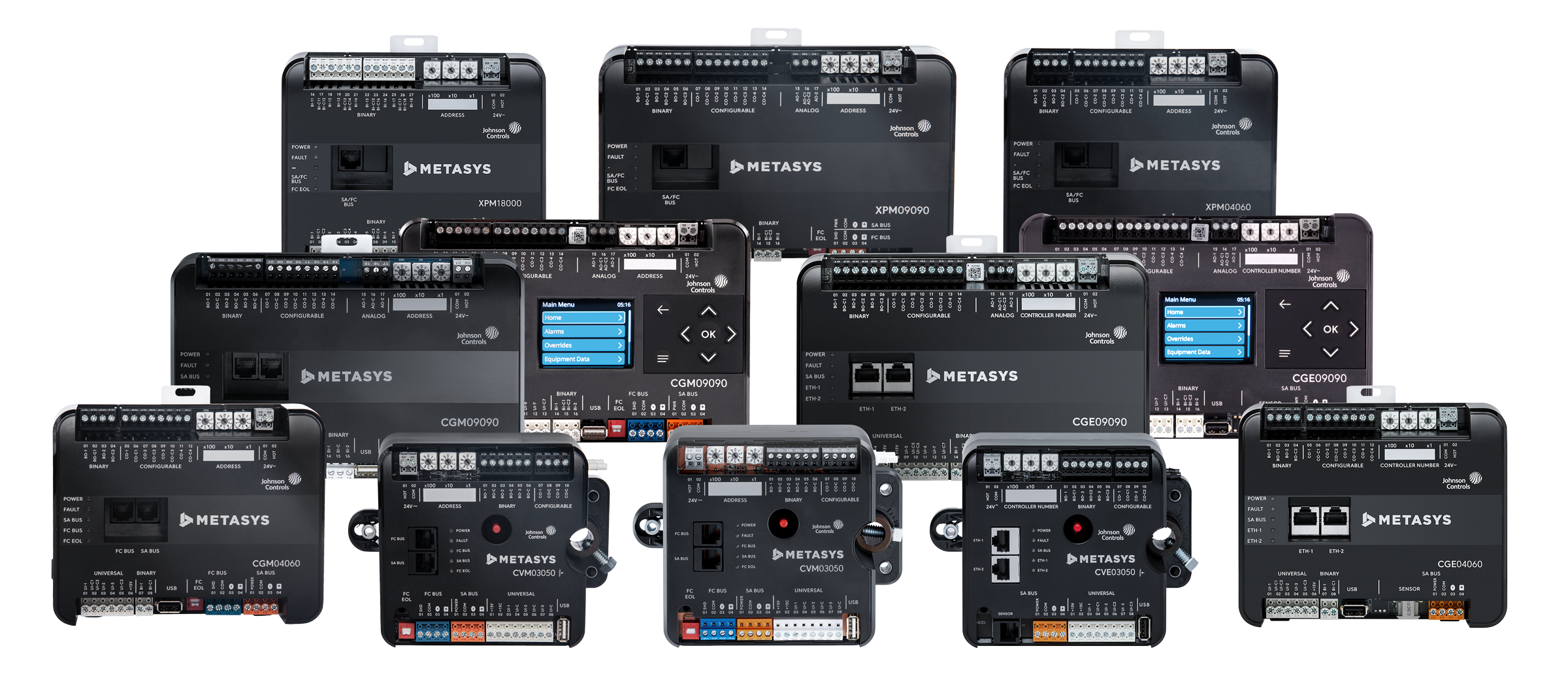
For a panel upgrade, match the required inputs and outputs separately. The 09090 has seven universal inputs, two binary inputs, three binary outputs, four configurable outputs and two dedicated analog outputs. The H suffix adds a local display. The network connection still depends on whether the model is CGM or CGE.
Compatibility
Compatible with Edge over routed MS/TP or BACnet/IP
CGM uses a BACnet MS/TP field bus in this configuration. CGE can expose points directly to Edge on BACnet/IP.
Record the installed order code, commissioned protocol and Device instance. Confirm the controller’s network mode before selecting the Ethernet route.
Connect it with

For a CGM commissioned on BACnet MS/TP
- BACnet
- Edge
- Platforms
For a CGE commissioned on BACnet/IP
- BACnet
- Edge
- Platforms
Models
| Models | Interface | Route into Edge |
|---|---|---|
| M4-CGM09090-0 and M4-CGM09090-0H | BACnet MS/TP via a site router. | BTL listing 31507 names M4-CGM09090-0 at 12.0.1.34. |
| M4-CGE09090-0 and M4-CGE09090-0H | BACnet/IP over Ethernet. Confirm that the site uses BACnet/IP for this route. | BTL listing 31511 names M4-CGE09090-0 at 12.0.1.34. |
Interface
Documented measurements and integration boundaries for CGM09090 / CGE09090.
- A binary input can count pulses. For a pulse meter, record the meter constant and ask whether the exported object contains a raw pulse count or a scaled quantity.
Assessment
Metasys CG 09090 series on the installed network.
- AccuracyNot yet assessed
- The point table describes the available hardware. The installed application determines the BACnet measurement.1
- SecurityNot yet assessed
- Network mode and access controls are site-specific.1
- RuggednessNot yet assessed
- Identify the installed enclosure and terminal or panel location.1
- ScalabilitySupported with conditions
- Match the I/O schedule to the hardware model before adding equipment.1
- LifecycleSupported with conditions
- Record model suffix, application version and commissioned connection with the point list.1
Setup
-
Trace the required measurement from the panel or terminal to its project-assigned BACnet object.
-
Record the exported value and the local meter total at two agreed times.
Compare the changes using the site pulse constant and unit. Different starting totals can still represent the same interval consumption.
-
Record the Device instance, object identifier, timestamp, Present_Value and applicable units in the handover.
Related devices
Sources
- Metasys CG controller model table, Release 15.0 (opens in a new tab)
- BTL listing 31507 for Metasys CGM (opens in a new tab) (PDF)
- BTL listing 31511 for Metasys CGE (opens in a new tab) (PDF)
Further reading
Product names and trademarks belong to their owners. Publication does not imply endorsement or a commercial relationship.