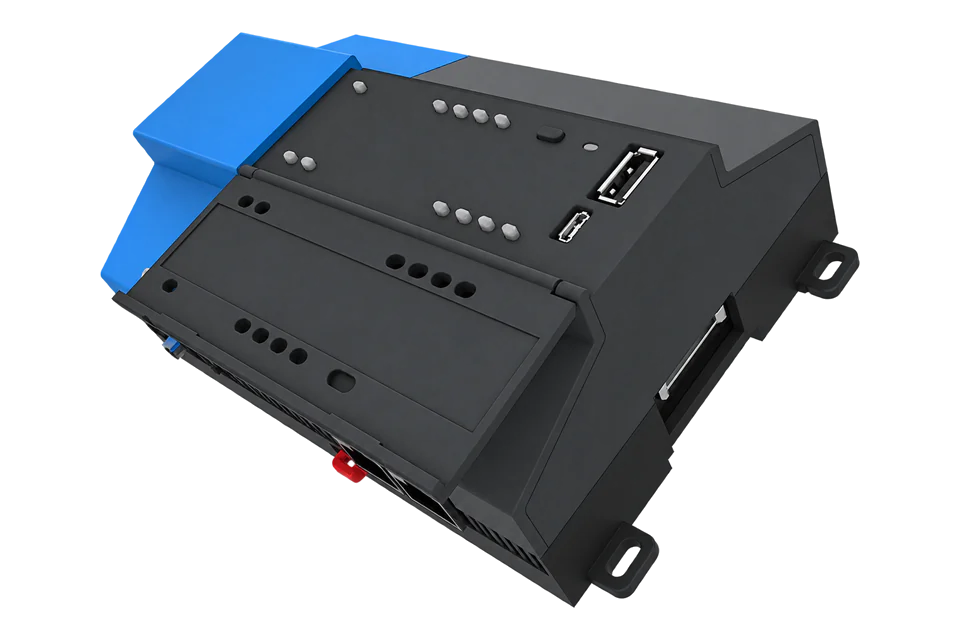
Tridium JACE 8000
Building integration controller
JACE 8000 aggregates field devices in a Niagara station. Start with one existing station measurement and inspect whether it is already exposed over BACnet/IP or a configured Modbus TCP server. Compare the unit, value and point health locally; request a new export only when the required point is absent. This programmable controller has no universal energy-meter register map.
- BACnet/IP
- Modbus TCP
Building integration controller
Compatibility
Compatible through BACnet/IP or Modbus TCP
Edge can read a configured Niagara Modbus TCP server over the site network. The BACnet/IP path requires an Edge build containing its BACnet client. Tridium includes both server driver roles in its standard driver offering, subject to the installed licence and capacity.
Use Tridium datasheet 2024-0028, driver list 2024-0007 and FAQ 2023-0021 as a best-effort starting point. Record the installed Niagara version and network once, then inspect the existing station points and server configuration with authorised access. A new export is needed only for points the station does not already expose.
Connect it with
-
Gateway ZGW-20From €899 ex VAT Configure Gateway
-
Evaluation Gateway on a Raspberry Pi Edge with one device licensedFree Set up Evaluation Gateway on a Raspberry Pi

When the Niagara station exposes the required measurements as BACnet objects
- BACnet
- Edge
- Platforms
When the station owner supplies a fixed export register map
- Modbus
- Edge
- Platforms
Models
| Models | Interface | Route into Edge |
|---|---|---|
| JACE 8000 | Two 10/100 Ethernet ports; two isolated RS-485 ports; Niagara 4.1 or later | Use a configured BACnet/IP or Modbus TCP server on the installed station. |
| JACE 8000 non-Wi-Fi | Same controller form and function without the Wi-Fi module | Use wired Ethernet; a Wi-Fi access point is not required for the integration. |
| JACE 9000 | Different hardware generation, requiring Niagara 4.13 or later | Review the 9000 hardware, installed Niagara version and station export configuration separately. |
Specifications
JACE 8000 is an integration controller, rather than a direct energy meter. Its two isolated RS-485 ports connect field networks and its two Ethernet ports provide IP connectivity. Optional I/O and communications modules expand the hardware. Driver inclusion does not remove Niagara device and point capacity limits.12
- Processor and memory
- 1 GHz ARM Cortex-A8; 1 GB DDR3; removable microSD with 2 GB user storage1
- Supply
- 24 VAC rated at least 24 VA, or 24 VDC rated at least 1 A1
- Serial ports
- Two isolated RS-485 ports with selectable bias and termination1
- Environment
- -20 to +60 °C; 5–95% relative humidity, non-condensing; panel or 35 mm DIN-rail mounting1
- Licensing
- Installed drivers need a valid licence and sufficient global capacity; optional drivers and software maintenance are separate considerations2
- Network starting point
- Factory IP 192.168.1.140; Ethernet ports do not route IP between networks; use the commissioned site address3
Interface
Documented measurements and integration boundaries for JACE 8000.
- Exported electrical energy and power readings from connected meters, with the original engineering units.
- Temperatures, equipment run states and other building points selected by the Niagara station owner.
- BACnet object type and instance, Present_Value, Units and Status_Flags where supported by the exported object.
- For Modbus, the station-specific register address, function, data type, word order and scale for each exported point.
- A freshness or health point that distinguishes a field-device failure from a healthy JACE network connection.
Assessment
JACE 8000 running a licensed Niagara 4 station with deliberately configured read-only exports. Measurement accuracy belongs to the connected field instruments.
- InteroperabilitySupported with conditions
- BACnet/IP client/server and Modbus TCP master/slave are documented included drivers; station exports and licence capacity determine what can be read.2
- AccuracyNot applicable
- This controller aggregates points. Measurement range and accuracy are properties of the upstream meter or sensor, not the JACE chassis.1
- SecuritySupported with conditions
- The hardware specifies secure boot. The selected plain BACnet/IP or Modbus TCP connection still needs a controlled network and explicit read-only point exposure.12
- ReliabilitySupported with conditions
- The manufacturer documents the 24 V supply requirements, batteryless design, removable storage and USB backup/restore support. Protect the supply and retain a compatible station backup.1
- RuggednessWell supported
- Published panel/DIN-rail mounting, -20 to +60 °C operation and non-condensing humidity limits define the building-controls installation envelope.1
Setup
Verify one exported BACnet measurement
Select a measurement already exposed by the commissioned station and compare it with its Niagara display. Object identities come from discovery or the station configuration; no hardware-wide object number or register address is assumed.
- Target
- The configured BACnet device instance at the agreed JACE IP endpoint
- Object
- The discovered exported object type and instance, matched to the intended Niagara measurement
- Read
- Present_Value, Units and Status_Flags where supported; no WriteProperty operation
- Reference
- The corresponding Niagara point and, where accessible, the source meter display at the same time
- Freshness
- A changing value or source timestamp/health indication; a reachable controller can still expose a stale upstream value
- Decode example
- Synthetic Present_Value 23.4 with Units degrees-celsius equals 23.4 °C; no additional register scaling
Acceptance: Identity, engineering unit, value and source health should agree with the local station point. Discovery is the starting step; request engineering work only if the intended measurement is not exposed. This example is not a physical-site acceptance claim.
-
Inspect the commissioned station
Record the JACE model, Niagara version and actual site IP. Tridium gives 192.168.1.140 as the factory address, not an address to impose on an existing installation. Its two Ethernet ports do not route IP traffic between networks. With authorised station access, select one existing meter or temperature point and note its source, unit and displayed value.
-
Choose the server interface
Inspect the existing BACnet/IP server or Modbus TCP slave configuration and licensed capacity. The included-driver list documents both server roles, while the FAQ says device and point limits are both hard limits: a 10-device/500-point licence cannot cover 12 devices even if they use only 120 points. View station resource summaries before adding devices.
-
Identify an existing exported measurement
For BACnet, discover the intended station device and select a measurement already exposed as an object; record its actual type, instance, Present_Value, Units and Status_Flags where supported. For Modbus, use the station server mapping for function, address convention, width, type, word order and scale. Ask the station owner to export the point only if it is absent; no factory object number or universal register table is needed for the initial survey.
-
Connect one point in Edge
Use the commissioned IP endpoint on a permitted site network. Read the selected BACnet/IP object or configured Modbus TCP register and compare it with the same Niagara station point. A synthetic Present_Value of 23.4 with Units degrees-celsius is 23.4 °C; do not apply another register or CT scale. Start with one measurement and retain the existing controls.
-
Prove freshness and preserve the mapping
Compare the source device, Niagara point and Edge value at the same time. Record status and update timing, then agree a controlled stale-source check with the station owner if needed. Preserve the selected object identities or server map with the station backup. Repeat the comparison after station changes or controller replacement.
Common questions
- Can I import a universal JACE 8000 Modbus template?
- A Niagara station is programmable, so use its configured server map rather than a universal chassis register list. Inspect existing BACnet exports or Modbus server mapping first. Request a new point export only when needed; retain the mapping for reuse across sites.23
- Does connecting Edge replace the existing BMS?
- A read-only export can sit alongside the existing Niagara station and its controls. The station owner chooses what to expose; preserve the existing control logic and field-network ownership.12
- Is a Niagara licence needed?
- The JACE must have the relevant driver licensed and enough capacity. Tridium’s included-driver list names BACnet IP client/server and Modbus TCP master/slave, but the licence and capacity of the installed station remain the deciding evidence.2
- Is JACE 9000 the same hardware?
- No. JACE 9000 is a newer controller with a quad-core processor and increased memory and storage. Its Niagara version requirements and migration process are separate from this JACE 8000 guide.4
Related devices
Sources
- JACE 8000 controller datasheet, 2024-0028 (opens in a new tab) (PDF)
- Niagara included drivers and licence requirements, 2024-0007 (opens in a new tab) (PDF)
- JACE 8000 frequently asked questions, 2023-0021 (opens in a new tab) (PDF)
- JACE 8000 and JACE 9000 controller family (opens in a new tab)
Further reading
Product names and trademarks belong to their owners. Publication does not imply endorsement or a commercial relationship.