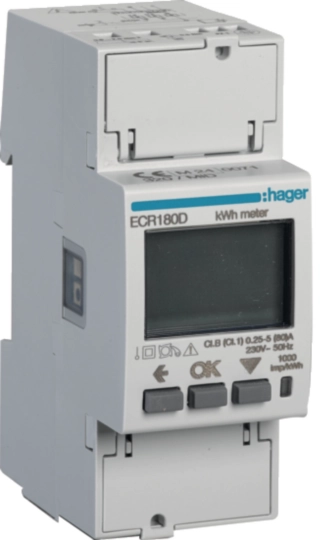
Hager ECR180D
Single-phase energy meter
The ECR180D is a two-module, single-phase kWh meter connected directly up to 80 A, with MID class B active energy and a screw-terminal RS-485 Modbus RTU port. Hager's Modbus table revision 1.14 lists it as a 1P_80 meter and gives every address in hexadecimal and decimal, with function 03 reads, integer data types and scaling such as V/100 and kW/100. Start with the single-register voltage read below, compare it with the display, then add current, power and energy.
Compatibility
Compatible with EpiSensor Edge over Modbus RTU
The ECR180D is compatible with EpiSensor Edge over its RS-485 Modbus RTU port, read through a ZMB-31 Modbus Interface or a Gateway serial port. Hager documents function 03 reads and publishes the ECR180D identity, instantaneous-measurement and energy registers with addresses, lengths, data types and scaling.
ECR180D (1P_80, Modbus on screw terminals), using Hager's Modbus Tables Summary revision 1.14 (October 2022) and user instructions 6LE005253B (January 2024). Site check: compare the first voltage read with the display before adding points. Read-only monitoring: no tariff, partial-reset or serial-setting writes. Only the meter's own total active-energy register serves MID billing.
Connect it with


For a meter on a sub-circuit or tenant supply where a wireless link avoids running a data cable back to the Gateway
- Modbus
- Wireless
- Edge
- Platforms
When the Gateway sits near the meter, or a row of single-phase meters shares one wired RS-485 line
- Modbus
- Edge
- Platforms
Models
| Models | Interface | Route into Edge |
|---|---|---|
| ECR180D | 1P+N, direct connection to 80 A, MID; Modbus RTU on screw terminals; product code register reads "ECR180D" | Read the 1P_80 column of the Modbus table with function 03 through a ZMB-31 or the Gateway serial port. |
| ECA180D | Agardio version of the 1P_80 meter, with the Modbus connection on RJ45 instead of screw terminals and no physical tariff input | The register table is the same, except that the physical tariff register reads 0xFFFF; the wiring in this guide is not. |
| ECR181D and ECA181D | Swiss market 1P_80 models that do not show reactive energies on the display | Read the product code at 0x1010 and the label before applying this guide. |
| ECR140D and ECR180T | ECR140D is the one-module 40 A meter (1P_40); ECR180T is a triple single-phase meter (3ple_1P_80) in four modules | Different columns of the same table, with different ranges and energy registers. Do not apply the 1P_80 points to them. |
Specifications
The ECR180D is a four-quadrant meter for single-phase two-wire networks, connected directly up to 80 A. It switches two tariffs from a 230 V input or up to eight over Modbus, and keeps energies and configuration in non-volatile flash.1
- Measurement system
- Single phase, two wires, 230 V phase to neutral; direct connection1
- Current
- Reference 5 A, minimum 0.25 A, maximum 80 A, starting current 0.015 A, transitional current 0.05 A1
- Voltage and frequency
- 92 to 276 V phase to neutral; 45 to 65 Hz, reference 50 Hz1
- Accuracy
- Active energy class B (EN 50470-3:2022), given as B / 1 in the technical data; active power class 1 (IEC 62053-21:2020); reactive energy class 2 (IEC 62053-23:2020)1
- RS-485
- Modbus RTU on three wires (-, +, 0); address 1 to 247; 1200 to 57,600 bit/s; parity none, even or odd; 1 or 2 stop bits1
- Tariffs and outputs
- T1 and T2 from a 230 V AC input, T1 to T8 over Modbus; front LED at 1000 imp/kWh1
- Display
- Backlit LCD; active energy 0.01 to 9,999,999.99 kWh, power 0.00 to 22.08 kW1
- Mounting
- Two DIN modules (36 mm) on a 35 mm rail, 60 mm deep, 175 g1
- Environment
- -25 to +55 °C operating, -25 to +70 °C storage; IP51 front when installed, IP20 terminals; indoor, M1 and E2; up to 2,000 m1
Interface
Documented measurements and integration boundaries for ECR180D.
- Addresses are printed in hexadecimal and decimal; the decimal value is the zero-based PDU address (0xB000 is 45056). Read every point with function 03.
- Identity: vendor name at 0x1000 (4096) and product code at 0x1010 (4112), 16 registers each, ASCII with the first character in the high byte; software version at 0x1020 (4128) and serial number at 0x1064 (4196). Network type at 0xC000 reads 1 (1BL) and MID certified at 0xC003 reads 1.
- Voltage L1-N at 0xB000 (45056): one register, U16, V/100. On the 1P_80 meter the L2, L3 and phase-to-phase voltages read 0xFFFF.
- Frequency at 0xB006 (45062): one register, U16, Hz/100.
- Current at 0xB009 (45065): two registers, U32, mA, 0 to 80,000. Neutral and the other phase currents read 0xFFFFFFFF.
- Active power at 0xB011 (45073), S32, kW/100, -2208 to +2208; reactive power at 0xB013 (45075), S32, kvar/100; apparent power at 0xB015 (45077), U32, kVA/100. The table also lists L1 active, reactive and apparent power at 0xB019, 0xB01F and 0xB025.
- Power factor at 0xB017 (45079, IEC sign) and 0xB018 (45080, IEEE sign): S16, divide by 1000; +1000 when no power flows.
- Imported active energy Ea+ at 0xB060 (45152) and exported Ea- at 0xB064 (45156): U32, kWh, up to 9,999,999. Reactive Er+ at 0xB062 and Er- at 0xB066, kvarh. Resettable partials P_Ea+ and P_Ea- at 0xB068 and 0xB06A. The block is 12 registers on this meter.
- Energy per tariff starts at 0xB0C0 (Ea+ T1 to T8), 0xB0D0 (Ea-), 0xB0E0 (Er+) and 0xB0F0 (Er-), two registers each, kWh or kvarh.
- The Wh registers at 0xB06C and 0xB06E need firmware 1.2 or later, and revision 1.14 says only the 3P_80 and 1P_40 families have it, so expect an exception from an ECR180D on older firmware.
- The table does not state the word order of two-register values. Read Ea+ once and keep the order that matches the display total.
- Values a model does not provide read as 0xFFFF, 0xFFFFFFFF, 0x7FFF or 0x7FFFFFFF. Otherwise, as Hager puts it, if the meter answers, the value is good.
- Writable registers: Set Tariff at 0xB0B4, partial-energy reset at 0xC020 and serial settings at 0xC040 and 0xC041. Keep them out of a monitoring client.
Assessment
ECR180D over Modbus RTU, using Hager's Modbus Tables Summary revision 1.14 and user instructions 6LE005253B, with display checks and no writes.
- InteroperabilitySupported with conditions
- The exact model, function 03, hexadecimal and decimal addresses, lengths, data types and scaling are published. The word order of two-register values is not stated and is set by comparison with the display.12
- AccuracySupported with conditions
- MID class B active energy, voltage, current, power, frequency and power factor, and separate import, export and reactive energies per tariff. The Wh-resolution energy registers depend on firmware 1.2, which revision 1.14 does not list for this family.12
- SecurityLimited
- Modbus RTU has no authentication or encryption, and the table documents writes for tariff, partial-energy reset and serial settings. Keep the client read-only and the line physically protected.2
- ReliabilitySupported with conditions
- Unavailable values have fixed codes, energies and configuration are stored in non-volatile flash, the meter answers bad requests with Modbus exceptions, and the display reports meter faults (ERROR N02, N03). Treat failed reads and unavailable codes as missing data.12
- RuggednessSupported with conditions
- Rated -25 to +55 °C, IP51 front and IP20 terminals, M1 and E2, indoor only, inside an IP51 enclosure.1
- ScalabilitySupported with conditions
- Addresses 1 to 247 on a terminated multi-drop line, subject to one Modbus master, unique addresses and a bounded poll plan.1
- LifecycleSupported with conditions
- Hager keeps a revisioned Modbus table with a change history that names the firmware revisions adding registers. Record the installed firmware with the point configuration.2
Setup
Read the voltage from 0xB000
Hager's Modbus Tables Summary revision 1.14 lists V(L1-N) at hexadecimal 0xB000, decimal 45056, as one U16 register in V/100, with a range of 9200 to 27600 for 1P_80 meters. Use it as the starting point and compare the result with the display.
- Request
- 01 03 B0 00 00 01 A2 CA: address 1, function 03, start 0xB000, one register, RTU CRC.
- Address convention
- Send 0xB000 as printed: it is the zero-based PDU address, decimal 45056. A client that numbers registers from one shows it as 45057; do not add 40001.
- Synthetic response
- 01 03 02 5A 0A 02 E3: two data bytes, 5A 0A.
- Decode
- 0x5A0A is 23050 as an unsigned 16-bit integer; divide by 100 for 230.50 V.
- Acceptance
- Keep the point when it agrees with the voltage on the display. If the meter answers with an exception, check the address and the meter's firmware before adding more points.
Acceptance: The response bytes are a synthetic decoder check, not a captured meter reply. A real reply must agree with the display before current, power and energy points are enabled.
-
Identify the meter
Read ECR180D from the front and note the software version and checksum the display shows at power-up. Over Modbus, the product code at 0x1010 should read ECR180D; the ECA180D Agardio version shares the table but connects on RJ45.
-
Read the serial settings without changing them
Open the configuration menu on the display and note the Modbus address, baud rate, parity and stop bits. Enter the same values in the Edge serial client or the ZMB-31.
-
Wire the RS-485 line
Connect -, + and the 0 V reference, ideally with Hager's HTG485H cable, give each meter its own address and terminate both physical ends of the line with 120 Ω.
-
Make one voltage read
Send function 03 to 0xB000 (45056) for one register and divide by 100, as in the worked read below. Compare the result with the voltage on the display.
-
Add current, power and energy
Add the U32 and S32 points, check the word order against the display energy total, and keep import, export and partial energies as separate series. Leave tariff, reset and serial writes out of the configuration.
Common questions
- Can Edge read the Hager ECR180D over Modbus?
- Yes. Wire the RS-485 port to a ZMB-31 Modbus Interface or a Gateway serial port, match the serial settings and read the 1P_80 registers with function 03.12
- Is 45056 a 4xxxx register number?
- No. 45056 is the decimal form of the hexadecimal PDU address 0xB000. Send it as it stands; a client that expects 40001-style references needs its own conversion, not 40001 added to 45056.2
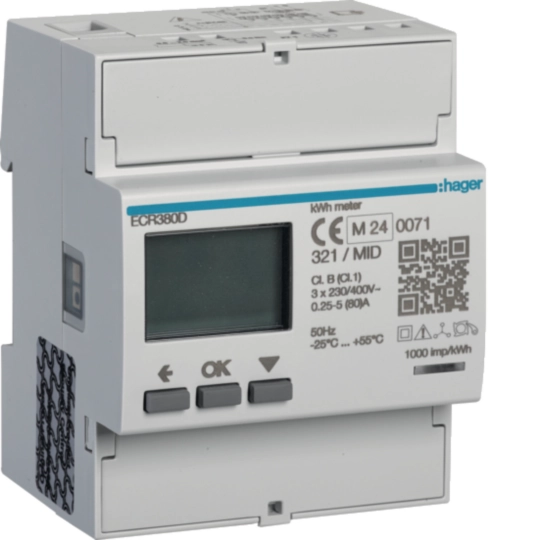
- Does the ECR180D use the same registers as the ECR380D?
- The addresses and data types are the same, because both are in Hager's one Modbus table. On the ECR180D only the L1 values are populated, the energy block is 12 registers rather than 24, and the L2, L3 and neutral registers read as unavailable.2
- Does reading the meter through Edge make the data MID billing data?
- No. Hager limits MID certification to active energy and states that only the meter's total active-energy register can be used for billing. Edge copies and interval series are monitoring data.1
- Can the monitoring client reset partial energy or change the tariff?
- It could, because 0xC020 and 0xB0B4 accept function 06 writes, which is why this guide keeps every write out of the Edge configuration.2
Related devices

Sources
- ECR180D user instructions 6LE005253B (German and English) (opens in a new tab) (PDF)
- Modbus Tables Summary revision 1.14 (opens in a new tab) (PDF)
Further reading
- GuideThree-phase model: Hager ECR380D
- GuideCT-connected three-phase model: Hager ECR300C
- ToolModbus register address translator
- ToolModbus data decoder
- ToolRS-485 termination and bias
- GuideModbus RS-485 commissioning
- ManufacturerHager devices
- ProtocolModbus devices and register maps
- CategoryEnergy meters
Product names and trademarks belong to their owners. Publication does not imply endorsement or a commercial relationship.