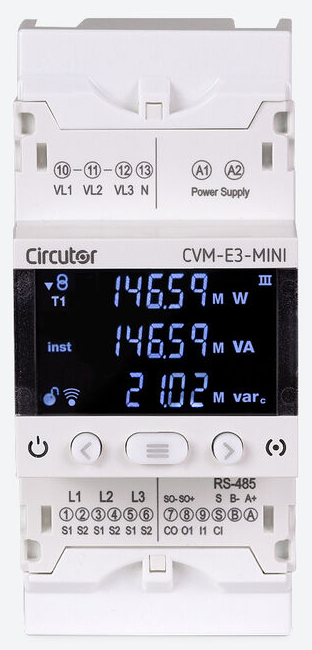
Circutor CVM-E3-MINI
Power and energy meter
The CVM-E3-MINI-ITF-485-IC (code M56414) is a three-phase, four-quadrant analyser that fits three DIN modules and measures through .../5 A or .../1 A current transformers. Circutor's instruction manual M170B01-03-25B documents Modbus RTU on its RS-485 port, FC03 and FC04 reads and two memory maps: Map 1 keeps the older CVM-MINI addresses and Map 2 uses the CVM-C10 addresses plus 0x1000. Values take two registers, high word first, with integer scaling such as V × 10, mA and W. Start with the L1 voltage read below, compare it with the display, then add current, power and energy.
Compatibility
Compatible with EpiSensor Edge over Modbus TCP or Modbus RTU
The CVM-E3-MINI is compatible with EpiSensor Edge over its RS-485 Modbus RTU port, read through a ZMB-31 Modbus Interface or a Gateway serial port, and the WiEth versions over Modbus TCP on their Ethernet port. Circutor documents FC03 and FC04 reads, a hexadecimal map with units and scaling, and its own example request and reply for L1 voltage, and states that the same map applies to the WiEth versions over Modbus TCP.
CVM-E3-MINI-ITF-485-IC, code M56414, and the MC, FLEX and WiEth versions that share instruction manual M170B01-03-25B (July 2025). Site check: compare the first L1 voltage read with the display; the same read confirms the map and the word order. Read-only monitoring: no FC05 delete commands and no FC10 configuration or password writes. BACnet MS/TP is a separate protocol choice on the same RS-485 port.
Connect it with


For an analyser in a distribution board where a wireless link avoids running a data cable back to the Gateway
- Modbus
- Wireless
- Edge
- Platforms
When the Gateway sits near the analyser, or several meters share one wired RS-485 bus
- Modbus
- Edge
- Platforms
For a CVM-E3-MINI-ITF-WiEth, MC-WiEth or FLEX-WiEth, which has Ethernet and Wi-Fi instead of RS-485
- Modbus
- Edge
- Platforms
Models
| Models | Interface | Route into Edge |
|---|---|---|
| CVM-E3-MINI-ITF-485-IC / M56414 | Three CT inputs for .../5 A or .../1 A; RS-485 Modbus RTU or BACnet MS/TP on terminals A, B and S; one NPN transistor output and one digital input | Read Map 2 (or Map 1 for an existing CVM-MINI integration) on the serial path through a ZMB-31 or the Gateway serial port. |
| CVM-E3-MINI-MC and CVM-E3-MINI-FLEX (RS-485 versions) | Same RS-485 port and map; MC1 or MC3 efficient transformers (.../0.250 A) or Rogowski sensors instead of .../5 A and .../1 A CTs | Same read path. Use the current input, transformer settings and accuracy figures for the installed version; Aron wiring is not available on FLEX. |
| CVM-E3-MINI-ITF-WiEth, MC-WiEth and FLEX-WiEth | RJ45 Ethernet (10/100) and 2.4 GHz Wi-Fi with Modbus TCP and a web server; no RS-485, no digital output | Read the same map over Modbus TCP on the site Ethernet network. |
Specifications
A three-module DIN-rail analyser for low and medium voltage distribution boards, measuring four quadrants on balanced or unbalanced three-phase, two-phase and single-phase circuits. The order code fixes the current input; the setup menu fixes the measurement system, transformer ratios and the protocol on the RS-485 port.12
- Exact reference
- CVM-E3-MINI-ITF-485-IC, code M56414: .../5 A or .../1 A inputs, RS-485 with Modbus RTU or BACnet, one transistor output, one digital input.1
- Current inputs (ITF)
- Three inputs for .../5 A or .../1 A transformers, set in the setup menu. Measures from 10 mA to 6 A; CAT III 300 V.2
- Voltage inputs
- Rated 300 V phase to neutral and 400 V phase to phase, measuring from 11.5 V phase to neutral at 45 to 65 Hz. CAT III 300 V.2
- Measurement systems
- Three-phase 4-wire, three-phase 3-wire, Aron, two-phase 3-wire, and single-phase 2-wire phase to phase or phase to neutral.2
- Auxiliary supply
- M56414: 207 to 253 VAC (230 V ±10%), 50/60 Hz, 4 VA. The manual also lists 100 to 240 VAC and 100 to 240 VDC supplies on some versions, so check the label.12
- Accuracy (ITF)
- Voltage and current 0.5% ±1 digit, active and apparent power 0.5% ±2 digits. Active energy class 1 below 0.1 In and class 0.5 (.../1 A) or 0.5S (.../5 A) above it, as the manual's table gives them; reactive energy class 2.2
- RS-485
- Terminals A (A+), B (B-) and S, the reference shared with the digital input. Modbus RTU or BACnet MS/TP, one at a time. Up to 32 devices and 1200 m per bus.2
- Serial settings
- 9600 or 19200 bit/s, plus 38400, 57600 and 115200 on software v2.xx; no, even or odd parity; 7 or 8 data bits; 1 or 2 stop bits. Peripheral number 1 to 255, at most 247 on v2.xx. Defaults: peripheral 1, 19200 bit/s, no parity, 8 data bits, 1 stop bit.2
- Ethernet (WiEth versions)
- RJ45, 10BaseT or 100BaseTX, Modbus TCP and web server, DHCP on by default; 2.4 GHz Wi-Fi (IEEE 802.11 b/g/n).2
- Inputs and outputs
- One NPN transistor output (24 V, 50 mA, up to 16 pulses per second) for alarms or energy pulses, and one optoisolated digital input for tariff selection, logic state or pulse counting.2
Interface
Documented measurements and integration boundaries for CVM-E3-MINI.
- Circutor publishes two layouts of the same measurements. Map 1 keeps the CVM-MINI addresses; Map 2 uses the CVM-C10 addresses plus 0x1000, and Circutor recommends it for a new integration. Use one map per meter and do not mix them.
- All addresses are hexadecimal and go on the wire as printed. Read with FC03 or FC04; each value takes two registers, high word first, as Circutor's own example reply shows. One request may carry at most 20 variables (40 registers).
- Map 2 phase voltage L1, L2 and L3 at 0x1000, 0x1010 and 0x1020 (decimal 4096, 4112, 4128): V × 10. Line voltages V12, V23 and V31 at 0x103E, 0x1040 and 0x1042, V × 10.
- Map 2 current L1, L2 and L3 at 0x1002, 0x1012 and 0x1022 (decimal 4098, 4114, 4130) in mA; neutral current at 0x1044 (decimal 4164) in mA.
- Map 2 active power L1, L2 and L3 at 0x1004, 0x1014 and 0x1024, and three-phase active power at 0x1030 (decimal 4144): all in W, although the symbol column says kW. Three-phase inductive and capacitive reactive power at 0x1032 and 0x1034 in var, apparent power at 0x1036 in VA.
- Map 2 three-phase power factor at 0x1038 and cos φ at 0x103A, × 100. Frequency at 0x103C (decimal 4156) in Hz × 100.
- Map 2 total consumed active energy at 0x10DC (decimal 4316) in kWh, with a separate Wh register at 0x10DE. Total generated active energy at 0x10F0 (decimal 4336) in kWh, with Wh at 0x10F2. Tariff 1 and tariff 2 consumed energy start at 0x105E and 0x1088.
- Per-phase energies are at the same addresses in both maps: total consumed active energy for L1, L2 and L3 at 0x1440, 0x14A0 and 0x1500 in kWh, with Wh in the next pair.
- Map 1, for systems already built for a CVM-MINI: L1 voltage at 0x0000 (V × 10), L1 current at 0x0002 (mA), three-phase active power at 0x001E (W), frequency at 0x0028 in Hz × 10 rather than × 100, and total consumed active energy at 0x01E0 in kWh with Wh at 0x0172. The manual prints 0x0172 out of step with its tariff columns (Wh at 0x018E and 0x01B8), so compare that register with the display before relying on it.
- Power status at 0x07D1 (FC04): bit 0 consumed, bit 1 generated, bit 2 inductive, bit 3 capacitive. The serial number is at 0x05AA to 0x05B0 (FC04).
- On software v2.xx, Circutor asks for a response time-out of at least 200 ms and at least 100 ms between frames.
- Writes in the map: FC05 commands delete maximum and minimum values, energies (0x0834 for three-phase energies, 0x0898 for every deletable value) and restore defaults (0x0BB8); FC10 writes transformer ratios from 0x2710, serial settings from 0x2742 and the programming password at 0x2B70. Keep all of them out of a monitoring client.
Assessment
CVM-E3-MINI-ITF-485-IC (M56414) and the MC, FLEX and WiEth versions over Modbus RTU or Modbus TCP, using instruction manual M170B01-03-25B, with display checks and no writes.
- InteroperabilityWell supported
- The manual documents Modbus RTU, FC03 and FC04 reads, two hexadecimal maps with units and scaling, and an example request and reply that fix the address convention and word order. The WiEth versions use the same map over Modbus TCP.12
- AccuracySupported with conditions
- Per-phase voltage, current and power, separate consumed and generated energy in total, per tariff and per phase, and class 0.5S or 0.5 active energy above 0.1 In on the ITF version. System accuracy also depends on the external CTs, the programmed ratios and the measurement system set on the analyser.2
- SecurityLimited
- The programming menu can be locked with a password, but Modbus has no authentication: FC05 deletes energies and restores defaults, FC10 writes configuration, and the password register accepts a new value without the old one. Keep the bus and network private and send reads only.2
- ReliabilitySupported with conditions
- The manual lists IEC 61010 safety, the IEC 61000-4 immunity tests and IEC 61557-12, and gives v2.xx time-out and frame-spacing rules. Configuration values out of range revert to defaults when read from EEPROM; treat failed reads as missing data.2
- RuggednessSupported with conditions
- IP30 with an IP40 front and IK08, CAT III 300 V, indoor use. The manual gives -10 to +50 °C and the product page -5 to +45 °C, so plan to the narrower range inside a suitable enclosure.12
- ScalabilitySupported with conditions
- Up to 32 analysers and 1200 m per bus, up to 20 variables per request and speeds up to 115200 bit/s on software v2.xx, subject to one Modbus master, unique peripheral numbers and the 100 ms frame spacing on v2.xx.2
- LifecycleSupported with conditions
- The manual is public with a revision log from 2017 to July 2025 and marks features by software version; Circutor states a two-year guarantee. v1.xx and v2.xx units cannot be upgraded from one to the other, so record the version with the configuration.2
Setup
Read L1 voltage from Map 2 address 0x1000
Instruction manual M170B01-03-25B, Table 63, lists L1 phase voltage at hexadecimal 0x1000, two registers, V × 10, read with FC03 or FC04. Section 7.2.1 gives Circutor's own example reply for the same value in Map 1. Use it as the starting point and compare the result with the display.
- Request
- 0A 04 10 00 00 02 74 70: peripheral number 10, FC04, start address 0x1000, two registers, RTU CRC. FC03 gives the same value: 0A 03 10 00 00 02 C1 B0.
- Address convention
- Send 0x1000, decimal 4096, as the zero-based address in the frame. A client that numbers registers from one shows it as 4097 (34097 for FC04, 44097 for FC03). Do not send decimal 1000.
- Reply
- 0A 04 04 00 00 08 4D 86 B1: four data bytes, high word 00 00 first, then low word 08 4D. These are the data bytes of Circutor's example reply; the manual prints its CRC as 86 21, but the Modbus CRC of these bytes is 86 B1.
- Decode
- 0x0000084D = 2125; 2125 / 10 = 212.5 V. A phase voltage in tenths of a volt fits in the low word, so a zero first word confirms high word first.
- Acceptance
- Keep the point when your live value agrees with the L1 phase voltage on the display at the same moment. If it does not, check the map, the voltage transformer ratio and whether the client added one to the address.
Acceptance: The reply bytes come from Circutor's example in the manual, with the CRC recalculated; they are not a reply captured by EpiSensor. When your own read agrees with the display, add current, power and energy points.
-
Identify the analyser
Read the order code on the side label and confirm CVM-E3-MINI-ITF-485-IC (M56414) or the MC, FLEX or WiEth version you have. Note the software version: v1.xx and v2.xx differ in speeds, peripheral range and timing, and cannot be upgraded from one to the other.
-
Check the measurement setup
Confirm the measurement system and the CT primary and secondary with the installer, and check that the analyser's setup matches them. The register values are scaled by the programmed ratios.
-
Select Modbus and record the serial settings
On the RS-485 communications screen choose Modbus rather than BACnet, then record the speed, peripheral number, parity, data bits and stop bits. The analyser restarts when you leave the menu after changing them.
-
Wire the bus
Connect A(+), B(-) and the S reference with shielded twisted pair of at least three wires, give each analyser its own peripheral number, and keep the bus within 32 devices and 1200 m.
-
Read L1 voltage first
Send FC04 (or FC03) to 0x1000 for two registers, as in the worked read below. Combine the high word first and divide by 10 for volts, then compare with the L1 voltage on the display.
-
Add current, power and energy
Add current at 0x1002 in mA, three-phase active power at 0x1030 in W and total consumed energy at 0x10DC in kWh with the Wh register at 0x10DE. Keep consumed and generated energy as separate series and leave every FC05 and FC10 address out of the configuration.
Common questions
- Should I use Map 1 or Map 2?
- Circutor recommends Map 2 for a new integration. It is the CVM-C10 layout with 0x1000 added to every address, so a configuration built for a CVM-C10 needs only that offset. Use Map 1 only to match a system already written for a CVM-MINI, and note that Map 1 frequency is Hz × 10 while Map 2 is Hz × 100.2
- Is 0x1000 the address I enter, or 41001?
- The manual states that every Modbus address is hexadecimal, and its example frame sends the address as printed. Enter 0x1000 (decimal 4096) in a client that takes zero-based addresses. A client with one-based labels calls it 34097 for FC04 or 44097 for FC03. 41001 would read 1000 as a decimal number; 0x1000 is 4096.2
- Is active power in kW or W?
- W. The symbol column says kW 1 and kW III, but the units column gives W for active power, var for reactive power and VA for apparent power. Divide by 1000 only if the destination expects kW.2
- Can Edge read a CVM-E3-MINI over Ethernet?
- Only the WiEth versions have Ethernet. Circutor states that the same map is valid over Modbus TCP on them. The RS-485 versions such as M56414 are read over Modbus RTU through a ZMB-31 or a Gateway serial port.12
- Can the RS-485 port run BACnet and Modbus at once?
- No. The RS-485 communications screen selects Modbus or BACnet MS/TP for the one port. This guide covers the Modbus RTU selection.2
Related devices

Sources
- CVM-E3-MINI-ITF-485-IC product page, code M56414 (opens in a new tab)
- CVM-E3-MINI instruction manual M170B01-03-25B, RS-485 communications, Modbus memory maps and technical features (opens in a new tab) (PDF)
Further reading
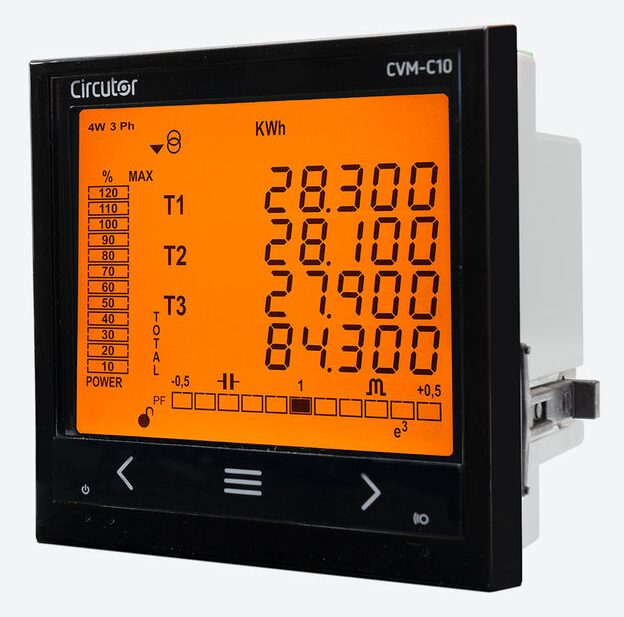
- GuideCircutor CVM-C10: the panel analyser whose addresses Map 2 reuses
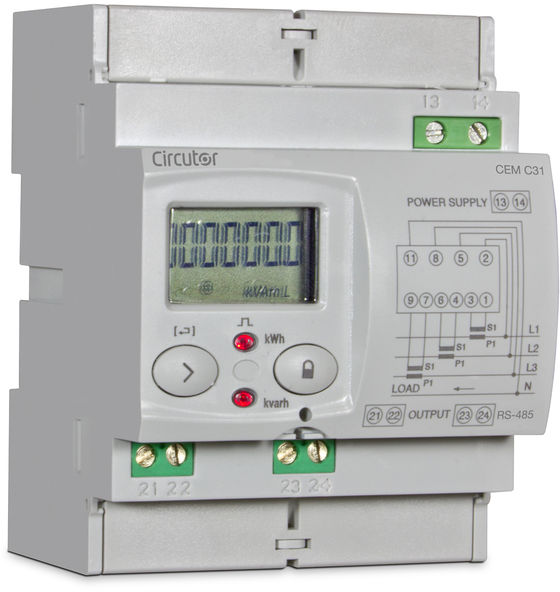
- GuideCircutor CEM-C31: a CT-connected MID energy meter with RS-485
- ToolModbus register address translator
- ToolModbus data decoder
- GuideModbus commissioning over RS-485
- ToolRS-485 termination and bias
- ManufacturerCircutor devices
- ProtocolModbus devices and register maps
- CategoryEnergy meters
Product names and trademarks belong to their owners. Publication does not imply endorsement or a commercial relationship.