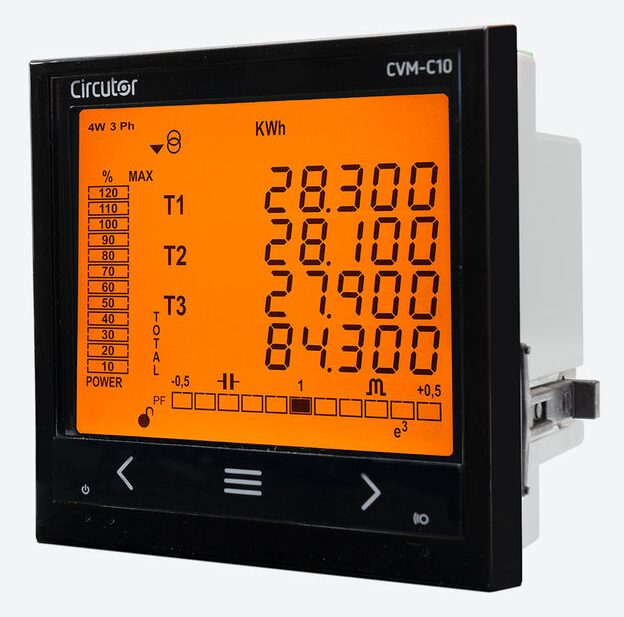
Circutor CVM-C10
Power and energy meter
The CVM-C10-ITF-485-ICT2 (code M55911) measures three-phase, two-phase and single-phase circuits through .../5 A or .../1 A current transformers and has one RS-485 port that runs Modbus RTU or BACnet. Circutor's instruction manual publishes the memory map in hexadecimal, two registers per value, high word first, with integer scaling such as V x 10, mA and W. Circutor now names the CVM-C11-ITF-IN-485-ICT2 as its replacement, so this guide is mainly for reading meters that are already installed.
Compatibility
Compatible with EpiSensor Edge over Modbus RTU
Circutor documents Modbus RTU on the RS-485 port, FC03 and FC04 reads, a hexadecimal memory map and its own example request and reply for L1 voltage. This is documented compatibility, without a physical Edge test.
CVM-C10-ITF-485-ICT2, code M55911, with the English instruction manual M001B01-03-23A. Circutor lists M55911 as replaced by the CVM-C11-ITF-IN-485-ICT2 (M58541), which has its own documentation and is not covered here. The ITF-IN, MC, MC-IN, mV and FLEX versions share the manual and map but have different current inputs. Read-only monitoring over Modbus RTU; BACnet is a separate protocol choice on the same port.
Connect it with


For the documented RS-485 port with the Modbus protocol selected in the setup menu
- Modbus
- Edge
- Platforms
Models
| Models | Interface | Route into Edge |
|---|---|---|
| CVM-C10-ITF-485-ICT2 / M55911 | Three CT inputs, .../5 A or .../1 A; RS-485 Modbus RTU or BACnet; two relays, two transistor outputs, two digital inputs | Read the measurement and energy map on the serial path. Do not send configuration or delete commands. |
| CVM-C10-ITF-IN, CVM-C10-MC, CVM-C10-MC-IN, CVM-C10-mV and CVM-C10-FLEX | Same manual and memory map; neutral current input, efficient MC transformers, .../0.333 V transformers or Rogowski sensors instead | Use the current input, transformer settings and accuracy figures for the installed version. ITF-IN, MC-IN and FLEX have no digital outputs. |
| CVM-C11-ITF-IN-485-ICT2 / M58541 | Circutor's named replacement for M55911 | A different product with its own documentation. Do not apply this register map to it without checking its manual. |
Specifications
A 96 x 96 mm panel analyser for low and medium voltage installations, measuring four quadrants through external current transformers. The order code fixes the current input; the setup menu fixes the wiring system, transformer ratios and the protocol on the RS-485 port.12
- Exact reference
- CVM-C10-ITF-485-ICT2, code M55911. Circutor names CVM-C11-ITF-IN-485-ICT2 (M58541) as the replacement.1
- Current inputs
- Three inputs for .../5 A or .../1 A transformers, programmed in the setup menu. Measuring range 2 to 120% In, minimum 10 mA.12
- Voltage inputs
- 300 V phase to neutral, 520 V phase to phase, measuring 5 to 120% Un at 45 to 65 Hz. CAT III 300 V.2
- Wiring systems
- Three-phase 4-wire, three-phase 3-wire, ARON, two-phase 3-wire and single-phase 2-wire, phase to phase or phase to neutral.2
- Auxiliary supply
- 95 to 240 VAC ±10%, 50/60 Hz, 4 to 6 VA. The manual limits the DC supply option to specific references such as M5591100F0000, so check the label before using a DC supply.12
- Accuracy (ITF)
- Voltage and current 0.5% ±1 digit, active power 0.5% ±2 digits. Active energy class 0.5S (I ≥ 0.1 In) to IEC 62053-22, reactive energy class 1 to IEC 62053-24.2
- RS-485
- Terminal 9 A(+), 10 B(-), 11 GND shared with the digital inputs. Modbus RTU or BACnet MS/TP, one at a time.2
- Serial settings
- 9600 or 19200 bit/s; no, even or odd parity; 7 or 8 data bits; 1 or 2 stop bits; peripheral number 0 to 255.2
- Inputs and outputs
- Two relay outputs (250 VAC, 6 A), two NPN transistor pulse outputs (24 V, 50 mA) and two digital inputs for tariff selection.2
- Environment
- Operating -10 to +60 °C, storage -10 to +65 °C, 5 to 95% relative humidity without condensation, up to 2000 m.2
- Enclosure
- Panel mounting, self-extinguishing V0 plastic. Front IP51 (IP64 with accessory), rear IP21. 96.7 x 96.7 x 62.5 mm, 330 g.2
Interface
Documented measurements and integration boundaries for CVM-C10.
- L1, L2 and L3 phase voltage at 0x0000, 0x0010 and 0x0020 (decimal 0, 16, 32): two registers each, V x 10.
- L1, L2 and L3 current at 0x0002, 0x0012 and 0x0022 (decimal 2, 18, 34): two registers each, in mA.
- Three-phase active power at 0x0030 (decimal 48): two registers in W. The table's symbol says kW III, but its units column says W.
- Three-phase apparent power at 0x0036 (decimal 54) in VA and three-phase power factor at 0x0038 (decimal 56) x 100.
- Frequency at 0x003C (decimal 60): two registers, Hz x 100. Line voltages V12, V23 and V31 at 0x003E, 0x0040 and 0x0042, V x 10.
- Total consumed active energy at 0x00DC (decimal 220) in kWh with a separate Wh register at 0x00DE (decimal 222). Total generated active energy at 0x00F0 (decimal 240) in kWh with Wh at 0x00F2 (decimal 242). Tariff 1 to 3 counters have their own addresses.
- Power status at 0x07D1 (decimal 2001), FC04: bit 0 consumed, bit 1 generated, bit 2 inductive, bit 3 capacitive.
- All values are read with FC03 or FC04, high word first. One request may carry at most 20 variables (40 registers).
Assessment
CVM-C10-ITF-485-ICT2, code M55911, with the English instruction manual M001B01-03-23A. Circutor lists M55911 as replaced by the CVM-C11-ITF-IN-485-ICT2 (M58541), which has its own documentation and is not covered here. The ITF-IN, MC, MC-IN, mV and FLEX versions share the manual and map but have different current inputs. Read-only monitoring over Modbus RTU; BACnet is a separate protocol choice on the same port.
- InteroperabilityWell supported
- The manual documents Modbus RTU, FC03 and FC04 reads, a hexadecimal address map with units and scaling, and a complete example request and reply. No vendor software is needed to read it.12
- AccuracySupported with conditions
- The ITF version states class 0.5S active energy to IEC 62053-22 and class 1 reactive energy to IEC 62053-24. System accuracy also depends on the external CTs, the programmed ratios and the selected wiring system.2
- SecurityLimited
- The front-panel programming menu can be locked with a password, but the Modbus interface has no authentication: FC05 deletes counters and FC10 writes configuration. Keep the serial bus private and send reads only.2
- ReliabilitySupported with conditions
- The manual gives a wide auxiliary supply range, the EN 61000-6-1 to 6-4 EMC standards, EN 61010 safety and an environmental envelope. It notes that invalid configuration values revert to defaults when read from EEPROM; treat failed reads as missing data.2
- RuggednessSupported with conditions
- Panel mounting with IP51 front (IP64 with accessory), IP21 rear, CAT III 300 V and -10 to +60 °C operation for the ITF version. The rear must stay inside a suitable enclosure.12
- ScalabilitySupported with conditions
- Up to 32 meters and 1200 m per bus, peripheral numbers 0 to 255 and up to 20 variables per request. Speeds are limited to 9600 or 19200 bit/s, which bounds the poll rate on a long bus.2
Setup
Read L1 voltage with Circutor's own example frame
Instruction manual M001B01-03-23A, section 4.10.2.1, gives a complete FC04 request and reply for the instantaneous L1 phase voltage at hexadecimal address 0x0000, two registers, V x 10.
- Request
- 0A 04 00 00 00 02 70 B0: peripheral number 10, FC04, start address 0x0000, two registers, CRC.
- Address convention
- 0x0000 is the zero-based address sent in the frame. A client that uses one-based labels shows it as 30001 for FC04 or 40001 for FC03.
- Reply data
- 0A 04 04 00 00 08 4D, then the CRC: four data bytes, high word 0x0000 first, then low word 0x084D.
- Decode
- 0x0000084D = 2125; 2125 / 10 = 212.5 V.
- Acceptance
- Read the live value from your meter and compare it with the L1 phase voltage on its display at the same moment.
Acceptance: These bytes are Circutor's example in the manual, not a reply captured by EpiSensor. When your own read agrees with the display, the address convention and word order are confirmed; add current, power and energy points next.
-
Identify the meter
Read the order code on the label and confirm CVM-C10-ITF-485-ICT2 (M55911). Confirm the wiring system and the CT primary and secondary with the installer, and check that the meter's installation type and transformer ratios match them.
-
Select Modbus on the RS-485 port
In the setup menu, the RS-485 protocol screen chooses Modbus or BACnet. Choose Modbus, then record the speed, peripheral number, parity, data bits and stop bits. The meter restarts when you leave the menu after changing them.
-
Wire the bus
Connect A(+) to terminal 9, B(-) to terminal 10 and the reference to terminal 11, using shielded twisted pair. Circutor allows up to 32 meters and 1200 m on one bus. Give each meter its own peripheral number; avoid 0, which Modbus reserves for broadcast.
-
Read L1 voltage first
Send FC04 (or FC03) to address 0x0000 for two registers, as in the worked read below. Combine the high word first and divide by 10 for volts, then compare with the L1 voltage on the display.
-
Add current, power and energy
Add current at 0x0002 in mA, three-phase active power at 0x0030 in W and total consumed energy at 0x00DC in kWh with the Wh register at 0x00DE. Check each against the display, including the programmed transformer ratios, before saving the point.
-
Keep the meter read-only
The map also lists FC05 commands that delete energy counters and FC10 configuration registers. Do not send them from a monitoring client. Use the front-panel programming lock to protect the setup.
Common questions
- Is 0x0000 the address I enter, or 30001?
- The manual states that all memory map addresses are hexadecimal, and its example frame sends 0000 as the initial register. Enter 0x0000 in a client that takes zero-based addresses. A client with one-based Modicon labels calls the same register 30001 (FC04) or 40001 (FC03).2
- Is active power in kW or W?
- W. The memory map labels the rows kW 1 and kW III, but its units column gives W for active power, var for reactive power and VA for apparent power. Divide by 1000 only if the destination expects kW.2
- How are the energy counters stored?
- Each counter has a kWh register pair and a separate Wh register pair: total consumed active energy is 0x00DC in kWh and 0x00DE in Wh, total generated is 0x00F0 and 0x00F2. Consumption and generation are separate counters. Compare the pair with the display before you decide how to combine them.2
- Can the same port run BACnet and Modbus?
- Not at once. The setup menu selects Modbus or BACnet for the one RS-485 port, and the manual says BACnet needs firmware 3.00 or later. This guide covers the Modbus RTU selection only.2
Related devices

Sources
- CVM-C10-ITF-485-ICT2 product page, code M55911 (opens in a new tab)
- CVM-C10 instruction manual M001B01-03-23A, communications, Modbus memory map and technical features (opens in a new tab) (PDF)
Further reading
Product names and trademarks belong to their owners. Publication does not imply endorsement or a commercial relationship.