Titan Products NetMaster TP-NM-D
BACnet router
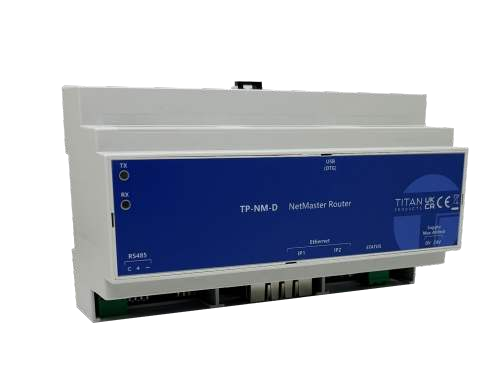
The TP-NM-D joins a serial BACnet network to the building IP network. It suits a retrofit where room or plant controllers already expose readings on MS/TP and the collector sits on Ethernet. Identify the controllers and the required points before specifying the router.
Compatibility
Compatible with Edge as a BACnet router
The NetMaster carries BACnet traffic between Ethernet and a serial trunk. Edge reads the objects that the downstream devices expose.
Check the TP-NM-D label and the commissioned trunk network number with the controls contractor.
Connect it with

For BACnet devices already connected to the serial network
- BACnet
- Edge
- Platforms
Models
| Models | Interface | Route into Edge |
|---|---|---|
| TP-NM-D | One EIA-485 serial trunk and two 10/100 Ethernet connections. The unit mounts on DIN rail and uses a 24 V AC/DC supply. | Allow an Ethernet path between Edge and the installed router. Confirm that the field device exposes the required BACnet object. |
Interface
Documented measurements and integration boundaries for NetMaster TP-NM-D.
- Select temperature, fan status or another documented point on the downstream controller. The point list comes from that controller and its application.
- Keep each sample tied to the field device instance, object type, instance and unit. Multiple controllers on the trunk can reuse the same object number.
Assessment
Site routing from a BACnet/IP collector to an installed MS/TP segment.
- InteroperabilityWell supported
- Routes between BACnet/IP and MS/TP. Both ends use BACnet addressing.1
- AccuracyNot applicable
- Measurement accuracy belongs to the instruments behind the router.1
- SecuritySupported with conditions
- Titan requires a password change at first login and calls for a protected enclosure.2
- ReliabilitySupported with conditions
- Check the 24 V supply capacity at the panel. The specified draw is 0.5 A and the permitted supply tolerance is 10%.1
- RuggednessLimited
- IP20 and a 5 to 40 °C operating range suit an indoor panel. Check the actual enclosure temperature.1
- ScalabilitySupported with conditions
- There is one MS/TP serial port. Size the polling load against the configured speed and controller response times.1
- LifecycleSupported with conditions
- The mounting and setup sheet identifies the hardware revision document and directs owners to Titan for the full commissioning manual.2
Setup
-
Obtain the trunk network number, field device instance and one known object from the building controls operator.
-
Confirm the trunk speed and installation record.
Titan provides selectable termination and bias on the serial port.
-
From the IP side, read the selected object and compare its value and unit with the operator display at the same time.
Related devices
Sources
- NetMaster TP-NM-D specification (opens in a new tab) (PDF)
- TP-NM-D mounting and commissioning (opens in a new tab) (PDF)
Further reading
Product names and trademarks belong to their owners. Publication does not imply endorsement or a commercial relationship.